pi-inline-viz
Render structured artifacts such as diagrams and formulas inside the Pi terminal UI
Package details
Install pi-inline-viz from npm and Pi will load the resources declared by the package manifest.
$ pi install npm:pi-inline-viz- Package
pi-inline-viz- Version
0.2.1- Published
- Aug 2, 2026
- Downloads
- 485/mo · 39/wk
- Author
- yanyaoer
- License
- unknown
- Types
- extension
- Size
- 1.6 MB
- Dependencies
- 0 dependencies · 2 peers
Pi manifest JSON
{
  "extensions": [
    "./extensions/pi-inline-viz.ts"
  ],
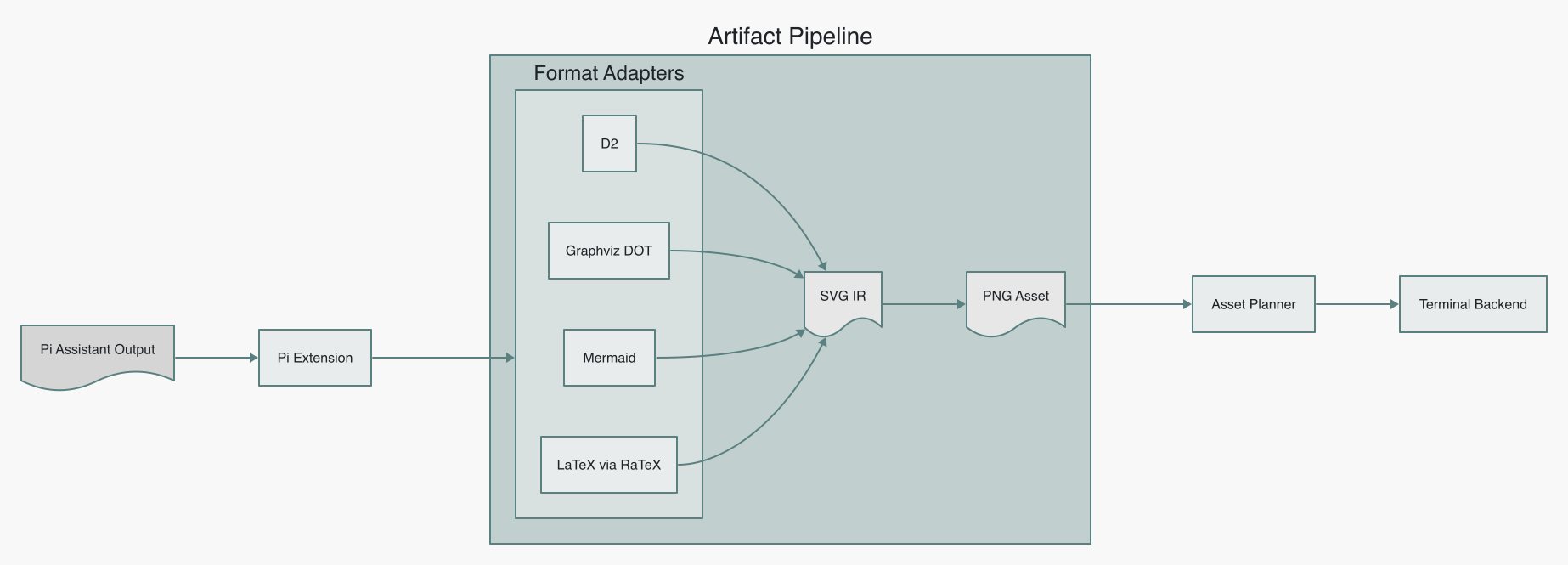
  "image": "https://raw.githubusercontent.com/yanyaoer/pi-inline-viz/main/docs/architecture.png"
}
Security note
Pi packages can execute code and influence agent behavior. Review the source before installing third-party packages.
README
Pi Inline Viz
Pi Inline Viz — render structured artifacts such as diagrams, formulas and charts inside Pi terminal UI.
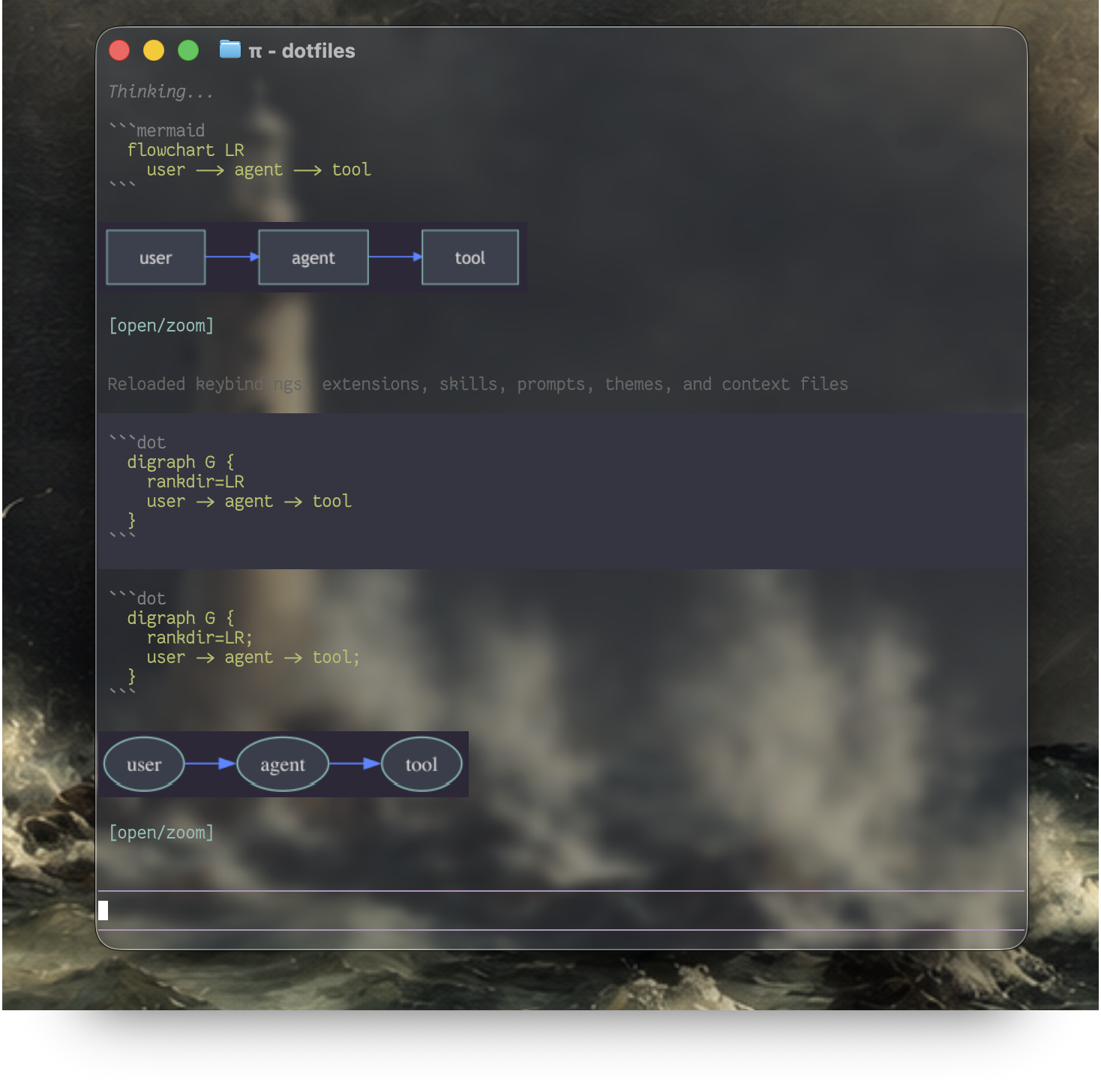
Pi Inline Viz is a Pi extension that turns explicit artifact blocks into a durable SVG intermediate representation, rasterizes them, and displays them inline in supported terminals. The current release supports D2, Graphviz DOT, Mermaid, and display LaTeX; chart adapters are planned.
Artifacts inherit the active Pi theme. D2, Graphviz, and Mermaid receive the current background, text, accent, muted, and border colors; RaTeX formulas use the current text color on a transparent, tightly padded canvas. Both truecolor and 256-color Pi themes are supported. Formula presentation is capped to five terminal rows and aligned with the surrounding transcript; diagrams retain the matching Pi entry background for reliable system image previews.
Install
Install the stable Pi package from npm:
pi install npm:pi-inline-viz
Install one shared SVG rasterizer. For example:
# macOS
brew install librsvg

# Debian or Ubuntu
sudo apt install librsvg2-bin
Then install only the format renderers you use:
- D2: install
d2(official instructions). - Graphviz: install
dot(official packages); for example,brew install graphvizon macOS orsudo apt install graphvizon Debian/Ubuntu. - Mermaid:
npm install -g @mermaid-js/mermaid-cli@11.16.0. Its Puppeteer-managed browser is used by default; a separate system Chrome is optional. - LaTeX: run
/inline-viz-install-ratexinside Pi.
Run the doctor inside Pi:
/inline-viz-doctor
Control inline presentation without restarting Pi:
/inline-viz on
/inline-viz off
/inline-viz clear
/inline-viz draw
ondraws existing stored artifacts and enables rendering for future blocks.offreplaces existing artifacts with their source blocks and stops materializing new artifacts.clearreplaces the artifacts that already exist with source blocks; future artifacts still follow the current on/off setting.drawredraws the artifacts that already exist from cached assets; future artifacts still follow the current on/off setting.
The setting is stored in the current Pi session and survives /reload. Blocks emitted while the renderer is off remain normal Markdown in the assistant transcript; they are not materialized retroactively when rendering is turned on again.
Missing optional renderers disable only their own format. If Pi was already running during installation, run /reload once.
To test the latest GitHub main instead, use pi install git:github.com/yanyaoer/pi-inline-viz.
Linux, custom executable paths, tmux, and terminal-specific setup are covered in Configuration. Common display problems are covered in Troubleshooting.
Try it
Ask Pi to emit an explicit supported block.
D2
```d2
direction: right
user -> agent -> tool
```
Mermaid
```mermaid
flowchart LR
  user --> agent --> tool
```
Graphviz DOT
```dot
digraph G {
  rankdir=LR
  user -> agent -> tool
}
```
LaTeX
Explain Einstein's mass-energy identity in prose, then render the attention term:

$$
\frac{QK^T}{\sqrt{d}}
$$
The Pi integration intentionally renders only display math ($$...$$). Inline $...$ remains prose because a custom transcript entry cannot replace part of an existing Markdown row without duplicating it.
Each image includes an [open/zoom] file link. Use the terminal's link gesture, usually Cmd-click on macOS or Ctrl-click on Linux, to open the cached PNG in the configured system image viewer.
Support matrix
| Artifact | Input | Renderer | Status |
|---|---|---|---|
| Architecture diagrams | d2 fence |
D2 | Supported |
| Graph and dependency diagrams | dot or graphviz fence |
Graphviz dot |
Supported |
| Documentation diagrams | mermaid fence |
Mermaid CLI with its managed browser | Supported |
| Formulas | $$...$$ |
RaTeX render-svg |
Supported |
| Charts | Explicit chart block | Future SVG adapter | Planned |
| Terminal | Inline backend | Notes |
|---|---|---|
| Kitty, Ghostty | Kitty graphics with Unicode placeholders | Direct and tmux passthrough |
| iTerm2 | iTerm image protocol | Direct |
| Other terminals | Text/file-link fallback | No unsupported escape sequences |
Architecture
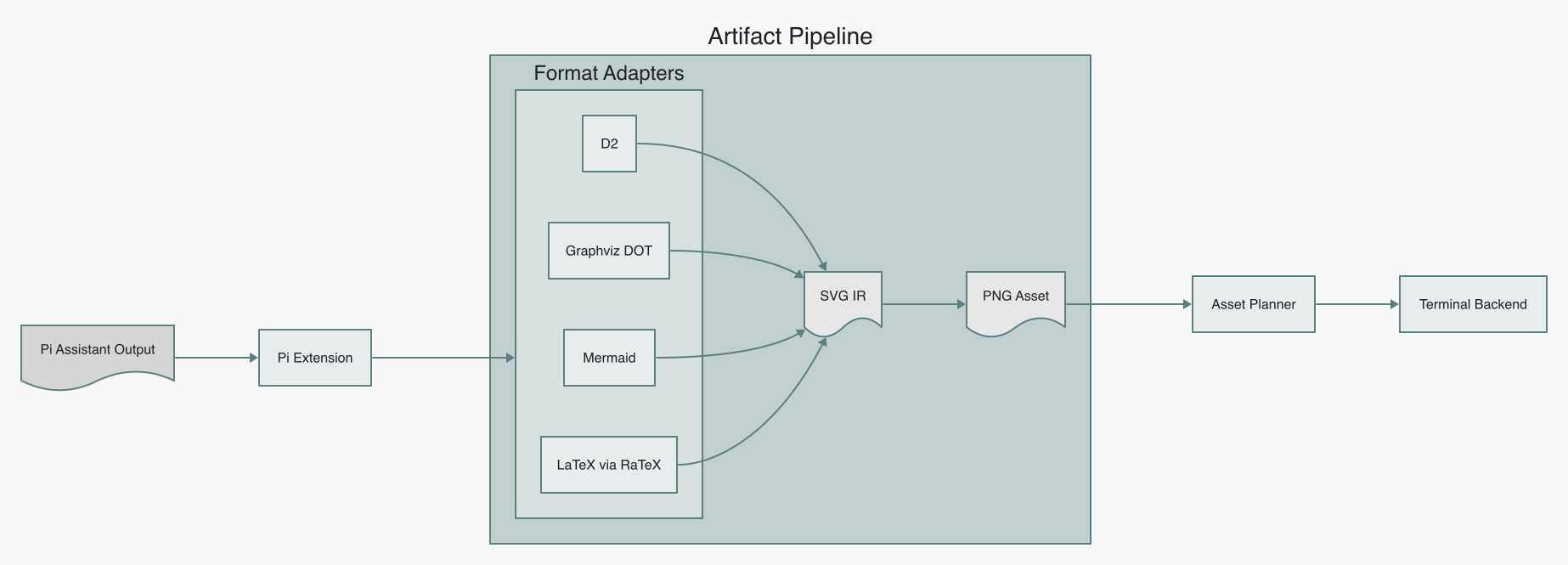
The image is generated by this project itself. Run npm run docs:architecture to rebuild it.
direction: right

input: Pi Assistant Output {
  shape: document
}
integration: Pi Extension
pipeline: Artifact Pipeline {
  direction: down
  adapters: Format Adapters {
    d2: D2
    graphviz: Graphviz DOT
    mermaid: Mermaid
    latex: LaTeX via RaTeX
  }
  svg: SVG IR {
    shape: document
  }
  raster: PNG Asset {
    shape: document
  }
  adapters.d2 -> svg
  adapters.graphviz -> svg
  adapters.mermaid -> svg
  adapters.latex -> svg
  svg -> raster
}
planner: Asset Planner
terminal: Terminal Backend

input -> integration -> pipeline.adapters
pipeline.raster -> planner -> terminal
The boundaries are deliberately small:
- A format adapter validates source and produces SVG.
AssetPlannerselects a bounded presentation size, scale, format, and background.- The materializer converts SVG to a cached PNG.
- The terminal backend presents the PNG without knowing its source format.
- The Pi extension detects blocks, appends transcript entries, and exposes setup commands.
SVG and raster identities are separate, so display policy changes can reuse the semantic SVG without rerunning D2, Graphviz, Mermaid, or RaTeX. Backend, transport, and raw viewport dimensions are presentation state and are not part of the cache identity.
The resolved artifact palette is part of SVG identity. Changing the active Pi theme creates a new SVG variant on the next generated artifact rather than reusing a stale light or dark asset. Existing transcript entries are not automatically rerendered.
Cache
The default cache is:
$XDG_CACHE_HOME/pi-inline-viz/  # when XDG_CACHE_HOME is set
# otherwise ~/.cache/pi-inline-viz/
└── <render-key>/
    ├── source.d2 | source.dot | source.mmd | source.tex
    ├── output.svg
    ├── metadata.json
    └── renders/<asset-key>/
        ├── output.png
        └── metadata.json
Set PI_INLINE_VIZ_CACHE_DIR to move it. On Linux, an absolute XDG_CACHE_HOME is honored automatically. Older agent-artifact-renderer and pi-rich-media cache locations remain readable only for managed RaTeX compatibility; new artifacts use the new cache.
Security boundary
Assistant output is untrusted. Pi Inline Viz invokes external tools without a shell, uses isolated temporary working directories and a minimal child environment, applies time and byte limits, rejects D2 imports/icons, blocks Graphviz attributes that can read files or emit external links, restricts Mermaid configuration and external resources, validates generated SVG, and accepts only constrained math rather than full TeX documents.
These controls are defense in depth, not an operating-system sandbox. Installed Pi extensions execute with the user's privileges, and D2, Graphviz, Mermaid CLI, RaTeX, and the SVG rasterizer are local external processes.
Package layout
extensions/       Pi host entrypoint
src/adapters/     D2, Graphviz, Mermaid, and RaTeX to SVG
src/parser/       Explicit Markdown artifact detection
src/renderer/     Cache, rasterization, and terminal backends
src/              Host-independent artifact contract and planner
scripts/          Doctor, installer, smoke tests, and docs rendering
docs/             Setup and troubleshooting
The host-independent API is exported from pi-inline-viz/core; pi-inline-viz and pi-inline-viz/pi export the Pi integration.
Configuration and maintenance
Update or remove the package with Pi:
pi update npm:pi-inline-viz
pi remove npm:pi-inline-viz
Development
npm install
npm run check
npm run test:integration
npm run smoke
npm run smoke:graphviz
npm run smoke:latex
npm run smoke:mermaid
npm run docs:architecture
For local Pi testing:
pi -e ./extensions/pi-inline-viz.ts
The real smoke tests execute the external renderer, rasterize an SVG, and verify the second render hits both cache layers. The D2 smoke also generates the terminal presentation sequence. Golden fixtures pin the D2 and librsvg rendering baseline so dependency drift fails visibly.