pi-jar
A warm, role-aware Pi terminal workspace with animated UI, plan and goal workflows, tasks, change review, model roles, background shells and subagents.
Package details
Install pi-jar from npm and Pi will load the resources declared by the package manifest.
$ pi install npm:pi-jar- Package
pi-jar- Version
0.1.9- Published
- Oct 1, 2026
- Downloads
- 639/mo · 639/wk
- Author
- yunazgr
- License
- MIT
- Types
- extension, theme
- Size
- 899.8 KB
- Dependencies
- 0 dependencies · 3 peers
Pi manifest JSON
{
  "image": "https://raw.githubusercontent.com/ygrip/pi-jar/main/docs/assets/pi-jar-demo.gif",
  "themes": [
    "./themes"
  ],
  "extensions": [
    "./extensions"
  ]
}Security note
Pi packages can execute code and influence agent behavior. Review the source before installing third-party packages.
README
pi-jar
A warm, role-aware TUI and workflow extension for Pi. pi-jar turns the terminal into a more expressive agent workspace with a living pixel-fire welcome, an adaptive composer, first-class plan, goal and role workflows, tracked tasks, reviewable changes, background shells and parallel subagents.
Works with the current
@earendil-works/*Pi API. Pi's core packages are peer dependencies ("*"), so pi-jar always runs against the Pi you have installed; it is tested against the latest release (0.87.x).
See it in action
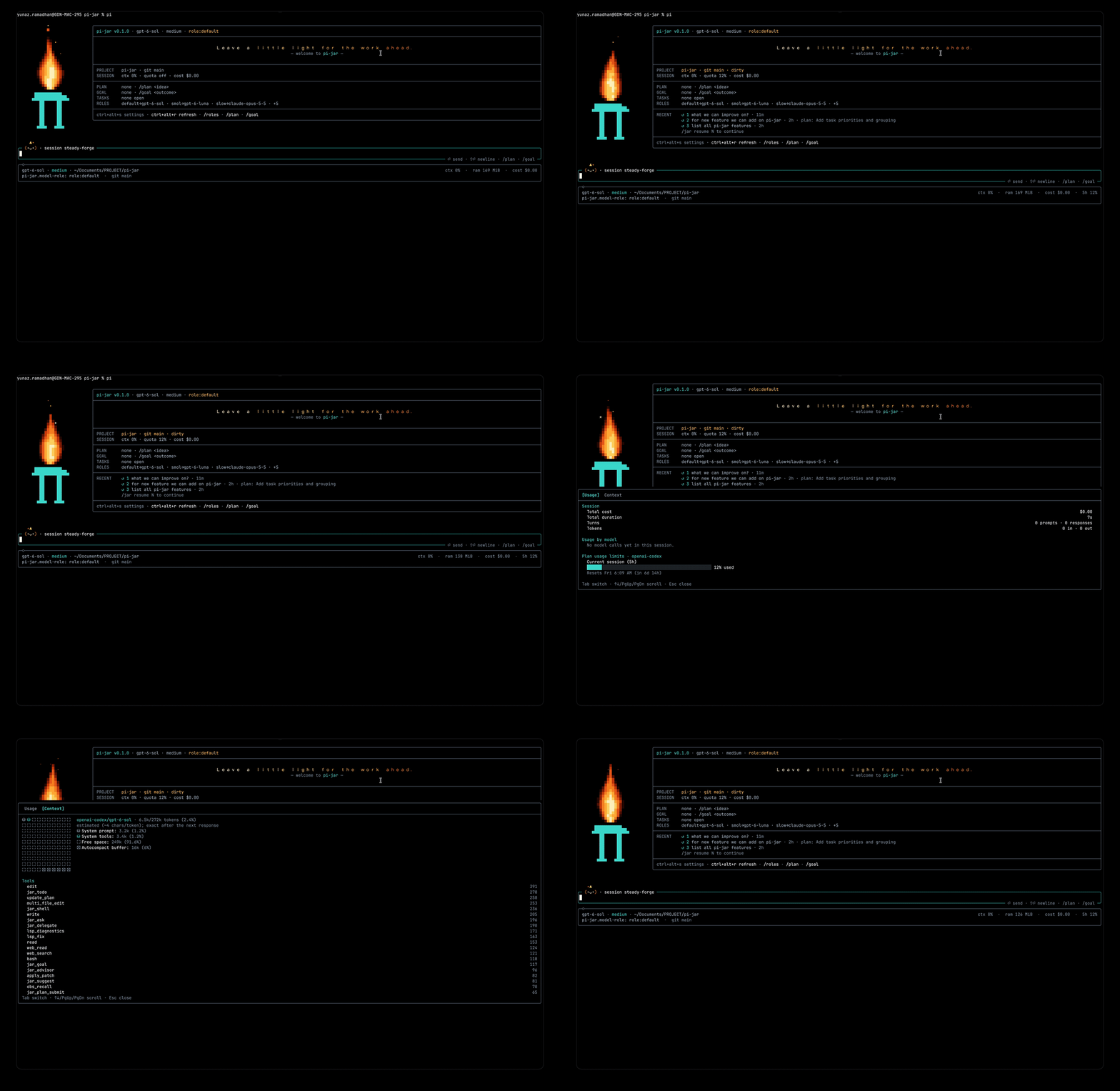
The showcase is captured from a real pi-jar terminal session: the torch-style π, animated flame and embers, live workspace state, tasks, roles and composer are the actual TUI rather than a mockup. Capture and media guidelines live in docs/SHOWCASE.md.
Highlights
| Area | What you get |
|---|---|
| Welcome | A natural pixel flame (rounded base, swaying tip, wisps, embers and sparks) over a large π; a large, flame-colored welcome message up top; a live card with project, git, session, plan, goal, tasks and roles; clickable actions (fullscreen) or keyboard hints (regular mode). |
| Composer | Rounded input that grows with your draft (up to ~60% of the terminal), click-to-place cursor in fullscreen, dim next-prompt suggestions you accept with Tab, and Ember — a tiny flame mascot that blinks, cheers, focuses, dozes and reacts. |
| Plan mode | Read-only exploration; the agent must write a structured plan file and submit it. You review it in a split view (headings on the left, section on the right) and approve, compact-and-approve, refine or stop. |
| Goal mode | Set an outcome; the agent must break it into tracked tasks and keeps working until they are done, then an auditor pass verifies the goal before it can be marked complete. |
| Roles | Named model roles (default, smol, slow, plan, implement, advisor, moderator, scout, worker, reviewer, task, commit, plus your own) with aliases, effort, per-role fallback models and project overrides. |
| Advisor | A second-opinion model: the agent calls jar_advisor for risky decisions or when stuck, /advisor [focus] asks on demand, and automatic gates consult it when the agent repeats the same tool call or keeps failing. |
| Usage & context | /usage shows session cost and tokens per model (advisor and commit calls included) and plan-limit bars with reset times; /context draws a grid of what fills the context window, with a per-file, per-skill and per-tool breakdown. |
| Commit | /jar commit [note] drafts a message for the staged changes with the commit role, lets you edit it, then commits (never pushes). |
| Tasks & questions | A Claude/omp-style jar_todo checklist with subtasks and per-task progress that the agent maintains itself, and jar_ask structured questions with options, multi-select and free-form answers. |
| Change review | Every file the agent or its editing subagents change is remembered as it was; /diff (Ctrl+Alt+D) shows changed files (each counted once) next to a colored diff, with accept or revert per file or all at once. |
| Background shells | jar_shell runs dev servers, watchers and long tests in the background; the agent is woken when a watch pattern matches or the process exits, so it never polls. Running shells get a footer row; click it (or Ctrl+Alt+A) to tail or kill them. |
| Subagents | The main agent becomes a moderator over a configurable retained pool (2, 4, 6, 8 or 16; default 4). jar_delegate starts scout, fork or sandboxed worktree agents and returns immediately, so the main agent can keep responding to user steering; Pi RPC event-bus messages deliver initial and resumed turn completions without polling. jar_subagent peeks, steers, asks BTW questions, pauses, resumes and stops them. Workers can exchange bounded structured Q/A through jar_discuss; worktree changes stay isolated until stop, then safely enter /diff. |
| Sessions & history | Recent sessions (with their goal and plan) on the welcome card, one click from resuming; Ctrl+Alt+H searches earlier prompts; pasted images show as chips under the composer. |
| Footer & themes | Responsive footer (model, effort, session, cwd, context, RAM, cost, quota, goal, roles, branch, live subagents and shells) with unicode, Nerd Font or ascii icons, and seven dark themes. |
Install
pi install npm:pi-jarOr track the repository directly with pi install git:github.com/ygrip/pi-jar.
Restart Pi, then pick a theme with /settings: pi-jar-dark, or pi-jar-dark-<accent> (gray, pink, teal, azure, violet, amber). For the closest match set your terminal background to #0B1018 (Pi themes cannot change the terminal's own background).
Loading only --extension ./extensions/index.ts does not register the bundled themes; install the package or also pass --theme ./themes. Do not load pi-jar twice.
Mouse, clicks and copy-on-select
Pi only delivers mouse events in its fullscreen TUI mode. In regular mode the terminal owns scrollback and selection, so pi-jar shows keyboard shortcuts instead of buttons.
- Turn it on in
/jar settings→ Pi → Mouse clicks (writes Pi'stuiMode; restart Pi), or start withpi --tui-mode fullscreen. - In fullscreen, selecting text copies it automatically (Pi → Copy on select, on by default). pi-jar's own views never capture drags, so selection works over the welcome, composer, plan view and dialogs.
- In regular mode, use your terminal's own copy-on-select option if it has one.
Commands and shortcuts
| Command | Purpose |
|---|---|
/plan [request] |
Enter plan mode (optionally sending the request). /plan review reopens the plan view; /plan off exits. |
/goal <outcome> |
Start goal mode. /goal edits, /goal status, /goal pause, /goal resume, /goal clear. |
/roles |
Role manager. /roles set ROLE provider/model[:effort]|@role [--project], /roles clear ROLE, /roles <role> activates, /roles cycle, /roles list. |
/advisor [focus] |
Ask the advisor for a second opinion on the current work; the answer joins the conversation. |
/usage · /context |
Usage (cost, tokens per model, plan limits) and context-window breakdown in one tabbed panel. |
/jar commit [note] |
Draft a commit message for the staged changes with the commit role, edit it, and commit. Offers git add -A when nothing is staged. |
/jar · /jar settings |
Visual and workflow preferences. |
/jar status |
One-line status summary. |
/jar perf |
Long-session diagnostics on demand: branch entries, context sampling, parent and child RSS, retained/hibernated subagents and recovery worktrees, render requests vs. frames, shell output, discussion and quota cache. |
/jar tasks [list|add|done|open|edit|delete] |
Human view/editor for the agent's checklist. |
/jar history |
Read-only conversation timeline for the active branch. |
/diff |
Review, accept or revert the files the agent changed. |
/jar activity · /jar shells |
Subagents and background shells: live transcript/output, stop or kill. |
/jar resume [N] |
Resume recent session N from the welcome list, or pick one. |
/jar sessions [query] · /jar name <title> |
Search sessions with a details pane (prompt, messages, goal, plan) and switch; name the current one. |
/jar welcome |
Replay the welcome screen. |
/jar ask [question] |
Answer a question in a dialog and insert the answer into the editor. |
/jar accent [preset] · /jar footer · /jar icons [unicode|nerd|ascii] |
Switch a loaded accent theme; toggle footer fields; pick the icon set. |
/jar composer on|off · /jar animations on|off · /jar ui on|off |
Toggle the composer, motion, or all pi-jar UI. |
/jar quota on|off |
Session-only, read-only quota lookups for supported OAuth providers. Lookups start on session boundaries (startup, prompts, model changes), never from a render: at most one per provider every 5 minutes, and failures back off up to 30 minutes. |
/jar hub |
Open an installed task or subagent manager command. |
/jar demo · /jar reset |
Labeled sample roles in the footer / back to live data. |
| Shortcut | Action |
|---|---|
| Ctrl+Alt+S | Open pi-jar settings |
| Ctrl+Alt+A | Subagents and background shells (activity view) |
| Ctrl+Alt+R | Refresh the welcome (new message and flame), or show it again |
| Ctrl+Alt+P | Toggle plan mode |
| Ctrl+Alt+M | Cycle model roles (cycleOrder) |
| Ctrl+Alt+D | Review agent changes (/diff) |
| Ctrl+Alt+H | Search earlier prompts into the composer |
| Tab / → in an empty composer | Accept the dim suggestion into the input (it is not sent) |
Welcome screen
The welcome stays until your first prompt, then dissolves (or hides immediately with motion off).
- Flame — one continuous flame with a rounded base and a tip that sways and licks, animated with smooth noise and drawn with half-block "pixels" in a ten-step ember→gold palette. Wisps break off the tip; embers and sparks rise from it. Every frame is deterministic per seed, so motion-off shows a frozen, still-lit flame. Terminals without 24-bit color get shaded blocks in theme colors. See docs/FLAME.md.
- Card —
pi-jarversion, model, effort and active role; a large hopeful message; project + git branch/dirty; context, quota and cost; plan state; goal progress; open tasks with the next one; configured roles; live teammates (other extensions andjar_delegatesubagents); and RECENT — the last three sessions with their goal and plan. Click a recent row (or run/jar resume N) to continue it. - Actions —
[ ⚙ Settings ] [ ↻ Refresh ] [ ◆ Roles ] [ ▤ Plan ] [ ◎ Goal ]in fullscreen (act on press). In regular mode the same row showsctrl+alt+s settings · ctrl+alt+r refresh · /roles · /plan · /goal.
Composer
Grows with your draft: the input expands to about 60% of the terminal before it scrolls (overflow shows
↑/↓ N morein the border).Click to place the cursor (fullscreen), including multi-line drafts. Autocomplete menus (including Pi's
@filefuzzy search) render below the frame.Image chips: images you paste (Ctrl+V) or reference by path appear under the frame as
▣ pasted png · 1280×720 · 240 KB.Prompt history search: Ctrl+Alt+H fuzzy-searches every prompt in this session and the opening prompts of recent ones; Enter puts the pick in the composer to edit. ↑/↓ still walks Pi's history.
Next-prompt suggestions: when the agent finishes a request it proposes one likely next prompt (
jar_suggest). It appears as dim ghost text in the empty input; Tab (or →, or a click on it) fills it in so you can edit and press Enter. Typing, sending, or a new run clears it. Toggle in settings.Ember the mascot perches on the top-left of the input — the face sits in the border, the flickering tips just above:
Mood Face When idle / blink (•ᴗ•)(-ᴗ-)waiting for you; blinks every few seconds happy / thinking (^ᴗ^)(°ᴗ°)the agent is generating focused (>ᴗ<)a tool is running (sparks fly) curious (•o•)a question or dialog is open sleepy (-ω-)idle for two minutes ( zrises)oops (×_×)a run failed proud (★ᴗ★)a goal was completed poked (^o^)you clicked it The title also shows Pi's session name (or a stable readable alias like
silver-lantern). Toggle the mascot in settings;/jar composer offrestores Pi's editor with your draft intact.
Plan mode
/plan switches Pi into read-only planning:
- Tools are gated. Only known read-only tools stay active;
bashis limited to an inspection allowlist; a second guard blocks unsafe calls even if another extension exposes them.write/editare allowed only for markdown files in the plan directory ($TMPDIR/pi-jar/plans/<session>/, resolved through symlinks). - The
planrole is applied if assigned, and restored afterwards. An active goal loop pauses. - The agent writes a plan file such as
<slug>-plan.mdand must end its turn withjar_plan_submit. The file is validated; an incomplete plan is sent back with the missing parts. If the agent ends a turn without submitting, pi-jar reminds it (at most twice per prompt) instead of accepting a chat-only plan.
Required structure:
# <Plan title>

## Context
Why, the literal request, and the intended end state.

## Approach
1. Ordered steps grouped by behavior, naming exact files, symbols, reused helpers and error handling.

## Critical files
- `path/to/file.ts` — symbol — why it changes

## Verification
- Exact commands and at least one concrete check of new behavior.

## Assumptions
- Decisions the user could override, each with a fallback.- Plan view — a full-screen split view: headings on the left (the lone
#title becomes the header,###steps are indented), the selected section rendered as markdown on the right, actions below.- Keys: Tab cycles focus (headings → body → actions), ↑↓/j k move or scroll, g/G, PgUp/PgDn, 1–4 pick an action, e edits the plan (saved back to the file), r cycles the continue with role, Esc stops. Fullscreen: click headings and actions, wheel scrolls the pane under the pointer.
- Actions: Approve & execute, Approve, compact & execute (compaction keeps the plan), Refine (send feedback, stay in plan mode), Stop.
- Execution seeds
jar_todofrom the Approach steps, restores tools and model, optionally switches to the chosen role, and sends the full plan inline (<plan path="…">…</plan>) with instructions to work step by step and verify each step.
Plan state is stored in the session branch, so reloading or navigating the tree restores it. Narrow terminals collapse the headings into a ‹ n/m heading › pager.
Goal mode
/goal Ship the export command starts an implement → audit loop:
- Tasks first. While a goal is active and no task is open,
write/editand non-read-only shell commands are blocked with "create jar_todo tasks for the goal first". The agent sees the goal and its current checklist at the start of every run. - Implementor. When a turn ends normally with open tasks (or none yet), pi-jar continues automatically with a hidden continuation listing the goal and open tasks.
- Auditor. When every task is done, the next round switches to the
advisorrole (if assigned) and asks for an independent audit against the repository: run the checks, look for missed requirements. The auditor either adds tasks for gaps (edits stay blocked during the audit), which sends work back to the implementor, or callsjar_goal completewith concrete evidence. Completion is refused outside the audit, while tasks are open, or without evidence. - Guard rails. The loop pauses when you interrupt (Esc), a run fails, plan mode starts, the agent calls
jar_goal block(it needs you), or the round budget runs out (default 8 automatic rounds per user message; settings → Pi → Goal auto rounds). A new message from you resets the budget./goal resumecontinues. - The footer and welcome show progress:
◎ goal · Ship · 3/5 tasks · round 2/8 · auditing.
Model roles
Roles map a purpose to a model. They live in ~/.pi/agent/pi-jar-roles.json (Pi's agent directory), with optional per-project overrides in <project>/.pi/pi-jar-roles.json:
{
  "version": 2,
  "roles": {
    "default": "anthropic/claude-sonnet-5",
    "slow": "anthropic/claude-opus-5-5:high",
    "plan": "@slow",
    "advisor": "@slow:xhigh",
    "smol": "anthropic/claude-haiku-4-5-20251001",
    "scout": "@smol:minimal",
    "worker": "anthropic/claude-sonnet-5:medium",
    "reviewer": "@default:medium"
  },
  "fallbacks": {
    "scout": ["openai/gpt-5-mini:low"],
    "worker": ["@default"]
  },
  "cycleOrder": ["smol", "default", "slow"]
}
Specs are
provider/model[:effort],@role[:effort](alias) or*(=@default). An effort on the referring role wins over the target's. Alias chains are followed up to five levels; cycles are reported.Built-in roles and where pi-jar uses them:
Role Used for defaultapplied at session start planplan mode (restored when you leave it) implementexecuting an approved plan and goal implement rounds (falls back to the current model) advisorjar_advisor,/advisor, stuck-work gates and the goal auditmoderatoroptional model assignment for the coordinating main agent scoutdefault for fresh read-only delegated discovery; ideal for a cheap model workerdefault for sandboxed worktree implementation reviewerdefault for context-forked read-only review tasklegacy/generic explicit subagent role commit/jar commitmessagessmol/slowcycling with Ctrl+Alt+M Any other valid name (
a-z,0-9,-) is a custom role.Switching is automatic and scoped. Entering plan mode applies
plan; approving applies your chosen role orimplementfor the run; goal rounds alternateimplementandadvisor. Each temporary switch restores the previous model afterwards — unless you picked a model or effort yourself in the meantime, which always wins./rolesopens a split manager: role list on the left; resolved model, alias chain, effort, fallback model, scope and usage on the right. Keys:mprimary model,ffallback model,aalias,teffort,smove between global/project scope, Enter activate,cclear,nnew role,ddelete custom role. The CLI still supports an ordered chain with/roles fallback ROLE MODEL....Older v1 files are read and upgraded in memory; they are rewritten as v2 only when you change a role.
Advisor
The advisor is a second model (the advisor role; the current model if unassigned) that sees a fresh view of the recent conversation plus git status and a diff stat, but cannot run tools.
jar_advisor({ question?, draft? })— the agent is told to use it before risky or hard-to-reverse choices, after two failed attempts, and before declaring complex work done; it passes its own candidate asdraft. Available in plan mode too./advisor [focus]— ask on demand; the answer is added to the conversation (visible) for the agent's next turn.- Gates — when the agent makes the same tool call three times within its last eight calls, the call is blocked and the advisor's review is returned instead; after three failing tool results in a row, the advice is steered into the running turn. At most two automatic consultations per prompt.
- Settings → Pi toggles the advisor and the gates. Advisor calls are counted in
/usage. The footer and welcome show it as a working teammate while it thinks.
Role fallback models
Every role can have an ordered fallback chain. The primary remains configured with /roles set ROLE:
/roles fallback advisor openai/gpt-5:high @smol
/roles fallback advisor
/roles fallback advisor clear
Add --project when saving or clearing to override the global chain for this project. Configuration is stored in pi-jar-roles.json alongside roles:
"fallbacks": { "advisor": ["openai/gpt-5:high", "@smol"] }Role activation and delegated model selection try the primary first and then configured fallbacks in order; aliases and per-model effort are supported and duplicate model/effort pairs are skipped. Side-model workflows such as advisor and commit keep their own retry/error reporting while using the same fallback configuration. An empty project fallback list disables inherited global fallbacks. This makes roles such as scout practical to pin to a cheap model with a more capable fallback instead of silently escalating every task.
This is a pi-jar enhancement: pi-advisor currently resolves one configured advisor model rather than a fallback chain.
Usage and context
/usage and /context open one tabbed panel (Tab switches, Esc closes):
- Usage — total cost, duration, prompts and responses, tokens (input, output, cache read/write); a per-model breakdown including advisor and commit calls; and, for Anthropic and OpenAI Codex subscriptions, 5-hour and weekly limit bars with reset times (lookups follow
/jar quota on|off). - Context — a 10×10 grid (each cell ≈ 1% of the window) beside a legend: system prompt, tools, context files, skills, compaction summary, user and assistant messages, tool results, extension messages, free space and the autocompact buffer. Parts are estimated at ~4 characters per token and scaled to the provider-reported total when one is known; context files, skills and tools are listed individually below.
Tasks, questions and history
jar_todo— a Claude/omp-style task list the agent keeps for multi-step work. A new request starts withwrite: the complete fresh plan, replacing old completed work.updatechanges one stableidwithout disturbing omitted fields/subtasks, andremovedeletes one task tree.appendis reserved mainly for new requirements introduced while an existing checklist is already active, such as user steering; if the previous list is fully completed, the agent writes a new list instead of extending the fossil record. IDs are returned for every task. Each task ispending,in_progress(exactly one leaf at a time) orcompleted, with optionalactiveForm.startanddonedeliberately return only the task they changed, while the internal details still carry the checklist state needed by the UI and parent/subagent mirroring. Tasks can have one level of subtasks; parent status and progress roll up automatically. The live checklist above the composer shows✔,◼and☐;/jar tasksremains the human editor.Use{ "action": "write", "todos": [{ "content": "Implement feature", "status": "in_progress" }, { "content": "Run tests", "status": "pending" }] } { "action": "update", "id": "<returned-id>", "status": "completed" } { "action": "append", "todos": [{ "content": "Handle newly requested edge case", "status": "pending" }] }parentwithappendto add a genuinely new subtask to active work;start,done,open,edit,list,addanddeleteremain available.jar_ask— structured questions: numbered options with descriptions, single or multi-select, Type your own answer (multi-line, paste-friendly) and Chat about this to discuss before choosing./diff— review what the agent (and its editing subagents) changed since the first edit to each file: files with+/−counts on the left, a full-path header and numbered, colored diff on the right. Changed lines get a colored rail and tinted background, replaced lines highlight the changed words, code is syntax-highlighted for known languages, and collapsed regions are labeled┄ N unchanged lines ┄./filters files;tswitches unified and aligned side-by-side views (unified below 70 columns),←/→(or[/]) change the context from 0 lines to the whole file,wwraps long lines, andn/p,Home/Endnavigate. Large changes offer summary or explicit windowed review (v), with clearly labeled coarse fallback and existing safety limits—not arbitrary-file streaming. See diff review.aaccept (keep, stop tracking),rthenyrevert (restore the original, or remove a file it created),A/Rfor all. The footer shows± N files · /diffwhile anything is unreviewed; each file counts once no matter who edited it. Onlyedit/writechanges inside the project are tracked; shell-made changes are not.jar_shell—start(optionalname,watchregex,notify, task/servicepurpose),list,peek, boundedwait,output,kill. ANSI-stripped logs have per-job caps and a 4 MiB aggregate budget; surfaced finished jobs compact to a 32 KiB tail. Live jobs retain useful tails and are never killed to reclaim logs. Watch/exit notifications are compact and coalesced; reads acknowledge observed events. Each running shell gets a footer row and an activity view (/jar shells) withxkill andffollow. All shells stop when the session ends.jar_delegate— spawns retained, session-scoped subagents up to Max subagents in/jar settings(2, 4, 6, 8 or 16; default 4). Idle, paused and hibernated agents count toward this pool; over-cap batches are rejected.scoutis fresh/read-only,forkinherits conversation read-only, andworktreeforks context into a path-guarded Git worktree. Settled retained agents close their Pi process after 30 seconds of quiet while keeping their private session and workspace;resume/askrelaunch that same session. Launch returns before startup or the first turn completes, including legacy one-shotwrite: truemode.jar_subagent—peekreports progress, including the workspace path and changed files for recovery records;steerredirects a running worker;resumerelaunches an idle/paused/hibernated agent.ask,pauseandstopreturn accepted receipts immediately; answers and final handoffs arrive aspi-jar.subagentevents.stopreconciles safe worktree changes; conflicts remain private and can be retried withstopafter resolving parent drift.discardremoves an unresolved recovery worktree without applying it. At most four active/recovery worktrees are admitted; resolve or discard one before starting another. Session shutdown reports paths of any preserved worktrees. Controls do not poll the child.- Subagent capabilities — each task can set
toolsorinheritTools: true; known-tool mode filters and child guards remain in force. See tool capabilities. - Worktree finalization — edits do not touch the parent merely because a worker settles or hibernates. On
jar_subagent stop, pi-jar checks parent drift and reviewability, applies safe changes and adds them to/diff; conflicts remain isolated for retry or explicit discard. Failed worktree transcripts are compacted independently of finished history. Process closure is awaited before finalization, and failed multi-file application rolls back rather than leaving a partial result. jar_democracy— exceptional only, for a persistent super-complex issue with several evidence-backed options after at least two distinct failed approaches. The moderator opens 2–8 options, resumes relevant idle/paused/hibernated fresh-context read-only scouts or spawns new scouts within the pool, and collects one private ballot per voter. A strict majority of invited voters wins; ties, plurality or missing/invalid ballots require user choice. Voting never implements its recommendation. A round has a 10-minute deadline and bounded rationales.jar_discuss— session-local, parent-owned discussion broker over authenticated local IPC; no shared paper, lock or polling.ask/answerreturn stable IDs without echoing your text.listreads only relevant unread questions/answers and advances your cursor;thread(orlistwithquestionId) reads one thread;pendingshows counts without message bodies.since: "d0"rereads relevant mail. At most 128 messages, 1600 characters each and 128 KiB are retained; unread/unanswered questions block new posts instead of being silently lost. Messages do not wake idle agents; the next natural turn gets an unread notice.- Activity view — one split view (Ctrl+Alt+A,
/jar activity, or a click on a footer row) for subagents, background shells and other extensions' teammates: list on the left, live details on the right (auto-follows; scroll up to pause,fto follow again). For a subagent the details show its task, its own checklist with subtasks, and a transcript like omp's: each tool call and message is one collapsed line that expands on demand (Tabinto it,↑↓,Enter, or click) to show arguments and output, while streaming text shows live.sopens a steering input: type a message and pressEnterto redirect the running subagent.xstops just that one. Finished runs stay listed for review. /jar history— separate, read-only timeline of the active branch (paging, search, expandable details). Pi's native transcript is untouched.- Pi's built-in read/shell/edit/write tool cards render compactly: collapsed, each is one padded, state-colored card with its call line and a one-line summary (edit included), and partially streamed arguments never flicker to a fallback; the full output or diff stays one click or Ctrl+O away. Every requested frame re-renders the whole transcript, so background sources (subagent streams, shell changes, context and cost updates) share one adaptive repaint budget: at most every 250 ms below 300 branch entries, 500 ms below 800, 1 s below 2,000, and only on visible state changes beyond that; a frame Pi draws on its own satisfies pending updates. User actions and state changes (a subagent or shell starting, settling or failing) still repaint at once. The open activity view repaints live updates every 100 ms, slowing to 500 ms in very large sessions. Context usage is cached: session start, tree navigation, compaction, model changes, renames and the end of a run refresh it at once, while message ends recompute it at most every 750 ms.
/jar perfshows the counters. The sliding bar some terminals show in the tab while the agent works is Pi's ownOSC 9;4progress (terminal.showTerminalProgressin Pi settings), not pi-jar.
Settings
/jar settings (or Ctrl+Alt+S, or the welcome's Settings action) has three tabs:
- Appearance — accent, motion, rounded composer, Ember mascot, next-prompt suggestions, pi-jar UI, icons (
unicodedefault,nerdfor a Nerd Font terminal like omp's nerd preset,asciifor plain labels). - Footer — field visibility. In fullscreen mode the session name (or
sessionsfor an unnamed session) opens the session picker and each subagent/shell row opens the activity view. SoL-Pi's savings status is not repeated in the footer (it already notifies). - Pi — mouse clicks (Pi fullscreen mode), copy on select, goal auto rounds, Max subagents (explicit choice then Save; default 4), advisor, advisor gates.
pi-jar preferences are saved in pi-jar-settings.json in Pi's agent directory; the Pi tab writes Pi's own settings.
Integrations
Other extensions can publish teammate roles and quota windows through Pi's public status API; see docs/INTEGRATIONS.md.
Repository structure
pi-jar/
├── extensions/index.ts   extension entry: wiring, welcome, footer, commands
├── src/
│   ├── flame.ts          pixel fire simulation
│   ├── mascot.ts         Ember's moods and sprites
│   ├── composer.ts       rounded composer, ghost text, mouse mapping
│   ├── suggest.ts        jar_suggest tool and suggestion state
│   ├── plan*.ts          plan mode, plan parsing/validation, plan view
│   ├── goal*.ts          goal state and the implement → audit loop
│   ├── model-roles.ts    role config, resolution, activation
│   ├── roles-ui.ts       role manager
│   ├── advisor.ts        jar_advisor, /advisor and stuck-work gates
│   ├── side-model.ts     one-shot role model calls and their usage
│   ├── commit.ts         /jar commit
│   ├── usage-view.ts     /usage; context-view.ts is /context; panel.ts frames both
│   ├── split-view.ts     shared two-pane frame
│   ├── changes.ts        change tracker, line diff and split layout; diff-view.ts is /diff, diff-inline.ts its word highlights
│   ├── shells.ts         background shells and jar_shell
│   ├── delegate.ts       retained subagents, moderator controls and RPC lifecycle
│   ├── delegate-worktree.ts isolated Git worktrees, path guard and safe reconciliation
│   ├── async-process.ts    cancellable async subprocess runner with deadlines and tree cleanup
│   ├── discussion.ts     session-local discussion broker and tool
│   ├── discussion-hub.ts bounded in-memory discussion mailboxes
│   ├── democracy.ts      exceptional scout ballots, strict majority and user tie-break
│   ├── activity-view.ts  subagent/shell details view
│   ├── perf.ts           long-session render budget, context sampling and /jar perf
│   ├── icons.ts          unicode / nerd / ascii glyph sets
│   ├── attachments.ts    image chips; prompt-search.ts is prompt history
│   ├── session-gallery.ts recent sessions for the welcome
│   ├── welcome.ts        welcome layout and hit-testing
│   └── …                 footer, tasks, questions, history, settings, quota
├── themes/               native Pi themes
├── tests/                node:test suites
└── docs/                 design, workflows, flame, integrations, development
Git executable and subprocess safety
pi-jar runs worktree Git plumbing asynchronously with a 30-second per-command deadline and terminates the process group on timeout or cancellation. Worktree snapshots and change inspection hash files in bounded batches (at most 1,000 files or 128 MiB per Git call), so startup and finalization cost a handful of Git processes rather than several per repository file. To bypass a Git proxy/wrapper (for example, git-ai), set PI_JAR_GIT_PATH to the real Git executable before starting Pi:
PI_JAR_GIT_PATH=/usr/bin/git piThis setting covers worktree snapshot, inspection, reconciliation and cleanup, advisor repository context (5-second deadline), and /jar commit Git calls (20-second deadline). Regular shell commands and Pi's built-in tools are unchanged.
Documentation
- docs/SHOWCASE.md — README demo capture and media guidelines.
- docs/WORKFLOWS.md — plan, goal, roles and suggestions in depth.
- docs/DESIGN.md — palette, motion, layout and accessibility.
- docs/FLAME.md — how the flame and mascot are drawn.
- docs/INTEGRATIONS.md — public status contracts.
- docs/DEVELOPMENT.md — setup, testing and release checks.
- docs/PLAN.md — roadmap.
Contributing
See CONTRIBUTING.md.
License
MIT. See LICENSE.