pi-lazy-panel
A lazygit-style TUI for browsing, resuming and managing pi sessions (/lazy-panel)
Package details
Install pi-lazy-panel from npm and Pi will load the resources declared by the package manifest.
$ pi install npm:pi-lazy-panel- Package
pi-lazy-panel- Version
0.2.2- Published
- Oct 21, 2026
- Downloads
- 1,396/mo · 237/wk
- Author
- jiajiecheng
- License
- MIT
- Types
- extension
- Size
- 802.1 KB
- Dependencies
- 1 dependency · 3 peers
Pi manifest JSON
{
  "image": "https://raw.githubusercontent.com/JessieChan0730/pi-lazy-panel/HEAD/assets/readme/preview-en.png",
  "extensions": [
    "./index.ts"
  ]
}Security note
Pi packages can execute code and influence agent behavior. Review the source before installing third-party packages.
README
English | 中文
Introduction
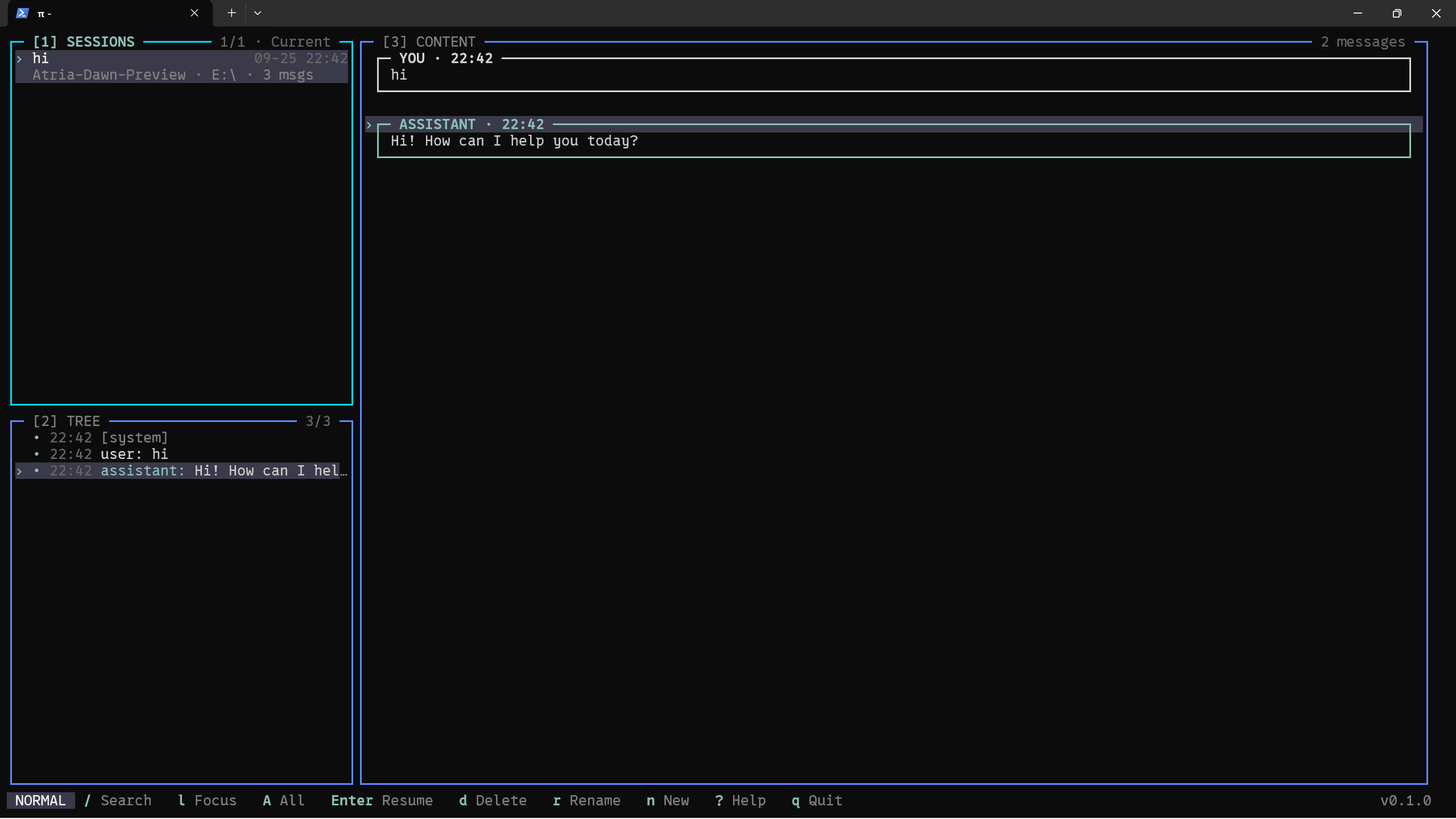
pi-lazy-panel is a panel for managing pi sessions and session trees, offering a lazygit-style workflow and TUI look. Once installed, run /lazy-panel inside pi to open a full-terminal three-pane interface:
- Top-left SESSIONS: the history of past sessions (mirrors
/resume) - Bottom-left TREE: the conversation tree of the selected session (mirrors
/tree, switches automatically with the selection above) - Right CONTENT: the conversation detail of the selected node, rendered with pi's native Markdown, distinguishing "me" from "AI"
The everyday session operations (new / resume / fork / clone / rename / delete / compact / export / import / share / copy) are all condensed into single-key shortcuts — no mouse required.
Press , for the built-in settings page: General (language, default scope, default sort), Layout (how wide the left column is), Keybindings (per scope, recorded by pressing the keys you want) and Theme (switches pi's own theme). Every edit takes effect at once and is written back to ~/.pi/agent/lazy-panel.json — no hand-editing JSON.
Preview
Features
- Pure keyboard flow — most operations take a single key (hjkl to move,
dto delete,rto rename, à la lazygit) - Three linked panes: SESSIONS → TREE → CONTENT cascade-refresh as the cursor moves
- Full coverage of the session commands: resume / new / fork / clone / rename / delete / compact / export / import / share / copy
- Session-tree navigation: restore to any node, choosing "No summary / Summarize / Summarize with custom prompt" for the abandoned branch
- lazygit-style search:
/jumps in place,n/Ncycle, withname:model:path:tag:role:after:before:qualifiers - Theme follows pi automatically — the settings page switches pi's own theme, both the built-in ones and custom ones under
~/.pi/agent/themes/ - Bilingual — English and Chinese (follows the system language, overridable in the config)
- Fully customizable keybindings: rebind any action in the settings page or in
~/.pi/agent/lazy-panel.json - Light mouse support (wheel to scroll, click to focus, double-click to enter / fold)
- Built-in settings page (
,): General / Layout / Keybindings / Theme edited in place — key bindings are recorded by pressing the keys, conflicts are caught before they are written, and each edit is saved as you make it
Quick start
Requires pi to be installed. Run the install command inside pi:
# npm
pi install npm:pi-lazy-panel

# GitHub
pi install git:github.com/JessieChan0730/pi-lazy-panel
After installing, run /lazy-panel inside pi to open the panel; ? shows all shortcuts for the current pane, and , opens the settings page.
Local development
The pi-related packages are devDependencies, so you must install dependencies after cloning:
npm install            # install dependencies (pi packages included; not installed automatically by default)
npm run dev            # load the plugin temporarily via pi -e ./src/index.ts, without writing config
npm run install:pi     # pi install . registers this directory into pi (once only); after editing code, run /reload in pi to pick up the latest
Run the full check suite before committing (same as the pre-push hook):
npm run lint           # ESLint
npm run check          # tsc --noEmit
npm test               # unit tests
npm run i18n:check     # English/Chinese copy alignment
Compatibility
- Runtime: Node.js ≥ 20.
- pi version: runs as a pi plugin, depending on pi's session API (
@earendil-works/pi-coding-agent). - Run mode: available only in pi's TUI mode (
/lazy-panelrefuses to open outside TUI mode). - OS: cross-platform — Windows / macOS / Linux all work (paths are handled uniformly per platform).
- Terminal: mouse support in regular mode needs a terminal that supports SGR mouse reporting (virtually all modern terminals do); without it, keyboard operation is unaffected.
- Optional external commands:
/shareopens a destination menu — Auto (private GitHub Gist whenghis logged in, otherwise Radius), GitHub Gist, or Radius. Radius uses pi's/login radiuscredential, while the gist path needs a logged-in GitHub CLI (gh); choosing Radius without a credential runs the same sign-in inside the panel (account / API key, browser or device code) and then continues the share. When deleting a session,trashis used if available (moving it to the recycle bin), otherwise the file is deleted directly.
Configuration
The config file lives at ~/.pi/agent/lazy-panel.json. Every field is optional and falls back to a built-in default when omitted:
{
 "locale": "zh",
 "defaultScope": "all",
 "defaultSort": "recent",
 "leftColumnRatio": 0.25,
 "keymap": {
  "global": { "help": "F1", "scope-all": ["A", "ctrl+space"] },
  "sessions": { "session-delete": "ctrl+d", "session-share": null }
 }
}| Field | Description | Values / range | Default |
|---|---|---|---|
locale |
UI language | "en" / "zh" |
follows system language |
defaultScope |
session scope on open | "current-folder" / "all" |
"current-folder" |
defaultSort |
session list ordering | "recent" / "created" / "title" / "threaded" |
"recent" |
leftColumnRatio |
left column width ratio | 0.15 ~ 0.6 |
0.25 |
keymap |
custom keybindings | see below | built-in keys |
keymap is grouped by scope (global / sessions / tree / content / tree-dialog); the key is an action id and the value is one or more chords (e.g. "ctrl+d", ["A", "ctrl+space"]). A user-provided binding replaces the action's default entirely, and null unbinds it. See docs/keybindings.md for the full list of action ids and keybindings.
The settings page (,) edits this same file: it patches only the fields you changed, leaves the rest of the file — including its indentation and line endings — as it was, and merges unrelated changes made in another window (a conflict on the same field stops the write and offers a retry).
Roadmap
0.2.0 adds the settings panel; the 0.2.x line is for fixes, polish and code cleanups rather than new features.
Two display quirks are known and still open: closing ? and switching panes right away can leave a one-frame ghost, and in pi's regular (main-screen) TUI mode a long session can clip the panel's top rows — pi --tui-mode fullscreen (or "tuiMode": "fullscreen" in pi's settings.json) avoids the latter.
Contributing
Contributions are welcome — see CONTRIBUTING.md for the local setup, coding conventions and commit/PR flow.
License
Licensed under the MIT License.