pi-lcars
LCARS agent console for pi — one command boots the web UI and the in-process pi backend
Package details
Install pi-lcars from npm and Pi will load the resources declared by the package manifest.
$ pi install npm:pi-lcars- Package
pi-lcars- Version
0.5.2- Published
- Nov 4, 2026
- Downloads
- 594/mo · 594/wk
- Author
- benxstudio
- License
- MIT
- Types
- extension
- Size
- 672.7 KB
- Dependencies
- 0 dependencies · 0 peers
Pi manifest JSON
{
  "image": "https://cdn.jsdelivr.net/gh/BenXsha/pi-lcars@main/docs/console.png",
  "extensions": [
    "./extensions/lcars.ts"
  ]
}Security note
Pi packages can execute code and influence agent behavior. Review the source before installing third-party packages.
README
pi-lcars
A web console for pi where the agent transcript reads like an LCARS station display — but every pixel is driven by real session events. No mock data, no scripted demo.
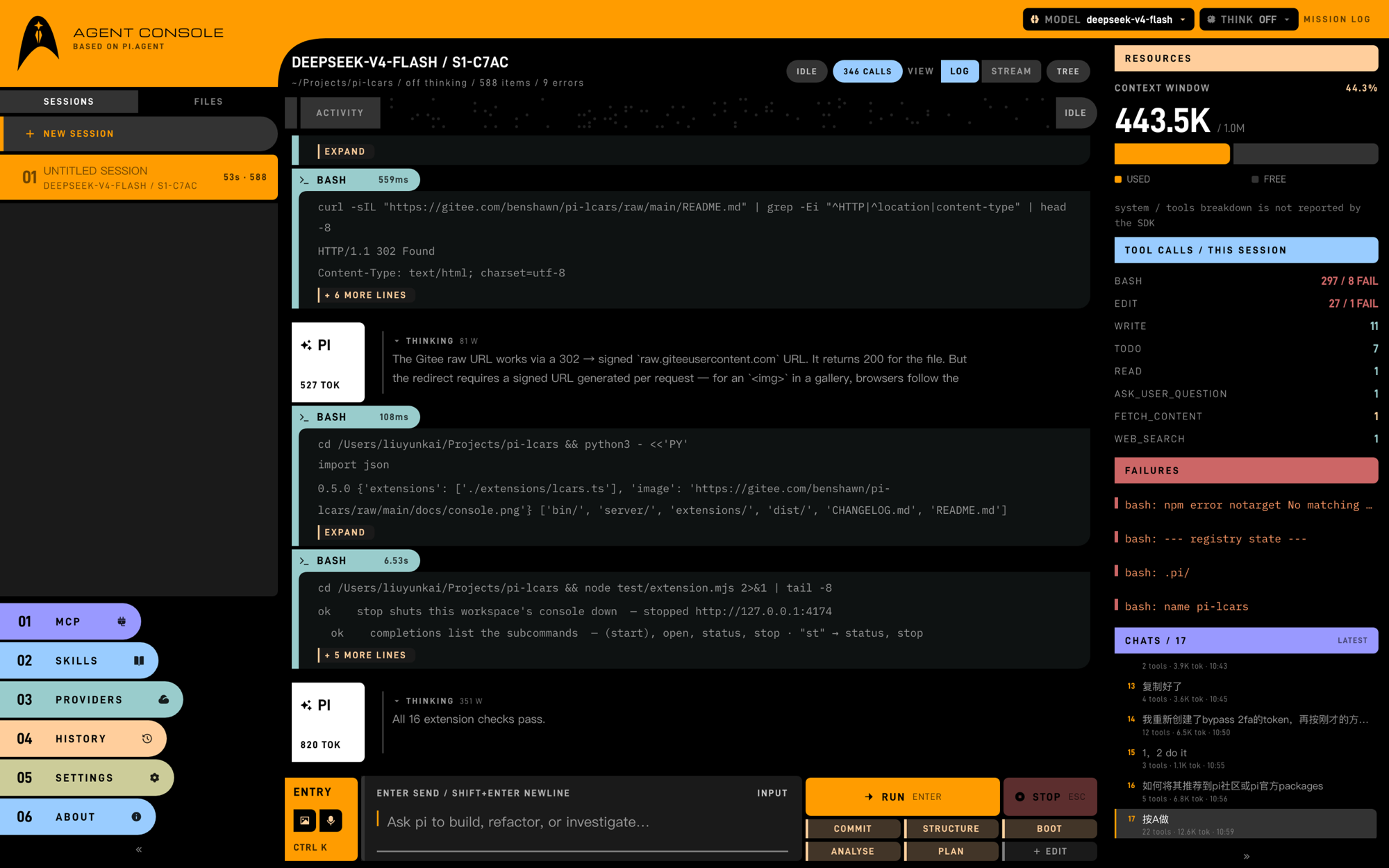
The mission log: sessions on the left, the live transcript in the middle (tool rows, diffs,
sub-agent calls), context and tool calls on the right, ACTIVITY reading the machine's state above it.
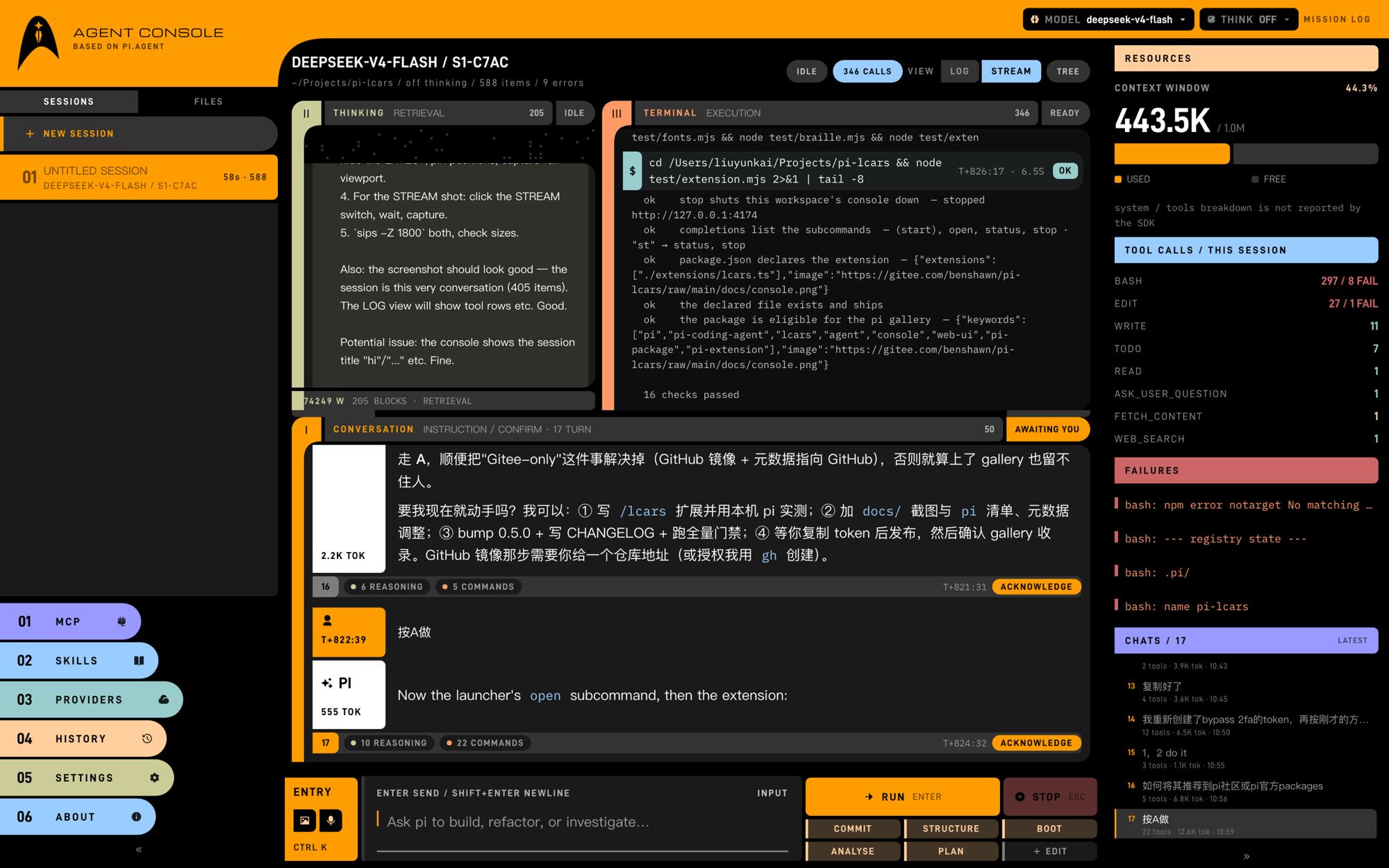
VIEW → STREAM: the same session cut into three instruments — I CONVERSATION, II THINKING
(with the dot matrix), III TERMINAL — each scrolling on its own, tied together by exchange.
Run
One command boots the pi backend, the UI and the browser — the client is served by the same Node process that hosts the SDK, so there is nothing else to start.
npx pi-lcars            # from anywhere; builds the client on first run
npm i -g pi-lcars       # or install it, then just `pi-lcars`
pi-lcars start, open the browser
pi-lcars --dev vite dev server with HMR on :5173
pi-lcars doctor check the pi backend, print the fix when it is missing
pi-lcars status running instances (pid, port, cwd, model); --json for scripts
pi-lcars open open a running instance in the browser
pi-lcars stop stop the newest instance--cwd <dir> sets the workspace, --port the first port to try (it walks up
when busy), --host the bind address, --policy off|risky|all the approval
gate, --json prints {url,port,pid,cwd} on the first stdout line.
The layout is built for a 1600×1000 desktop and verified down to 1280×800
(1440×900 and 1280×800 are asserted on every npm test). Below 1180 the
three-zone STREAM view stacks into one column.
Release notes live in CHANGELOG.md. Mirrored on Gitee for readers behind the GFW: gitee.com/benshawn/pi-lcars.
From inside pi
The package is also a pi package: installing it adds a /lcars command to the TUI,
so you never leave the terminal to get the console.
pi install npm:pi-lcars # once/lcars start the console for this workspace (or reattach to the one
already running for it) and print the URL
/lcars open same, and open the browser
/lcars status what is running, and for which workspace
/lcars stop stop this workspace's consoleIt shells out to the same launcher the CLI uses, so pi-lcars status / open /
stop and the footer's :4173 agree with it. Nothing is offered to the model —
the console is the operator's tool, not the agent's.
Requirements
- Node >= 22.19 (pi's own minimum)
- pi itself — the installer (
curl -fsSL https://pi.dev/install.sh | sh, orirm https://pi.dev/install.ps1on Windows) ornpm i -g --ignore-scripts @earendil-works/pi-coding-agent
pi-lcars doctor finds the backend automatically: PI_SDK → project
node_modules → <agent>/install/releases/* (newest release that answers the
SDK API the console calls) → npm global root. Nothing installed? It prints the
platform-correct install command instead of failing with a stack trace.
Development
npm install
npm run dev      # client at :5173, proxies /api → :4173
npm run server   # in another shell: real pi session, SSE on :4173
npm test         # themes (9x12) + pi-env (18) + fonts (12) + braille (29) + mcp-config (27) + endpoints (66) + launcher (28) + ui (193) checks

SMOKE_MODEL=1 npm test   # also does one real turn + fork (costs a model call)
node scripts/check-release.mjs   # pre-publish gate: notes, clean tree, package contents
npm run ship -- --dry-run # whole release: gates, tag, push both remotes, publish| env | default | purpose |
|---|---|---|
PORT |
4173 |
first port to try |
HOST |
127.0.0.1 |
bind address (no auth — keep it loopback) |
PI_CWD |
process.cwd() |
workspace the agent runs in |
LCARS_SESSIONS |
pi default | where transcripts are written |
LCARS_POLICY |
off |
approval gate: off / risky / all |
LCARS_TRUST_PROJECT |
1 |
load project .pi/ extensions |
LCARS_RESUME |
0 |
1 = resume the newest session in the workspace on boot |
LCARS_STATE_DIR |
~/.pi/agent/lcars |
instance records for status / stop |
PI_SDK |
auto-resolved | explicit path to (or specifier of) the pi SDK |
PI_CODING_AGENT_DIR |
~/.pi/agent |
pi config dir, honoured everywhere |
Layout
bin/pi-lcars.mjs   launcher: args, build-if-stale, port walk, status/open/stop/doctor
extensions/        lcars.ts — the `/lcars` command pi loads from this package
server/            Node, no runtime deps beyond the pi SDK
  index.mjs        the shell: config, shared objects, http + SSE lifecycle
  http.mjs         JSON envelope, error shape, body reader, query (one place)
  routes/          one module per station: core · session · files · providers · mcp · skills · history
  pi/sdk.mjs       pi backend discovery: PI_SDK → node_modules → releases → npm -g
  pi/registry.mjs  session lifecycle, transcript items, meta
  pi/queue.mjs     one global run at a time
  pi/approval.mjs  blocking tool approval gate (inline pi extension)
  pi/stream.mjs    pi events → UI items
src/               Vite + Preact + TS client
  styles/          tokens (structure) + themes (colour) + fonts (@font-face) + lcars (components)
  components/      Elbow · ToolStrip · ApprovalDeck · FieldRow · Braille · Icon …
  braille.ts       dot-matrix phases: idle · thinking · streaming · running · done
  views/console/   LogState (the ACTIVITY strip) · phase.ts (one voice for both bands)
  format.ts        pure readouts: sizes, tokens, mm:ss, ages, paths (no DOM)
  ime.ts           the one IME gate every keydown consults
  drafts.ts        per-session composer drafts + sent-history (localStorage)
  views/Console.tsx      the shell: top rail, three columns, deck stack
  views/console/         conversation pieces: Sidenav · Transcript · Workspace · Composer · Rail
  views/stations/        one file per station: Mcp · Providers · Tree · History · Skills · Settings
  views/Craft.tsx        craft layer, the visual contract in one page
  icons.ts         generated: remixicon -fill paths (57 icons, no font)
  fontPack.ts      generated: bundled families, weights, byte counts, licences
public/fonts/      5 woff2 (74.6 KB) + 3 OFL texts — SIL Open Font License 1.1
boards/            MasterGo frames (v1 skeleton, v2 real stream)
AGENTS.md          the design contract — read before touching UI (repo only, not published)
PLAN.md            milestone plan (M0..M9) (repo only, not published)
API
| method | path | notes |
|---|---|---|
| GET | /api/bootstrap |
sessions, active meta, policy, items |
| GET | /api/stream |
single SSE channel; events carry sessionId |
| GET | /api/state |
same + queue snapshot (debugging) |
| POST | /api/session |
{op: new|open|fork|activate|rename|delete|compact|tree|goto|rewind} |
| POST | /api/prompt |
{text, images?} — steers the running session, otherwise queues. Images are base64, png/jpeg/webp/gif, max 6 |
| GET | /api/files?q= |
flat, ranked workspace file index for the composer's @ completion |
| POST | /api/abort |
cancels queued work, denies pending approvals |
| POST | /api/approve |
{id, decision: approve|deny|always} |
| POST | /api/policy |
off / risky / all |
| POST | /api/model |
{provider, model} — takes effect next turn |
| POST | /api/thinking |
off / low / medium / high (reports clamped) |
| GET | /api/models |
available models for the active session |
| GET | /api/fs?path= |
directories only, for the workspace picker |
| GET | /api/backdrop?dir= |
folders + image files, for the backdrop picker (whole disk) |
| GET | /api/backdrop/file?path= |
streams the chosen still from its own path; no copy, no bundle |
| GET | /api/mcp |
servers from mcp.json (global + project overrides) |
| POST | /api/mcp |
{op: toggle|add|remove} — writes with a .bak backup |
Screens
/— the console: left rail (session list + MCP / SKILLS / PROVIDERS / HISTORY / SYSTEM / ABOUT), shelf controls (model / thinking), live transcript, pinned composer, resources rail. Stations are hash-addressable:/#about,/#providers, …/#stream— the three-zone workspace: the same live stream cut by role instead of by time, and numbered by the cycle an exchange runs through —ICONVERSATION (instruction, and where the result comes back),IITHINKING (retrieval and reasoning),IIITERMINAL (execution). Each zone is an instrument: a numbered strip with a live state block (SCANNING,AWAITING YOU,1 RUNNING), its own scroll, and its own tone.- CONVERSATION is grouped per exchange. Each exchange closes with a footer that joins the three zones:
1 REASONING/3 COMMANDSare real tallies — clicking one dims every other exchange in all three zones and jumps them to the same number, and the acknowledge pill is what closes the cycle ("I read this"). - TERMINAL is a command channel: the real command line after a
$, its raw output, a solid return-code lamp (exit 0/exit 1/FAILED), anEXCH 0ndivider when the session has more than one exchange, and a blinking$ ▊while a command still runs. - THINKING reads as a state, not as prose: each block says
SCANNINGorSETTLED, and the zone's readout strip names the file currently being read (READING · test/login.test.ts). TheSTREAMbadge toggles it,Escgoes back — the mission log stays the only place that reads the whole session, tools included, in one pass.
- CONVERSATION is grouped per exchange. Each exchange closes with a footer that joins the three zones:
/?craft— the primitive sheet (elbows, motion, icons, form language, themes, the zone layout), i.e. the visual contract on one page.
SYSTEM → BACKDROP lets you point the console at one of your own stills (any
folder on any volume, or your photo folder). The file is streamed from where it
lives, never copied into the project and never bundled — clear it and the screen
is LCARS black again.
Composer
The input area is the one place that remembers things:
| behaviour | |
|---|---|
| draft | kept per session in localStorage; survives reload, switching stations and switching sessions |
| history | ↑ from the start of the draft recalls what you already sent (per session, last 40); ↓ walks forward again |
| images | paste, drop or the attach button → chips, sent through pi's own prompt(text, { images }). The transcript only keeps the counts |
@ |
opens a ranked file list; the pick lands in the draft as a backticked path for pi's read tool |
/ |
skills, prompt templates and the console's own commands (/compact /fork /new /model /stop) |
| height | grows with the draft to min(240px, 26vh), then scrolls; Enter sends, Shift+Enter breaks the line |
Troubleshooting
Typing space kills the page on KDE Wayland. On KDE Plasma 6 (KWin 6.6) with
fcitx5, a browser that uses the compositor's text-input-v3 protocol can have its
renderer killed when the IME commits a candidate with Space. It reproduces on a
bare file:// page with one <textarea>, so it is not this console's code: the
input method, the compositor and the browser are the whole path. Two fixes, both
outside the app:
# run the IME through the GTK module instead of text-input-v3
GTK_IM_MODULE=fcitx QT_IM_MODULE=fcitx XMODIFIERS=@im=fcitx

# or keep the browser off Wayland
MOZ_ENABLE_WAYLAND=0 firefox        # Firefox
google-chrome --ozone-platform=x11  # Chromium family
/probe (bare textarea) and /lab (five isolated inputs) exist to bisect this
class of report: if /probe dies, the console is not involved.
Keyboard
| keys | action |
|---|---|
⌥1 – ⌥6 (Alt 1 – Alt 6) |
jump to a station — the numbers on the rail are the combos |
⌥0 (Alt 0) |
back to the mission log |
⌘K / Ctrl K |
focus the composer |
Enter |
send (steers while a run is active) |
Shift+Enter |
newline |
Esc |
close a deck / branch tree / workspace / viewer, else stop the current run |
↑ / ↓ |
at the start of the draft: walk the sent-history (or move the palette cursor) |
@ |
file references: ranked workspace paths, inserted as a code span |
/ |
command palette (Tab / Enter completes, Esc clears) |
⌘B |
collapse / expand the left rail (64px icon rail when collapsed) |
⌘⇧B |
collapse / expand the resources rail |
Non-obvious behaviour
- Fonts ship inside the package.
public/fonts/holds D-DIN (labels, numerals), Michroma (wordmark) and IBM Plex Mono (code) — 5 woff2 files, 74.6 KB, all SIL OFL 1.1, withOFL-*.txtnext to them. They are unmodified downloads from the upstream that publishes both glyphs and licence (node scripts/fetch-fonts.mjs,--checkverifies what is on disk); catalogue sites such as fontspace.io redistribute commercial faces as "free", so they are useful for discovery and useless for provenance. CJK is deliberately not bundled — Chinese text uses the platform face while the Latin runs inside the same string stay on D-DIN. - One run at a time. A second prompt queues and starts when the slot frees. Prompts aimed at the running session are steered into it instead of queueing.
- The approval gate is a pi extension, not a transport hack: it awaits the operator inside the
tool_callhook, so a denial surfaces to the model as a normal tool error. - Fork needs a transcript. Forking a session with no turns returns
409 E_EMPTY. - Boot does not resume. A fresh console starts a new session; resuming the newest one
(which may be your CLI session, with its context and token history) is opt-in via
LCARS_RESUME=1. - MCP edits are written to disk, not applied live: the next session picks them up. Every write keeps
a
.baknext to the file. - Binding is loopback only and there is no auth — this process can run
bashinPI_CWD.