pi-long-task
Pi coding agent extension that breaks large coding requests into tracked TODOs and runs them in bounded, adaptively reused AI worker sessions. A long-running task runner and subagent orchestrator for Pi, with a live TUI progress sidebar, retries, goal loo
Package details
Install pi-long-task from npm and Pi will load the resources declared by the package manifest.
$ pi install npm:pi-long-task- Package
pi-long-task- Version
0.7.0- Published
- Sep 8, 2026
- Downloads
- 1,493/mo · 617/wk
- Author
- thestuntcoder
- License
- MIT
- Types
- extension
- Size
- 674.6 KB
- Dependencies
- 0 dependencies · 4 peers
Pi manifest JSON
{
  "image": "https://raw.githubusercontent.com/thestuntcoder/pi-long-task/main/docs/assets/package-preview.png",
  "extensions": [
    "./src/index.ts"
  ]
}
Security note
Pi packages can execute code and influence agent behavior. Review the source before installing third-party packages.
README
Pi Long Task


Pi Long Task is a long-running task runner and subagent orchestrator for the Pi coding agent. It is a Pi extension that breaks large coding requests into tracked TODOs, executes them in bounded AI worker sessions, registers a real Pi TUI progress sidebar while a run is active, and optionally commits completed work.
If you are looking for a way to run long-running, multi-step, autonomous coding tasks with Pi — refactors, test coverage pushes, full feature builds, or entire product goals — this extension handles the planning, delegation, progress tracking, retries, and safe git commits for you.
Use it when a coding request is bigger than one focused interaction. Pi Long Task creates or cleans up the TODO plan, gives every TODO a task-scoped assignment, adaptively reuses a healthy compatible worker session when safe, tracks every attempt, and keeps the run artifacts so you can inspect what happened later.
Why use it
- Take on bigger tasks: split broad product, refactor, testing, or cleanup requests into smaller TODOs that Pi can complete one at a time.
- Track progress visibly: in Pi TUI, see the active TODO, inferred
**Status:**subtasks, completed/failed/blocked counts, and remaining work in the Pi Long Task sidebar while the run is active. - Recover with retries: tasks that do not report completion can be retried with context from previous attempts instead of losing the thread.
- Wait through transient outages: optionally pause after Pi exhausts its bounded provider retries, show connection-wait status, and safely resume the interrupted coordinator phase.
- Commit safely when asked: enable commits for completed task work, while generated run files and pre-existing dirty files are kept out of those commits.
- Keep task artifacts: every run writes a generated
TODO.md, generatedTASK_RESULT.md, attempt summaries, and final status undertmp/pi-long-task/<run-id>/. - Watch cost visibility: worker spend is captured and surfaced in progress and final summaries when usage cost data is available.
What happens during a run
When you ask Pi to run a long task, Pi Long Task:
- Recognizes natural-language requests like "run a long task with commits" and routes them to
pi_long_task. - Creates or cleans up a TODO plan from your request, optionally guided by a high-level
goal. Natural-language planning uses a bounded planner session; if generated TODO markdown is invalid, Pi Long Task asks the planner to repair it once before failing the run. - Works through each unfinished TODO task in order, reusing a healthy compatible worker session when its context remains safely below the configured limit and rotating otherwise.
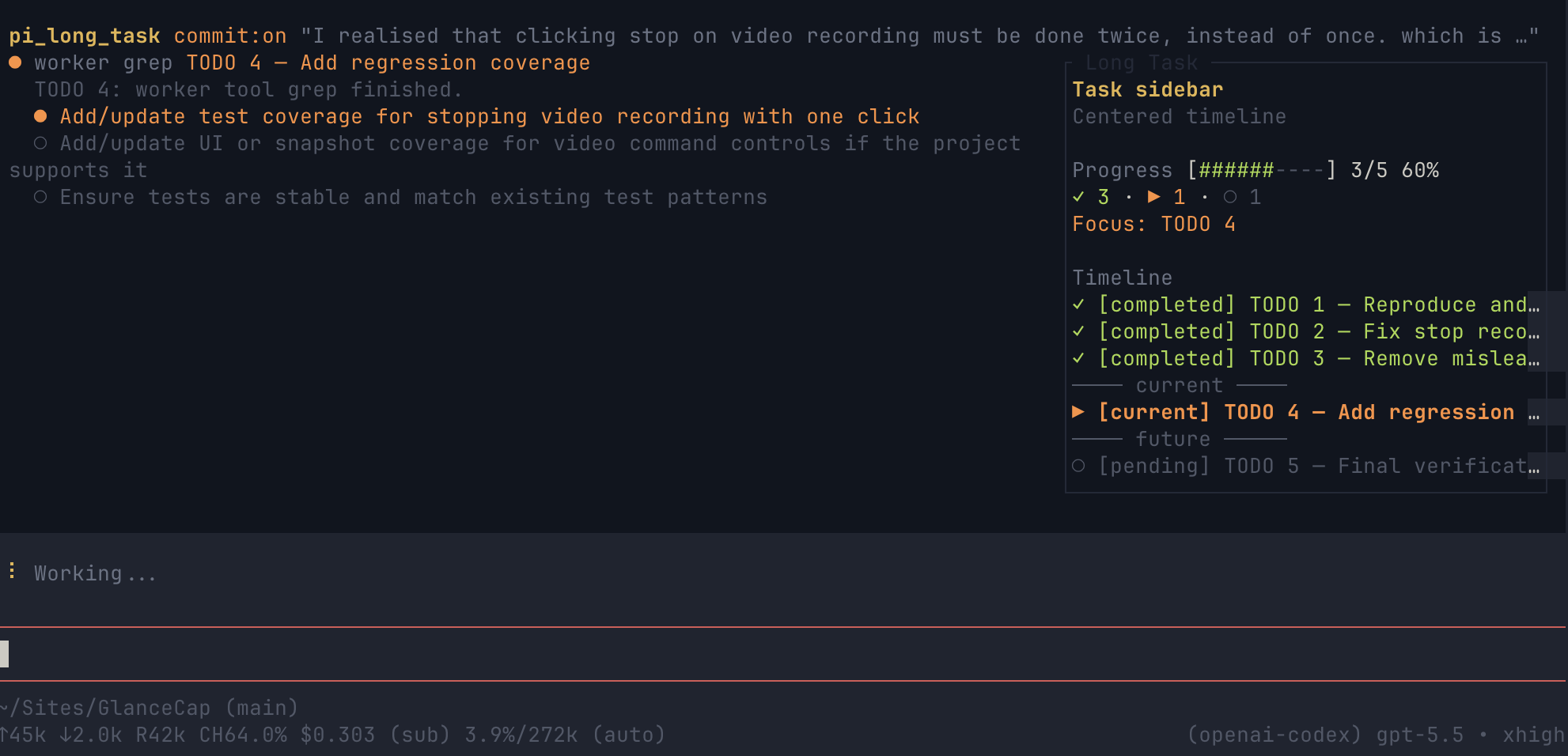
- Registers a Pi TUI sidebar/widget when UI support is available and updates it with the current task, inferred subtask progress, and full task timeline while the run is active.
- Retries unfinished tasks up to the configured attempt limit.
- Records progress, planner diagnostics, task artifacts, and final results under
tmp/pi-long-task/<run-id>/. - Returns a summary with completed, failed, blocked, and remaining task counts, plus worker spend when available.
- Optionally commits completed work after each task.
For a large project goal, this means Pi Long Task turns the single broad request into structured TODO tasks first, then assigns each TODO to a worker session one at a time. For example, a hypothetical request to build a fast team chat app would become a plan of focused tasks instead of one giant all-at-once implementation; workers would complete or report on each task incrementally before the coordinator moves to the next task.
During and after a run you get:
- a concise status summary in Pi
- a generated
TODO.md - a generated
TASK_RESULT.md - live TUI sidebar progress during the run for the active task and its
**Status:**checkbox subtasks - task attempt history and any remaining or blocked tasks clearly listed
- worker spend when cost data is available
- commit hashes when commits were enabled and created
Install
Install it from npm with:
pi install npm:pi-long-task
For local development, load this checkout for one Pi session:
pi -e /path/to/pi-long-task
Or install the local checkout so Pi can load it normally:
pi install /path/to/pi-long-task
After installing, start pi in your target project and ask it to run a long task.
To update an existing npm install:
pi update npm:pi-long-task
Or update all installed Pi extension packages:
pi update --extensions
Quick start examples
Use natural language; you do not need to mention pi_long_task explicitly. Copy one of these prompts and replace the quoted work with your own task.
Run with commits enabled, so each completed TODO can be committed separately:
Run a long task with commits to implement the TODOs in @TODO.md.
Run a long task with commits to refactor the checkout flow, update the tests, and commit each completed task.
Request commits and a coverage target in the same natural-language prompt:
Run a long task with commits with goal to have testing line coverage above 80%.
Run without commits when you want to review all changes yourself before committing:
Run a long task without commits to add tests for the parser and fix any failures.
Run a long task without commits to audit the README examples and leave the final diff uncommitted.
What "with commits" means
When you ask for a long task "with commits," Pi Long Task may create a git commit after each TODO task that a worker completes with eligible changes. Each worker session is expected to stay focused on its assigned TODO only, so any commit reflects a specific slice of progress rather than the entire broad request.
Those incremental commits preserve completed work between worker sessions, make it easier to review what changed for each task, and provide clear checkpoints if a later task is blocked or needs another attempt.
Scope expectations for broad product goals
A hypothetical request like "run a long task with commits to build a fast Slack alternative" is too large and vague to finish as one instant product build. Pi Long Task would first turn that broad goal into a realistic plan, often centered on an MVP rather than every feature of a full Slack replacement.
The generated plan would break the work into focused areas such as authentication, workspace/channel data, message creation and history, realtime sync, persistence, UI screens, tests, and deployment or configuration follow-up. Each area would become one or more TODO tasks assigned to separate worker sessions, with incremental verification and optional commits along the way.
The initial result should be expected to be a structured TODO plan, MVP-oriented breakdown, or first narrow implementation slice. A complete production-ready team chat product would require many focused tasks and repeated progress checks, not a single vague prompt completing everything immediately.
How to run a Long Task
1. Prepare the work request
Pi Long Task can plan from a plain-language request or from pasted TODO markdown. If you write the TODO markdown yourself, use this structure:
# Pi Long Task TODO

Global instructions:

- Keep any rule that applies to every task here.

## Progress

- [ ] TODO 1 — First focused task
- [ ] TODO 2 — Second focused task

---

## TODO 1 — First focused task

**Goal:** Explain the outcome for this task.

**Status:**

- [ ] Implement the first focused task

**Verify:**

- Run the focused check for this task.

**Done when:**

- The task is implemented and verified.

## TODO 2 — Second focused task

**Goal:** Explain the outcome for this task.

**Status:**

- [ ] Implement the second focused task

**Verify:**

- Run the focused check for this task.

**Done when:**

- The task is implemented and verified.
2. Start Pi in the target project
Install or load the extension first, then run Pi from the repository you want to modify:
cd /path/to/your/project
pi
In the Pi prompt, use natural language:
Run a long task without commits to implement the TODOs in @TODO.md.
Or call the tool explicitly:
Use pi_long_task with inputText "implement the TODOs in @TODO.md" and commit false.
Use with commits or commit true only when you want Pi Long Task to create eligible commits after completed tasks.
3. Monitor progress and completion
During execution, Pi Long Task creates tmp/pi-long-task/<run-id>/TODO.md and TASK_RESULT.md, runs unfinished TODOs in order with adaptive worker-session reuse, and retries unfinished tasks up to the configured attempt limit. Every assignment remains task-scoped even when its SDK session is reused. Checked progress in pasted TODO markdown is preserved, so completed tasks are skipped when that artifact is supplied again. A task is marked complete only after the worker returns every required TASK_RESULT field without a session error, timeout, or cancellation, and the attempt evidence is appended before the TODO completion marker. In Pi TUI, watch the Long Task sidebar/widget for the active task, subtask checklist, task timeline, counts, and worker spend when available. In headless or non-UI runs, watch the partial tool-result updates in the main output. When the run finishes, the final response lists completed, failed, blocked, and remaining task counts plus the result and TODO file paths.
Steer a run in progress
While one Pi Long Task is active, send another plain-text message in the Pi prompt to refine the remaining work. For example:
Add an accessibility review before the documentation task, and require pagination tests for the API task.
Pi acknowledges the guidance immediately, queues rapid messages in submission order, and asks the planner to incorporate each message into the current complete plan. Accepted guidance may edit pending tasks, add or remove work, or reorder the unfinished tasks. The updated TODO.md and sidebar use the revised order, and the same run continues from the next eligible task instead of starting over.
Progress is reconciled conservatively:
- Equivalent completed tasks stay checked and are not run again; their result evidence remains available to later workers.
- If guidance changes completed work, the completed result is retained as history and corrective work is represented as a new unchecked follow-up rather than erasing the old result.
- If guidance changes or removes the currently running task, that worker may finish, but its stale result is recorded as obsolete and cannot complete the replacement. The scheduler then runs the revised task.
- A revision must be a complete valid Pi Long Task TODO plan. If generation or validation fails, Pi reports the rejection and keeps executing the prior plan unchanged.
- Guidance received close to task completion is serialized with the completion update so the rendered checkboxes and scheduler state remain consistent.
Steering applies to text submitted with Pi's active-session steering behavior. Slash commands, shell commands beginning with !, image messages, follow-up messages deferred until after the response, and extension-generated input retain their existing behavior instead of revising the plan. If more than one long-task run is active in the same extension session, guidance is not guessed between them.
What it looks like

In Pi TUI, Pi Long Task keeps worker activity in the main tool result flow and registers a real right-side TUI sidebar for the run timeline:
┌─ Main content: active worker activity ─────────┬─ Pi Long Task sidebar ─────────┐
│ Worker TODO 2 — Add parser tests               │ Progress: 2/5 tasks complete   │
│                                                │ Worker spend: $0.18            │
│ $ npm test -- parser                           │                                │
│ ✓ parser handles nested arrays                 │ Timeline                       │
│ ✗ parser rejects invalid escapes               │ ✓ TODO 1 Rewrite intro done    │
│                                                │ ▶ TODO 2 Add tests active      │
│ Editing src/parser.test.ts...                  │   ◌ add edge fixtures          │
│ Re-running tests after fix...                  │   ◌ fix assertions             │
│                                                │ ○ TODO 3 Update docs next      │
│ Worker reports commands, edits, results here.  │ ○ TODO 4 Validate later        │
│ Current TODO output stays in main thread.      │ Tracks status/timeline/spend   │
└────────────────────────────────────────────────┴────────────────────────────────┘
The actual sidebar is a Pi TUI overlay anchored on the right when the terminal is large enough, with a Pi widget fallback for UI contexts where the overlay is unavailable. It is cleared when the run finishes; this README mockup stays narrow enough to avoid wrapping in package galleries.
How it works
Pi Long Task coordinates a long request from planning through task completion:
- Plan the work: it creates a TODO plan from your request, or normalizes pasted TODO markdown so each item can be tracked consistently.
- Run bounded workers: each TODO receives a new task-scoped assignment with the relevant task text, global instructions, attempt history, and commit setting. A healthy compatible SDK worker session may carry sequential assignments; each reused prompt includes an explicit assignment boundary.
- Stream progress back: the active worker's activity streams into the main Pi thread as partial tool results, so you can follow commands, edits, verification, and the final
TASK_RESULTas they happen. - Update the Pi TUI sidebar: when Pi provides UI support, the extension uses Pi's TUI UI APIs to maintain a real sidebar/widget that lists the full run timeline, including completed, active, upcoming, failed, or blocked tasks and inferred subtask progress from each task's
**Status:**checklist. - Write run artifacts: the coordinator writes the generated/normalized
TODO.md,TASK_RESULT.md, attempt summaries, and final run details totmp/pi-long-task/<run-id>/. - Commit only when enabled: if
commitistrue, Pi Long Task may create a commit after each completed task using only eligible task changes. If commits are disabled, no commits are created; even when enabled, commits can be skipped when there are no eligible changes or the task outcome is not commit-worthy.
Adaptive worker-session reuse
Reuse is enabled by default. Related sequential TODOs in the same coordinator run and worktree may share one idle Pi AgentSession, which avoids repeated startup and repository exploration. Reuse does not merge task semantics: every TODO still gets its complete current assignment, an explicit boundary from the previous assignment, its own result extraction, attempts, progress, and TASK_RESULT outcome.
The default context-usage threshold is 62.5%. A session is retained only while Pi reports valid context usage below that threshold. It is rotated at or above the threshold, or conservatively when context usage is missing or invalid. Rotation also occurs after timeout, abort, cancellation, unrecoverable or invalid session state, an obsolete assignment caused by steering, or a compatibility change in the coordinator run, repository/worktree, provider/model, worker options, or session configuration. All retained sessions are disposed when rotated or when the coordinator ends.
You can put runtime directives in inputText (including pasted TODO global instructions):
Worker session reuse: enabled
Worker session reuse context threshold: 60%
The threshold accepts a percentage greater than 0 and at most 100. An absent or invalid value uses the safe 62.5% default. To restore the previous one-session-per-assignment behavior:
Worker session reuse: disabled
Programmatic callers of runCoordinator() can use the corresponding options:
await runCoordinator({
  commit: false,
  inputText: "implement the TODO plan",
  workerSessionReuse: true,
  workerSessionReuseContextThresholdPercent: 60,
});
Explicit, complete status: partial results may continue in the same healthy, compatible, below-threshold session on the next attempt. All independent retries—including timeout, abort, cancellation, errors, invalid/incomplete results, and non-partial failures—start fresh. Existing retry limits and delays are unchanged. Setting workerSessionReuse: false (or the disabling directive) always isolates assignments.
TODO planner budgets, grace, and thinking
TODO planning starts with a 5-minute budget. When no timeout is configured, Pi Long Task deterministically extends that budget for requests containing an explicit item count, enumerated deliverables, or language requiring items to be planned separately. The first four detected items fit in the base budget; each additional item adds 30 seconds, up to a 15-minute maximum. For example, a request for 24 separately planned stories receives the capped 15-minute budget. This calculation uses textual scale signals rather than model judgment.
Set an exact budget and grace period in an explicit tool call when needed:
Use pi_long_task with inputText "plan and implement the checkout migration" and commit false and todoTimeoutMs 720000 and todoGracefulShutdownMs 30000.
The tool schema uses whole milliseconds. The same settings can be written in inputText or pasted TODO global instructions with friendly units:
TODO planner timeout: 12m
TODO planner graceful shutdown: 30s
A positive timeout is required. Grace defaults to 15 seconds, may be zero to disable it, and starts only after the planner deadline. Both values are bounded by the runtime timer maximum (about 24.9 days). Configuration precedence is:
- structured
todoTimeoutMsandtodoGracefulShutdownMsoptions - recognized natural-language or global directives
- adaptive timeout and the default grace period
An explicit timeout remains exact and bypasses adaptive scaling. Omitting the new options preserves the previous call shape. The selected budget is returned additively as plannerBudget, including its source, detected signals, and extension reason when applicable.
The planner-only thinking default is high, chosen to balance plan quality and latency. This does not change worker, discovery, or reviewer defaults. Programmatic runCoordinator() callers may set todoThinking explicitly; every supported Pi level is forwarded unchanged, including xhigh:
await runCoordinator({
  commit: false,
  inputText: "Create 24 separately planned tasks for the migration.",
  todoTimeoutMs: 12 * 60_000,
  todoGracefulShutdownMs: 30_000,
  todoThinking: "xhigh",
});
Before planning, CLI/TUI and headless progress report the effective budget in friendly units and explain any adaptive extension. Three bounded updates report elapsed and remaining time. If the deadline is reached, progress announces the grace period and its duration rather than appearing frozen.
A grace period is not an extra general-purpose planning budget. It asks the active planner to stop and allows a safe, complete TODO plan already finishing to settle. Invalid or truncated output still fails. Timeout and cancellation diagnostics record only whether partial output was observed; they do not expose the partial text.
Isolated workers and browser capabilities
Pi Long Task workers are isolated SDK sessions. Extensions loaded in the parent Pi session are deliberately disabled in workers, and workers receive only the direct read, bash, edit, write, grep, find, and ls tools. Consequently, a worker cannot silently use a Chrome/browser extension, Chrome DevTools MCP, or an unlisted browser tool merely because it is available in the parent session.
When a request explicitly requires one of those unavailable capabilities, Pi Long Task emits an actionable warning, includes an isolated-worker constraint in planning, and returns the additive capabilityWarnings details. The run may continue when a safe available alternative is equivalent—for example, fetching public content with a supported command-line mechanism through bash, running project-provided browser automation through bash, or supplying page/source content for local reading. If the exact extension or browser tool is mandatory, the affected task must report blocked instead of claiming it used the tool. Merely asking workers to implement a browser extension does not by itself claim that the extension must be loaded during the run.
Coordinator-level network recovery
Network recovery is disabled by default for backward compatibility. When enabled, it begins only after Pi has exhausted its own bounded provider-request retries. Pi Long Task then uses jittered exponential backoff starting at 1 second, capped at 30 seconds, for a maximum continuous outage of 5 minutes. During recovery, progress displays Waiting for connection… with the retry number, next retry delay, or elapsed outage time. Cancellation interrupts both backoff waits and in-flight recovery calls immediately.
Add directives to inputText or to the global instructions of a pasted TODO plan. These examples cover every mode:
# Default: recovery is disabled; the timing defaults below are dormant.
Run a long task without commits to implement @TODO.md.
# Bounded recovery using the default 1s base, 30s cap, and 5m outage window.
Network recovery: enabled
# Bounded recovery with explicit timing.
Network recovery: enabled
Network recovery base delay: 2s
Network recovery maximum delay: 45s
Network recovery maximum outage: 10m
# Explicitly retain fail-fast behavior after Pi's own request retries.
Network recovery: disabled
To wait indefinitely while the provider or network remains unavailable, enable recovery and set the maximum outage to unlimited, indefinite, or until cancelled:
Network recovery: enabled
Network recovery maximum outage: until cancelled
Indefinite mode has no outage deadline; it always remains cancellable. It does not turn deterministic errors into recoverable ones.
Programmatic runCoordinator() callers can pass the same policy as structured options; pi_long_task and pi_goal_task expose the same networkRecovery object in their tool parameters:
await runCoordinator({
  commit: false,
  inputText: "implement the TODO plan",
  networkRecovery: {
    enabled: true,
    baseDelayMs: 2_000,
    maxDelayMs: 45_000,
    maxOutageMs: 10 * 60_000,
  },
});
Use maxOutageMs: null for indefinite waiting or enabled: false to disable recovery. Durations must be positive finite safe integers, maxDelayMs must be at least baseDelayMs, and a bounded maxOutageMs must be at least baseDelayMs.
Recovery classification boundaries
Recovery is deliberately narrow. Recoverable failures include failed fetches; DNS, connection, and socket failures such as ENOTFOUND, ECONNRESET, or ETIMEDOUT; premature HTTP/WebSocket/stream termination; request and gateway timeouts; temporary provider overload; HTTP 408, 425, and overload-style 429 responses; and retryable server responses such as HTTP 500, 502, 503, and 504. Provider errors and nested causes are inspected so useful status, code, request ID, and retry metadata can be retained.
Authentication and authorization failures, billing or credit failures, exhausted account/usage quota, invalid models, malformed or unsupported requests, context-length and content-policy failures, most other 4xx responses, non-retryable server responses, certificate/configuration failures, coordinator timeouts, cancellation, and unknown errors fail immediately through the existing error path. Deterministic evidence wins over transient-looking wrapper text—for example, a 429 response that says the account quota is exhausted is not treated as temporary rate limiting.
Planner deadline, grace, recovery, and cancellation
These controls have separate clocks and outcomes:
- The planner deadline bounds each provider attempt using the effective adaptive or explicit planning budget.
- The grace period begins only when that deadline is reached and only collects a safely completed plan from the stopping attempt.
- Network recovery has its own outage clock and retry counter. Recovery wait does not consume or silently extend the per-attempt planner deadline; each fresh provider attempt receives the same configured planning budget.
- Cancellation takes priority during active planning, grace, or recovery. It stops promptly and is reported as cancellation, not as timeout or network failure.
Network retries do not consume TODO attempts, planner repair retries, reviewer retries, or goal-loop iterations. Time attributed to network recovery is excluded from worker, TODO-planner, reviewer, goal-iteration, and overall goal-loop timeout budgets; while connectivity is unavailable, maxOutageMs (or cancellation in indefinite mode) is the recovery limit. Once the operation resumes, its ordinary timeout and retry rules still apply. Because retries can add wall-clock time, progress labels them separately as planner network recovery and states that the per-attempt deadline is unchanged. If the outage window expires, the run fails with the last classified network failure retained as evidence.
Completed TODOs, current TODO identity and ordinary attempt number, durable attempt evidence, working-tree changes, accepted steering revisions, accumulated costs, and persisted goal/review state remain intact across an outage. An interrupted worker resumes the same TODO in a fresh session: the errored session is rotated, and the continuation is told to inspect the result artifact and current files before acting. This avoids blindly replaying already completed tool calls. The coordinator does not roll back external side effects, so tasks that call non-idempotent external systems should record durable completion/idempotency evidence that a resumed worker can verify.
Reuse diagnostics and accounting
Programmatic progress callbacks receive lifecycle updates with phase: "worker_session". The additive fields are:
workerSessionEvent:session_started,session_reused,session_retained, orsession_rotatedworkerSessionReason: a stable diagnostic reason such asfresh_session,reuse_eligible,context_threshold_reached,health_timed_out,model_mismatch, orreuse_disabledworkerSessionContextUsagePercent: the observed context percentage when availableworkerSessionContextThresholdPercent: the configured rotation threshold
Each coordinator outcome may also include sessionDiagnostics entries with event, reasonCode, optional contextUsagePercent, optional contextThresholdPercent, and optional previousTaskId. These diagnostics are appended to the run's TASK_RESULT.md. The programmatic CoordinatorResult.workerSessionMetrics summarizes starts, reuses, rotations, retained, and counts by rotationReasons without removing or changing existing result fields.
Pi session statistics can be cumulative across reused assignments. outcomes[].workerCostTotal and outcomes[].workerUsage are therefore calculated as nonnegative task/attempt-level deltas between assignment boundaries, not as the cumulative session totals. CoordinatorResult.workerCostTotal and workerUsageTotal aggregate those deltas exactly once across reuse, retries, and rotation; a statistics reset starts a new baseline. This keeps sidebar spend and the cost added to the parent Pi message task-accurate even when one session performs several TODOs.
Feature reference
- Adaptive TODO-planner budgets: deterministically extend the normal 5-minute budget for explicit large item sets, up to 15 minutes, while preserving exact caller overrides.
- Visible planner timing: report effective budget, extension reason, elapsed/remaining time, grace entry, and safe partial-output diagnostics across CLI/TUI and headless progress.
- Capability-aware planning: warn when isolated workers are explicitly asked to use disabled extensions or unavailable browser tools, then constrain the plan to honest alternatives or a blocked result.
- Adaptive worker-session reuse: reuse healthy compatible sessions below the 62.5% default context threshold, while preserving task boundaries and rotating conservatively.
- Optional network recovery: wait through classified transient provider/transport outages without consuming ordinary attempts, while keeping planner deadlines unchanged, deterministic failures fail-fast, and cancellation immediate.
- Real Pi TUI sidebar: in TUI sessions, every TODO appears in a registered sidebar/widget with past, current, and future statuses so you can distinguish completed, active, upcoming, failed, blocked, and remaining work at a glance.
- Main-thread worker activity: the active worker still streams commands, edits, verification, and its per-task
TASK_RESULTback into the main Pi conversation; the sidebar does not replace tool-result rendering. - Cost visibility: worker spend is included in Pi Long Task progress and is added to the main Pi
$ spenttotal when cost data is available. - Result and TODO artifacts: each run keeps the generated or normalized
TODO.md, aggregateTASK_RESULT.md, per-attempt summaries, and final run details undertmp/pi-long-task/<run-id>/. - Commit-safe behavior: when commits are enabled, Pi Long Task commits only eligible completed-task changes and skips generated run files.
- Dirty-worktree protection: files that were dirty before a worker started are not included in Pi Long Task commits, keeping your existing local work separate.
Usage
You can also call the tool explicitly.
Run without commits:
Use pi_long_task with inputText "add tests for the parser and fix any failures" and commit false.
Run with commits:
Use pi_long_task with inputText "implement the TODOs in @TODO.md" and commit true.
Run with an explicit high-level goal for the planner and worker prompts:
Use pi_long_task with inputText "update the checkout TODOs" and commit false and goal "ship a reliable checkout recovery experience".
When a goal is enough context, inputText can be omitted:
Use pi_long_task with commit true and goal "have testing line coverage above 80%".
Use a pasted TODO plan:
Use pi_long_task with inputText "<paste TODO markdown here>" and commit false.
Goal-oriented iterative loop
Use pi_goal_task when you have a high-level outcome instead of a ready TODO plan and want Pi Long Task to keep iterating until a reviewer confirms the goal is complete.
Use pi_goal_task with goal "modernize the settings page, add tests, and update docs" and commit true.
Goal loops default to commit true, minIterations 1, maxIterations 50, a 48-hour total timeout, 3 hours per implementation iteration, and 30 minutes per reviewer pass. Override limits when you want a larger or smaller loop. When you explicitly set maxIterations without minIterations, that number also becomes the minimum target, so the loop will not stop early just because a reviewer found one pass complete.
Examples:
Run a goal task with commits for goal: build a full Slack alternative chat app focused on speed.
Use pi_goal_task with goal "build a full Slack alternative chat app focused on speed" and commit true and minIterations 100 and maxIterations 100.
Use pi_goal_task with goal "ship a polished analytics dashboard with onboarding, tests, docs, and launch notes" and commit false and maxIterations 20.
For broad software-product goals like the Slack example, pi_goal_task first creates a software/product specification, then generates implementation TODOs from that spec, runs them, reviews completion, and repeats until the spec is complete and the minimum iteration target is reached, or until safety limits stop the loop.
Discovery for vague software goals
When a pi_goal_task goal is vague, such as a short product direction or broad feature idea, the goal loop first runs software-focused discovery before implementation TODOs are generated. Discovery turns the original goal into a persisted product definition and definition-of-done so implementation workers do not have to guess the scope.
Discovery uses role-based planning outputs from these supported roles:
- Product Owner
- Project Manager
- Software Architect/Tech Lead
- UX/UI Designer
- QA/Reviewer
- Marketing/Growth, when relevant for user-facing launch or adoption context
The consolidated specification is saved as GOAL_SPEC.json under the goal run directory. It includes traceability to the original user goal, role-output summaries, in-scope and out-of-scope requirements, assumptions, open questions, milestones, acceptance criteria, verification gates, design constraints, product constraints, optional marketing/growth context, and a definition-of-done with required artifacts and notes.
For vague goals, the loop runs as:
- accept the high-level
goal - classify the goal as vague and run discovery
- persist
GOAL_SPEC.json - generate implementation TODO markdown from the persisted specification
- run that generated TODO as a normal task-scoped long-task coordinator run
- run a separate reviewer session that decides
complete,incomplete,blocked, orfailedagainst the persisted specification - if the reviewer says
incomplete, generate another TODO using previous review context plus the same persisted specification and repeat
Implementation TODO generation treats the persisted specification as the source of truth. Generated tasks are instructed to cover relevant requirement, milestone, acceptance-criterion, verification-gate, constraint, and definition-of-done items, including spec IDs such as REQ-*, MS-*, AC-*, and VG-* where applicable. Reviewer sessions also load the persisted specification and use it as the primary review target; the original goal remains available for traceability, but vague wording alone is not the completion standard.
Concrete goals and compatibility
When a pi_goal_task goal is already concrete, existing direct behavior is preserved: the loop skips discovery and generates implementation TODOs from the provided goal, previous iteration context, and reviewer feedback. Goals are generally considered concrete when they already include implementation details such as files or paths, specific commands/tests, explicit acceptance criteria, or enough detailed scope for direct TODO generation.
pi_long_task behavior is unchanged. Discovery is only enabled by default for pi_goal_task; direct long-task planning, TODO normalization, worker execution, progress display, retries, artifacts, and commit behavior continue to work as before.
Goal-loop artifacts are stored under tmp/pi-goal-task/<goal-run-id>/, including GOAL_STATE.json, GOAL_TRACE.jsonl, GOAL_RESULT.md, optional GOAL_SPEC.json for discovered goals, and per-iteration generated TODO, worker, and reviewer files. Persisted pending, todo_generated, todo_executed, failed, and reviewed boundaries can be resumed by SDK callers without rerunning completed phases or rewriting existing result/trace history. Child TODO execution still writes normal tmp/pi-long-task/<run-id>/ artifacts.
Safety controls:
minIterationsprevents early success before the requested number of loops; default is1.maxIterationsstops retry loops when the reviewer keeps finding remaining work; default is50. If explicitly provided withoutminIterations, it is also used as the minimum target.timeoutMscaps the overall goal loop; default is172800000ms (48 hours).iterationTimeoutMscaps each generation, execution, and review sequence; default is10800000ms (3 hours).reviewerTimeoutMscaps each reviewer session within the remaining overall and iteration budgets; default is1800000ms (30 minutes).- tool cancellation is passed through, bounded locally even if an SDK prompt does not settle after abort, and stops the loop with
cancelledstatus. networkRecoveryapplies the same coordinator recovery policy to discovery, TODO generation/execution, and review; its wait time is excluded from goal-loop deadlines and iteration counts.maxAttemptsPerTaskandmaxBashTimeoutMsare forwarded to worker long-task runs.todoTimeoutMsandtodoGracefulShutdownMsare forwarded to child long-task planning and plan revisions with the same precedence and validation described below.commitcontrols whether implementation workers may commit; goal loops default tocommit true, so passcommit falsewhen you want to review all changes first.
Options
pi_long_task has one required input and five optional inputs:
{
  commit: boolean;
  inputText?: string;
  goal?: string;
  todoTimeoutMs?: number;
  todoGracefulShutdownMs?: number;
  networkRecovery?: {
    enabled?: boolean;
    baseDelayMs?: number;
    maxDelayMs?: number;
    maxOutageMs?: number | null;
  };
}
commitcontrols whether Pi Long Task may create git commits.inputTextoptionally provides the request or TODO markdown to work on.goaloptionally provides a high-level desired outcome that is passed to TODO planning and worker task prompts. Coverage goals such ashave testing line coverage above 80%add coverage-specific planning and verification guidance.todoTimeoutMsoptionally sets the exact positive whole-millisecond planner deadline. When omitted, deterministic adaptive budgeting applies.todoGracefulShutdownMsoptionally sets the non-negative whole-millisecond grace period after the planner deadline; it defaults to 15 seconds.networkRecoveryoptionally enables and tunes coordinator-level transient network recovery. See Coordinator-level network recovery for defaults and safety behavior.
See TODO planner budgets, grace, and thinking for precedence, directives, and programmatic thinking overrides.
pi_goal_task accepts a high-level goal plus safety controls:
{
  goal: string;
  commit?: boolean;
  minIterations?: number;
  maxIterations?: number;
  timeoutMs?: number;
  iterationTimeoutMs?: number;
  reviewerTimeoutMs?: number;
  maxAttemptsPerTask?: number;
  maxBashTimeoutMs?: number;
  todoTimeoutMs?: number;
  todoGracefulShutdownMs?: number;
  networkRecovery?: {
    enabled?: boolean;
    baseDelayMs?: number;
    maxDelayMs?: number;
    maxOutageMs?: number | null;
  };
}
Use pi_goal_task for iterative goal completion. Vague pi_goal_task goals enter discovery and persist GOAL_SPEC.json; already concrete goals keep the direct implementation path. Use pi_long_task when you already have a concrete request or TODO markdown and want one planned long-task run.
Example explicit goal-task calls:
Use pi_goal_task with goal "build a full Slack alternative chat app focused on speed" and commit true.
Use pi_goal_task with goal "build a full Slack alternative chat app focused on speed" and commit true and minIterations 100 and maxIterations 100 and timeoutMs 1296000000.
For natural-language requests, Pi Long Task routes phrases like "run a long task with commits" to the tool with commits enabled. Phrases like "with goal to have testing line coverage above 80%" are parsed into the goal option. If you ask for a long task without mentioning commits, commits stay disabled.
Natural-language routing intentionally avoids informational questions, such as "How do I run a long task with commits?", and explicit tool calls are left unchanged.
No other public options are required.
Progress display
While a task is running, Pi Long Task shows the active TODO and subtasks parsed from that task's **Status:** checkbox list. In Pi TUI this appears in the live sidebar/widget; in headless or non-UI contexts the same progress is still published through partial tool results.
Status markers are:
○not started- green
●done - orange
●inferred as in progress
Because workers currently report structured results at the end of a task, in-progress subtask state is inferred: the first unchecked status item is shown as in progress while the task runs.
Commits and files
When commit is false, Pi Long Task never creates commits.
When commit is true, it may commit eligible task changes after a task reports useful progress. It avoids committing:
- generated run files under
tmp/pi-long-task/ - generated
TASK_RESULT.mdfiles - files that were already dirty before the task's first attempt (the same protected baseline is retained across retries)
This lets you keep existing local work separate from Pi Long Task changes.
Commit messages are generated from the task title and adjusted to resemble recent commit-message style in the repository. Pi Long Task does not prefix commits with generated labels like Complete TODO 1 — ....
Runtime compatibility
Pi Long Task requires Node.js 22.19 or newer, matching the supported runtime of the Pi SDK versions used by the package. The extension and isolated-worker setup are validated against Pi 0.80.7 (legacy AuthStorage/ModelRegistry), Pi 0.80.8 (the ModelRuntime transition), and Pi 0.81.1. Older Pi releases may use the legacy fallback but are not part of the validated matrix.
The Pi TUI is optional: JSON and print modes run without sidebar registration, and RPC mode uses the non-component widget path. Git is required only when commit mode is enabled. Model credentials are not required to load the extension, but they are required to execute planner, worker, or reviewer model sessions.
Development and validation
Run the local development checks:
cd /path/to/pi-long-task
npm run check
The development SDK tracks current Pi releases. There is no separate build command: Pi loads the TypeScript extension directly through its supported package loader, while npm run typecheck validates the source without emitting JavaScript.
Check that Pi can load the extension:
PI_OFFLINE=1 pi --mode json --no-extensions -e /path/to/pi-long-task --no-session
Run the full native smoke test if Pi has usable model credentials:
npm run smoke:native
That smoke test creates disposable git repos and verifies both commit: false and commit: true runs.
Limitations and expectations
- Tasks run sequentially, one TODO at a time; Pi Long Task prioritizes task isolation, progress tracking, and safe handoff over parallel execution. Adaptive reuse may share the underlying SDK session only while policy checks remain safe.
- Natural-language TODO planning has a bounded 5-minute base budget, which can adapt deterministically up to 15 minutes or be overridden explicitly, followed by a 15-second grace period by default. If no valid plan settles, the run fails before worker tasks start and records timeout/cancellation and safe partial-output-presence diagnostics in
TASK_RESULT.md. - Isolated workers cannot load parent-session extensions or unavailable Chrome/browser tools. Explicit requirements produce a warning and planning constraint; exact mandatory capability requirements may leave the affected task blocked.
- If the planner returns invalid TODO markdown, Pi Long Task makes one repair attempt. A second invalid response fails planning with diagnostics instead of guessing at a plan.
- Real runs require usable Pi model credentials, such as a working Pi login or API key for the selected model. Network recovery does not retry invalid or exhausted credentials, billing failures, or account quota exhaustion.
- Worker spend is added to the main Pi
$ spenttotal as cost-only usage. Token counts are not merged into the main thread because worker sessions have separate context windows, and merging their token usage would corrupt the main conversation's context statistics. - Run artifacts are written under
tmp/pi-long-task/<run-id>/.
Keywords
Pi extension, Pi package, Pi coding agent, AI coding agent, AI coding assistant, LLM agent, agentic coding, subagent orchestration, long-running tasks, task runner, task orchestration, TODO planner, autonomous coding, background coding agent, adaptive worker sessions, multi-step coding tasks.
License
MIT. See LICENSE.