pi-magi-theme
MAGI SYSTEM theme + extension for pi (Evangelion fan art): MAGI control screen panel, three-model /magi council, MECHA SELECT model picker, angel-attack loading, seven-seal context gauge, llama-swap and NInfer telemetry
Package details
Install pi-magi-theme from npm and Pi will load the resources declared by the package manifest.
$ pi install npm:pi-magi-theme- Package
pi-magi-theme- Version
0.3.3- Published
- Oct 3, 2026
- Downloads
- 1,820/mo · 245/wk
- Author
- biurea
- License
- MIT
- Types
- extension, theme
- Size
- 159.2 KB
- Dependencies
- 0 dependencies · 3 peers
Pi manifest JSON
{
  "image": "https://raw.githubusercontent.com/b-iurea/pi-magi-theme/main/docs/screenshot.png",
  "themes": [
    "./themes"
  ],
  "extensions": [
    "./extensions/magi/index.ts"
  ]
}Security note
Pi packages can execute code and influence agent behavior. Review the source before installing third-party packages.
README
pi-magi-theme
A three-mind council theme + extension for pi: a MAGI SYSTEM header, the three MAGI as their control screen in a fixed side panel, live llama-swap and NInfer telemetry, and /magi, a council of three models that votes on your engineering questions and reviews your pending changes.
Fan-art theme inspired by Neon Genesis Evangelion: the MAGI and their screen belong to their creators, all rights reserved to khara, Inc. This project is not affiliated with them. The rest of the symbolism (the Tree of Life, the sephirot, the seven seals) is public domain.
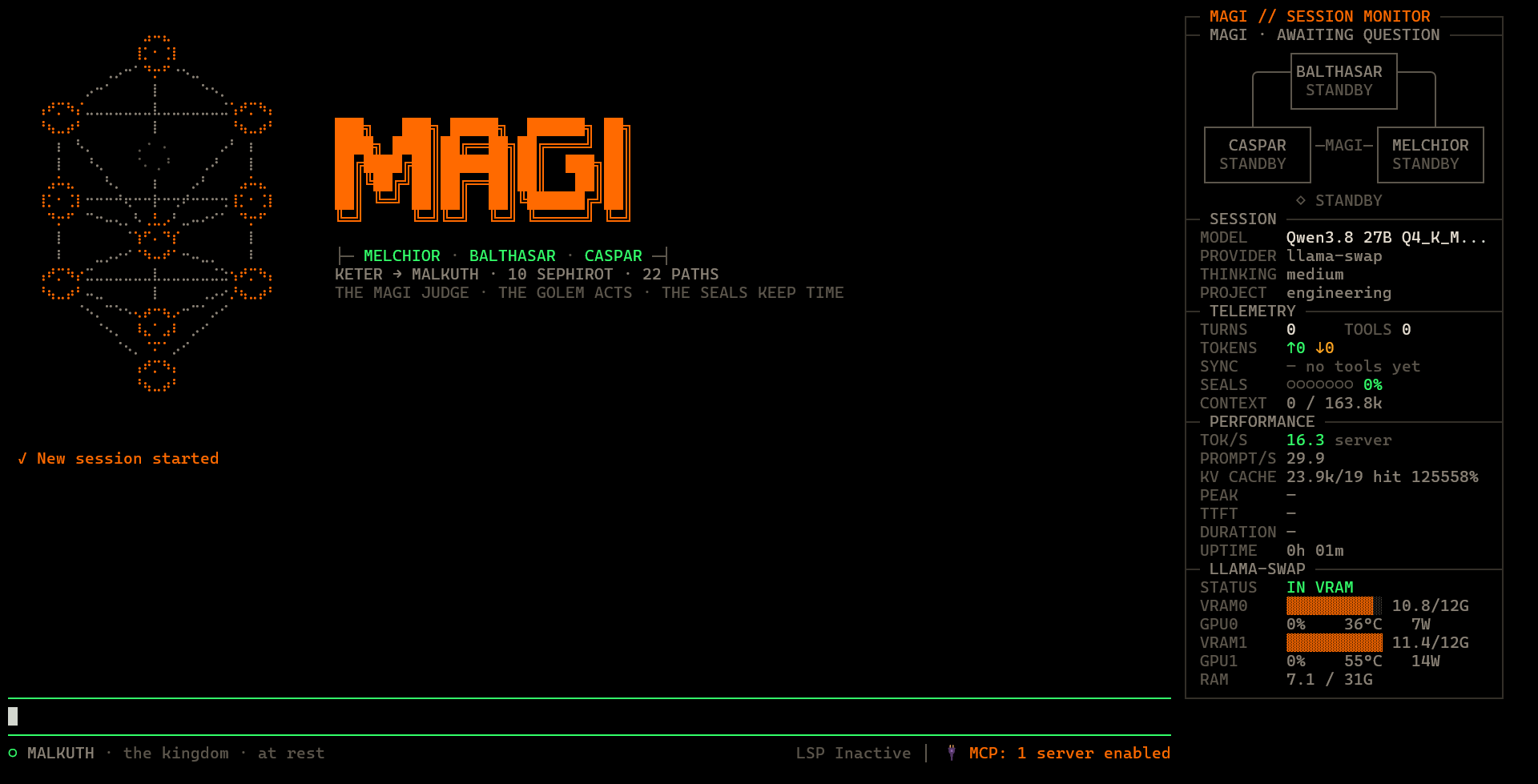
What's new in 0.3.3
- NInfer models in MECHA SELECT. ninfer-serve models are MECHA units too, shown in VRAM while their server answers
/health; a ninfer session also opens the picker and/magi mecha.
What's new in 0.3.2
- NInfer support. List your
ninfer-serveservers inmagi.json("ninfer": { "urls": [...] }) and their models appear in pi asninfer/<id>, with nomodels.jsonentry: context window, thinking levels and image input come from what the server publishes. See NInfer. - NINFER panel section. With a
ninfermodel the side panel shows GPU, VRAM, RAM, energy, cost and the last request's speed and cache hits, read from the server's/metrics, and whether the server is up from/health. - Thinking budget on NInfer. The learned budget (
/magi budget) is sent asthinking_budget_tokens, which NInfer honours like llama-server. - Requires a ninfer-serve with capabilities and
/metrics(b-iurea/ninfer-v100, branchv3-artifact-support); an older one still works, with text input and the Qwen low/medium/xhigh levels assumed, and no panel stats.
Install
pi install npm:pi-magi-themeThen in ~/.pi/agent/settings.json:
"theme": "magi",
"tuiMode": "fullscreen"
tuiMode: fullscreen keeps the side panel fixed while the chat scrolls.
From source
Clone the repo and point pi at it instead (edits in the repo are live on the next pi start):
"extensions": ["/path/to/pi-magi-theme/extensions/magi"],
"themes": ["/path/to/pi-magi-theme/themes"]
Commands
| Command | What it does |
|---|---|
/magi council <question> |
the council answers a question (recent conversation as context) |
/magi council review [focus] |
the council reviews your pending changes (git diff HEAD plus untracked file names) before you commit |
/magi config |
pick a model for each MAGI |
/magi mecha |
MECHA SELECT: pick the llama-swap or NInfer model to activate, each shown as a mecha head lit by its real state |
/magi compact |
toggle the compact side panel (basic info and animations only); remembered across sessions |
/magi status |
llama-swap report from its last 100 requests: speed, tokens, cache hits, MTP draft acceptance, durations, errors per model |
/magi cost |
set the electricity price per kWh and the currency (EUR or USD) for the COST row |
/magi panel · on · off |
hide/show the side panel, enable/disable the whole chrome |
/magi hygiene · on · off · step <tokens> · <turns> <results> |
show how much context the hygiene pruned; enable/disable it; how many prunable tokens make a pruning step (e.g. step 40k, default 15k); how many recent turns keep their thinking and how many tool results stay whole (e.g. 3 5) |
/magi budget · auto · off · reset · message · <planning> <acting> |
show the thinking budget of the current model; learn it per model (default); leave it to llama-server; forget what was learned for this model; turn the closing message off/on; or fix it (e.g. 16k 4k) |
Everything lives under /magi: type /magi (with the space) to see every option with a short description; keep typing to narrow it down, Tab or Enter to pick one. Anything that is not an option is a question for the council.
Lore ↔ function
Every symbol stands for something real the agent is doing.
| Symbol | Meaning | Function | Where |
|---|---|---|---|
| Tree of Life, upper triad (Keter, Chokmah, Binah) | will, wisdom, understanding | the model is thinking | footer |
| light descending Tiferet → Malkuth | manifestation | the model is streaming the answer (with live tok/s) | footer |
| light ascending Malkuth → Keter | ascent | the model is being loaded into VRAM | footer |
| Malkuth at rest | the kingdom | idle, with the last run duration | footer |
| MELCHIOR · BALTHASAR · CASPAR flickering | the three Magi at work | what the agent is doing (thinking, responding, compacting); below them, the last real /magi verdict |
panel |
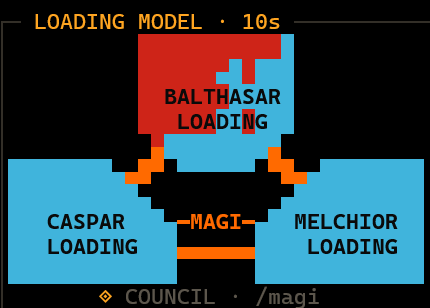
| red spreading through BALTHASAR, MELCHIOR, CASPAR | an angel hacking the MAGI | the model is being loaded into VRAM, at the pace of its last load; CASPAR's last corner blinks once everything else has fallen | panel |
| blue taking the MAGI back from that corner | the attack repelled | the model is loaded | panel |
| MECHA-I · II · III · LEGION | units waiting for a pilot | the llama-swap and NInfer models: dormant, waking while loading, eyes lit in VRAM (a running ninfer-serve is always in VRAM) | MECHA SELECT |
| the session's unit, in sync | the unit acts under its pilot | a tool is running, with the file or command it works on | panel + footer |
| the unit going berserk | the leash breaks: red eyes, jaw wide open | a tool failed | panel + footer |
| SYNC | the unit's sync ratio | tool success rate | panel + footer |
| CHESED ✓ / GEBURAH ✗ | mercy / severity | successful / failed tools | panel + footer |
| the seven seals | the end of an age | context window usage, one seal per seventh | panel |
| the sixth seal blinking | the last warning | context close to compaction: compact now instead of mid-task | panel + footer |
| breaking the seals → seventh seal opened | apocalypse and renewal | context compaction running → done | panel + footer |
| Malkuth asleep | the kingdom sleeps | llama-swap unloaded the model; typing wakes it | panel + footer |
The window title is π - Magi - <working directory>. After a run longer than 30 seconds it becomes ✓ π - Magi - … until you touch the keyboard, so you notice from another window that the agent finished.
In fullscreen mode the side panel always reaches the bottom of the terminal.
In a terminal too narrow for it, the footer scrolls as one line instead of being cut off.
The seventh seal: smart compaction
The theme does not compact anything itself: it shows who does. For better compaction install pi-smart-compact:
pi install npm:pi-smart-compactIt extracts files, errors, decisions and open loops locally (no LLM calls), then synthesizes and verifies the summary. Point its summaryModel at a local model to keep compaction free. When it is installed, the sixth seal suggests /smart-compact, the seals name it while they break (✶ BREAKING THE SEALS · smart-compact · 4s) and the seventh seal reports who actually produced the summary: smart-compact, or pi native if it fell back to pi's own compactor.
Local models: context hygiene, thinking budget, loop guard, MAGI.md
Local models run out of context on long tasks well before they run out of work. They also tend to think for minutes between two tool calls and to repeat the same command when stuck. MAGI works on all three, automatically (the thinking budget for llama-swap models, the rest for any model):
- Context hygiene: the model's memory stays lean. Problem: every file the agent reads and every long reasoning stays in the conversation, until the model's context is full and the task falls apart. What MAGI does: before each request it replaces old reasoning, old tool outputs and old file writes with a one-line note (
<<pruned by MAGI…>>). Only what the model sees is trimmed: your saved session stays complete. The latest 3 turns keep their reasoning and the latest 5 tool outputs stay whole. On two real sessions it brought 104k and 119k tokens down to ~64k and ~47k. - Thinking budget: no more ten-minute thinks. Problem: a local model can reason for thousands of tokens before a simple step, and at 10 tokens/s that is minutes of waiting. What MAGI does: it gives the model a maximum length of thinking on every request: larger right after you write (planning), smaller between tool calls (acting). When the limit is reached the model is stopped mid-thought, says "Time is up. I will take the smallest safe next step…" and acts. The limit adapts to each model on its own. The side panel counts these cuts (
HYGIENE -18.2k ✂2). - Loop guard: no endless retries. Problem: a stuck model runs the same command again and again. What MAGI does: the third identical tool call in a row is blocked, with a message asking the model to try something else.
- MAGI.md: house rules for the model. Problem: local models repeat the same mistakes: reading whole files, inventing paths, claiming success without checking. What MAGI does: it creates
MAGI.mdin your project on the first start (never overwritten) and adds it to the model's instructions on every run: short rules against these mistakes, plus the habit of keeping the task plan inPLAN.mdand findings inNOTES.md, so nothing important is lost when old context is trimmed. Edit it per project; delete it to get the defaults back.
Nothing needs setting up in llama-swap. The defaults suit most tasks; two adjustments are worth knowing:
- Long tasks:
/magi hygiene step 40k. Each time the hygiene trims, the server has to re-read part of the conversation, and on some models (see Hybrid models below) almost all of it, which can take a few minutes. A step of 40k trims less often: on a real session it cut the re-reading from ~6 minutes to ~1. - A model that really needs to think longer:
/magi budget <planning> <acting>, e.g./magi budget 16k 8k. Frequent ✂ cuts in the side panel are the sign.
How it works
For the curious, and for tuning.
Hygiene. Trimming happens in steps, not on every request: the conversation up to a mark is trimmed, and the mark only moves forward once ~15k more tokens (the step) could be trimmed. Between steps the conversation only grows at the end, so llama.cpp reuses what it already processed (its KV cache) and only reads the new messages. Each step changes the conversation from the first newly trimmed message on, and the server re-reads from there: that is why steps are large and rare. Old tool outputs are replaced, not summarized: simple observation masking matches LLM summarization at half the cost.
Hybrid models. Some models (e.g. Qwen3.8 Flash Next; dense or MoE does not matter) mix a few classic attention layers with recurrent ones, which squeeze the whole conversation into a fixed-size state instead of keeping each token. The server cannot rewind that state to an arbitrary point: it can only restore a saved copy (a checkpoint) and re-read from there, and the only copy before the trimmed part is usually the end of the system prompt. So on these models each step re-reads almost the whole prompt. With 10k-token thoughts and 4k-token file reads, a 15k step is crossed every 2–3 turns: on a real 70k-token session that was 3 re-reads in 6 requests (~6 min at 185 tokens/s); with a 40k step, 1 re-read (~1 min) for a prompt at most 6k larger. A model is hybrid if its llama-server log shows restored context checkpoint lines.
Thinking budget. MAGI sends the limit with every request (thinking_budget_tokens), and llama.cpp applies it. It learns per model and per phase: 1.5 × the 95th percentile of the model's last 30 thinking lengths, rounded up to 1k. A cut is recorded as 1/1.5 of the limit it hit, so cuts never raise the limit: a model that often runs away is held, not chased. Replies that end close under the limit raise it; a model that thinks little lowers it. Limits: planning 4k–32k, acting 2k–4k (past ~4k between two tool calls it is overthinking). Until a model has 10 replies in a phase it uses 16k / 4k.
When the limit is reached llama.cpp does not abort the reply: it inserts the closing sentence and the end-of-thinking tag, and the model goes on to act. MAGI sends that sentence with every request too (reasoning_budget_message; /magi budget message turns it off and on). MAGI.md tells the model what to do after a cut (one small verifiable step, the open plan into PLAN.md), and the next turn gets a fresh budget.
llama-server versions. The per-request limit works whenever llama-server was started without --reasoning-budget, which is the default. If it was started with one, the server's limit wins: MAGI notices the model thinking well past its own limit and /magi budget says so. A llama-server too old for the closing sentence ends the thinking silently, and MAGI detects the cut by its length.
Loop guard details. A tool call counts as identical when both the tool and its arguments match. A file write or edit that copies a <<pruned by MAGI…>> note into a file is blocked too.
The council
/magi council <question> asks three models in parallel, each with its own nature, then shows the votes and a majority verdict:
| Unit | Nature | Looks at |
|---|---|---|
| MELCHIOR | PRAGMATIST | what solves the problem, the simplest path, effort vs value, what already exists (in software: reuse, YAGNI, shipping) |
| BALTHASAR | GUARDIAN | what can go wrong and for whom, reversibility, hidden costs (in software: failure modes, security, operability) |
| CASPAR | VISIONARY | whether the question is framed right, alternatives, people's experience, long-term direction (in software: design, DX, evolution) |
Each nature is a lens, not a specialty, so the council answers any question, not only software ones. Every MAGI first answers the question, then judges it through its lens, naming concrete tools, numbers and scenarios from your question instead of generic advice. Votes: APPROVE = go ahead or clear recommendation; CONDITIONAL = only if the named conditions hold, or when information is missing (it says what it needs); REJECT = a concrete problem, with what to do instead. A MAGI never rejects because a topic is outside its nature. Answers come back in the language of your question.
/magi council <question> gives the MAGI the recent conversation as context; /magi council review gives them the pending diff (truncated at 24k characters). Full opinions are added to the chat (not sent to the agent), and the last verdict stays under the MAGI in the side panel.
Configuration
~/.pi/agent/magi.json (written by /magi config, /magi compact and /magi cost, editable by hand):
{
  "MELCHIOR": { "model": "llama-swap/Qwen3.8 27B Q4_K_M - Thinking", "thinking": "low" },
  "ui": { "compact": false, "kwhPrice": 0.30, "currency": "EUR" },
  "loads": { "qwen3.8-27b": 41200 },
  "totalWh": 1843.2,
  "hygiene": { "enabled": true, "keepThinkingTurns": 3, "keepToolResults": 5, "stepTokens": 15000, "minPruneChars": 600 },
  "thinkingBudget": { "mode": "auto", "planning": 16384, "acting": 4096, "message": true, "learned": { "qwen3.8-27b": { "acting": [812, 430, 2211] } } }
}- per MAGI:
model(unset = current session model) and optionalthinkinglevel; ui.compact: start with the compact side panel;ui.kwhPriceandui.currency(EURorUSD): the COST row multiplies the GPU energy by this price, showing the running total of every session with the current one in brackets;totalWh: written by the theme, GPU energy summed over every session (delete the key to reset the COST total);hygieneandthinkingBudgetare set with/magi hygieneand/magi budget(hygiene.minPruneCharsby hand only);thinkingBudget.messagesends the closing message with every request (defaulttrue);thinkingBudget.learnedis written by the theme (recent thinking lengths per model and phase);loads: written by the theme, how long each llama-swap model took to load last time (paces the angel attack; 60s when unknown);ninfer:{ "urls": ["http://host:8080"], "apiKey": "…" }, see NInfer.
Release
.github/workflows/publish.yml publishes to npm when a v* tag is pushed, and refuses if the tag does not match package.json:
npm version patch && git push --follow-tagsNo token: npmjs is configured to trust this repository's publish.yml (npm trusted publishing, OIDC), which also signs the provenance.
NInfer
NInfer ninfer-serve loads one model per process. List the servers in magi.json (apiKey only if they run with --api-key):
"ninfer": { "urls": ["http://192.168.2.220:8080"] }At startup MAGI reads each server's /v1/models and registers its model under the ninfer provider (/model ninfer/<id>): the context window from max_model_len, the thinking levels from meta.ninfer.reasoning.levels (sent as reasoning_effort, off sends none) and image input from architecture.input_modalities (on when the server runs with --vision). A server that is down or still loading is skipped until the next pi start. Add ninfer/* to enabledModels if you use that filter.
With a ninfer session model the side panel shows a NINFER section like the llama-swap one: GPU, VRAM, RAM, energy and cost from /metrics, the last request's speed and cache hits, ready or offline from /health. The thinking budget is sent as thinking_budget_tokens. NInfer models are MECHA units too: MECHA SELECT shows them in VRAM while their server answers /health. /magi status, the prefix prewarm and the live seals need llama-swap.
llama-swap
Thinking levels. pi-llama-swap registers every model with reasoning off, so /thinking only offers off. At session start MAGI reads the reasoning levels llama-swap publishes in /v1/models (meta.llamaswap.reasoning.levels) and re-registers those models with thinking on: /thinking then offers exactly those levels, sent as chat_template_kwargs (enable_thinking, reasoning_effort). Aliases (e.g. the Instruct twin of a Thinking model) stay off, and image input follows architecture.input_modalities. A new or renamed model works without a modelOverrides entry in models.json; entries you keep there still apply on top (e.g. samplingParams). The starting level is pi's usual one for a model switch: the level saved for that model (Ctrl+S in /thinking), else defaultThinkingLevel.
When the session model uses the llama-swap provider, the side panel:
- loads nothing at startup: a new session opens MECHA SELECT, a resumed one shows whether its model is already in VRAM;
- loads the model into VRAM when you pick it, change it with
/modelor type (GET /upstream/<model>/health), with the angel attack animation; - prewarms a new session: pi's real system prompt and tools are processed as soon as the model is ready, so the first answer doesn't wait for them;
- follows the context live in the seven seals while the model works (
/upstream/<model>/slots); - notices when llama-swap unloads the model (
/running), shows it asleep and reloads it as soon as you type; - shows VRAM, GPU load/temperature/power, RAM and the GPU energy used in the session from
/metrics(every 3s while working, every 30s when idle); - shows server-measured tok/s, prompt tok/s and KV cache hits of the last request (
/api/metrics/activity?limit=1).