pi-material-black-simple
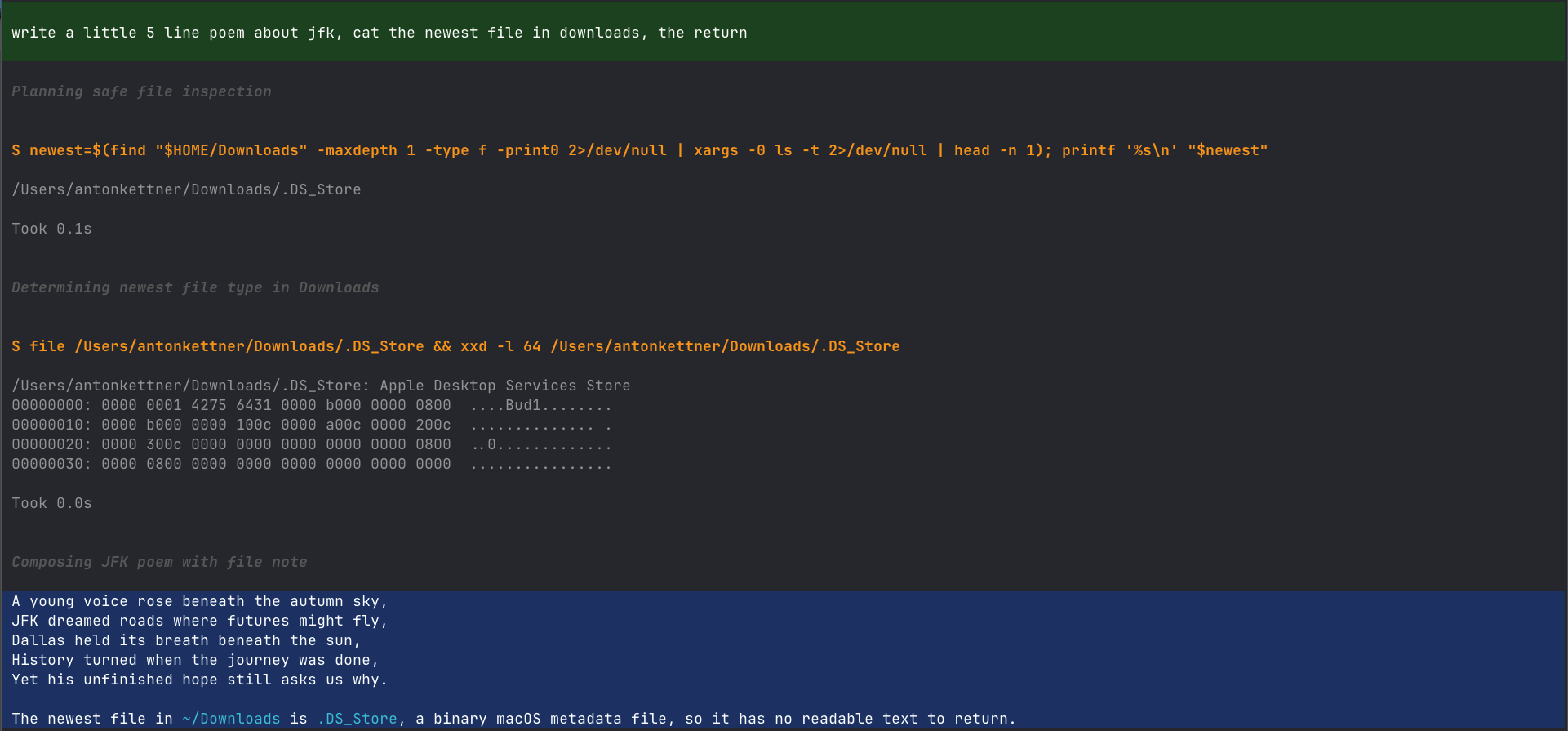
Material black theme for the pi coding agent - near-black UI, green user messages, and a highlighted final answer so you can see where a run ended at a glance.
Package details
Install pi-material-black-simple from npm and Pi will load the resources declared by the package manifest.
$ pi install npm:pi-material-black-simple- Package
pi-material-black-simple- Version
0.1.0- Published
- Jul 29, 2026
- Downloads
- 137/mo · 137/wk
- Author
- akettner
- License
- MIT
- Types
- extension, theme
- Size
- 34.5 KB
- Dependencies
- 0 dependencies · 0 peers
Pi manifest JSON
{
  "extensions": [
    "extensions/material-black-simple/index.ts"
  ],
  "themes": [
    "themes/material_black_simple.json"
  ],
  "image": "https://raw.githubusercontent.com/AntonKettner/pi-material-black-simple/main/assets/material-black-simple.png"
}
Security note
Pi packages can execute code and influence agent behavior. Review the source before installing third-party packages.
README
material_black_simple
A dark theme for the pi coding agent, built around one idea: you should be able to see, at a glance, where a run ended.
| Element | Style |
|---|---|
| User messages | green background, white text |
| Tool calls | orange heading, no background |
| Assistant intermediate text | grey |
| Assistant final answer | white on blue background |
| Run recap / summary | blue text, no background |

Install
pi package add npm:pi-material-black-simple
Then pick the theme with /theme, and restart pi once so the patch below takes effect.
Plays well with
Developed and daily-driven in Ghostty, alongside:
- pi-sticky-usermessage - keeps the current user message pinned while the run scrolls
- pi-rewind - jump back to an earlier point in the session
The patch
pi's theme schema has no key for an assistant-message background, and no way to
distinguish intermediate from final assistant text. Both are rendered by
assistant-message.js with the same markdown theme.
This package patches that one file so that:
- assistant text in a message that contains a tool call (intermediate) renders in
muted - assistant text in a message that does not (the final answer) renders in
textonselectedBg
The patch is applied automatically on startup, is idempotent, and keeps a
.orig backup next to every file it touches. If an upstream release changes the
code it anchors to, it refuses and reports rather than half-applying.
Note: this modifies a file inside your pi installation. That is unavoidable for a background on final answers. If you would rather not have that, the theme still works standalone - just don't run the extension, or run
/material-black-simple revert.
Commands
/material-black-simple restart            re-apply the patch now
/material-black-simple status             show which installs are patched
/material-black-simple revert             restore from .orig backups
/material-black-simple bg-opacity         show current background opacity
/material-black-simple bg-opacity 55      re-blend both backgrounds at 55%
/material-black-simple overlay activate   apply the highlighting to every theme
/material-black-simple <colour> <hex>     override one message colour
/material-black-simple <colour> reset     fall back to the theme value
Message colours
The six colours the patch controls can be changed live, without editing the theme file:
input-bg                 input-font-color
final-output-bg          final-font-color
intermediate-bg          intermediate-font-color
Example: /material-black-simple final-output-bg #1565c0. Values are stored in
~/.pi/material-black-simple.json (or the equivalent config dir of a rebranded
pi build); status lists the current ones.
Everything else - tool titles and output, diffs, syntax highlighting, borders,
markdown - is plain pi theme configuration and lives in
themes/material_black_simple.json.
bg-opacity
Terminal ANSI colours have no alpha channel, so true transparency is impossible.
bg-opacity instead pre-blends the two background colours against the
theme's page background and writes plain hex - visually identical to opacity on
an opaque terminal background.
Blends are always computed from full-strength source colours, never from the
current (already blended) values, so repeated changes don't compound. 0
collapses to the page background; 100 gives full-strength Material colours.
The command reports resulting contrast ratios and warns when the backgrounds
become effectively invisible.
Re-select the theme via /theme after changing it.
Upgrades
A brew upgrade (or npm update) of pi-coding-agent installs to a fresh
directory, which arrives unpatched. pi has no install hook, so the extension
re-checks on each cold start and repairs it, then asks you to restart. This means
the first session after an upgrade renders unpatched - the module is already
loaded by the time the check runs.
Development
npm install
npm run check      # tsc --noEmit
The package ships TypeScript sources directly - pi loads extensions through
jiti, so there is no build step. @earendil-works/pi-coding-agent is a
dev-only dependency: the extension imports CONFIG_DIR_NAME and the
ExtensionAPI type from it, both of which resolve against the host pi install
at runtime.
Layout:
extensions/material-black-simple/
  index.ts     # default export: registers session_start hook + /material-black-simple
  config.ts    # ~/.pi/material-black-simple.json read/write, colour keys
  patch.ts     # locate pi installs, apply/revert the renderer patch
  opacity.ts   # pre-blend theme backgrounds against the page background
themes/
  material_black_simple.json
License
MIT