pi-material-black-simple
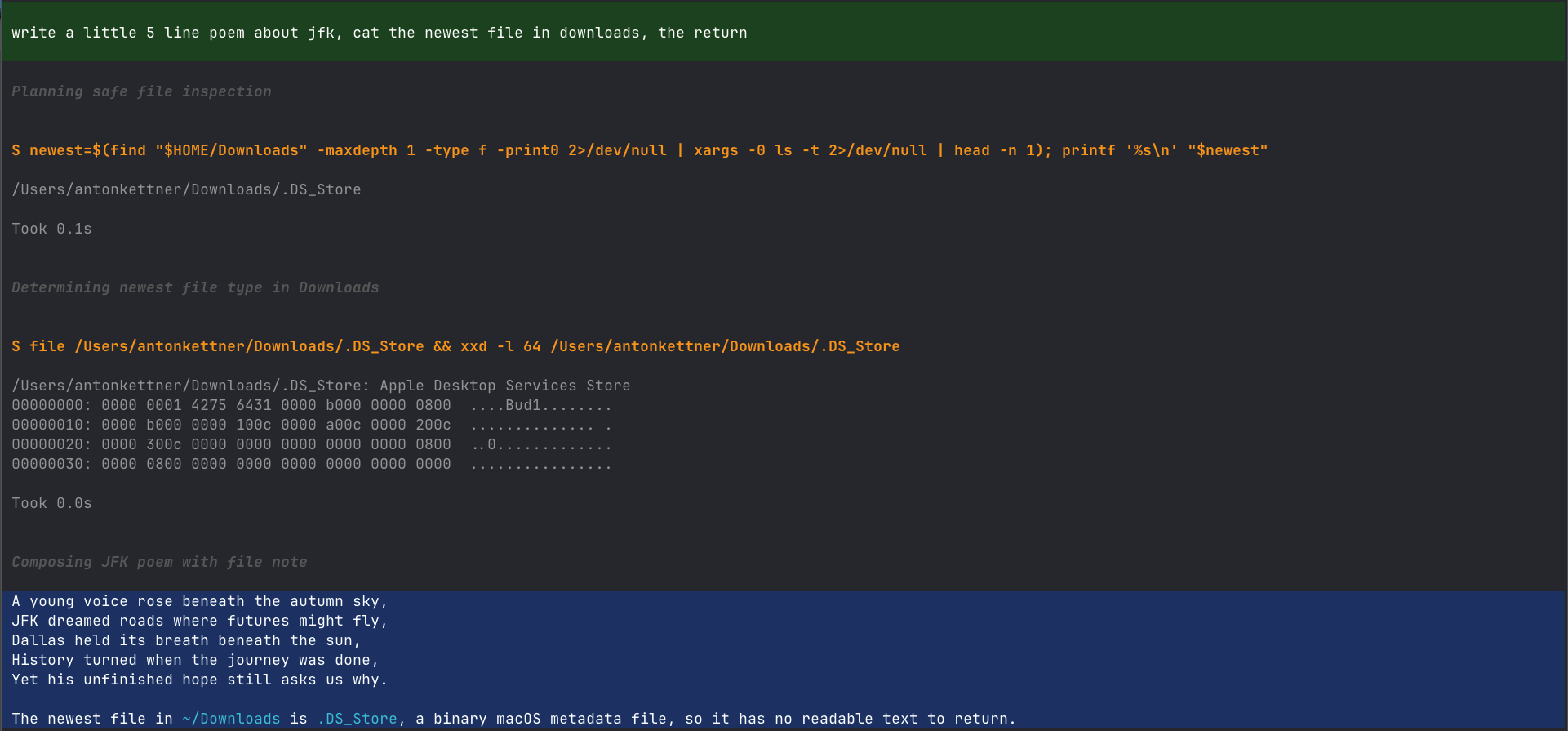
Material black theme for the pi coding agent - near-black UI, green user messages, and a highlighted final answer so you can see where a run ended at a glance.
Package details
Install pi-material-black-simple from npm and Pi will load the resources declared by the package manifest.
$ pi install npm:pi-material-black-simple- Package
pi-material-black-simple- Version
0.2.2- Published
- Sep 16, 2026
- Downloads
- 299/mo · 195/wk
- Author
- akettner
- License
- MIT
- Types
- extension, theme
- Size
- 36.2 KB
- Dependencies
- 0 dependencies · 0 peers
Pi manifest JSON
{
  "image": "https://raw.githubusercontent.com/AntonKettner/pi-material-black-simple/main/assets/material-black-simple.png",
  "themes": [
    "themes/material_black_simple.json"
  ],
  "extensions": [
    "extensions/material-black-simple/index.ts"
  ]
}
Security note
Pi packages can execute code and influence agent behavior. Review the source before installing third-party packages.
README
material_black_simple
A dark theme for the pi coding agent, built around one idea: you should be able to see, at a glance, where a run ended.
| Element | Style |
|---|---|
| User messages | green background, white text |
| Tool calls | orange heading, no background |
| Assistant intermediate text | grey |
| Assistant final answer | white on blue background |
| Run recap / summary | blue text, no background |

Install
pi install npm:pi-material-black-simple
Then pick the theme in /settings, and restart pi once so the patch below takes effect.
A full restart is required. /reload cannot replace a renderer already loaded by the process.
Plays well with
Developed and daily-driven in Ghostty, alongside:
- pi-sticky-usermessage - keeps the current user message pinned while the run scrolls
- pi-rewind - jump back to an earlier point in the session
The patch
pi's theme schema has no key for an assistant-message background, and no way to
distinguish intermediate from final assistant text. Both are rendered by
assistant-message.js with the same markdown theme.
This package patches that file and user-message.js for input colours. On pi
0.85 bundled installs, it also patches the runtime chunk used by the CLI. The
standalone modules alone no longer control the terminal display.
The patch ensures that:
- assistant text that is still streaming or in a message that contains a tool call (intermediate) renders in
muted - assistant text in a finished message without a tool call (the final answer) renders in
textonselectedBg
The anchors support the pi 0.84 standalone layout and the pi 0.85 runtime bundle.
The patch is applied automatically on startup, is idempotent, and keeps a
.orig backup next to every file it touches. If an upstream release changes the
code it anchors to, it refuses and reports rather than half-applying.
Note: this modifies a file inside your pi installation. That is unavoidable for a background on final answers. If you would rather not have that, the theme still works standalone - just don't run the extension, or run
/material-black-simple revert.
Commands
/material-black-simple restart            re-apply the patch now
/material-black-simple status             show which installs are patched
/material-black-simple revert             restore from .orig backups
/material-black-simple bg-opacity         show current background opacity
/material-black-simple bg-opacity 55      re-blend both backgrounds at 55%
/material-black-simple overlay activate   apply the highlighting to every theme
/material-black-simple <colour> <hex>     override one message colour
/material-black-simple <colour> reset     fall back to the theme value
Message colours
The six colours the patch controls can be changed live, without editing the theme file:
input-bg                 input-font-color
final-output-bg          final-font-color
intermediate-bg          intermediate-font-color
Example: /material-black-simple final-output-bg #1565c0. Values are stored in
~/.pi/material-black-simple.json (or the equivalent config dir of a rebranded
pi build); status lists the current ones.
Everything else - tool titles and output, diffs, syntax highlighting, borders,
markdown - is plain pi theme configuration and lives in
themes/material_black_simple.json.
bg-opacity
Terminal ANSI colours have no alpha channel, so true transparency is impossible.
bg-opacity instead pre-blends the two background colours against the
theme's page background and writes plain hex - visually identical to opacity on
an opaque terminal background.
Blends are always computed from full-strength source colours, never from the
current (already blended) values, so repeated changes don't compound. 0
collapses to the page background; 100 gives full-strength Material colours.
The command reports resulting contrast ratios and warns when the backgrounds
become effectively invisible.
Re-select the theme via /theme after changing it.
Upgrades
A brew upgrade (or npm update) of pi-coding-agent installs to a fresh
directory, which arrives unpatched. pi has no install hook, so the extension
re-checks on each cold start and repairs it, then asks you to restart. This means
the first session after an upgrade renders unpatched - the module is already
loaded by the time the check runs.
Development
bun install
bun run check      # tsc --noEmit
Check the installed CLI renderer, including final backgrounds and theme isolation:
node tests/runtime-rendering.mjs /path/to/node_modules/@earendil-works/pi-coding-agent
This check resolves the renderer from the CLI entry point and uses a temporary home directory so personal color overrides do not affect the result. Importing the standalone renderer can pass even when the running CLI remains unpatched.
The package ships TypeScript sources directly - pi loads extensions through
jiti, so there is no build step. @earendil-works/pi-coding-agent is a
dev-only dependency: the extension imports CONFIG_DIR_NAME and the
ExtensionAPI type from it, both of which resolve against the host pi install
at runtime.
Layout:
extensions/material-black-simple/
  index.ts     # default export: registers session_start hook + /material-black-simple
  config.ts    # ~/.pi/material-black-simple.json read/write, colour keys
  patch.ts     # locate pi installs, apply/revert the renderer patch
  opacity.ts   # pre-blend theme backgrounds against the page background
themes/
  material_black_simple.json
License
MIT