pi-minimal-footer
An opinionated minimal Pi footer - one-line status bar showing subscription usage, path, status, model and context.
Package details
Install pi-minimal-footer from npm and Pi will load the resources declared by the package manifest.
$ pi install npm:pi-minimal-footer- Package
pi-minimal-footer- Version
0.13.0- Published
- Nov 4, 2026
- Downloads
- 3,369/mo · 1,094/wk
- Author
- ryu-cz
- License
- MIT
- Types
- extension
- Size
- 87.7 KB
- Dependencies
- 0 dependencies · 2 peers
Pi manifest JSON
{
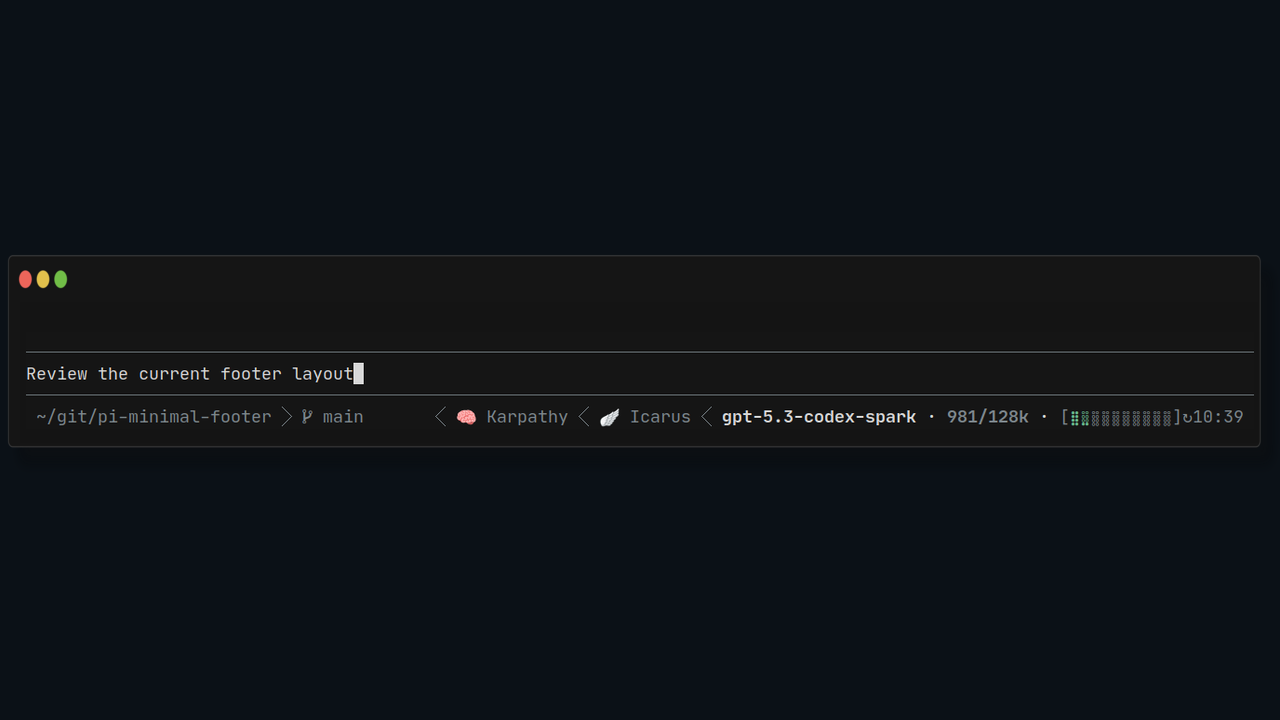
  "image": "https://raw.githubusercontent.com/Ryu-CZ/pi-minimal-footer/main/media/pi-preview.png",
  "extensions": [
    "./extensions"
  ]
}
Security note
Pi packages can execute code and influence agent behavior. Review the source before installing third-party packages.
README
pi-minimal-footer
An opinionated, compact, one-line status bar for Pi.
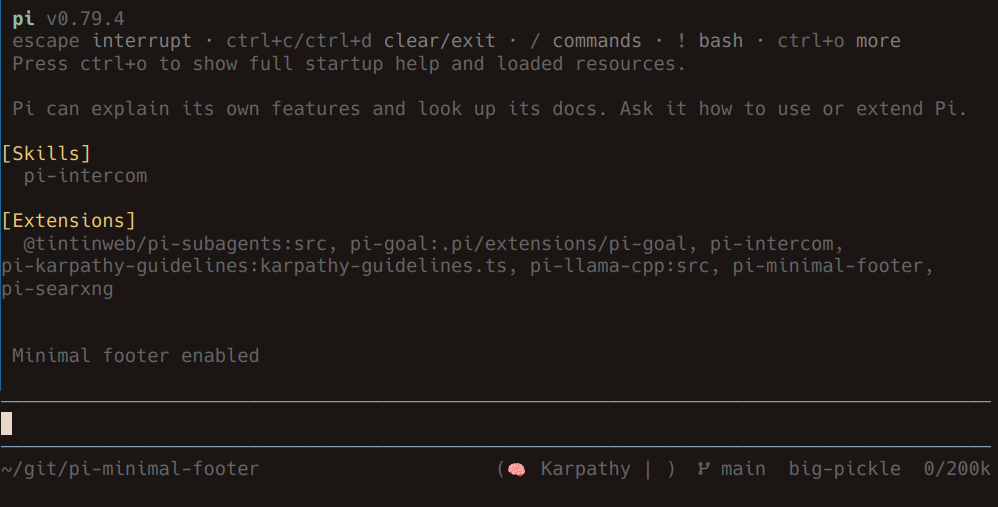
Left
- Working directory:
~/git/project - Git branch:
main ↑2 ↓1(↑to push,↓to pull)
Right
- Extension statuses:
🧠 Karpathy 🪽 Icarus - Model:
model - Context usage:
12k/256k(default), or4.7%/256kwithcontextAsPercentage: true - Subscription usage:
[⣿⣿⣿⣿⣄⠀⠀⠀⠀⠀]↻1d8h, or estimated session cost:~$0.123
Install
Requires Node.js >=22.19.0. Interactive terminal UI only. Tested with Pi 1.4.0 and 1.5.0, including compact-editor mode.
pi install npm:pi-minimal-footerCommands
| Command | Action |
|---|---|
/minfooter |
Toggle footer |
/minfooter on |
Enable |
/minfooter off |
Disable |
Settings
Edit minFooter in Pi's agent settings.json (normally ~/.pi/agent/settings.json). All defaults are shown below. Apply edits with /reload or /minfooter on.
{
  "minFooter": {
    "enabled": true,
    "compactEditor": false,
    "showGitBranch": true,
    "showSkills": true,
    "showPath": true,
    "showModel": true,
    "showContext": true,
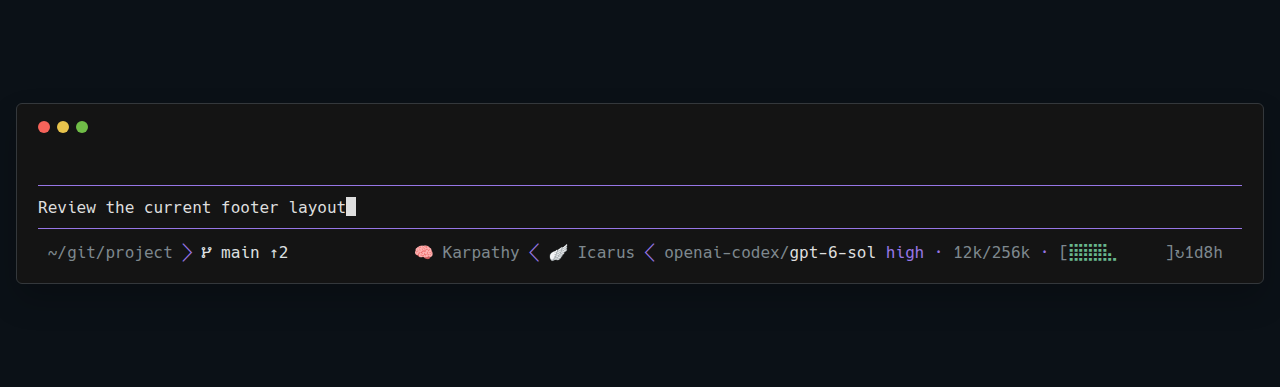
    "showProvider": false,
    "showThinking": false,
    "showUsage": true,
    "showCost": true,
    "contextAsPercentage": false,
    "powerlineSeparator": true,
    "gitRefreshSeconds": 91,
    "gitFetch": false,
    "gitFetchTimeoutSeconds": 17,
    "maxUsageBarCells": 10
  }
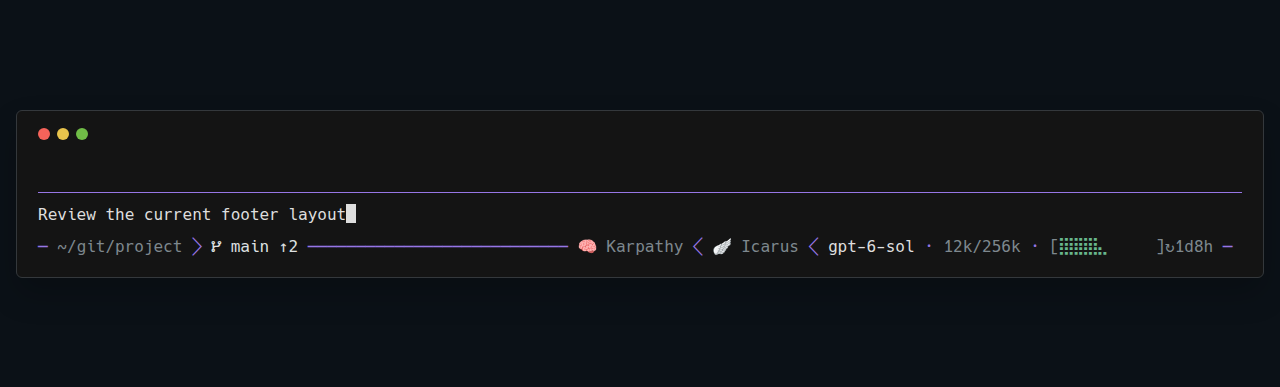
}compactEditorembeds the footer in the editor's bottom separator, saving one row; experimental, defaultfalse. See compact editor for limitations.showProviderprefixes the model with its provider id, e.g.opencode-go/deepseek-v4.1-flash; defaultfalse.showThinkingappends the thinking level for reasoning models, e.g.deepseek-v4.1-flash highorthinking off, in the theme's thinking-level color; defaultfalse.showSkillsshows extension status text, not installed skills. The footer does not add the example statuses itself.showUsageshows subscription usage; set it tofalseto hide the bar and stop quota queries. Defaulttrue.showCostshows estimated session cost when no subscription bar is shown. Set it tofalseto hide cost. Defaulttrue.- Set
powerlineSeparatortofalsefor plain spaces instead of/if your font lacks those glyphs. The git iconand sync arrows also need compatible glyphs; hide Git data withshowGitBranch: falseif needed. gitRefreshSeconds: local refresh interval;1–2147483seconds; default91.gitFetch: background fetch on startup, then roughly 5 minutes after each attempt completes; failures are silent; defaultfalse.gitFetchTimeoutSeconds: fetch timeout;1–2147483seconds; default17. Invalid timer settings use their defaults.maxUsageBarCellscaps the Braille bar length (excluding brackets and reset time). Use a positive integer, e.g.4for a compact bar; invalid values fall back to10.
With showProvider and showThinking enabled:
Compact editor
Set "compactEditor": true to replace both the footer and prompt editor, embedding the status line in the prompt's bottom separator to save one row:
See compatibility and layout-switching details.
Reading the footer
Git
Counts require a configured upstream. Unsynced branches use normal text color; synced branches are dim. Count changes pulse the whole Git section bold for one second; further changes restart the pulse.
Context
12k/256k means tokens used / context window. Set "contextAsPercentage": true to show 4.7%/256k instead. Unknown usage shows ?/256k when the window is known, or ? otherwise.
The context label turns yellow at 85% and red at 92% of Pi's configured compaction threshold, in either display mode.
Usage or cost
- Subscription: shows your allowance when available and
showUsageis enabled; this takes priority. - Pay per token: shows estimated session cost when
showCostis enabled, e.g.~$0.123(USD)—not your account balance or final bill. - Neither available: hides the field, as with a local llama.cpp server without pricing.
Subscription usage
[⣿⣿⣿⣿⣄⠀⠀⠀⠀⠀]↻1d8h shows subscription allowance used (44% here), not context usage.
- Bar: expands into spare space, using 2–10 cells by default, capped by
maxUsageBarCells. Smaller caps and very narrow terminals may show fewer cells or only the reset label. - Colors: green below 85%, amber from 85%, red from 92%.
- Cached data: dim after a refresh failure or when its reset time has passed.
- Reset: local
↻HH:mmthrough 24 hours; whole days/hours above 24 hours (↻1d8h); whole days above 10 days (↻12d). Remaining durations round down. No reset reported means bar only. - Shows the shortest available usage window for the selected provider. Missing credentials, unsupported/local models, or absent limits hide the usage bar. Custom proxy endpoints are not polled.
- Virtual/routed models show model and context usage, but no subscription bar.
Supported subscriptions
Uses your existing Pi login; ordinary Claude API keys do not expose subscription usage.
Authenticated endpoints remain unverified live; see verification limits.
Supported services:
- OpenAI Codex
- Claude OAuth
- GitHub Copilot
- Gemini CLI
- MiniMax
- Kimi Coding
- OpenCode Go
Extension statuses
Provided by other extensions; hidden with showSkills: false. Narrow terminals may shorten or omit them.
Only one footer extension can be active. For plugin integration, see VISION.md.
Integrations
Other extensions can control footer visibility, subscription usage, estimated cost, and compact mode for the current session without changing your saved settings. New sessions and /reload restore your preferences.
For extension authors: integration guide.
Development & design
Install from source:
pi install git:github.com/Ryu-CZ/pi-minimal-footerDeveloper guide: VISION.md. Release history: CHANGELOG.md.
Credits
Provider usage-fetching and parsing logic copied and adapted from Can Celik (@ogulcancelik)'s pi-minimal-footer. Upstream MIT attribution is retained in extensions/lib/LICENSE.