pi-minimalist
Compact one-line tool and thinking rows for Pi's interactive transcript
Package details
Install pi-minimalist from npm and Pi will load the resources declared by the package manifest.
$ pi install npm:pi-minimalist- Package
pi-minimalist- Version
0.3.1- Published
- Oct 8, 2026
- Downloads
- 1,318/mo · 84/wk
- Author
- evihex
- License
- MIT
- Types
- extension
- Size
- 136 KB
- Dependencies
- 0 dependencies · 2 peers
Pi manifest JSON
{
  "image": "https://raw.githubusercontent.com/EviHex/pi-minimalist/main/docs/click.png",
  "extensions": [
    "./index.ts"
  ]
}
Security note
Pi packages can execute code and influence agent behavior. Review the source before installing third-party packages.
README
pi-minimalist
Less scrolling. More room for the answer.
A quieter transcript for Pi: turn bulky tool calls into one-line summaries, and open the full output whenever you need it.
See the difference
Before: one tool call takes up most of the screen.
After: the same call, one line.
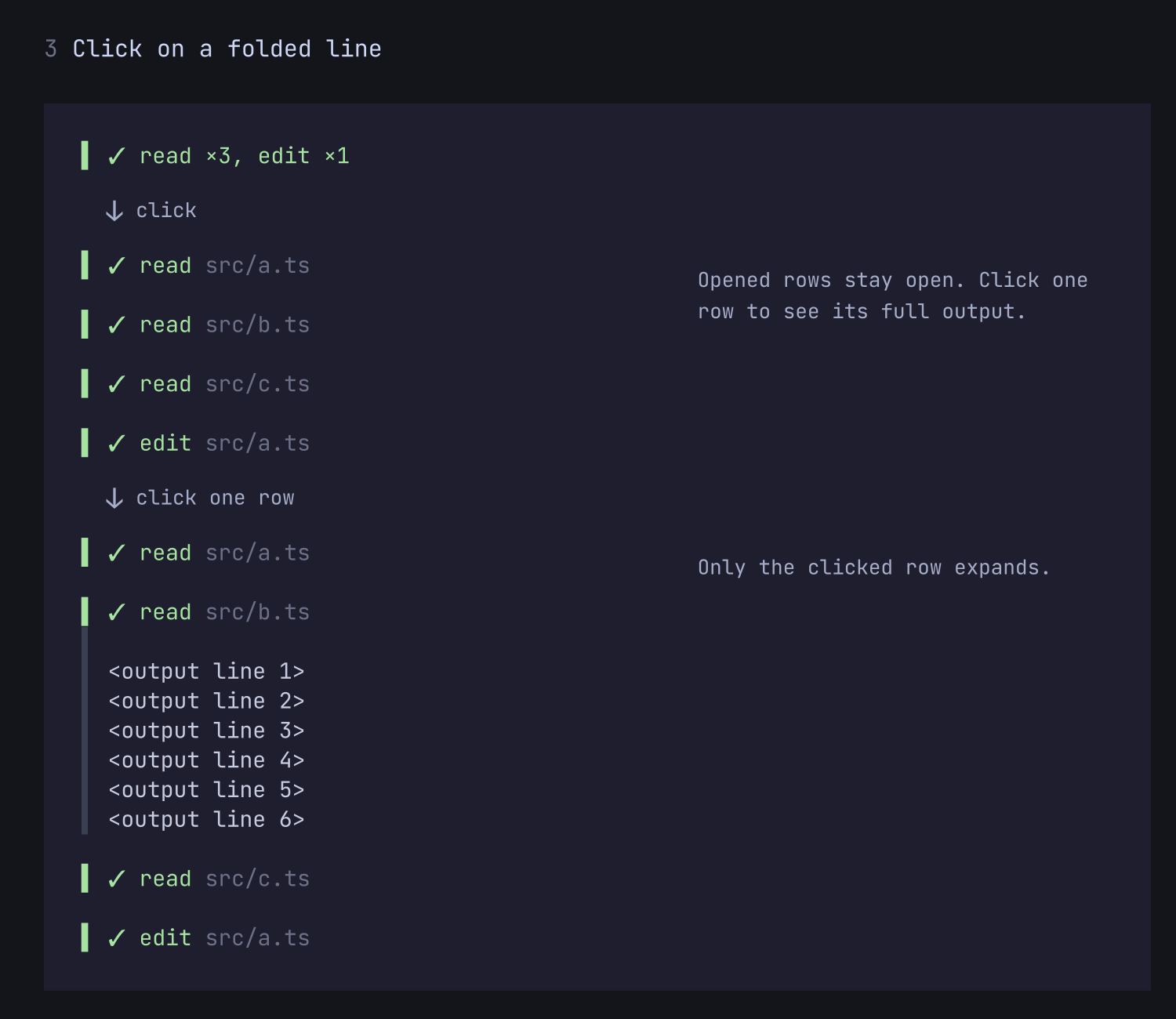
Click a folded line to open it into separate rows. Click one row to see only its output. Click the ▾ Expanded · click to fold line above an opened run to fold it back.
Press Ctrl+O to expand tool output—including diffs and syntax highlighting. Expanded rows also wrap long commands instead of cutting them off. Nothing is removed from the session or hidden from the model; only the display changes.
Install
pi install npm:pi-minimalistRestart Pi, and tool calls appear as compact rows. No configuration needed.
Choose how quiet you want it
Run /minimalist to change settings live. Start with compact tool rows, or go further:
- Combine consecutive tool calls into a single summary, such as
read ×2, edit ×1. - Collapse earlier activity so the latest reply stays in focus. Replace the preceding activity with elapsed work time or tool counts.
- Compact thinking rows, or keep thinking visible as it arrives.
- Keep running tools visible while grouping other calls, with an elapsed timer to show how long they take.
- Excluded tools: let chosen tools (for example
subagent) keep their own card instead of a one-line row. Open the row in/minimalist, type to search, and press Enter on a tool to flip it.
A fresh install starts on the full preset (see below): compact tool rows, grouped calls and compact thinking. Activity folding is opt-in. Choose lite if you prefer to see each call separately.
Presets
The Preset row at the top of /minimalist sets four options at once: Compact tool rows, Combine consecutive tool calls, Collapse earlier activity and Compact thinking rows.
| Preset | What you get |
|---|---|
off |
Pi's native tool cards. |
lite |
One-line tool rows, each call on its own line. |
full |
lite plus combined consecutive calls and compact thinking rows. |
max |
full plus collapsed earlier activity (Worked for …). |
custom |
Your own values for those four options. |
A preset never overwrites your settings. While off, lite, full or max is selected, only those four rows are greyed out and show the preset's values; pressing Enter on one does nothing. Every other option (Left border, Elapsed timer, Symbols and so on) stays yours and stays editable. Your own values are kept and come back when you choose custom. The first time you choose custom, it starts from lite.
Upgrading: if your settings already contain a minimalist block, you stay on custom and nothing changes. Only a user with no minimalist settings at all starts on full, which makes thinking rows compact. To pick another look, change Preset.
Everyday controls
| Control | Action |
|---|---|
/minimalist |
Open settings (/minimalist config also works) |
/minimalist status |
Show current settings |
| Ctrl+O | Expand or collapse tool output |
| Ctrl+T | Expand or collapse thinking |
Settings apply to existing conversation history and are saved globally. If a symbol looks wrong in your terminal, choose Symbols → ASCII. No Nerd Font required.
Go back to Pi's usual view
Turn off Compact tool rows to restore native tool cards. Or choose the off preset.
To disable the extension completely, run pi config, disable pi-minimalist, and restart Pi
Compatibility
Tested with Pi 1.0.0. Pi updates can affect rendering compatibility; report a problem with your Pi version, terminal, and a screenshot.