pi-mission
Mission tracking for pi: capture work the moment it appears (rabbit holes included), track it autonomously, and browse current work, history, and remaining tasks in one dependency-aware, searchable popup.
Package details
Install pi-mission from npm and Pi will load the resources declared by the package manifest.
$ pi install npm:pi-mission- Package
pi-mission- Version
0.2.1- Published
- Oct 28, 2026
- Downloads
- not available
- Author
- donpark
- License
- MIT
- Types
- extension, skill
- Size
- 199.2 KB
- Dependencies
- 0 dependencies · 3 peers
Pi manifest JSON
{
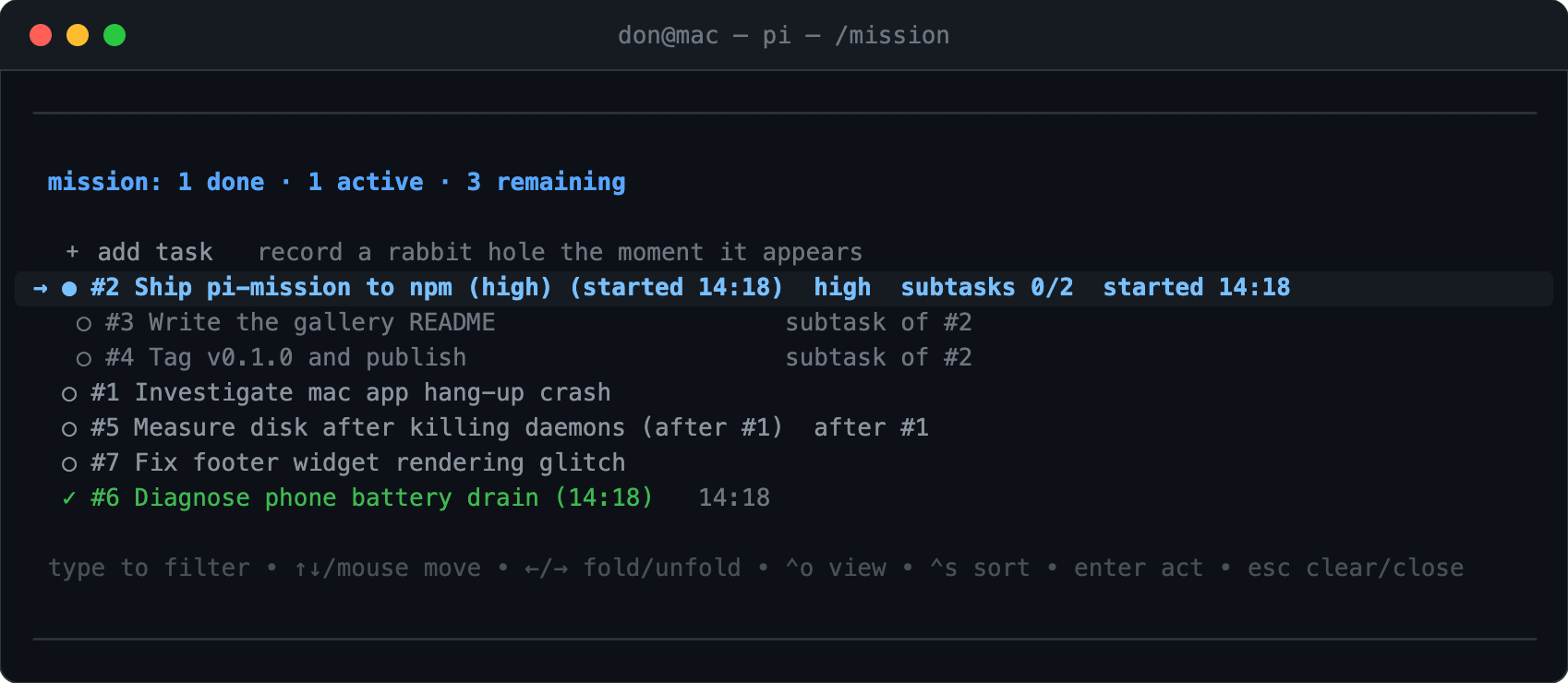
  "image": "https://raw.githubusercontent.com/donpark/pi-mission/main/docs/screenshot.png",
  "skills": [
    "./skills/mission"
  ],
  "extensions": [
    "./extensions/pi-mission/index.ts"
  ]
}
Security note
Pi packages can execute code and influence agent behavior. Review the source before installing third-party packages.
README
pi-mission
Mission tracking for pi. The extension records each piece of work when it appears. It tracks the work while you work. It shows one list with three parts: current work, completed work, and remaining work.
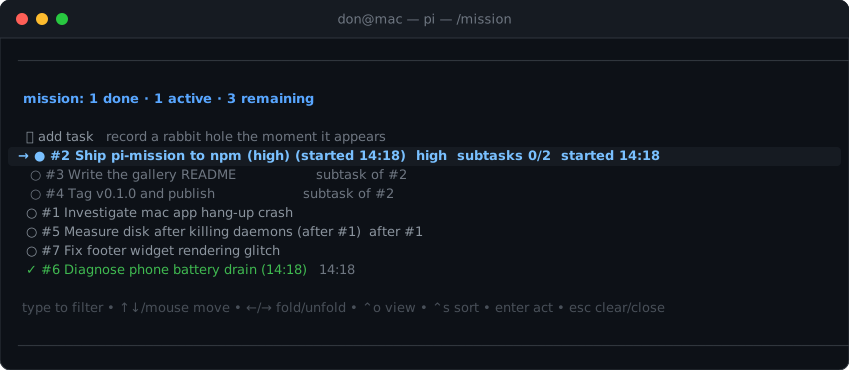
The popup marks the current mission with →. It indents subtasks under their
mission. It marks blocked work with after #n.
Install
pi install npm:pi-mission
# or from git
pi install git:github.com/donpark/pi-mission
What you get
One searchable list. /mission opens the list in a popup. The shortcuts
⌥M, ⌥J, and ⌃⇧K open the same popup. Type text to filter the list by
title or #id. Use ↑↓ or the mouse to move the selection. Press Enter for
the actions of one mission. Use ←→ to fold and unfold subtasks. ⌃O selects
the view mode (all / open / current). ⌃S selects the sort order (board /
recent / oldest / priority / status). Home, End, PgUp, and PgDn move
the selection fast. Press Esc to clear the filter, then to close the popup.
Autonomous tracking. The agent maintains the list as it works. It adds a
mission when work appears. It starts the mission when work begins. It marks the
mission done when work completes. You intervene only to change a state. The
popup sends each action as a Mission override: message.
Names on capture. You can add a rough thought instead of a name. A small model then writes the name. The name has 3 to 7 words and starts with a plain verb. See Naming model to choose that model. The extension never calls your session model for this.
Structure. A mission can have subtasks (one level). A mission can have
prerequisites (depends_on). The tool rejects prerequisite cycles. A mission
has a priority: high, normal, or low. The list sorts remaining work by
the prerequisite graph and marks blocked work with after #n.
Persistence. Each session keeps its board in one append-only file,
~/.pi/agent/mission-boards/<session-id>.jsonl — one file per session, the
same pattern pi uses for transcripts. Each line is the board after a change;
the last line is the current board, and the lines before it are that session's
history. Boards are session-scoped like /tree: a new session starts empty.
Set PI_MISSION_STORE to change the location. A bundled skill teaches other
agents how to read and update these boards.
How a session flows
- Start working. The board starts empty. As work appears — planned steps, rabbit holes, ad-hoc requests — the agent records each item as a mission and marks it started and done as the work happens. You do not manage the board.
- Ask for what should be on it. "Add these as tasks", "add the remaining open items" — the agent records them in one call. Rough thoughts are fine: a small model writes the name ("look into that crash" becomes "Investigate the hangup crash").
- Look at the board whenever you wonder "what's left?"
/mission(or⌥M,⌥J,⌃⇧K) opens the popup: current work first, remaining work in dependency order, blocked work markedafter #n. Type to filter,←→to fold subtasks,⌃Oand⌃Sto change the view or sort. - Steer only when you disagree.
Enteron a mission offers its next actions: start, done, priority, drop. Each goes out as aMission override:message and is applied exactly. That is the only time you touch state by hand. - End the session whenever. The board's history stays in that session's file. The one habit worth keeping: before quitting, mark finished work done (or drop what you will not do) so "what is unfinished" is already curated.
- Continue in a new session with
/mission-handoff. It carries the unfinished missions of all earlier sessions that still have open work over to the new board — explicitly, never automatically. A session where the handoff was forgotten does not shadow older leftovers. They enter aspending; work restarts here. Since sessions from different projects can interleave, the handoff names its source sessions: if it picked up the wrong project's, say so and name the right one.
Naming model
Set PI_MISSION_NAME_MODEL to choose the model that names captures. The value
is <provider>/<model-id>. Use the same form as the model entries in your pi
settings.
PI_MISSION_NAME_MODEL=vercel-ai-gateway/google/gemini-3.5-flash-liteThe default is openrouter/xiaomi/mimo-v2.6-flash. If pi cannot find that
model, the extension uses the capture text as the name. It does not fall back
to your session model. Set this variable in the environment that starts pi.
Token cost
pi-mission never calls your session model. Its one model call names captures with the small model. All other work is file input and output.
| Action | Cost |
|---|---|
| tool active (each request in the session) | the tool description and the guideline, about 200 tokens |
| add, start, done, drop, dep, prio | one short tool result, about 30 tokens |
| add from a capture | one call to the naming model, about 160 tokens |
| popup action (start, done, priority, drop) | one short user message, then one agent turn at your model's normal rate |
| open the popup, filter, sort, persist | no model calls |
Each tool result carries the board snapshot in its details field. That field
is transcript-side state for branch reconstruction. The model does not receive
it.
Granularity
PI_MISSION_GRANULARITY controls how much work becomes a mission:
fine— record every step and every side quest.normal— record each piece of work; use subtasks for its steps (default).coarse— record only work items that have several steps.
Terminal note
The ⌥ shortcuts need option-as-alt from the terminal. In Ghostty, set
macos_option_as_alt = true. This setting also enables the pi editor motions
⌥B, ⌥D, and ⌥F. The ⌃⇧K shortcut needs no configuration in CSI-u
terminals.
Development
node extensions/pi-mission/selftest.mjsPublish
The pi-package keyword lists the package in the
pi package gallery. The host packages
(@earendil-works/*, typebox) are peerDependencies only. pi supplies them.
Publishing is tag-driven: push a v* tag matching package.json's version
(e.g. v0.2.1) and the npm publish GitHub Action runs the self-test and
publishes to npm (npm publish --access public there, not locally).
License
MIT