pi-mlx-models
Local MLX model launcher extension for Pi
Package details
Install pi-mlx-models from npm and Pi will load the resources declared by the package manifest.
$ pi install npm:pi-mlx-models- Package
pi-mlx-models- Version
0.1.4- Published
- May 6, 2026
- Downloads
- 224/mo · 61/wk
- Author
- vmarino
- License
- MIT
- Types
- extension
- Size
- 23.8 KB
- Dependencies
- 0 dependencies · 1 peer
Pi manifest JSON
{
  "extensions": [
    "dist/index.js"
  ],
  "image": "https://raw.githubusercontent.com/vmarinogg/pi-mlx-models/main/assets/preset-selector.png"
}
Security note
Pi packages can execute code and influence agent behavior. Review the source before installing third-party packages.
README
pi-mlx-models
Local MLX model launcher for Pi on Apple Silicon.
pi-mlx-models adds a local OpenAI-compatible provider to Pi, with a guided startup flow for MLX models.
What you get
- Interactive preset selector via
/mlx-start - Local runtime bootstrap via
/mlx-init(venv +mlx-lm) - Startup progress with stage/status updates and warm-up timer
- Provider models only appear when the server is actually ready
- Stop/cleanup command via
/mlx-stop
Install
From npm
pi install npm:pi-mlx-models
From GitHub
pi install git:github.com/vmarinogg/pi-mlx-models
Quick start
/mlx-init
/mlx-start
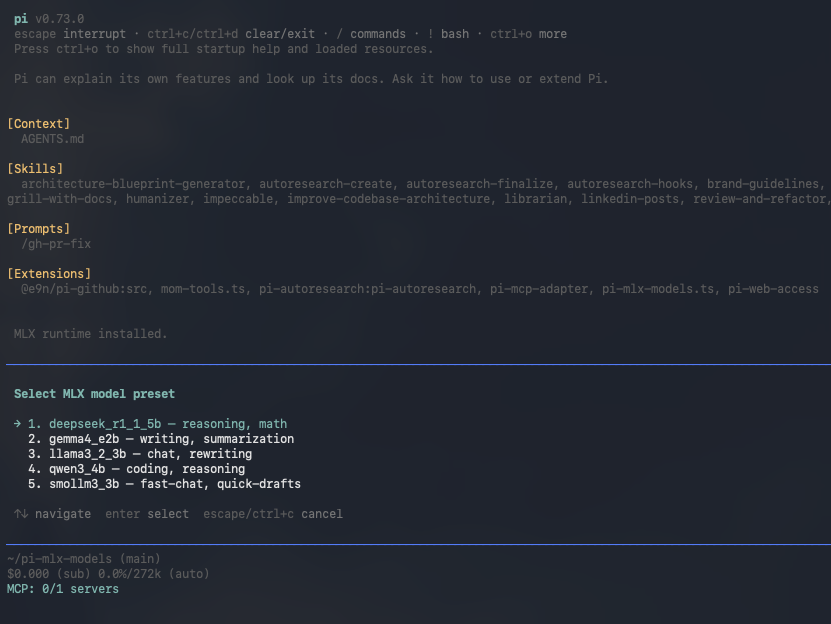
When /mlx-start is used with no args, a selector opens and you can pick a preset with arrow keys + Enter.
You can also start directly with a full model id:
/mlx-start mlx-community/Qwen3-4B-Instruct-2507-4bit
Commands
/mlx-init— initialize local MLX runtime/mlx-start [hf-model-id]— open selector (no args) or start with full model id/mlx-stop— stop server and clear active provider models
Included presets
deepseek_r1_1_5b— reasoning, mathgemma4_e2b— writing, summarizationllama3_2_3b— chat, rewritingqwen3_4b— coding, reasoningsmollm3_3b— fast chat, quick drafts
[!TIP] Want to try other models? Browse MLX Community collections on Hugging Face:
https://huggingface.co/mlx-community/collections
Requirements
- macOS on Apple Silicon
- Python 3.10–3.13
Configuration
Environment variables supported by the extension:
PI_MLX_MODELS_PORT(default:11434)PI_MLX_MODELS_HOST(default:127.0.0.1)PI_MLX_MODELS_BASE_URL(default:http://<host>:<port>/v1)PI_MLX_MODELS_DEFAULT_MODEL(default:mlx-community/Qwen3-4B-Instruct-2507-4bit)
Local data paths
Runtime artifacts are stored under:
~/.pi/agent/pi-mlx-models/venv~/.pi/agent/pi-mlx-models/models
Development
npm install
npm run build
Pi package manifest is in package.json:
pi.extensions: ["dist/index.js"]
Screenshots
Startup progress

Command menu

Model selection
