pi-model-mention
Route one Pi turn to a scoped model using ~model mentions.
Package details
Install pi-model-mention from npm and Pi will load the resources declared by the package manifest.
$ pi install npm:pi-model-mention- Package
pi-model-mention- Version
1.0.2- Published
- Aug 16, 2026
- Downloads
- 457/mo · 10/wk
- Author
- jundev76
- License
- MIT
- Types
- extension
- Size
- 72.2 KB
- Dependencies
- 0 dependencies · 3 peers
Pi manifest JSON
{
  "extensions": [
    "./extensions/index.ts"
  ]
}
Security note
Pi packages can execute code and influence agent behavior. Review the source before installing third-party packages.
README
pi-model-mention
Mention a scoped model. Run one turn with it. Keep your main model.
Installation · Usage · How it works
pi-model-mention adds ~model mentions to Pi's interactive TUI. Mention any existing scoped model at start of prompt; Pi runs full turn with that model, including tool calls, then restores original model and thinking level.
It does not register models or replace Pi's scoped-model feature. It provides fast per-turn selection across models already in scopedModels.
Demo
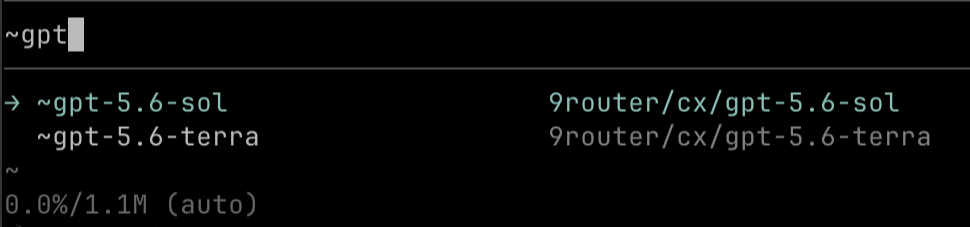
Type partial model name to filter scoped models. Completion always inserts official model name.
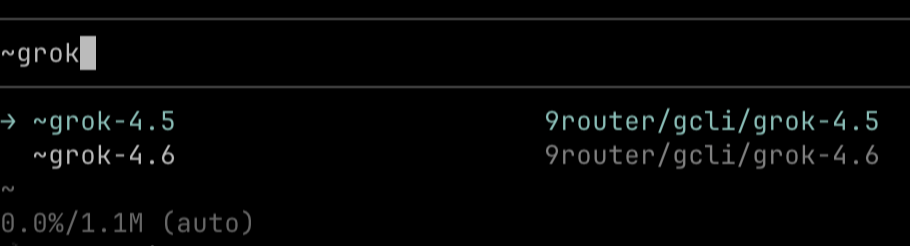
Ambiguous mentions stay safe. ~grok shows matching scoped models so user can choose exact version before prompt starts.
Features
- One-turn routing — target model handles entire agent turn and tool loop
- Automatic restore — main model and thinking level return after turn settles
- Scoped-model only — searches models configured through
--modelsorenabledModels - Fuzzy matching — exact, prefix, substring, then subsequence scoring
- Safe ambiguity handling — asks user to choose before starting when candidates tie
- Native completion — official model names shown in Pi autocomplete
- Path friendly — keeps
~/,@file, and explicit path completion working
Installation
Install from npm:
pi install npm:pi-model-mention
Or install directly from GitHub:
pi install git:github.com/JunDev76/pi-model-mention
Restart Pi or reload active session:
/reload
For local development:
pi install /absolute/path/to/pi-model-mention
Usage
Put mention at start of prompt:
~glm fix this
~terra review this
~gr46 summarize this
~dsp check this
Type ~ to browse models, or continue typing to filter them:
~gpt       → gpt-5.6-sol, gpt-5.6-terra, ...
~deepseek  → deepseek-v4-pro, deepseek-v4-flash, ...
Loose inputs resolve to same model when result is unique. Use family, version, suffix, or subsequence — no alias configuration required:
~sol       → gpt-5.6-sol
~gptsol    → gpt-5.6-sol
~gpt56sol  → gpt-5.6-sol
~gpt56s    → gpt-5.6-sol
~g46       → grok-4.6
~gr46      → grok-4.6
~terra     → gpt-5.6-terra
~dsp       → deepseek-v4-pro
If mention is ambiguous, Pi asks before sending prompt:
~grok → choose grok-4.5 or grok-4.6
Requirements
- Pi interactive TUI
- At least one configured scoped model
Example ~/.pi/agent/settings.json:
{
  "enabledModels": [
    "provider/glm-5.2",
    "provider/gpt-5.6-sol",
    "provider/gpt-5.6-terra"
  ]
}
Pi's existing --models flag works too.
Completion compatibility
Leading ~model belongs to this extension. Home paths and explicit file paths still use Pi's built-in completion:
~/path
~glm check src/file.ts
~glm check @file.ts
~glm check ./relative/path
How it works
inputintercepts leading~modelmention.- Mention resolves against
ctx.scopedModelsonly. pi.setModel()switches active model before agent starts.- Input transform removes mention from prompt.
- Full turn runs normally in same session and context.
agent_settledrestores original model and thinking level.
No subprocess, nested agent, proxy, or extra model request.
Development
Node.js 24 or newer required for native TypeScript type stripping used by tests.
node matcher.test.mjs