pi-model-prices
Show per-model prices in CNY (in/out/cacheRead/cacheWrite + tiers) inside pi's built-in /model selector
Package details
Install pi-model-prices from npm and Pi will load the resources declared by the package manifest.
$ pi install npm:pi-model-prices- Package
pi-model-prices- Version
1.0.1- Published
- Sep 12, 2026
- Downloads
- 275/mo · 275/wk
- Author
- renwei.zhu
- License
- MIT
- Types
- extension
- Size
- 20.4 KB
- Dependencies
- 0 dependencies · 3 peers
Pi manifest JSON
{
  "extensions": [
    "./extensions"
  ]
}
Security note
Pi packages can execute code and influence agent behavior. Review the source before installing third-party packages.
README
pi-model-prices
Show per-model prices in CNY directly inside pi's built-in /model selector.
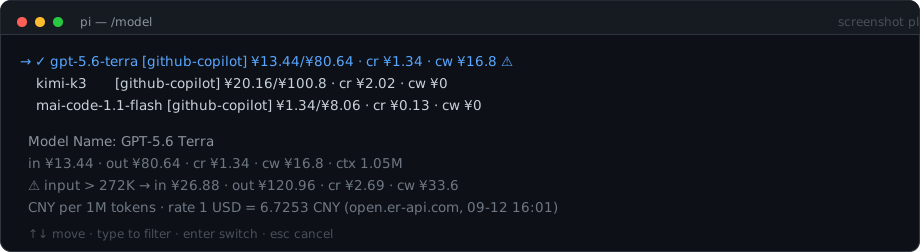
No extra command to learn: /model (or Ctrl+L) now shows what each model costs.
Why
pi's built-in selector renders only model.id per row, so picking a model by price means
memorising a table somewhere else. This extension puts the numbers where you choose.
Features
- All four price metrics on every row —
in/outprice, pluscr(cacheRead) andcw(cacheWrite). - Tier warnings —
⚠marks models whose price jumps above an input-token threshold; the highlighted model expands every tier. - CNY display — pi's catalog stores USD per 1M tokens; this converts at render time, so it never hardcodes a price.
- Transparent rate — the USD→CNY rate actually in force, its source, and its refresh time are always printed in the detail block.
- Live registry data — reads
model.coston every render, so catalog refreshes (including yourmodels.jsonoverrides) show up immediately.
Install
pi install npm:pi-model-prices
Then /reload (or restart pi). Verify with Ctrl+L.
Configuration
Optional config at ~/.pi/agent/model-selector-prices.json:
{
  "usdToCny": null,
  "liveRate": true,
  "refreshHours": 12
}
| Key | Default | Meaning |
|---|---|---|
usdToCny |
null |
Pin a fixed rate (e.g. 7.2). When set, live fetching is disabled. |
liveRate |
true |
false never hits the network — uses the cache, then the built-in default. |
refreshHours |
12 |
How long a cached live rate stays fresh. |
Rate resolution order
usdToCnyin the config file — fixed override- cached live rate in
~/.pi/agent/model-selector-prices-cache.json - live fetch — open.er-api.com, falling back to jsdelivr / fawazahmed0
- a built-in default (
6.72), only when nothing else is available
The rate in use is always visible in the selector's detail block, so a stale or fallback rate is never silent.
To keep everything offline and deterministic:
{ "usdToCny": 7.2, "liveRate": false }
How it works
The built-in selector renders only model.id per row, so this extension replaces
ModelSelectorComponent.prototype.updateList with an equivalent implementation that
appends prices. Costs come from the live model registry, resolved as
models.json → models-store.json → built-in catalog.
Because it patches an internal method rather than using a public hook, a future pi release
that changes updateList may require this wrapper to be re-checked. If prices stop
appearing after a pi update, that is the first thing to look at.
Development
git clone git@github.com:kiwizhu0719/pi-model-prices.git
cd pi-model-prices
pi install "$PWD"     # pi installs from a path without copying
Edit extensions/index.ts, then /reload in pi to pick up changes.
Requirements
- pi with an interactive (TUI) session — the selector only exists there.
- Network access is optional; only used to refresh the exchange rate.
License
MIT — see LICENSE.
中文说明
在 pi 内置的 /model 选择器里直接显示每个模型的人民币价格,不需要记额外的命令。
- 每一行显示四项指标:输入价 / 输出价(
in/out)、缓存读cr、缓存写cw ⚠表示该模型有阶梯价,高亮行下方会展开全部阶梯阈值- 单位为人民币/百万 token;pi 目录本身存的是美元,插件在渲染时按实时汇率换算,不写死价格
- 汇率来源和刷新时间始终打印在详情块最后一行,走缓存或默认值时一眼可见
安装
pi install npm:pi-model-prices
然后 /reload 或重启 pi,按 Ctrl+L 打开 /model 查看。
汇率配置:~/.pi/agent/model-selector-prices.json
{ "usdToCny": 7.2, "liveRate": false }
想锁死汇率就用上面这样;留 "usdToCny": null + "liveRate": true 则自动联网取最新汇率(默认 12 小时缓存一次)。