pi-multi-skills
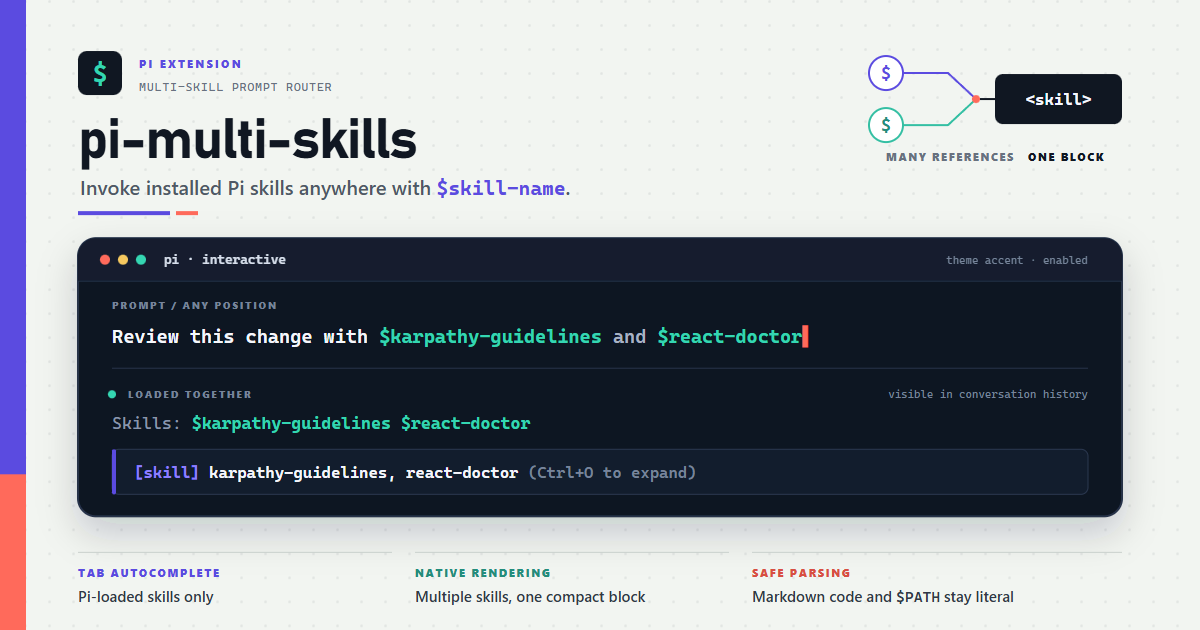
Invoke one or more installed Pi skills anywhere in interactive or RPC prompts with $skill-name syntax and native skill-block rendering.
Package details
Install pi-multi-skills from npm and Pi will load the resources declared by the package manifest.
$ pi install npm:pi-multi-skills- Package
pi-multi-skills- Version
1.2.1- Published
- Sep 12, 2026
- Downloads
- 632/mo · 447/wk
- Author
- nguyenquangthai
- License
- MIT
- Types
- extension
- Size
- 36.5 KB
- Dependencies
- 0 dependencies · 1 peer
Pi manifest JSON
{
  "image": "https://raw.githubusercontent.com/QuangThai/pi-multi-skills/main/assets/pi-multi-skills.png",
  "extensions": [
    "./index.ts"
  ]
}
Security note
Pi packages can execute code and influence agent behavior. Review the source before installing third-party packages.
README
pi-multi-skills
Invoke one or more installed Pi coding agent skills anywhere in an interactive or RPC prompt with $skill-name syntax.
Apply $code-review and $ui-ux-pro-max to review this UI.

Run $karpathy-guidelines on the latest changes,
then $interview-me on the architecture.
The extension reuses the skills Pi has already loaded, so project trust, package filters, settings, command collisions, and CLI-provided skills stay aligned with Pi.
Requirements
- Node.js 22.19 or newer
- Pi with custom autocomplete triggers (tested against Pi 0.80.2 and the current latest release, 0.85.1)
Install
From npm:
pi install npm:pi-multi-skills
From a reproducible GitHub release:
pi install git:github.com/QuangThai/pi-multi-skills@v1.2.1
Reload Pi and verify discovery:
/reload
/skills
Usage
References can appear anywhere outside Markdown code:
Use $code-review before applying $code-simplification.
A bare invocation also works:
$interview-me
After submission, each successfully loaded $skill-name stays visible with its $ sigil and uses Pi's theme accent color. Failed references remain unstyled and are accompanied by an error notification, so the transcript does not imply that they loaded successfully.
Names beginning with a digit are supported when Pi has loaded that skill:
Use $3d-modeling.
Autocomplete
Type $ at a token boundary and press Tab. Suggestions are ranked with prefix matches first and capped at 20 items.
Apply $code- [Tab]
  ↓
┌─ $code-change-verification ─┐
│  $code-review-and-quality    │
│  $code-simplification        │
└──────────────────────────────┘
Literals and code
- Inline code and fenced code are not scanned:
`$code-review`stays unchanged. - Prefix a dollar with
\when an installed skill name should remain literal:\$code-review. - Unknown names and ordinary variables such as
$PATH,$100, or$not-installedremain unchanged; their preceding backslashes are also preserved when another skill is invoked. - Outside Markdown code, an exact lowercase match to an installed skill is intentionally treated as an invocation; escape it when writing shell/PHP text without a code fence.
- Messages injected by another extension are not transformed. Interactive and RPC input are supported.
Commands
| Command | Description |
|---|---|
/skills |
List every skill exposed by Pi with its $name syntax |
/skills-search <keyword> |
Search loaded skill names and descriptions |
How it works
| Step | Component | Role |
|---|---|---|
| 1 | resolver.ts |
Builds a cached, filesystem-free registry from Pi's loaded /skill:name commands |
| 2 | parser.ts |
Finds installed references outside Markdown code while preserving token boundaries and escapes |
| 3 | expander.ts |
Lazily reads only requested skill files, preserves surrounding formatting, and marks successful mentions for theme-aware rendering |
| 4 | index.ts |
Handles Pi input, commands, notifications, widgets, and autocomplete |
A single reference uses Pi's native structural format:
<skill name="code-review" location="/path/to/code-review/SKILL.md">
References are relative to /path/to/code-review.

...skill instructions...
</skill>
Pi's compact renderer currently recognizes one leading <skill> wrapper. Multiple references are therefore placed in one compatible wrapper, with every section carrying its own skill file and relative-reference directory. A failure to read one skill leaves that $reference untouched while successfully loaded skills still run.
Successful references in the visible user-message portion are represented as inline-code Markdown, which Pi renders through its mdCode theme token (accent in the built-in dark and light themes). The backticks are not displayed. This avoids hard-coded terminal colors, keeps $ as a non-color cue, and works across the tested Pi versions. A mention remains unstyled when adding code delimiters would alter surrounding Markdown metadata, a URL/path token, or an adjacent code span.
The extension warns when combined skill bodies exceed 50,000 characters so an accidental invocation does not silently consume excessive model context.
$skill-name versus /skill:name
| Aspect | $skill-name |
Native /skill:name |
|---|---|---|
| Position | Anywhere outside Markdown code | Start of message |
| Persistence | In conversation history | In conversation history |
| Multiple skills | Multiple per message | One per message |
| Single-skill wrapper | Native-compatible | Native |
Development
npm ci
npm test             # production-path and integration suite
npm run typecheck
npm run test:coverage
npm run verify       # typecheck + enforced coverage thresholds
npm pack --dry-run
The E2E suite:
- Executes the real extension factory and registered input handler
- Parses transformed output with Pi's exported
parseSkillBlock - Loads
index.tsthrough Pi's real Jiti loader and transforms input through Pi's realExtensionRunnerin a subprocess - Covers multiline formatting, independent multi-skill roots, partial file failures, RPC images, autocomplete delegation/capping, transient UI state, Markdown/URL safety, and real dark/light Pi user-message rendering
CI verifies Node 22.19 and Node 24 on Linux and Windows, including the minimum tested Pi 0.80.2 and Pi's latest release. See CHANGELOG.md for release notes and RELEASING.md for the manual maintainer release checklist.
Security model
Skills are instruction files trusted and loaded by Pi. This extension does not rescan arbitrary directories or execute skill files; it reads only the canonical paths from Pi's skill commands. As with native skills, review third-party skill content before installing it.