pi-my-ask-user
Interactive ask_user_question tool for pi-coding-agent with searchable split-pane selection UI, multi-select, and freeform input
Package details
Install pi-my-ask-user from npm and Pi will load the resources declared by the package manifest.
$ pi install npm:pi-my-ask-user- Package
pi-my-ask-user- Version
0.21.0- Published
- Oct 10, 2026
- Downloads
- 359/mo · 359/wk
- Author
- hhhtj
- License
- MIT
- Types
- extension, skill
- Size
- 134.8 KB
- Dependencies
- 0 dependencies · 3 peers
Pi manifest JSON
{
  "skills": [
    "./skills"
  ],
  "extensions": [
    "./index.ts"
  ]
}
Security note
Pi packages can execute code and influence agent behavior. Review the source before installing third-party packages.
README
pi-my-ask-user
A Pi package that adds an interactive ask_user_question tool for collecting user decisions during an agent run.
Origin
pi-my-ask-user is a fork of edlsh/pi-ask-user, originally authored by Enzo Lucchesi. This fork is maintained under a separate package name at cybershape/pi-my-ask-user. The upstream MIT license and original copyright notice are preserved; see LICENSE. Historical release, commit, and issue links continue to point to the upstream repository for traceability.
Demo
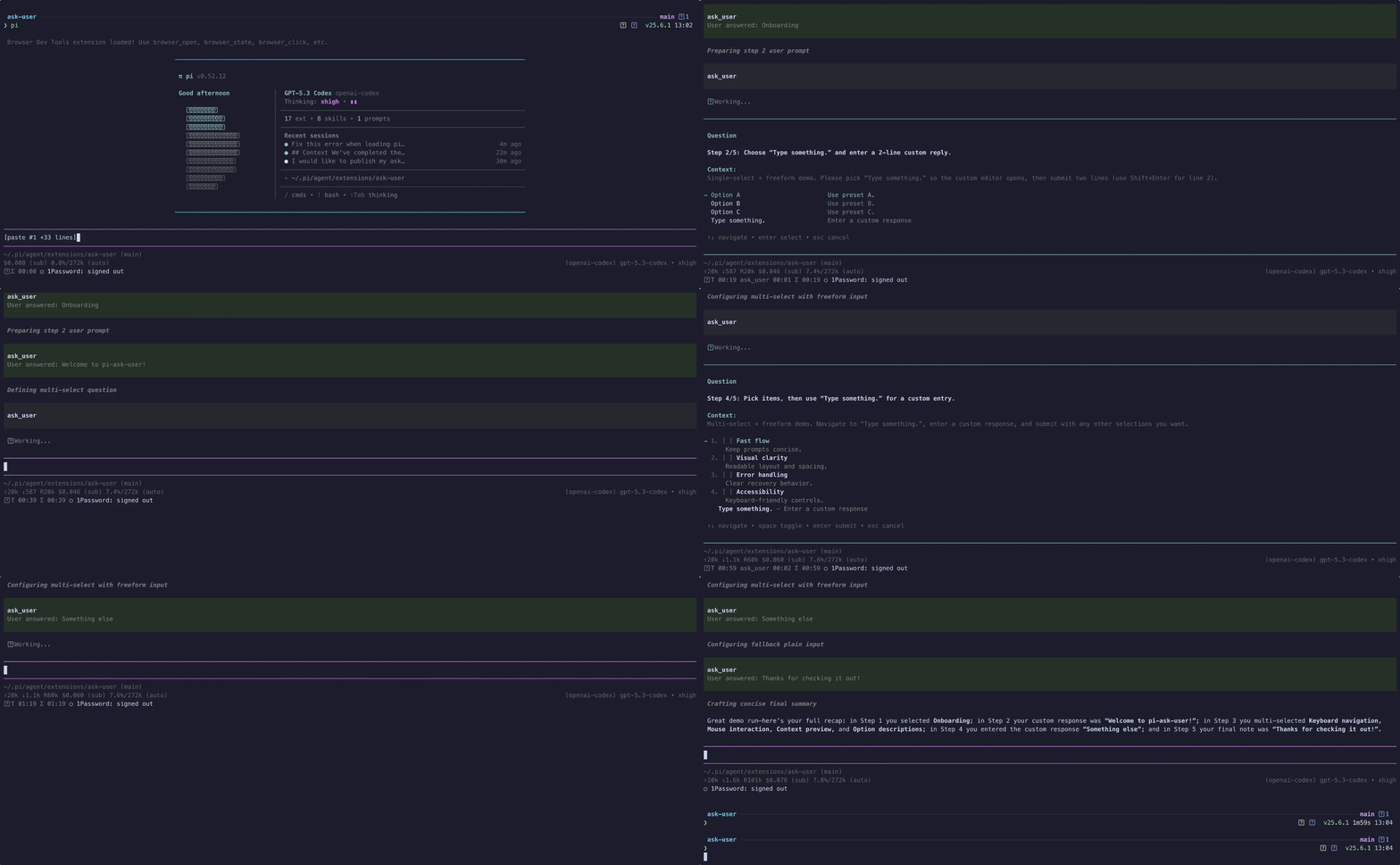
High-quality video: ask-user-demo.mp4
Features
- Searchable single-select option lists with wrapped labels and descriptions
- Responsive split-pane details preview on wide terminals in both selection modes, with a persistent single-column preference
- Multi-select option lists
- A unified
questionsarray for 1-4 focused, independent questions, with a review page before submitting when asking multiple questions - A free-form answer is always offered alongside the listed options, numbered like them; until you type anything the row shows a dim
Type something.placeholder with anEnter a custom responsehint, and once you have a draft the row shows it - Configurable display mode:
inline(rendered directly in the flow, default) oroverlay(modal) - Globally persisted display, layout, shortcut and timeout preferences via
/ask-user-question-settings - Runtime overlay toggle: press the configured overlay-toggle key (
alt+oby default, configurable through settings or an env var) while an overlay prompt is open to temporarily hide/show the popup so you can read prior agent output, then press it again to bring it back - Pi-TUI-aligned keybinding and editor behavior
- Custom TUI rendering for tool calls and results
- System prompt integration via
promptSnippetandpromptGuidelines - Optional timeout for auto-dismiss in both overlay and fallback input modes
herdr:blockedlifecycle events while waiting for interactive input- Structured answer and cancellation
detailsfor session state reconstruction - Graceful fallback when interactive UI is unavailable
- Bundled
ask-before-actingskill for mandatory decision-gating in high-stakes or ambiguous tasks
Bundled skill: ask-before-acting
This package now ships a skill at skills/ask-before-acting/SKILL.md that nudges/mandates the agent to use ask_user_question when:
- architectural trade-offs are high impact
- requirements are ambiguous or conflicting
- assumptions would materially change implementation
The skill follows a "decision handshake" flow:
- Gather evidence and summarize context
- Ask one focused question via
ask_user_question - Wait for explicit user choice
- Confirm the decision, then proceed
Install
pi install npm:pi-my-ask-userTool name
The registered tool name is:
ask_user_question
Parameters
| Parameter | Type | Default | Description |
|---|---|---|---|
questions |
{question, header, options, multiSelect?}[] |
required | 1-4 focused questions, even when asking only one. Put question-specific fields on each entry. Multiple questions must be independent with settled prerequisites. See Asking several questions at once |
Fields on each questions entry
| Field | Type | Default | Description |
|---|---|---|---|
question |
string |
required | One focused, non-empty question |
header |
string |
required | Short group label shown in the prompt's top border, above the question. Keep it brief — it is ellipsised when the terminal is too narrow for it |
options |
{label, description, preview?}[] |
required | 2-4 distinct options. label is the value returned when the user picks it; description is required; preview is an optional longer body shown in the wide details pane |
multiSelect |
boolean? |
false |
Enable multi-select mode |
A free-form "Type something" row is always offered alongside the listed options, so there is no toggle for it — and for the same reason "Other", "Type something." and "Next" are rejected as option labels. The schema is flat (no anyOf) so proxies that strip unions cannot mangle it.
Top-level question, header, options, and multiSelect are rejected. questions is the only top-level parameter. Display, layout, shortcuts and timeout are user settings configured with /ask-user-question-settings; passing them as tool parameters is an error.
Validation
A call is rejected before any UI opens when:
questionsis missing, not an array, or holds fewer than 1 or more than 4 entries- a
questionis blank, or two entries repeat the samequestiontext - a
headeris missing or blank optionsholds fewer than 2 or more than 4 entries- an option is missing its
labelordescription - two options in one question repeat the same
label - an option uses a reserved label (
Other,Type something.,Next) - any entry field or setting key appears at the top level
Example usage shape
{
  "questions": [
    {
      "question": "Which option should we use?",
      "header": "Deploy target",
      "options": [
        { "label": "staging", "description": "Internal only, safe to break" },
        { "label": "production", "description": "Customer-facing" }
      ],
      "multiSelect": false
    }
  ]
}
The default inline display uses the same interaction logic but skips overlay mode when calling ctx.ui.custom(...). RPC/headless fallback behavior is unchanged.
Asking several questions at once
Always use questions, with 1-4 entries. To ask several decisions together, they must be independent of each other and their prerequisites must already be settled. Anything that depends on another answer belongs in a later ask_user_question call.
{
  "questions": [
    {
      "question": "Which database should the service use?",
      "header": "Storage",
      "options": [
        { "label": "Postgres", "description": "Managed, JSONB support" },
        { "label": "SQLite", "description": "No extra infrastructure" }
      ]
    },
    {
      "question": "Which deploy target?",
      "header": "Deploy",
      "options": [
        { "label": "Fly.io", "description": "Global edges, VM based" },
        { "label": "Cloudflare", "description": "Workers, cold-start free" }
      ]
    },
    {
      "question": "Anything else we should know before starting?",
      "header": "Notes",
      "options": [
        { "label": "Nothing else", "description": "Proceed as planned" },
        { "label": "Yes, let me explain", "description": "Pick this, then choose the free-form row to write it" }
      ]
    }
  ]
}
When asking multiple questions (2-4), the prompt shows one page per question plus a review page. Confirming a page records its answer and moves to the next unanswered question, then to the review page. tab / shift+tab switch pages without losing filters, drafts, or checked options, and number keys on the review page jump back to a question. Only the review page submits. If questions are still unanswered, the first press warns and a second press submits without them. If only one question is passed, the review page is omitted and confirming the question submits directly.
In RPC/headless mode the questions are asked one after another with the fallback dialogs. There is no review page there, so cancelling any question cancels the whole batch.
User settings: /ask-user-question-settings
Run /ask-user-question-settings to open an interactive configuration menu. Select a setting, choose or enter its value, and repeat as needed; select Done or cancel to close the menu. Each accepted change is saved immediately and applies to the next ask_user_question call. An already-open prompt keeps the settings with which it started.
You can also configure a value directly:
/ask-user-question-settings displayMode overlay
/ask-user-question-settings singleSelectLayout list
/ask-user-question-settings overlayToggleKey alt+h
/ask-user-question-settings timeout 300000
Use default to remove a saved override and restore the environment/built-in fallback, for example /ask-user-question-settings displayMode default. Set timeout to 0 to disable automatic cancellation.
| Setting | Built-in default | Description |
|---|---|---|
displayMode |
inline |
inline renders in the conversation flow; overlay opens a centered modal |
singleSelectLayout |
auto |
Applies to both selection modes: auto enables the details pane on wide terminals; list always shows descriptions below options |
overlayToggleKey |
alt+o |
Hide/show the overlay; only used in overlay mode; off disables it |
timeout |
0 (disabled) |
Whole-prompt deadline in milliseconds, across all questions and dialog stages; integer from 0 to 2147483647 |
Persistence and precedence
The dedicated configuration file is ask-user-settings.json in Pi's user directory, normally ~/.pi/agent/ask-user-settings.json. Pi's PI_CODING_AGENT_DIR override is respected. Settings are global across projects and survive restarts; the command never modifies Pi's shared settings.json or shell profiles.
Effective order for the four settings:
- Saved value in
ask-user-settings.json - Existing environment preference, if applicable
- Built-in default from the table above
Existing environment variables remain supported as fallbacks:
export PI_ASK_USER_DISPLAY_MODE=overlay
export PI_ASK_USER_SINGLE_SELECT_LAYOUT=list
export PI_ASK_USER_OVERLAY_TOGGLE_KEY=alt+h
timeout has no environment variable. Environment variables must be present in the process that launches Pi. Invalid environment preferences fall back to built-in defaults. Invalid or unreadable configuration files produce a warning during a tool call and use the environment/default values; the settings command reports an error rather than overwriting such a file.
Shortcut specs follow the Pi-TUI KeyId format, such as alt+o, alt+shift+x, escape or tab. Use off, none or disabled to disable a shortcut. Invalid command values are rejected without changing the configuration.
Controls
While an ask_user_question prompt is open:
| Key | Action |
|---|---|
alt+o (configurable via overlayToggleKey) |
Hide/show the overlay popup so you can read the agent's prior output. Available in overlay mode only. The first time you hide it, a notification reminds you which key brings it back. |
enter |
Confirm the focused option or submit a free-form answer. On the free-form row it always opens (or reopens) the editor, in both selection modes. In a multi-select question the editor records its text on the ticked free-form row and returns to the list; confirming from an option row then submits the labels together with that text. In a batch, confirming records the answer; on the review page it submits. |
esc |
Clear the search filter, leave the free-form editor, or cancel the prompt. In a batch, cancelling cancels every question. |
↑ / ↓, ctrl+k / ctrl+j |
Navigate options. ctrl+k / ctrl+j (vim-style) work while typing in searchable prompts without disturbing the filter. On a batch's review page they scroll the answers. |
tab / shift+tab |
In a batch of 2-4 questions, switch to the next/previous question or the review page. For a single question, use arrows, tab, or ctrl+j / ctrl+k to navigate options. |
1-4 |
Batch review page: jump back to that question. |
PgUp / PgDn, Home / End, ctrl+u / ctrl+d |
Scroll the question text in overlay mode when it is taller than the prompt pane. |
Inline is the default. To explicitly select it, use /ask-user-question-settings displayMode inline.
Cancellation
Aborting a tool call dismisses its active prompt, including the free-form editor and RPC dialogs.
Every call has one deadline across all questions and dialog stages, in both the custom UI and the dialog fallback, including calls with just one question.
Small terminals
When the option list is taller than the space available, it scrolls and shows the focused item's position, so the question and at least one choice always remain visible.
Events
While an interactive prompt is open, the extension emits herdr:blocked with { active: true, label: "Waiting for user response" }. It emits { active: false } in finally, including cancellation and error paths. Hosts without a listener are unaffected.
The tool emits no answer or cancellation events. The answers are delivered to the agent through the tool result, and to any host UI through the rendered result.
Known limitations
- Overlays cannot draw over inline images (#8). Pi-TUI's overlay compositor skips rows occupied by terminal images (Kitty/iTerm2 graphics), so an
ask_user_questionoverlay that intersects an image is partially or fully invisible. This must be fixed upstream in pi-tui (compositeLineAtreturns image rows unchanged). Until then,/ask-user-question-settings displayMode inline(or the fallbackPI_ASK_USER_DISPLAY_MODE=inline) sidesteps the overlay compositor entirely and should keep the prompt visible.
Result details
Every call returns the same structured details for rendering and session state reconstruction:
interface AskAnswer {
  question: string;
  kind: "option" | "custom" | "multi";
  answer: string | null;
  selected?: string[];
}

interface AskResultDetails {
  answers: AskAnswer[];
  cancelled: boolean;
  error?: string;
}
One entry per question the user actually answered, in question order:
| Situation | kind |
answer |
selected |
|---|---|---|---|
| One option picked | "option" |
the chosen label |
omitted |
| Several options picked | "multi" |
null |
the chosen labels, plus the user's free text as the final entry when they also wrote one |
| Free-form row used | "custom" |
the typed text | omitted |
Questions left unanswered on the review page are dropped rather than recorded, so answers can be shorter than questions. A cancelled prompt returns { answers: [], cancelled: true }.
Malformed options, invalid questions batches, unavailable interactive UI, and UI failures throw so Pi records a failed tool call rather than a successful answer. These host-created error results do not guarantee this details shape; details: { error: string } is rendered as a failure.
Contributing
See CONTRIBUTING.md for development setup and checks.
Changelog
See CHANGELOG.md.