pi-netrunner
Theme-aware netrunner flavor for the pi coding agent: Night City loader lines, glitch effects, spinners, NetWatch trace, a glitch logo banner and an optional neon theme
Package details
Install pi-netrunner from npm and Pi will load the resources declared by the package manifest.
$ pi install npm:pi-netrunner- Package
pi-netrunner- Version
0.1.1- Published
- Sep 27, 2026
- Downloads
- 372/mo · 27/wk
- Author
- mgar_
- License
- MIT
- Types
- extension, theme
- Size
- 45.6 KB
- Dependencies
- 0 dependencies · 1 peer
Pi manifest JSON
{
  "image": "https://raw.githubusercontent.com/mgar/pi-netrunner/main/docs/preview.png",
  "video": "https://raw.githubusercontent.com/mgar/pi-netrunner/main/docs/demo.mp4",
  "themes": [
    "./themes/netrunner.json"
  ],
  "extensions": [
    "./extensions/netrunner.ts"
  ]
}
Security note
Pi packages can execute code and influence agent behavior. Review the source before installing third-party packages.
README
pi-netrunner
Netrunner flavor for the pi coding agent. While pi works, the plain "Working..." loader turns into a Night City terminal. It takes its colors from your pi theme, so it fits whatever palette you use.
This is an unofficial fan work and is not approved/endorsed by CD PROJEKT RED. See Disclaimer.
What it changes
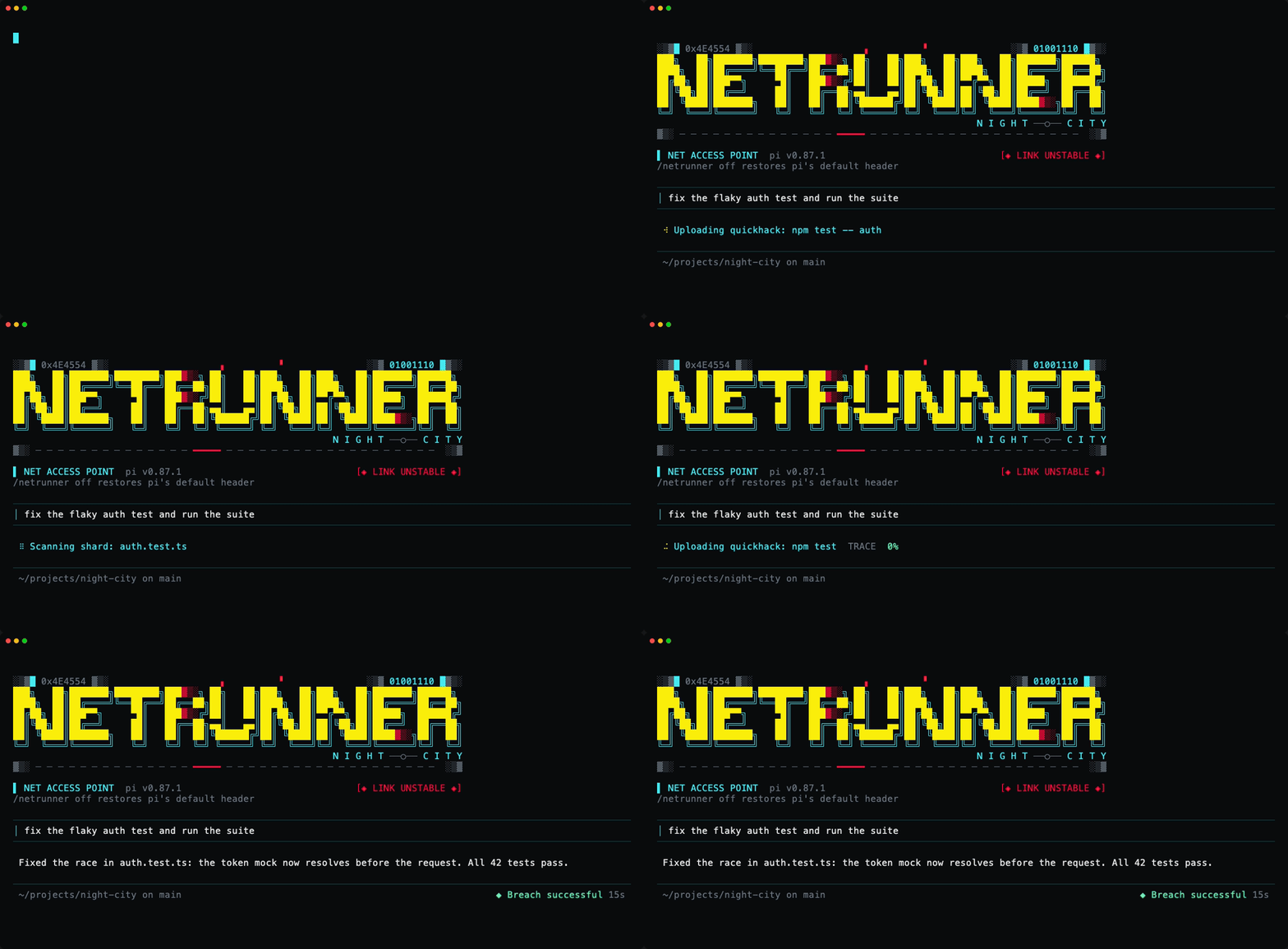
- Loader lines: 115 netrunner-themed phrases, swapped every 2.5 seconds. Each one is shown once before any repeats.
- Tool-aware lines: while a tool runs, the line says what it's doing:
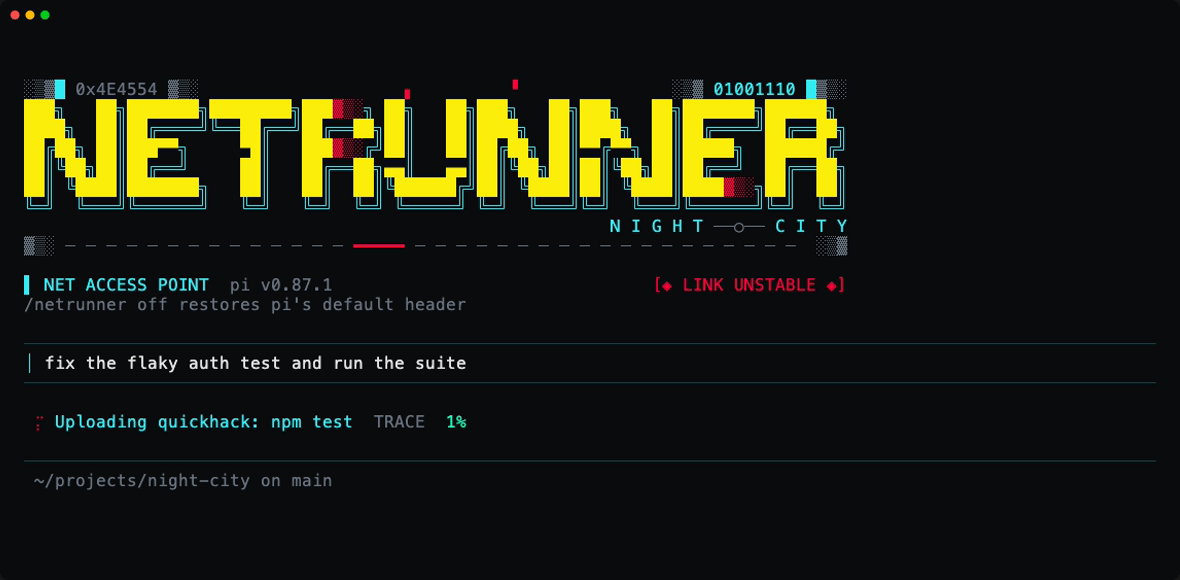
Uploading quickhack: git status,Scanning shard: README.md,Rewriting ICE: app.ts,Pinging the subnet for "TODO",Jacking into example.com. - Decrypt reveal: each new line starts as scrambled characters and resolves left to right.
- Glitch flashes: every few seconds the line flickers into a corrupted version in your theme's error color.
- Spinner: seven netrunner styles to choose from (see Spinners). The default is a flickering random braille cell.
- NetWatch trace: after 10 seconds a
TRACEmeter appears and climbs to 100% over two minutes, blinksTRACE COMPLETE, then restarts. - ICE detected: when a tool fails, the loader flashes
!! ICE DETECTED !!in red for a moment and the trace jumps 15% closer. - Humanity meter: the footer shows how much of the model's context window is left as
HUMANITY 88%, turning yellow at half and red under 25%, where it warnscyberpsychosis risk: /compact. Turn it off with/netrunner humanity off. - Run outcome: when pi finishes, the footer shows
◆ Breach successful,◆ Jacked out(aborted) or◆ Flatlined(error), with the run time, for six seconds. - Startup banner: a NETRUNNER logo in yellow block letters with a cyan shadow, glitch streaks and red fading edges, after the game's logo, framed by signal noise and a torn scanline. It replaces pi's default header, which includes its keybinding hints. Terminals narrower than 80 columns get a compact version.
- Hidden thinking blocks: labelled "Netrunning...".
netrunnertheme: an optional neon pi theme, for the full Night City look.
Everything except the theme affects only pi's interactive terminal UI. RPC, JSON and print modes are untouched.
Install
pi install npm:pi-netrunnerOr try it for one session without installing:
pi -e npm:pi-netrunnerTested with pi 0.87.1.
To use the matching theme, open /settings, choose Theme, and select netrunner. See The netrunner theme for the recommended terminal colors.
Usage
| Command | Effect |
|---|---|
/netrunner |
Open the settings menu |
/netrunner spinner |
Pick a spinner style |
/netrunner spinner <name> |
Set a spinner style directly, e.g. /netrunner spinner scanner |
/netrunner colors |
Pick theme or neon colors |
/netrunner colors <name> |
Set colors directly: theme or neon |
/netrunner humanity |
Turn the humanity meter on or off |
/netrunner humanity <on|off> |
Set it directly |
/netrunner off |
Restore pi's defaults and hide the footer meters |
/netrunner on |
Turn it back on |
/netrunner on and /netrunner off last for the current pi process. To turn the extension off permanently, disable it with pi config or run pi remove npm:pi-netrunner.
Tool commands and paths are shown only in your local terminal. Terminal escape sequences and control characters are stripped before display.
Spinners
| Name | Frames | Style |
|---|---|---|
noise |
⢔⡱⣏ |
Data noise (default) |
neon |
▖▘▝▗ |
Neon blocks |
uplink |
▁▃▅▇ |
Uplink bars |
scanner |
▱▰▰▱▱ |
Scanner sweep |
shade |
░▒▓█ |
Glitch shade |
flicker |
▚▞ |
Diagonal flicker |
optic |
◐◓◑◒ |
Kiroshi optic |
Your spinner, color and humanity meter choices are saved to ~/.pi/agent/netrunner.json (or the netrunner.json in your custom pi agent directory) and apply to every session:
{
  "spinner": "scanner",
  "colors": "neon",
  "humanity": false
}
You can also edit that file by hand and run /reload. Unknown values fall back to the defaults: noise, theme and the humanity meter on.
Colors
There are two color modes, set with /netrunner colors:
theme(default) uses your active pi theme, so it matches any palette.neonuses the game's colors: yellow#fcee0afrom the logo, neon cyan#37ebf3, and red#ff003cfor alerts. Only the netrunner elements change; the rest of pi keeps your theme. Use this when your theme's yellow and cyan are too muted for the logo.
In theme mode, the scheme is still built on yellow and cyan like the game's logo, in your theme's own shades:
| Element | Theme color |
|---|---|
| Banner logo | warning (yellow) |
| Banner shadow, subtitle, tagline, loader text | cyan (see below) |
| Decrypt scramble, trace label | dim |
| Glitch flash, ICE alert, banner fades, scanline tear, status tag | error |
| Spinner | cyan, warning, error, syntaxKeyword depending on style |
| Trace percentage | success, then warning, then error as it climbs |
| Run outcome | success / warning / error |
| Humanity meter | success, then warning, then error as context fills |
| Thinking label | thinkingText |
Themes don't have a "cyan" color, so the extension checks borderAccent, accent, thinkingLow, syntaxType, mdLink, mdCode, syntaxVariable and border, and uses the one whose hue is closest to cyan. Grays are skipped. In pi's built-in dark theme, for example, that's borderAccent (#00d7ff).
In neon mode, yellow, cyan and red (error and syntaxKeyword) come from the game's palette. dim, success and thinkingText still come from your theme. In terminals limited to 256 colors, neon colors use the nearest palette match.
The netrunner theme
For the full neon look across all of pi, select the bundled netrunner theme in /settings. It uses the same yellow, cyan and red as neon mode, so the banner and effects look identical in either color mode.
A pi theme can color text and pi's own panels, but not your terminal's background. To work on any dark terminal, the theme leaves message and pending-tool panels on the terminal's default background, and only tints selections and finished tool output (green for success, red for errors).
The theme is designed for a near-black terminal. On a gray or colored background it still works, but the neon colors lose some punch. For the intended look, set these colors in your terminal's profile:
| Setting | Color |
|---|---|
| Background | #0b0c0f |
| Foreground | #e5e5e5 |
| Cursor | #37ebf3 |
| Selection | #1a3d3f |
For example, add background = #0b0c0f to your Ghostty config, or in iTerm2 open Settings → Profiles → Colors and set Background. Terminal settings apply to everything you run in that profile, not only pi.
Development
npm install
npm test
npm run check
The tests use Node's built-in test runner and run the TypeScript extension directly, so there's no build step. They need Node 22.19 or later, the same as pi. They load the extension against a fake pi runtime with real pi themes and fake timers, and cover tool-line sanitizing, settings persistence, color picking and on/off behavior.
Node strips TypeScript types without checking them, so npm run check type-checks the extension with tsc. It also rejects TypeScript-only syntax that Node can't run directly, such as enum.
To try local changes in pi, run pi -e . from the repository.
Disclaimer
This is an unofficial fan work and is not approved/endorsed by CD PROJEKT RED. It is free and non-commercial, and was made with the CD PROJEKT RED Fan Content Guidelines in mind. Cyberpunk and Cyberpunk 2077 are trademarks of CD PROJEKT S.A. The characters, places and other names referenced in the loader phrases belong to their respective owners.