pi-odoo-workflow
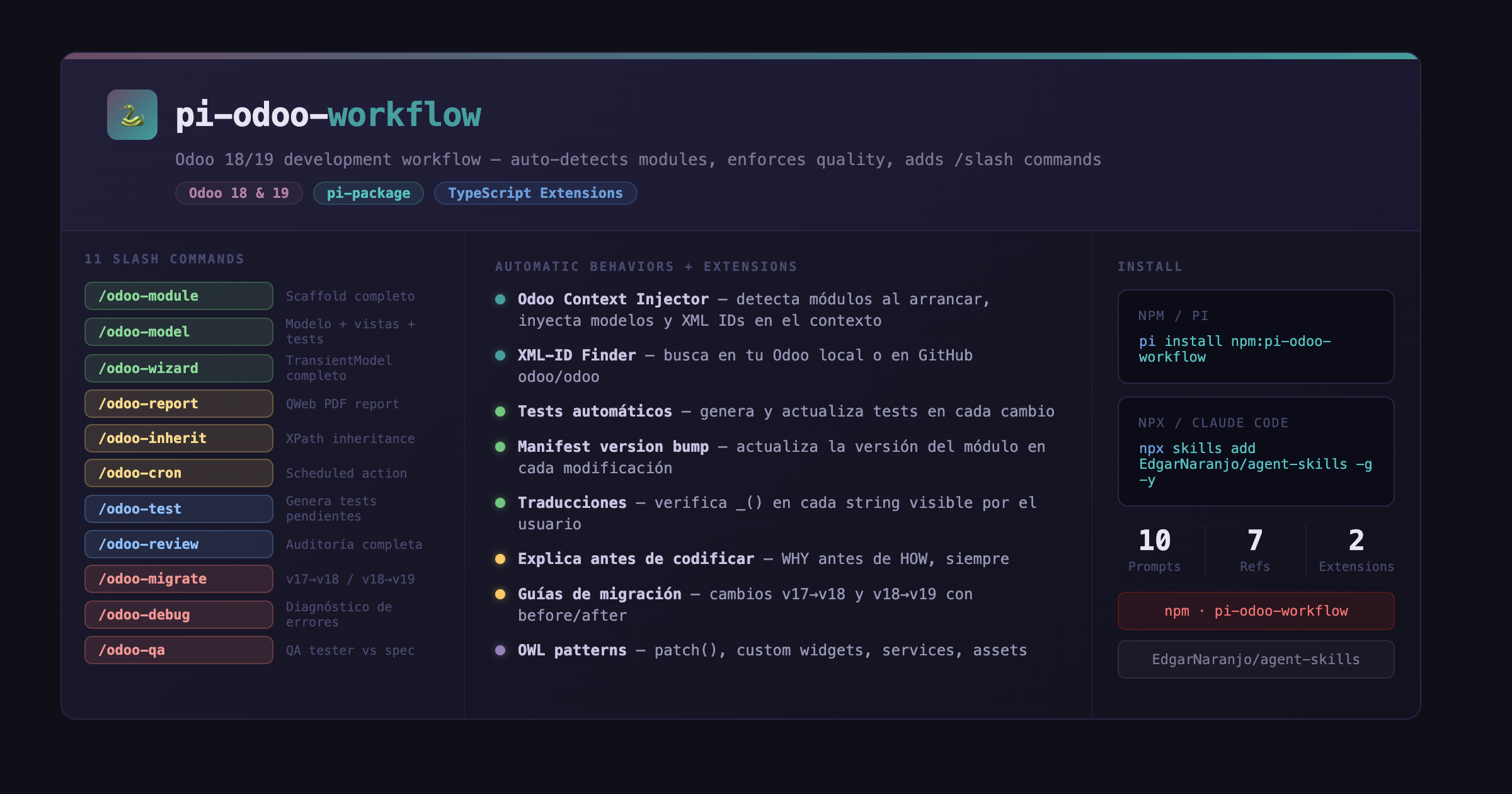
Odoo 18/19 module development for pi and Claude Code — auto-detects your modules, finds XML IDs, and scaffolds models, views, wizards, reports, controllers, OWL components, tests and migrations with 15 /odoo-* slash commands. Includes TypeScript extension
Package details
Install pi-odoo-workflow from npm and Pi will load the resources declared by the package manifest.
$ pi install npm:pi-odoo-workflow- Package
pi-odoo-workflow- Version
1.12.1- Published
- May 28, 2026
- Downloads
- 1,297/mo · 254/wk
- Author
- edgarnaranjo
- License
- LGPL-3.0-or-later
- Types
- extension, skill, prompt
- Size
- 293.4 KB
- Dependencies
- 0 dependencies · 0 peers
Pi manifest JSON
{
  "skills": [
    "./skills"
  ],
  "prompts": [
    "./prompts"
  ],
  "extensions": [
    "./extensions"
  ],
  "image": "https://raw.githubusercontent.com/EdgarNaranjo/agent-skills/main/assets/preview.png",
  "changelog": "https://github.com/EdgarNaranjo/agent-skills/blob/HEAD/CHANGELOG.md"
}Security note
Pi packages can execute code and influence agent behavior. Review the source before installing third-party packages.
README
pi-odoo-workflow
Odoo 18/19 development workflow for pi coding agent — stops you from repeating the same Odoo context on every message. The skill tells Claude how to behave automatically: what to check, what to generate, and what to never skip.
Works with
| Feature | pi | Claude Code |
|---|---|---|
| Skill automatic behaviors | ✅ | ✅ |
Reference guides (v18-changes.md, etc.) |
✅ | ✅ |
/odoo-* prompt templates |
✅ Native slash commands | ⚠️ Paste content manually |
odoo_scan tool (auto-detects modules) |
✅ Auto-injected | ❌ Not available |
odoo_find_xmlid tool |
✅ Auto-injected | ❌ Not available |
| Module context in system prompt | ✅ Automatic | ❌ Not available |
pi: full experience. Claude Code: skill + reference guides only (via npx skills add).
Quickstart
# 1. Install
pi install npm:pi-odoo-workflow

# 2. Open pi inside your Odoo project
cd my-odoo-addons/
pi

# 3. Start planning a feature
/odoo-plan "add priority field to hospital appointments"

# Or scaffold a new module from scratch
/odoo-module my_module
The skill activates automatically. On your first message, Claude will ask for the Odoo version (18 or 19) and the UI language — then remembers both for the session.
What it does
🧠 Skill: workflow-odoo
Loaded automatically when working on Odoo code. Claude will — without being asked:
- Ask for version once (18 or 19) and remember it for the session
- Check module structure before and after every change
- Write tests for every new method or feature
- Update tests when modifying existing code
- Check translations — all user-visible strings use
_() - Explain decisions before writing code, naming alternatives
- Suggest better patterns when they exist
Reference guides included:
| File | Content |
|---|---|
module-structure.md |
OCA-compatible directory layout, naming conventions |
v18-changes.md |
v17 → v18 breaking changes with before/after code |
v19-changes.md |
v18 → v19 breaking changes with before/after code |
testing-patterns.md |
@tagged, setUpClass, wizard tests, exception tests |
translations.md |
_() usage, .pot generation, common mistakes |
owl-patterns.md |
patch(), custom field widgets, services, asset declaration |
⚡ Prompt Templates
Type /command in pi to expand into full instructions:
| Command | What it generates |
|---|---|
/odoo-module <name> |
Complete module scaffold: dirs, manifest, __init__.py, security CSV, i18n, tests |
/odoo-model <model.name> |
Full model: Python + form/list views + security + tests + manifest update |
/odoo-wizard <name> |
TransientModel wizard: Python + dialog view + trigger button + tests |
/odoo-report <name> |
QWeb PDF report: action + template + paper format + Print menu binding |
/odoo-inherit <view_xml_id> |
View inheritance with correct XPath for 9 change types (form, list columns, attributes, header, notebook, hide, group, replace) |
/odoo-cron <name> |
Scheduled action: Python method + ir.cron XML + manifest update |
/odoo-test |
Scans existing code and generates/updates tests for uncovered methods |
/odoo-review |
Pre-commit audit — static analysis: structure, APIs, translations, tests, security — use before every commit ✅/⚠️/❌ |
/odoo-migrate |
Migrates module between versions (v17→v18 or v18→v19) |
/odoo-db-migrate <change> |
Generates migrations/pre-migration.py and post-migration.py for schema changes (field rename, type change, model merge, XML ID rename) |
/odoo-plan <feature> |
Plans a complex feature through structured phases: explore → propose → spec → design → tasks. Use before /odoo-model or /odoo-wizard for large work |
/odoo-qa |
Post-spec validation — validates implementation against a spec or plan, requires test evidence, issues APPROVED/REJECTED/PENDING verdict — use when a feature is "done" |
/odoo-debug [error] |
Diagnoses tracebacks, access errors, view failures, cron issues, missing XML IDs — guides to root cause with concrete fix steps |
/odoo-controller <name> |
HTTP controller with @route endpoints — backend, portal, JSON-RPC, or external API — with security checklist and HttpCase tests |
/odoo-owl <name> |
OWL 2 component — field widget, standalone component, or service — with asset declaration and optional tour test |
🔌 Extensions (pi only)
Two TypeScript extensions that run automatically when you open pi in a directory with Odoo modules — no commands needed:
🐍 Odoo Context Injector (odoo-context.ts)
- Detects all
__manifest__.pyfiles - Extracts module name, version, dependencies, models, inherited models, and view XML IDs
- Notifies you: "🐍 Odoo: my_module (v19.0.1.0.0)"
- Injects that context into Claude's system prompt automatically
Claude then knows exactly which models exist, which views can be inherited, and which XML IDs are available — without you having to explain anything.
Tool available to Claude: odoo_scan — returns the full module structure on demand.
🔍 Odoo XML-ID Finder (odoo-xmlid.ts)
Tool available to Claude: odoo_find_xmlid — finds the exact XML ID for any view, action, or record.
Searches in order:
- Local Odoo source (if found at
~/odoo,~/src/odoo, etc.) — instant grep - GitHub API (
odoo/odoorepository) — fallback with direct raw file links
Install
pi (full experience)
All features: skill + prompt templates + extensions + auto-injected context.
# From npm
pi install npm:pi-odoo-workflow

# From GitHub
pi install git:github.com/EdgarNaranjo/agent-skills

# Try without installing (-e loads the package for this session only, no persistent install)
pi -e git:github.com/EdgarNaranjo/agent-skills
Claude Code (skill only)
The skill works in Claude Code via the Agent Skills standard. You get the automatic behaviors and all reference guides. You do not get the /odoo-* slash commands (pi-specific syntax) or the odoo_scan / odoo_find_xmlid tools (pi extensions).
npx skills add EdgarNaranjo/agent-skills -g -y
What makes this different
Every other Odoo skill for AI agents is a reference — it tells Claude how Odoo works. This skill tells Claude how to behave: what to do automatically, what to check, what to generate, and why.
The prompt templates are unique — no other Odoo skill package has /slash commands.
Works well alongside
unclecatvn/agent-skills@odoo-19.0— deep API reference for Odoo 19alessandrorlm/agent-skills@odoo-17.0— reference for v17 patterns
FAQ
Q: When do I use /odoo-review vs /odoo-qa?
/odoo-review is a pre-commit static audit — run it any time to catch code issues (wrong patterns, missing tests, security gaps). /odoo-qa is a post-feature gate — run it when you think a feature is complete, provide your test output, and get a formal APPROVED/REJECTED verdict against a spec.
Q: Does this work without Odoo source code installed locally?
Yes. The odoo_find_xmlid tool falls back to the GitHub API when local source isn't found. Only the odoo_scan extension requires a local Odoo module directory.
Q: Can I use this with Claude Code instead of pi?
Yes, but only the skill and reference guides work. The /odoo-* slash commands and the auto-context injection (odoo_scan, odoo_find_xmlid) are pi-only. See the "Works with" table at the top.
Q: The skill keeps asking me the Odoo version. How do I stop it?
Answer once at the start of the session. The skill remembers it. If using prompts like /odoo-model directly, include the version in your first message: "v19, add model hospital.appointment".
Q: How do I migrate an existing module from v18 to v19?
- Run
/odoo-migrate— migrates the code (APIs, XML tags, Python patterns) - Run
/odoo-db-migratefor each schema change (renamed fields, model renames) - Run
/odoo-testto check test coverage - Run
/odoo-qawith your migration plan as the spec
License
LGPL-3.0-or-later — same license as Odoo Community modules.
Links
- npm: pi-odoo-workflow
- GitHub: EdgarNaranjo/agent-skills
- pi.dev: pi-odoo-workflow
- Changelog: CHANGELOG.md