pi-open-tui
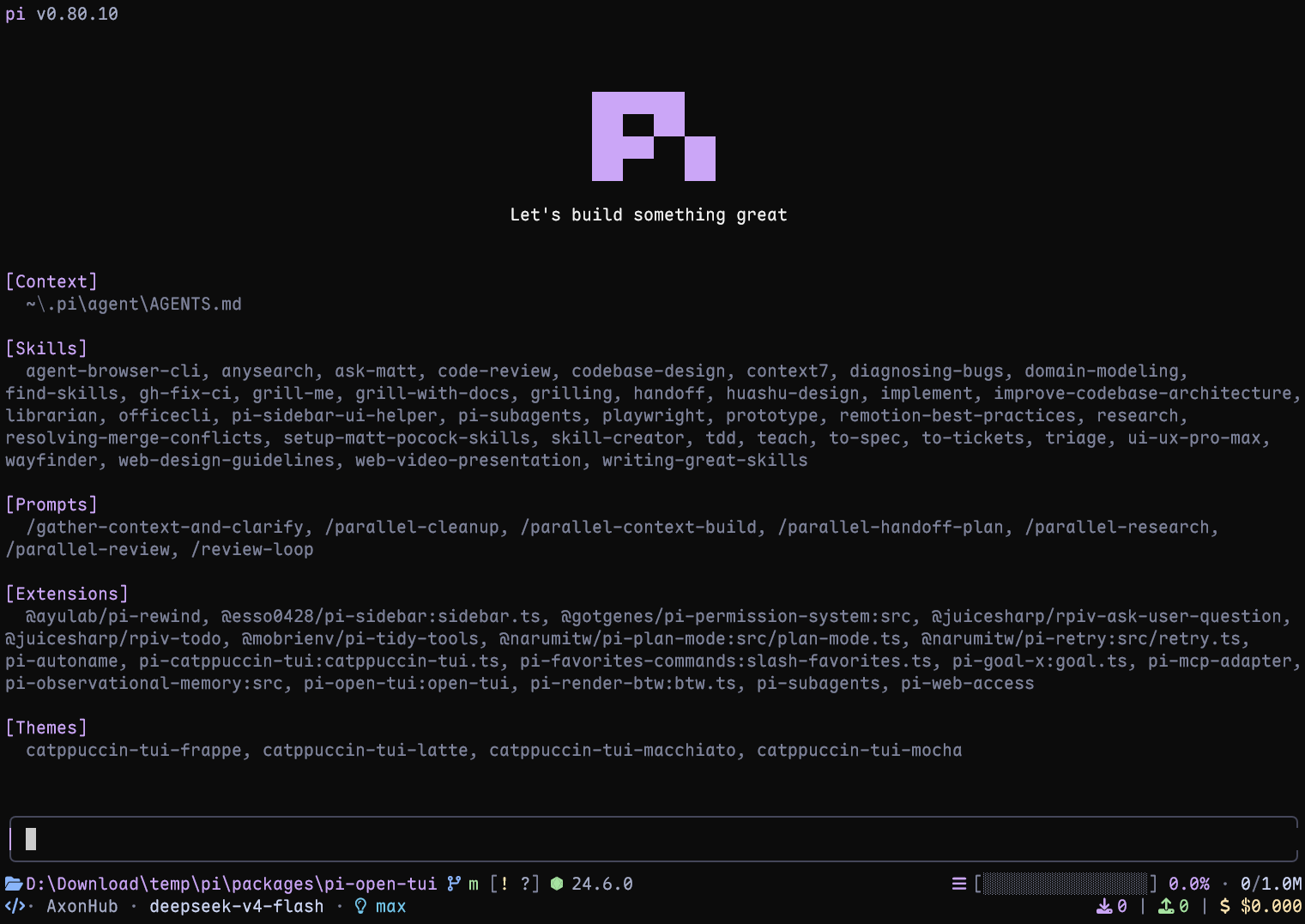
A polished TUI for Pi coding agent: animated logo header, Starship-style footer, rounded editor with model metadata, and prompt-box user messages.
Package details
Install pi-open-tui from npm and Pi will load the resources declared by the package manifest.
$ pi install npm:pi-open-tui- Package
pi-open-tui- Version
0.2.15- Published
- Aug 22, 2026
- Downloads
- 5,555/mo · 2,257/wk
- Author
- oldsuns
- License
- MIT
- Types
- extension
- Size
- 262.4 KB
- Dependencies
- 0 dependencies · 3 peers
Pi manifest JSON
{
  "extensions": [
    "./extensions/open-tui/index.ts"
  ],
  "image": "https://raw.githubusercontent.com/OldSuns/pi-open-tui/main/assets/preview_dashboard_1.png"
}Security note
Pi packages can execute code and influence agent behavior. Review the source before installing third-party packages.
README
pi-open-tui
English | 简体中文
A polished terminal interface for the Pi coding agent. It brings the strongest ideas from pi-haiku, pi-claude-code-tui, and pi-zentui into one configurable extension.
Highlights
- Pi header with model, thinking level, working directory, and useful slash-command hints
- Responsive footer with Git state, detected runtime, context usage, token counts, cost, and extension status
- Framed editor with block, bar, and underline cursor styles
- Project awareness for 50+ runtimes and detailed Git states, including ahead/behind, staged, modified, untracked, stashed, and detached HEAD
- Turn telemetry for TPS, time to first token (TTFT), duration, stalls, tokens, and list-price rate
- Interactive settings through
/open-tui, available in English and Simplified Chinese - Version-guarded Pi compatibility shim: fullscreen wheel speed falls back to Pi's default if its runtime support changes
Requirements
- Pi 0.80 or later
- A terminal with UTF-8 and color support
- A Nerd Font for the full icon set (optional; ASCII icons are built in)
Install
Install the extension:
pi install npm:pi-open-tui
Or try it for one session:
pi -e npm:pi-open-tui
Font and icons
Download any patched font from the official Nerd Fonts downloads page or latest GitHub release. Install it, select that font in your terminal profile, and restart the terminal.
The default auto mode detects the terminal environment, not the installed font file. If icons appear as boxes or incorrect symbols, open /open-tui and choose one of these modes under Appearance:
nerd: force Nerd Font icons after configuring a Nerd Font in the terminalascii: use plain-text icons with no patched font requiredauto: use Nerd Font icons in recognized terminals and ASCII elsewhere
If the font is installed but auto still selects ASCII, choose nerd explicitly. In VS Code, Windows Terminal, and similar apps, configure the font in the terminal profile rather than only installing it in the operating system.
Configuration
Run /open-tui to open the settings dialog. It provides General, Appearance, Footer, and Telemetry tabs. Settings are stored in ~/.pi/agent/open-tui.json:
{
  "enabled": true,
  "settingsLanguage": "en",
  "cursorStyle": "block",
  "fullscreen": {
    "wheelScrollLines": 4
  },
  "icons": {
    "mode": "auto"
  },
  "footerSegments": {
    "cwd": true,
    "sessionName": false,
    "gitBranch": true,
    "gitStatus": true,
    "gitCommit": false,
    "runtime": true,
    "context": true,
    "tokens": true,
    "cost": true,
    "extensionStatuses": true
  },
  "telemetry": {
    "enabled": true,
    "tps": true,
    "ttft": true,
    "duration": true,
    "tokens": true,
    "stalls": true,
    "cost": true
  }
}
Key options:
| Option | Values | Notes |
|---|---|---|
settingsLanguage |
en, zh |
Changes the /open-tui interface language |
cursorStyle |
block, bar, underline |
bar and underline require terminal cursor-shape support |
fullscreen.wheelScrollLines |
1-10 |
Lines scrolled per mouse-wheel notch in fullscreen mode; defaults to 4. In /open-tui, press Enter on this item and type a number (values are clamped to 1-10) |
icons.mode |
auto, nerd, ascii |
Controls footer and telemetry icons |
footerSegments |
Boolean flags | Shows or hides individual footer data |
telemetry |
Boolean flags | Enables telemetry and its individual measurements |
sessionName appears only when the session has a name. gitCommit shows the short hash and tag in detached HEAD state. Disabling extensionStatuses hides the entire extension status line, including MCP status.
Fullscreen wheel speed uses an isolated compatibility shim for Pi 0.84.2's runtime field because Pi does not yet expose a public setter. On Pi versions without a compatible field, the setting is ignored and Pi's default scrolling remains active.
Turn telemetry
After each complete agent run, pi-open-tui shows one transient result. Tool-call turns are combined into that result:
> TPS 42.5 tok/s | ~ TTFT 1.2s | + 29.7s | ↑ 567 | ↓ 1.2k | ! stall 1x / 4.3s | $ $3.60/M
TPS is calculated from all provider-reported assistant output tokens divided by the total generation time across the run. Timing starts at turn_start and ends at the assistant message_end, so it includes TTFT, hidden reasoning, buffering, and stalls; tool execution between turns is excluded. Runs without output tokens or measurable generation time show TPS —.
The $ / M value is the model's list-price rate from usage.cost.total, not the cumulative session cost shown in the footer. Every telemetry field can be toggled from the Telemetry tab.
Local development
npm install
npm test
npm run typecheck
pi -e .
Acknowledgements
This project builds on several Pi community packages:
- pi-haiku — two-line footer structure and working timer
- pi-claude-code-tui — Pi logo frames and rounded editor border technique
- pi-zentui — Starship-style footer segments, runtime detection, session lifecycle, and settings UI pattern
- pi-tps — turn timing, stall detection, and conservative TPS measurement
The logo frames are derived from Pi's official install script (pi.dev/install.sh). Runtime detection and Git porcelain parsing borrow structure from pi-zentui.
Special thanks to the LINUX DO community for its support.