pi-open-tui
A polished TUI for Pi coding agent: branded header, responsive footer, framed editor, thinking preview, and compact tool views.
Package details
Install pi-open-tui from npm and Pi will load the resources declared by the package manifest.
$ pi install npm:pi-open-tui- Package
pi-open-tui- Version
0.4.2- Published
- Nov 3, 2026
- Downloads
- 10.4K/mo · 5,190/wk
- Author
- oldsuns
- License
- MIT
- Types
- extension
- Size
- 327.8 KB
- Dependencies
- 1 dependency · 3 peers
Pi manifest JSON
{
  "image": "https://raw.githubusercontent.com/OldSuns/pi-open-tui/main/assets/preview_dashboard_1.png",
  "extensions": [
    "./extensions/open-tui/index.ts"
  ]
}Security note
Pi packages can execute code and influence agent behavior. Review the source before installing third-party packages.
README
pi-open-tui

English | 简体中文
A polished terminal interface for the Pi coding agent.
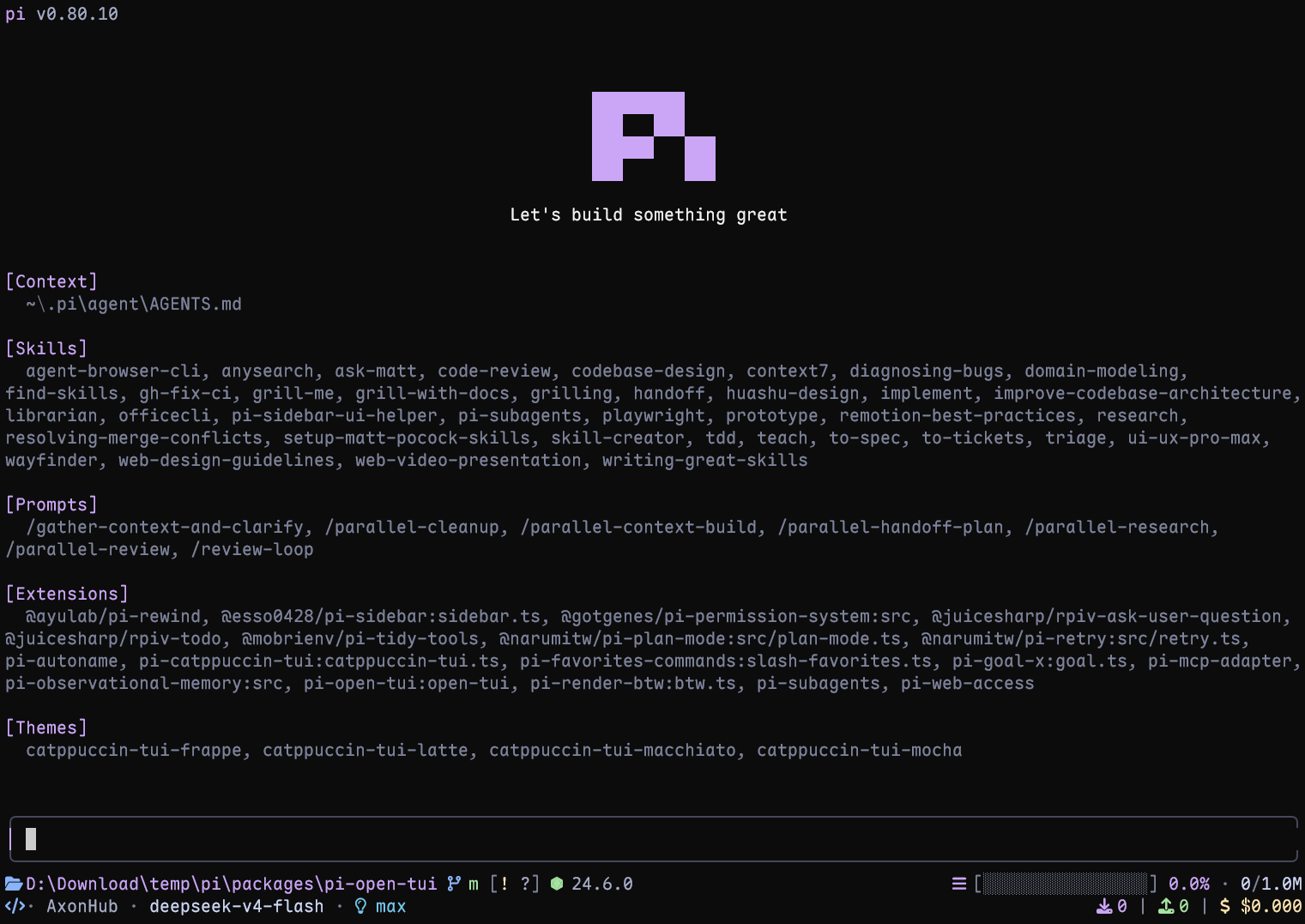
Live terminal screenshot with Pi 1.4.0.
Highlights
- Pi header with model, thinking level, working directory, and useful slash-command hints
- Responsive footer with Git state, detected runtime, context usage, token counts, cost, and extension status
- Framed editor with block, bar, and underline cursor styles; it preserves compatible editors installed by other extensions
- Project awareness for 50+ runtimes and detailed Git states, including ahead/behind, staged, modified, untracked, stashed, and detached HEAD
- Turn telemetry for TPS, time to first token (TTFT), duration, stalls, tokens, and list-price rate
- Thinking peek: an inline ticker replaces Pi's hidden
Thinking...label with the tail of the model's reasoning while it works - Interactive settings through
/open-tui, available in English and Simplified Chinese
Requirements
- Pi 1.2.0 or later
- Node.js 22.19.0 or later (Pi's minimum)
- A terminal with UTF-8 and color support
- A Nerd Font for the full icon set (optional; portable Unicode icons are built in)
Install
Install the extension:
pi install npm:pi-open-tuiOr try it for one session:
pi -e npm:pi-open-tuiFont and icons
Download any patched font from the official Nerd Fonts downloads page or latest GitHub release. Install it, select that font in your terminal profile, and restart the terminal.
The default auto mode checks the terminal environment, not the installed font file. It uses Nerd Font icons in interactive UTF-8 TTYs, including terminals running through a runner or subshell. If icons appear as boxes or incorrect symbols, open /open-tui and choose one of these modes under Appearance:
nerd: force Nerd Font icons after configuring a Nerd Font in the terminalunicode: portable Unicode icons (folder, branch, laptop, bulb, plug, hourglass, ...) that render without a patched font; emoji glyphs use the terminal's emoji fallbackascii: use plain-text icons with no patched font requiredauto: use Nerd Font icons in interactive UTF-8 TTYs; use portable Unicode icons for SSH sessions (the client terminal controls the font and usually has no Nerd Font); use ASCII for non-interactive output,TERM=dumb, or an explicitly non-UTF-8 locale
If the font is installed but auto still selects ASCII, choose nerd explicitly. In VS Code, Windows Terminal, and similar apps, configure the font in the terminal profile rather than only installing it in the operating system. If your SSH client terminal does ship a Nerd Font and you want the full icon set over SSH, set the mode to nerd explicitly.
If wide Nerd Font icons visually consume the gap before their labels (for example in Kitty), enable footerSegments.nerdIconSpacing (Footer → Extra space after Nerd icons in /open-tui). The footer then reserves an extra blank cell after Nerd Font icons, including runtime icons, and includes it in regular and inline footer width calculations. Unicode/ASCII icons and compact Git status flags are unchanged. In Kitty, narrow_symbols U+E000-U+F8FF 1 in kitty.conf is an alternative.
Configuration
Run /open-tui to open the settings dialog. It provides General, Appearance, Footer, and Telemetry tabs and adapts to the terminal size. Settings are stored in open-tui.json inside Pi's agent directory, which defaults to ~/.pi/agent; PI_CODING_AGENT_DIR overrides that directory. If saving fails, a warning explains that the change applies only to the current session.
Example configuration:
{
  "enabled": true,
  "header": true,
  "inlineFooter": false,
  "copyButtons": true,
  "settingsLanguage": "en",
  "cursorStyle": "block",
  "icons": {
    "mode": "auto"
  },
  "footerSegments": {
    "cwd": true,
    "hostname": false,
    "sessionName": false,
    "gitBranch": true,
    "gitStatus": true,
    "gitCommit": false,
    "runtime": true,
    "context": true,
    "tokens": true,
    "cost": true,
    "liveTps": true,
    "extensionStatuses": true,
    "capitalizeProviderName": true,
    "nerdIconSpacing": false
  },
  "telemetry": {
    "enabled": true,
    "tps": true,
    "ttft": true,
    "duration": true,
    "tokens": true,
    "stalls": true,
    "cost": true
  },
  "thinkingPeek": {
    "lines": 1
  },
  "toolView": {
    "mode": "native"
  }
}
Key options:
| Option | Values | Notes |
|---|---|---|
settingsLanguage |
en, zh |
Changes the /open-tui interface language |
header |
true, false |
Overrides Pi's header with the open-tui header; set it to false to leave the header slot to Pi or another extension |
inlineFooter |
true, false |
Moves the two main Footer rows into the editor's top and bottom borders; defaults to false. Extension status rows remain below the editor |
copyButtons |
true, false |
Frames code blocks and shows a clickable [Copy] label on code blocks and user messages in fullscreen mode; defaults to true. See Copy buttons |
cursorStyle |
block, bar, underline |
bar and underline require terminal cursor-shape support |
icons.mode |
auto, nerd, unicode, ascii |
Controls footer and telemetry icons |
footerSegments |
Boolean flags | Shows or hides individual footer data |
footerSegments.capitalizeProviderName |
Boolean | Capitalizes the first character of the provider name in the footer; set it to false to keep the provider's original casing |
footerSegments.nerdIconSpacing |
Boolean | Adds an extra blank cell after Nerd Font icons in the footer; defaults to false |
telemetry |
Boolean flags | Enables telemetry and its individual measurements |
thinkingPeek.lines |
0, 1, 2 |
Off, one-line, or two-line hidden thinking preview |
toolView.mode |
native, compact |
Pi's native cards (default) or compact call/summary rows with successful edit/write previews. Applies to rows created after the change |
sessionName appears only when the session has a name. hostname shows the short host name (first label of the machine's host name, e.g. mba from mba.example.com) with a server icon. In detached HEAD state, gitBranch shows HEAD with the short commit hash; gitCommit appends the tag pointing at that commit and only takes effect while gitBranch is on. Disabling extensionStatuses hides the entire extension status line, including MCP status. Each status keeps the colours its extension applied with ctx.ui.theme.fg(). A status without colours renders in the muted theme colour.
Footer token and cost totals include assistant responses, tool-reported usage, compaction and branch summaries, and cache warming. The cache-hit percentage describes the most recent assistant response, not the cumulative session.
When the first Footer row is too narrow, the runtime and context bar are hidden first, then Git, the session name, and the host name and timer. The CWD stays longest, shortened to its folder name.
With inlineFooter enabled, the two normal Footer rows are rendered inside the editor frame to save vertical space. The top border places the Git branch on the left and CWD first in the right-hand group; the session title appears on the left too when sessionName is enabled. The Header and extension status rows remain separate; narrow terminals truncate lower-priority Footer data first, keeping the right-hand statistics and the border corner.
open-tui frames existing editors that retain Pi’s native editor layout and its cursor, mouse, and padding APIs, including CustomEditor extensions. It decorates the same instance, preserving ghost text, key handling, completion, and submit callbacks. Editor extensions using the current ctx.ui.setEditorComponent() API can register before or after pi-open-tui; runtime replacements, including those made from shortcut callbacks with a fresh UI context, are framed too. Replacements are decorated when Pi mounts them, without calling the extension's factory again; temporary dialogs are left alone. Before decorating, open-tui renders the editor once at the terminal width to check for recognizable native top and bottom borders. Each framed render also checks its actual output; layouts without those borders are rendered again at the full requested width without frame mouse offsets, and framing resumes when native borders return. Editors without those capabilities or borders, or whose layout probe throws, remain unchanged, with the footer displayed separately even when inlineFooter is enabled. Disabling open-tui removes its decoration, restores the registration methods, and keeps the latest editor factory, including wrappers registered after open-tui.
This ordering guarantee applies to editor registration, not header or footer replacements. Extensions that bypass the current registration API by calling a previously saved setter or replacing the API methods themselves are outside this guarantee.
Turn telemetry
After each complete agent run, pi-open-tui shows one transient result. Tool-call turns are combined into that result:
> TPS 42.5 tok/s | ~ TTFT 1.2s | + 29.7s | ↑ 567 | ↓ 1.2k | ! stall 1x / 4.3s | $ $3.60/MTPS is calculated from all provider-reported assistant output tokens divided by the total generation time across the run. Timing starts at turn_start and ends at the assistant message_end, so it includes TTFT, hidden reasoning, buffering, and stalls; tool execution between turns is excluded. Runs without output tokens or measurable generation time show TPS —.
While a response streams, the working timer also shows the current estimated speed, for example working 12.3s · ~54 tok/s. The ~ marks it as an estimate: it is the rate over the last 2 seconds of streamed text, thinking, and tool-call arguments, estimated at about 4 characters per token for Latin text and code and 1 token per CJK character. It drops toward zero during stalls and stays dimmed at its last value during tool execution and between messages. It is controlled by Footer → Live TPS (footerSegments.liveTps), independently of the telemetry notification. It disappears when the run ends; the exact TPS above is the authoritative value.
The $ / M value is the model's list-price rate from usage.cost.total, not the cumulative session cost shown in the footer. Every telemetry field can be toggled from the Telemetry tab.
Thinking peek
When Pi's Hide thinking setting is enabled, pi-open-tui shows a compact ticker in the native hidden thinking block's Thinking... position. The /open-tui setting offers three modes: Off, 1 line, and 2 lines.
- while the model is reasoning, the current thinking tail streams by with a spinner (
~ think ⠋ …); - when the answer starts, it settles on a check mark (
~ think ✓); - in 2-line mode, the previous and latest thinking lines share the same text indentation; if the latest line overflows, both rows follow its newest tail as tokens arrive instead of retaining the previous line;
- after the task settles, the native
Thinking...label is restored.
~ think ⠋ previous thought
          latest thought
The ticker appears only once the model actually streams reasoning, so non-reasoning models never show it. Pi's own Hide thinking toggle controls visibility; changing it takes effect immediately. Each row is truncated by visible width, so CJK-wide thinking text cannot overflow. Configure it from General → Thinking peek in /open-tui, or via thinkingPeek.lines in open-tui.json.
Tool view
Native remains the default. With General → Tool view set to Compact (toolView.mode: "compact"), Pi's built-in tools (read, bash, powershell, edit, write, grep, find, ls) render as one call line and one summary line, with previews for successful edits and writes:
● Read(extensions/open-tui/footer.ts:1-120)
  └  120 lines
● Edit(extensions/open-tui/footer.ts)
  └  +2 −1
● Bash(npm test)
└ Done · 131 lines · 6.4s- Successful calls have dim call/summary text and a green dot. Pending dots are dim; running dots alternate between accent and dim once per second. Errors keep the red dot and summary. Failed shell summaries retain the last output line; while running, shell commands show the newest 3 output lines and elapsed time.
- Successful
editpreviews parse Pi's actual diff and syntax-highlight old and new code separately. Removed/added rows have red/green background bands ending two columns before the terminal's right edge. Stronger changed-word backgrounds apply only to paired adjacent removed/added lines sharing at least 30% non-whitespace content; exceeding the matching budget falls back to whole-line highlighting. Without a valid diff, the summary stays. - Successful
writepreviews show syntax-highlighted content with line numbers and no+signs on the normal, neutral terminal background. New files and overwrites look the same; no old-file diff is shown. Partial results and errors get no success previews. - Preview bodies show at most 16 rows; longer bodies show the first 16 plus a hidden-row count and
Ctrl+Ohint. Edit context and ellipsis rows count toward these limits. In compact mode only, long lines truncate horizontally with…instead of wrapping. - Clicking a row expands only that row into Pi's native card, and
Ctrl+Oexpands all rows. Native expanded rendering, including full output, diffs, and truncation notices, is unchanged. Calls remain separate, with no grouping or extra configuration. - Only the display changes. Tools, arguments, results, and what the model sees are untouched. Only tools confirmed by Pi as built-in are wrapped; third-party and MCP tools, including replacements with built-in names, keep their own rendering.
- Compact summaries flag truncated output, including grep's long-line truncation. Bracketed output and failure messages are preserved rather than mistaken for tool notices.
- The mode is chosen when Pi creates a row, so switching it affects new rows;
/reloador a new session applies it to the whole transcript.
Copy buttons
In fullscreen mode (Pi's tuiMode: "fullscreen"), every fenced code block is drawn in a rounded frame with its language and an always-visible [Copy] label in the top border, and every user message gets a [Copy] label too. Click it to put the source text on the clipboard; Pi flashes Copied!.
╭─ sh ─────────────── [Copy] ╮
│ pi install npm:pi-open-tui │
╰────────────────────────────╯- Code blocks: the frame replaces the two fence rows, so a block keeps its height; long lines wrap inside the frame. The label copies the code without the fences, with indentation and tabs preserved. This applies to code in both user and assistant messages.
- User messages: the label sits on the bubble's last row and copies the message as you typed it.
- Whole assistant replies have no label; use Pi's
/copyfor that. - While a reply streams, its code blocks are framed without a label, so you cannot copy unfinished code. The label is also dropped when the frame is too narrow; thinking blocks keep Pi's plain fences.
- Regular mode has no mouse capture, so code blocks keep Pi's plain fences there.
- Drag-selecting across a frame includes its border characters and the
[Copy]text. - If pi-pretty-tui is installed, its own code-block frames and copy buttons are kept and these are not drawn.
Toggle it from General → Copy buttons in /open-tui, or via copyButtons in open-tui.json.
Local development
npm install
npm test
npm run typecheck
pi -e .
CI checks Pi 1.2.0 and the latest release on Node.js 22.19.0 and 24, across Linux, Windows, and macOS. Keep Pi packages on the same version when checking compatibility. Automated tests do not replace checking terminal fonts, mouse interaction, and cursor support with pi -e ..
Acknowledgements
This project builds on several Pi community packages:
- pi-haiku — two-line footer structure and working timer
- pi-claude-code-tui — Pi logo artwork and rounded editor border technique
- pi-zentui — Starship-style footer segments, runtime detection, session lifecycle, and settings UI pattern
- pi-tps — turn timing, stall detection, and conservative TPS measurement
- pi-polish — compact tool-call rows and syntax-highlighted edit diffs
The logo artwork is derived from Pi's official install script (pi.dev/install.sh). Runtime detection and Git porcelain parsing borrow structure from pi-zentui.
Special thanks to the LINUX DO community for its support.