pi-open-tui
A polished TUI for Pi coding agent: branded header, responsive footer, framed editor, thinking preview, and compact tool views.
Package details
Install pi-open-tui from npm and Pi will load the resources declared by the package manifest.
$ pi install npm:pi-open-tui- Package
pi-open-tui- Version
0.4.4- Published
- Nov 6, 2026
- Downloads
- 11.8K/mo · 6,286/wk
- Author
- oldsuns
- License
- MIT
- Types
- extension
- Size
- 395.4 KB
- Dependencies
- 1 dependency · 3 peers
Pi manifest JSON
{
  "image": "https://raw.githubusercontent.com/OldSuns/pi-open-tui/main/assets/preview_dashboard_1.png",
  "extensions": [
    "./extensions/open-tui/index.ts"
  ]
}Security note
Pi packages can execute code and influence agent behavior. Review the source before installing third-party packages.
README
pi-open-tui

English | 简体中文
A polished terminal interface for the Pi coding agent.
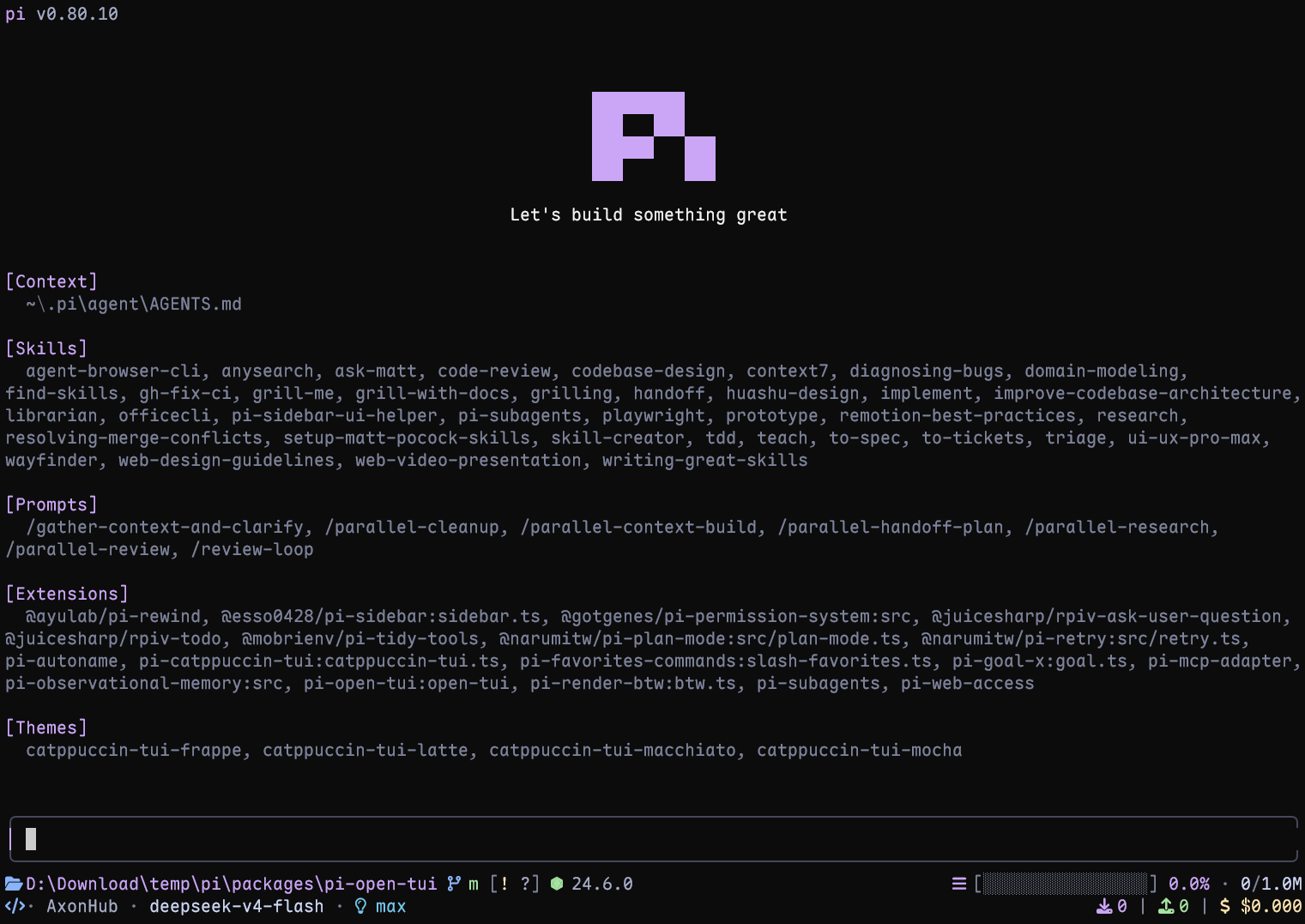
Highlights
- Pi header with model, thinking level, working directory, and useful slash-command hints
- Responsive footer with Git state, detected runtime, context usage, tokens, cost, and extension status
- Framed editor with block, bar, and underline cursors, preserving compatible editors from other extensions
- Project awareness for 50+ runtimes and detailed Git state, including ahead/behind, staged, modified, untracked, stash, and detached HEAD
- Turn telemetry with generation speed, time to first token, duration, stalls, tokens, and cost rate
- Thinking peek with a live preview of hidden reasoning while the model works
- Compact tool view with edit/write previews and optional support for extension and MCP tools
- Fullscreen Copy buttons for code blocks and user messages
- Interactive settings in English and Simplified Chinese through
/open-tui
Requirements
- Pi 1.5.0 or later
- Node.js 22.19.0 or later (Pi's minimum)
- A terminal with UTF-8 and color support
- A Nerd Font for the full icon set (optional; Unicode and ASCII modes are available)
Install
Install the extension:
pi install npm:pi-open-tuiOr try it for one session:
pi -e npm:pi-open-tuiFont and icons
For the full icon set, install a Nerd Font, select it in your terminal profile, and restart the terminal. Installing the font in the OS alone is not enough for apps such as VS Code or Windows Terminal.
In /open-tui, Appearance → Icons offers auto, nerd, unicode, and ascii. The default auto mode checks the terminal environment, not the installed font. If icons appear as boxes, choose unicode; if your terminal has a Nerd Font, you can force nerd, including over SSH.
See icon detection and spacing for automatic selection rules and the Kitty spacing option.
Configuration
Run /open-tui to open the settings dialog. Its General, Appearance, Footer, and Telemetry tabs are available in English and Simplified Chinese and adapt to the terminal size. Use Tab/Shift+Tab or ←/→ to switch tabs, ↑/↓ to move, Enter/Space to change a value, and Esc/q to close.
Settings are stored in open-tui.json inside Pi's agent directory (default: ~/.pi/agent; overridden by PI_CODING_AGENT_DIR). If saving fails, a warning explains that the change applies only to the current session.
| Setting | Where to find it | Default |
|---|---|---|
| Header and settings language | General → Interface | Header on, English |
| Thinking peek | General → Messages & tools | 1 line |
| Copy buttons | General → Messages & tools | On, fullscreen only |
| Tool view | General → Messages & tools | Native |
| Footer in editor border | General → Footer | Off |
| Icons and cursor style | Appearance | Auto icons, block cursor |
| Footer fields and telemetry measurements | Footer / Telemetry | Individually configurable |
Selecting Tool view: Compact reveals Compact extension tools as a child setting. Switching back to Native hides it and retains its value. The configuration reference contains the complete JSON defaults, every option, and tool exclusions.
Header, footer, and editor
The header provides model and project context with command hints. The two main footer rows keep location, Git state, runtime, a working/done timer, context usage, model details, tokens, and cost visible as space allows. Fields can be toggled individually; the layout shortens or hides lower-priority information in narrow terminals.
Footer token and cost totals include assistant responses, tool-reported usage, compaction and branch summaries, and cache warming. The cache-hit percentage describes the latest assistant response. Other extensions can use separate status rows or contribute text directly to the main footer.
Enable Footer in editor border to move the two main rows into the editor's top and bottom borders. Extension status rows remain below the editor. Compatible editors keep their input behavior, completion, and ghost text; editors that cannot be framed retain a separate footer. See editor compatibility and layout for the integration boundaries.
Turn telemetry
After each complete agent run, pi-open-tui shows one transient result, combining its assistant turns:
> TPS 42.5 tok/s | ~ TTFT 1.2s | + 29.7s | ↑ 567 | ↓ 1.2k | ! stall 1x / 4.3s | $ $3.60/MTPS measures provider-reported output tokens over generation time, including waiting and stalls but excluding tool execution between turns. The working timer also shows an estimated live speed such as ~54 tok/s during streaming. The $ / M field is the effective rate per million tokens for the run; the footer shows cumulative session cost.
Toggle notification fields under Telemetry → Measurements, or live speed under Footer → Runtime → Live TPS. See measurement definitions for formulas, timing boundaries, and cache accounting.
Thinking peek
With Pi's Hide thinking enabled, pi-open-tui replaces the hidden block's Thinking... label with the latest reasoning tail while the model works:
~ think ⠋ previous thought
          latest thought
Choose Off, 1 line, or 2 lines under General → Messages & tools → Thinking peek. The ticker appears only when the model streams reasoning, settles on a check mark when the answer begins, and returns to Pi's native label after the task settles. It follows Pi's Hide thinking toggle immediately and clips text to fit the available width.
Tool view
Native remains the default. Select General → Messages & tools → Tool view → Compact to display Pi's built-in tools (read, bash, powershell, edit, write, grep, find, ls) as call and summary rows:
● Read(extensions/open-tui/footer.ts:1-120)
  └  120 lines
● Edit(extensions/open-tui/footer.ts)
  └  +2 −1
● Bash(npm test)
└ Done · 131 lines · 6.4s- Successful
editandwritecalls show syntax-highlighted previews of up to 16 rows, with a hint to expand longer output. - Running shell calls show recent output and elapsed time; errors retain their error summary.
- Click a row to expand its native card, or use
Ctrl+Oto expand all rows. Tools, arguments, results, and model-visible content are unchanged. - Enable Compact extension tools to include extension and MCP tools. Use
toolView.excludein the config file for tools that should keep native rendering. Recognized@ff-labs/pi-ffftools receive search-specific summaries. - Changing the mode affects newly created rows. Use
/reloador a new session to apply it to the whole transcript.
See tool rendering details for preview rules, extension summaries, and renderer compatibility.
Copy buttons
In fullscreen mode (Pi's tuiMode: "fullscreen"), completed code blocks show a clickable [Copy] label in their rounded frame when there is enough width. User messages have a Copy label too. Clicking copies the source text and Pi flashes Copied!.
╭─ sh ─────────────── [Copy] ╮
│ pi install npm:pi-open-tui │
╰────────────────────────────╯
Code labels copy code without fences, preserving indentation and tabs. User-message labels copy the original message. Streaming code blocks gain their label when streaming finishes; regular mode and thinking blocks keep Pi's plain fences. Use Pi's /copy to copy a whole assistant reply.
Toggle General → Messages & tools → Copy buttons to enable or disable this feature. Copy-button details cover width limits, cached blocks, and interaction with other renderers.
Documentation
- Configuration reference — complete defaults, options, and icon selection
- Implementation and compatibility — measurement formulas, layout, rendering, and lifecycle
- Extension footer segments — public events and an integration example for extension authors
- Changelog — released and upcoming changes
Local development
npm install
npm test
npm run typecheck
pi -e .
CI checks Pi 1.5.0 and the latest release on Node.js 22.19.0 and 24 across Linux, Windows, and macOS. Keep all Pi packages on the same version. Use pi -e . to check terminal fonts, mouse interaction, and cursor support interactively.
Acknowledgements
This project builds on several Pi community packages:
- pi-haiku — two-line footer structure and working timer
- pi-claude-code-tui — Pi logo artwork and rounded editor border technique
- pi-zentui — Starship-style footer segments, runtime detection, session lifecycle, and settings UI pattern
- pi-tps — turn timing, stall detection, and conservative TPS measurement
- pi-polish — compact tool-call rows and syntax-highlighted edit diffs
The logo artwork is derived from Pi's official install script (pi.dev/install.sh). Runtime detection and Git porcelain parsing borrow structure from pi-zentui.
Special thanks to the LINUX DO community for its support.