pi-paste-image-to-model
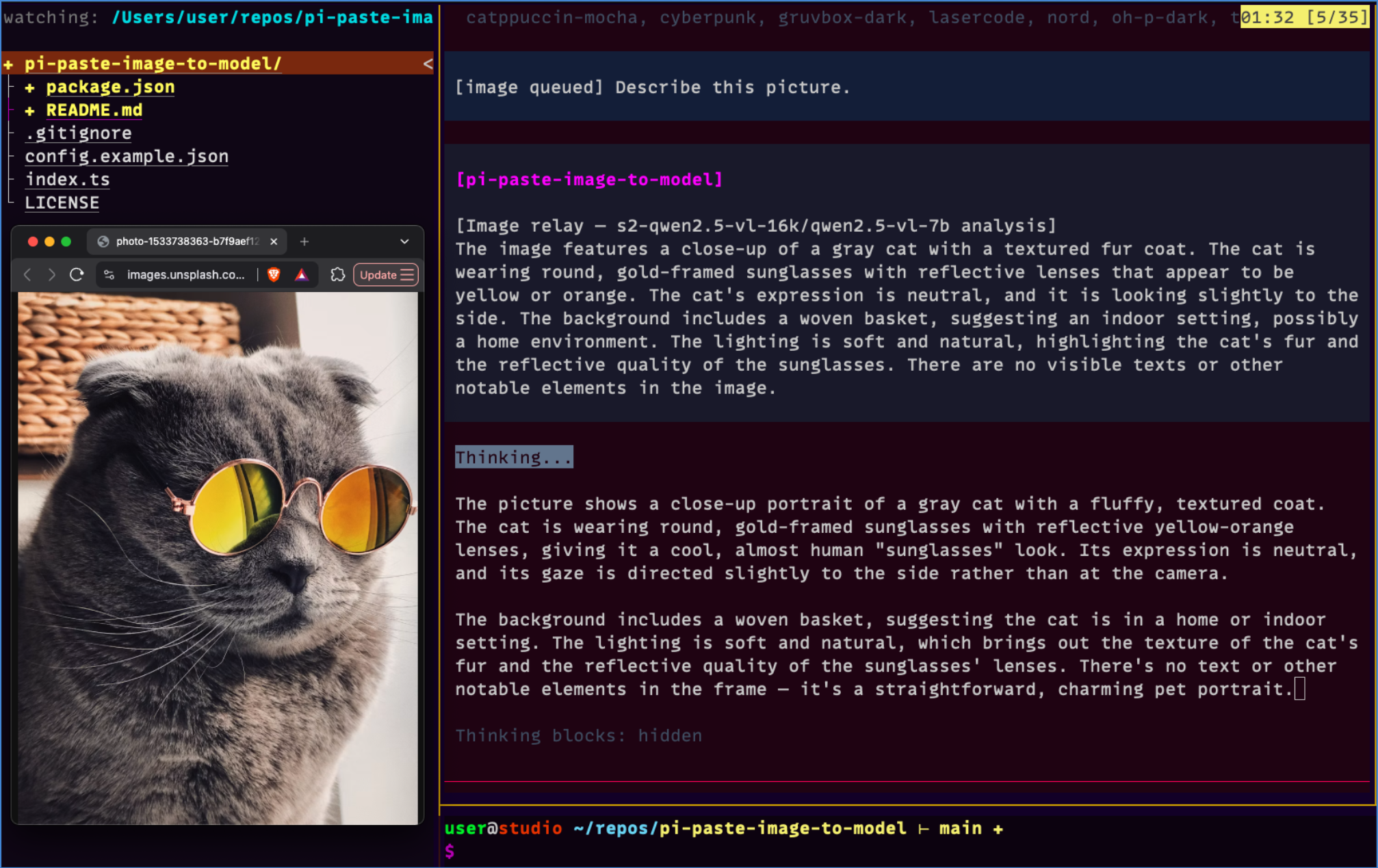
Paste an image in Pi TUI; relay it with recent chat context and your prompt to a vision model, and inject the analysis into the main model's context
Package details
Install pi-paste-image-to-model from npm and Pi will load the resources declared by the package manifest.
$ pi install npm:pi-paste-image-to-model- Package
pi-paste-image-to-model- Version
0.3.1- Published
- Sep 5, 2026
- Downloads
- 517/mo · 41/wk
- Author
- f1lt3r
- License
- MIT
- Types
- extension
- Size
- 36 KB
- Dependencies
- 0 dependencies · 1 peer
Pi manifest JSON
{
  "image": "https://raw.githubusercontent.com/F1LT3R/pi-paste-image-to-model/main/preview.png",
  "extensions": [
    "./index.ts"
  ]
}
Security note
Pi packages can execute code and influence agent behavior. Review the source before installing third-party packages.
README
🖼️ pi-paste-image-to-model

Paste an image in the Pi Coding Agent TUI, and have it relayed to a vision (VL) model together with recent chat context and your prompt — with the analysis injected back into your main (text-only) model's context.
Use it when your everyday coding model is text-only (or you just don't want to pay vision-model prices per turn) but you still want the model to "see" screenshots, error shots, UI mockups, and photos you paste.
📋 [clipboard] ──ctrl+v──▶ queue + "[image queued]" marker in editor
⏎ [submit]   ─────────▶ marker stripped; image + history tail + your prompt
                       sent to your VL model (from models.json)
✅ [result]   ─────────▶ VL analysis injected as a persistent message:
                        "[Image relay — <provider>/<model> analysis] ..."
The injected message is visible in the transcript and in the main model's LLM context, so it can act on the image's contents without ever receiving the raw pixels.
📦 Install
Three ways — pi install writes to ~/.pi/agent/settings.json (use -l for
project settings instead):
1️⃣ Local path — works right now, no publishing needed:
pi install /Users/user/repos/pi-paste-image-to-model
Local paths are added to settings without copying; pi loads the extension
through the pi manifest in package.json.
2️⃣ Git — shareable with the community as soon as you push the repo (no publishing needed):
pi install git:github.com/F1LT3R/pi-paste-image-to-model
Pin a version with @<tag-or-sha>, e.g. ...@v0.1.0.
3️⃣ npm:
pi install npm:pi-paste-image-to-model
npm:sources resolve against the npm registry, so the package must be published for that form to work. Until then, use the local path or git form.
To try it for a single run without installing:
pi -e /Users/user/repos/pi-paste-image-to-model
🛠️ Or without packages at all — copy the extension and register it directly:
cp index.ts ~/.pi/agent/extensions/pi-paste-image-to-model.ts
then add it to the extensions array in ~/.pi/agent/settings.json:
"extensions": ["~/.pi/agent/extensions/pi-paste-image-to-model.ts"]
⚙️ Configuration
All of it is optional and lives in ~/.pi/agent/paste-image-to-model.json
(start from config.example.json):
{
  "enabled": true,
  "shortcut": "ctrl+v",
  "provider": "s2-qwen2.5-vl-16k",
  "model": "qwen2.5-vl-7b",
  "historyChars": 6000,
  "marker": "[image queued]"
}
| Field | Type | Default | Description |
|---|---|---|---|
enabled |
boolean | true |
Set false to disable the whole extension. |
shortcut |
string | "ctrl+v" |
Key that reads the clipboard (any Pi KeyId, e.g. "ctrl+alt+v"). |
provider |
string | — (required)¹ | Provider id from your ~/.pi/agent/models.json. |
model |
string | — (required)¹ | Model id from your ~/.pi/agent/models.json (vision-capable). |
historyChars |
number | 4000 |
How many trailing characters of the conversation to send to the VL model. 0 = no history. |
marker |
string | "[image queued]" |
Marker text inserted into the editor when you paste an image. |
relayTimeoutMs |
number | 120000 |
Hard timeout for the VL model call. If it expires you get an error notification and the turn continues without the image — pi can never wedge on a relay. |
vlMaxTokens |
number | 1024 |
Max tokens the VL model may generate. Small local models can ramble to their max; lower = faster. |
¹ If provider/model are missing, the shortcut still works but the relay is
skipped with a clear notification telling you to configure them.
Environment overrides (take precedence over the file):
| Variable | Maps to |
|---|---|
PI_PASTE_IMAGE_TO_MODEL_ENABLED |
enabled |
PI_PASTE_IMAGE_TO_MODEL_SHORTCUT |
shortcut |
PI_PASTE_IMAGE_TO_MODEL_PROVIDER |
provider |
PI_PASTE_IMAGE_TO_MODEL_MODEL |
model¹ |
PI_PASTE_IMAGE_TO_MODEL_HISTORY_CHARS |
historyChars |
PI_PASTE_IMAGE_TO_MODEL_RELAY_TIMEOUT_MS |
relayTimeoutMs |
PI_PASTE_IMAGE_TO_MODEL_VL_MAX_TOKENS |
vlMaxTokens |
¹ The _MODEL variable accepts either a bare model id or "provider/modelId".
Config changes take effect after
/reload(or restarting pi).
⌨️ Keybinding note (default ctrl+v)
Pi's built-in app.clipboard.pasteImage (default ctrl+v) would conflict with
this extension's shortcut. If you use ctrl+v, unbind the built-in one in
~/.pi/agent/keybindings.json:
{ "app.clipboard.pasteImage": [] }
Pick a different shortcut instead and you don't need to touch this.
🧰 Requirements
- 🍎 macOS for clipboard image reading (uses
osascriptwith«class PNGf», the same mechanism as pi-image-tools). Text clipboard fallback works on macOS too. Linux/Windows clipboard providers are a TODO. - 👁️ A vision-capable model registered in your Pi model registry
(
~/.pi/agent/models.json) with working auth. Local servers (vLLM, llama.cpp, …) and API providers both work — the extension only needs aprovider/modelpair thatctx.modelRegistry.find()can resolve.
📤 What gets sent to the VL model
One user message containing:
1️⃣ A fixed relay instruction (you are the image relay for a text-only model).
2️⃣ The tail of the current conversation (user/assistant text plus one-line
tool-call summaries), truncated to the last historyChars characters.
3️⃣ Your current prompt text (the text you wrote alongside the pasted image).
4️⃣ The image(s) themselves, as base64 image content blocks.
The VL model's text answer is then injected as a persistent custom message
([Image relay — <provider>/<model> analysis] …) before the main model's turn
starts. The raw image is not attached to your user message.
🛠️ Agent tool: image_describe
The extension also registers a tool the agent can call itself:
| Parameter | Type | Description |
|---|---|---|
path |
string (required) | Path to the image file (png/jpg/webp/gif); relative paths resolve against the working directory. |
prompt |
string (required) | Your question or context for the VL model about the image — what you need from it. The VL model sees no other context (no conversation history), so be specific. |
Example of what the LLM sees as the tool result:
image_describe({ "path": "/tmp/screenshot.png", "prompt": "what's the error in this terminal?" })
→ <the VL model's analysis, as plain text>
The TUI call line shows your query alongside the target file:
image_describe "what's the error in this terminal?" → /tmp/screenshot.png
The image never reaches the main model — only the text analysis does, as a normal tool result. This lets the agent inspect screenshots, photos, and diagrams on its own (e.g. right after taking a screenshot with a shell command) without you pasting anything.
🧠 How the main model learns to handle relayed images
The relayed text is framed so the text-only model isn't surprised by it:
- 📋 Paste path: when a relayed image injects the custom message, the same
before_agent_starthook returns a per-turnsystemPrompttelling the model the message is a vision model's description of the user's image, that it should treat it as the image's contents, and that it must not invent visual details or claim to have seen pixels. - 🛠️ Tool path: the
image_describetool description, itspromptGuidelines, and a one-line header on every tool result all say the same thing — the returned text is your only view of the image, it is a third-party reading (may contain small errors), and if it conflicts with the user, the user wins.
No AGENTS.md entry is needed; the guidance ships with the extension and applies to anyone who installs it.
🚧 If a relay looks stuck
The VL call is bounded: a JS-side timer (relayTimeoutMs, default 120 s)
and the provider timeoutMs both abort it, and the image_describe tool
also follows your interrupt. On timeout you get a notification and your turn
starts anyway. If relays are slow or failing:
1️⃣ Check the VL server is up: curl -s <baseUrl>/v1/models.
2️⃣ Lower vlMaxTokens — small models asked to be "thorough" can generate
thousands of tokens, which on a consumer GPU means minutes of invisible
waiting.
3️⃣ Lower historyChars — the relay sends the history tail to the VL model.
4️⃣ Use a faster VL model/provider.
🙏 Credits
This extension is based on
pi-image-tools by
MasuRii — specifically its trigger
mechanism: registering a custom paste shortcut, reading clipboard images on
macOS, queueing images with an editor marker, and stripping the marker via the
input event transform. Thanks MasuRii for building such a well-structured
package to learn from!
Built on the Pi Coding Agent extension API
(pi.registerShortcut, the input and before_agent_start events,
ctx.modelRegistry.complete(), ctx.sessionManager.getBranch()).