pi-permission-modes
Switchable, user-definable permission modes for the pi coding agent. Each mode pairs an OS-level sandbox (bubblewrap, sandbox-exec, native Windows) with an allow / ask / deny policy for every tool. Default, Plan Mode, Build and YOLO ship; retune them or a
Package details
Install pi-permission-modes from npm and Pi will load the resources declared by the package manifest.
$ pi install npm:pi-permission-modes- Package
pi-permission-modes- Version
2.7.2- Published
- Oct 25, 2026
- Downloads
- 2,261/mo · 571/wk
- Author
- wynainfo
- License
- MIT
- Types
- extension
- Size
- 672 KB
- Dependencies
- 3 dependencies · 3 peers
Pi manifest JSON
{
  "video": "https://github.com/wynainfo/pi-permission-modes/releases/download/v2.7.2/pi-permission-modes-demo-web.mp4",
  "extensions": [
    "./src/index.ts"
  ]
}Security note
Pi packages can execute code and influence agent behavior. Review the source before installing third-party packages.
README
pi-permission-modes


Switchable, user-definable permission modes for the pi coding agent. A mode bundles an OS-level sandbox profile with an allow / ask / deny policy for every tool the agent has. Four modes ship by default - Default -> Plan Mode -> Build -> YOLO - and you can retune them or add your own.
It is the most complete integration of Anthropic's sandbox-runtime for pi,
with the usability work on top: one keystroke switches the mode, network
prompts pause the command instead of failing it, the model is told its
boundaries so it works within them, and every blocked step points at the
documentation that explains it. Linux (including WSL2), macOS and
Windows are supported.
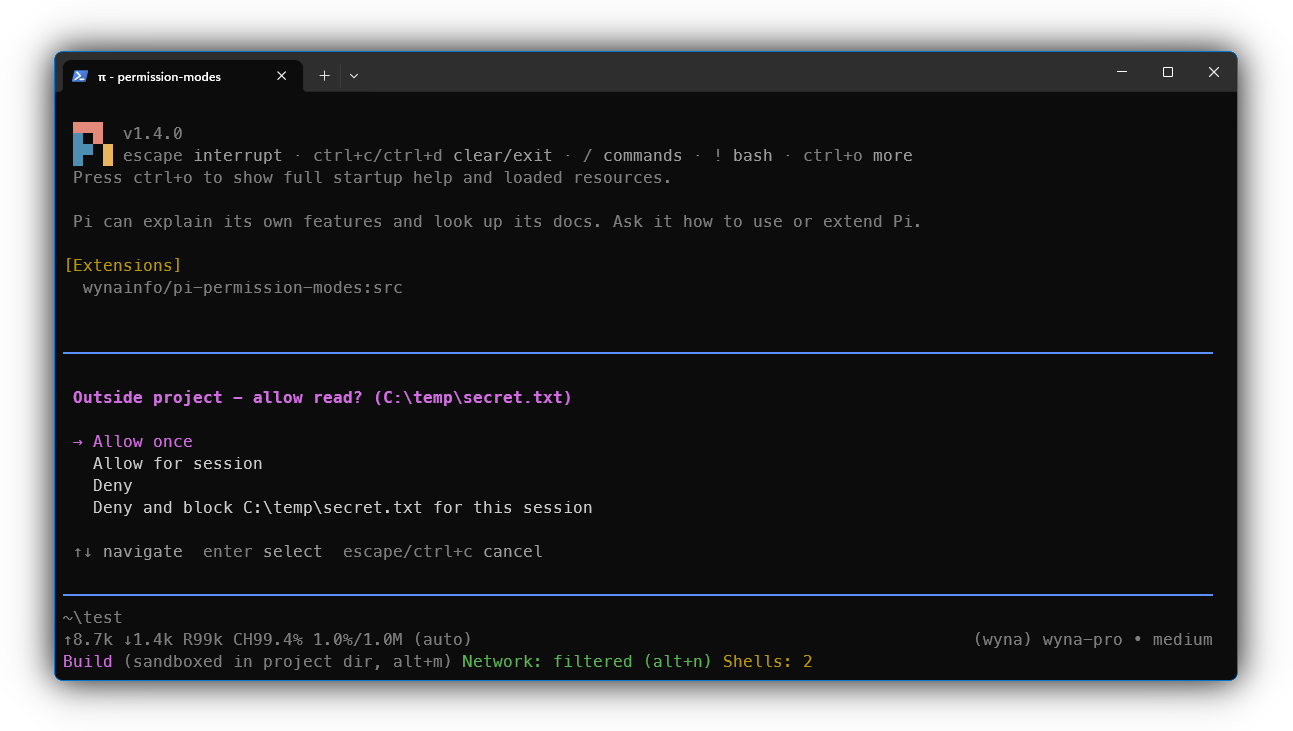
The complete reference lives in docs/ and ships with the
extension, so the agent can read it too. SECURITY.md has the
threat model, CHANGELOG.md the releases, and
CONTRIBUTING.md how to hack on it.
Quick start
pi install npm:pi-permission-modesOn Linux (including WSL2) the sandbox also needs three system packages
on PATH:
# Debian / Ubuntu / WSL2
sudo apt install -y bubblewrap socat ripgrep
Verify
- Start pi in any project - the footer shows a mode indicator, e.g.
Default. - Switch to Build (
alt+muntilBuild, or/perm build):- sandbox active ->
Build (sandboxed in project dir); - otherwise ->
Build (!) sandbox-runtime missing ...plus a fix-it notification.
- sandbox active ->
/sandboxprints the active sandbox configuration (or why it's unavailable).
Install
pi install fetches the package and runs npm install for you, so
@anthropic-ai/sandbox-runtime comes along automatically; the pi SDK is
provided by the host. Node 22.12 or newer is required (pi itself needs
22.19).
Other install methods
pi install git:github.com/wynainfo/pi-permission-modes- straight from GitHub (the latest release)pi install npm:pi-permission-modes@2.7.0- pin a version (pi update --extensionswon't advance it)pi install git:github.com/wynainfo/pi-permission-modes@dev- the development branch; may break between releasespi install -l npm:pi-permission-modes- project-local install (.pi/npm/, shareable with your team)pi update --extensions- pull the latest release, whichever way you installed
Platform notes
Linux. Ubuntu 24.04 and newer (desktop and server; WSL2 images usually
do not) restrict unprivileged user namespaces through AppArmor, and every
sandboxed command fails with bwrap: ... Operation not permitted. Nothing
runs unsandboxed. The fix is a small AppArmor profile or one sysctl:
docs/troubleshooting.md.
WSL1 has no user namespaces at all; the sandbox reports it as unsupported.
macOS. The sandbox uses the built-in sandbox-exec - no extra packages.
Go tools (gh, kubectl, terraform) need an opt-in switch per mode
(docs/sandbox.md); loopback services and local
ports are open unless a mode turns sandbox.allowLocalBinding off
(docs/sandbox.md).
Windows (alpha). The sandbox is the runtime's native Windows backend:
commands run as a separate local account behind a firewall rule keyed on
it, with the profile as NTFS permissions. It needs Git for Windows and one
/sandbox install in pi (one UAC prompt, then one question: whether your
user profile is readable to sandboxed commands, minus the credential
stores). Until then the sandboxed modes degrade to prompting only.
Details and limits: docs/sandbox.md.
Modes
The table describes the shipped defaults; every mode is data and can be retuned, and you can add your own (docs/modes.md).
| Mode | Behavior |
|---|---|
| Default | Confirm every bash/edit/write; reads are free. Approved in-project bash runs sandboxed (writes confined to the project). |
| Plan Mode | Reads are free; in-project bash runs sandboxed read-only, so only read commands work. The one mutation allowed without confirmation is creating or editing Markdown inside the project. A system-prompt addition steers the model to write a plan to plan/<date>_<description>.md, render it with the show_plan tool, and hand over: an Accept / Decline prompt follows the plan (approving a plan). |
| Build | Reads, writes, and bash inside the project run with no confirmation; in-project bash runs sandboxed. |
| YOLO | Never prompts, never sandboxes, no protected-path backstop. Can do anything the current user can. |
In every mode except YOLO: out-of-project access prompts; bash that
reaches outside the project or escalates privileges (sudo and friends,
detected even through wrappers and bash -c scripts) prompts, and runs
unsandboxed once you approve it; edit/write to protected paths
(.git/, .env, dotfiles, ...) are hard-blocked. When the sandbox is
unavailable, the sandboxed modes show (!) <reason> in the footer and
in-project bash prompts instead - you are never silently unprotected.
At a glance
The current mode is persisted per session and shown in the footer, next to
the network state: Build (sandboxed in project dir, alt+m) Network: filtered (alt+n).
| Command | What it does |
|---|---|
alt+m, /perm <mode> |
Cycle or switch the mode |
alt+n, /net ... |
Toggle network filtering; allowlist, grants, denies |
/perm init |
Write a full copy of the stock defaults to the global config |
/perm clear-approvals, /perm blocks, /perm unblock <path> |
Session grants and "Deny and block" paths |
/plan approve, /plan status |
Plan approval |
/shells |
List and stop background shells |
/sandbox |
The active sandbox configuration |
pi --perm <mode>, pi --no-sandbox |
Start mode; keep the modes, drop OS sandboxing |
Network requests to hosts outside the allowlist pause while you're asked
(allow for the session or forever, or deny); the model can also ask for hosts
up front with request_network_access
(docs/network.md). Prompts for an out-of-project path
offer Deny and block, which masks the path for the rest of the session
(docs/permissions.md). Git over SSH
cannot authenticate inside the sandbox (~/.ssh is masked); use HTTPS with a
fine-grained token (docs/network.md).
How protection works
Two independent layers compose:
- Policy engine (
allow/ask/deny): every tool call resolves against the active mode's policy for its surface (bash, file tools, the project boundary, web search, extension tools, skills). For bash, the command line is parsed with tree-sitter and every command it contains, nested ones included, is judged separately; out-of-project paths and privilege escalation are detected structurally (docs/permissions.md). - OS sandbox (
@anthropic-ai/sandbox-runtime): the real enforcement for bash. In-project bash runs wrapped bybubblewrap(Linux),sandbox-exec(macOS) or a separate local account (Windows), with writes confined to the profile'sallowWrite, the profile'sdenyReadsecrets unreadable, and network traffic filtered by a domain allowlist, regardless of what the command does (docs/sandbox.md).
So a bash command that policy says allow still runs sandboxed; ask
prompts, then runs sandboxed, or unsandboxed for an escape you approve;
deny never runs. Only the model's bash tool is OS-sandboxed; the file
tools are governed by the policy engine and the protected-path backstop.
While a sandboxed mode is active, the model is told its boundaries in the
system prompt, so it picks paths and hosts that work. SECURITY.md
has the full threat model and the known limitations.
Background shells. A dev server, a watcher or a long build runs as a
background shell (bash with run_in_background: true) under the same
sandbox and the same prompts; the model reads it with bash_output, stops
it with kill_shell, and is told when it ends. /shells lists and stops
them. On Linux expose relays ports into the shell so you can open its
server in a browser (docs/shells.md).
Configuration
Modes are data, layered in this order:
- Stock defaults -
permission-mode.defaults.json, shipped with the extension. Run/perm initto drop a full copy at the global path. ~/.pi/agent/permission-mode/permission-mode.json(global, full authority): redefine built-in modes, add your own, setdefaultModeandcycleOrder.<project>/.pi/permission-mode.json(project, tighten-only): may only make an existing mode stricter. Opening an untrusted repo can never weaken your protection.
A mode has a sandbox block (what bash may read, write and reach) and a
permission block (an allow / ask / deny per tool, as a single action
or a glob map). A redefined mode keeps every stock field you leave out, and
a block you set replaces the stock block whole. A global config that gives
Build its own network allowlist and asks before every rm:
{
  "$schema": "https://raw.githubusercontent.com/wynainfo/pi-permission-modes/main/schemas/permission-mode.schema.json",
  "modes": {
    "build": {
      "sandbox": { "network": { "allowedDomains": ["github.com", "*.github.com", "registry.npmjs.org"] } },
      "permission": { "bash": { "*": "allow", "rm*": "ask" } }
    }
  }
}
In a glob map the last matching pattern wins and, across layers, the most restrictive wins. Every key, the pattern syntax, the project rules, and the outdated-default warnings: docs/configuration.md, docs/sandbox.md, docs/permissions.md.
Documentation
| File | Covers |
|---|---|
| docs/index.md | Topic map, commands and shortcuts |
| docs/configuration.md | Files, layers, what a project config may change, keeping the global config current |
| docs/modes.md | The stock modes, mode fields, start mode, plan approval, your own modes, strict home |
| docs/permissions.md | Rules, pattern syntax, resolution, bash gating, protected paths, session grants, Deny and block |
| docs/sandbox.md | Every sandbox key, scratch directory, violations, placeholders, platforms |
| docs/network.md | Allowlist, requesting access, grants, git authentication |
| docs/shells.md | Background shells: run_in_background, bash_output, kill_shell, /shells, notices, port exposure |
| docs/troubleshooting.md | One section per error message |
| docs/architecture.md | For forks and contributors |
Disabling
- Temporarily: launch pi with
--no-extensions(disables all), or--no-sandboxto keep the modes but drop OS sandboxing. - Permanently:
pi remove npm:pi-permission-modes(orgit:github.com/wynainfo/pi-permission-modes, matching how you installed it) - or remove the entry from your pi settings.