pi-pokepet
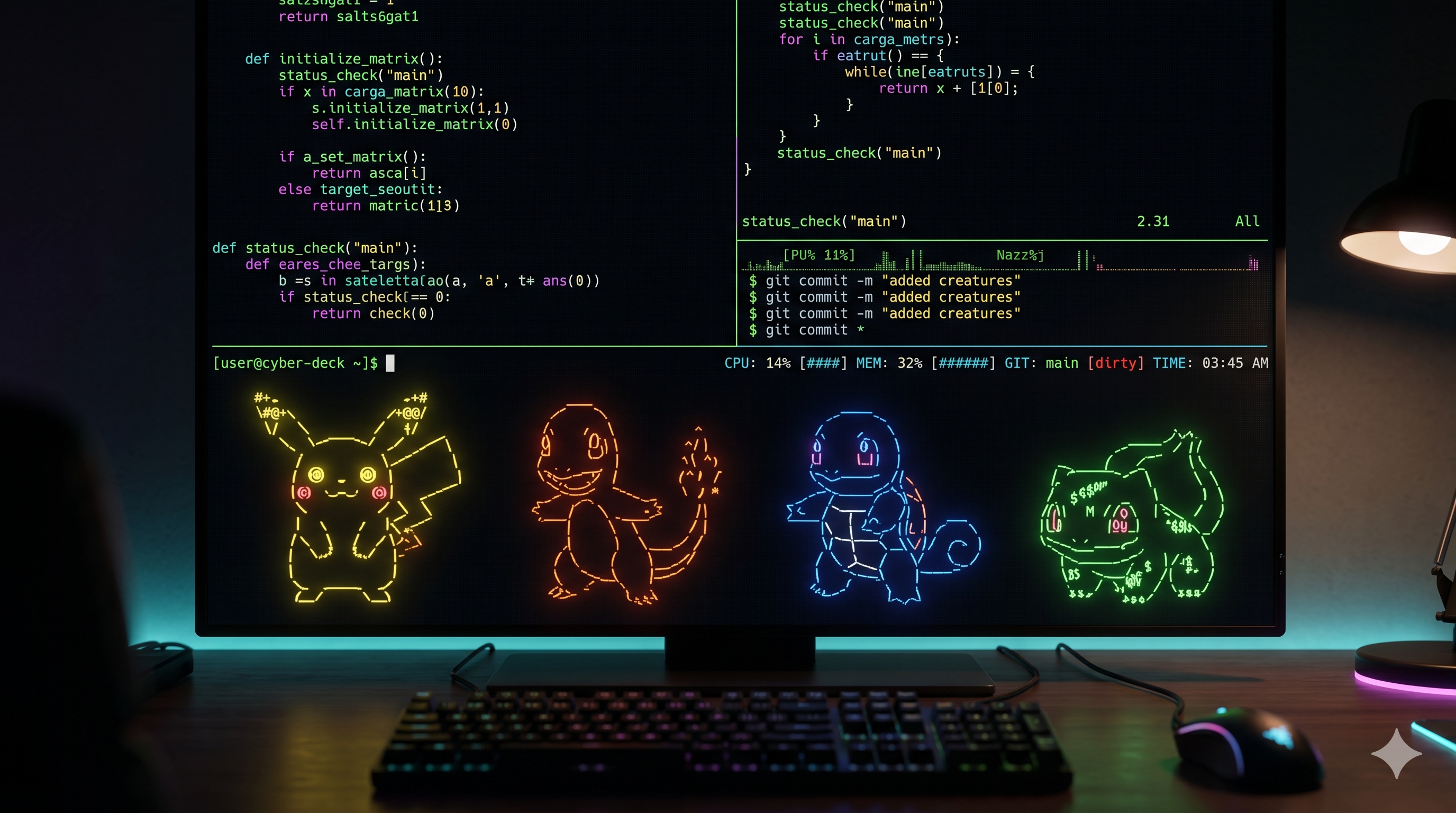
A cute, colorful pet companion for the pi coding agent. Use classic ASCII pets or Petdex image pets that live below your editor and react to tools, tests, commits, PRs, reviews, subagents, model swaps and more.
Package details
Install pi-pokepet from npm and Pi will load the resources declared by the package manifest.
$ pi install npm:pi-pokepet- Package
pi-pokepet- Version
1.6.3- Published
- Jun 6, 2026
- Downloads
- 1,452/mo · 1,452/wk
- Author
- djdiptayan
- License
- MIT
- Types
- extension
- Size
- 152.3 KB
- Dependencies
- 3 dependencies · 1 peer
Pi manifest JSON
{
  "extensions": [
    "./extensions/index.ts"
  ],
  "image": "https://raw.githubusercontent.com/djdiptayan1/pi-pokepet/main/demo.png"
}
Security note
Pi packages can execute code and influence agent behavior. Review the source before installing third-party packages.
README
pi-pokepet
A colorful pet companion for the pi coding agent.
pi-pokepet lives below your editor and reacts in real time while pi thinks,
talks, runs tools, edits files, opens PRs, reviews code, compacts sessions, and
more.
It has two visual styles:
- Petdex image pets: animated Codex-style sprite pets from Petdex, rendered with Pi's native terminal image support when available and ANSI terminal pixels as a fallback.
- ASCII pets: the original compact and large terminal line-art roster.
Install
pi install npm:pi-pokepet
Try it for one run:
pi -e npm:pi-pokepet
Commands
/pet                         status
/pet style image             use Petdex image companion (Electron window)
/pet style ascii             use the legacy ASCII roster (TUI only)
/pet setup | repair          install or repair the Electron companion runtime
/pet list                    list pets for the active style
/pet choose <id>             choose an installed Petdex pet or ASCII pet
/pet gallery [query]         search the public Petdex gallery
/pet install <slug>          download and select a Petdex / codex-pets gallery pet
/pet nick <nickname>         give it a nickname
/pet feed                    restore energy
/pet awake [reason]          keep your system from sleeping
/pet sleep                   release keep-awake or make the pet nap
/pet stats                   productivity and bond dashboard
/pet status                  show server port, Electron PID, and runtime state
/pet ps | processes [query]  list active Pokepet or system-wide processes
/pet kill [pid]              kill Electron process or any system PID
/pet hide | show             toggle the terminal status widget
/pet help                    show all available commands
/pokemon is no longer registered. Use /pet style ascii for the original
ASCII pets.
Petdex Image Pets (Electron Companion)
When /pet style image is active, the extension runs a local HTTP/SSE server and launches a dedicated Electron desktop companion:
- Premium UI: A transparent, frameless, always-on-top window positioned in the bottom-right of your screen.
- Glassmorphic Speech Bubble: A floating, bobbing speech bubble above the pet's head showing status messages in real-time.
- Click Reactions: Clicking the pet triggers a happy jump animation override and makes the pet say a random coding/break/hydration quote.
- Terminal Status Widget: While in image mode, the terminal displays a clean, compact status text line showing nickname, energy, and state, keeping the terminal layout uncluttered.
Install one directly from the Petdex gallery:
/pet gallery boba
/pet install boba
Or install any Petdex/Codex pet directly from your system command-line terminal:
npx pi-pokepet add boba
npxresolves packages by their package name, so always usenpx pi-pokepet add <slug>. Thepi-pets/pi-petaliases only work as local commands once the package is installed (e.g.pi-pet add <slug>), not via a standalonenpx pi-pets/npx pi-pet.
Then select it in pi:
/pet style image
/pet choose boba
Energy persists across sessions in ~/.pi/agent/pokepet-state.json.
| pi mood | Petdex row | Description |
|---|---|---|
| idle, sleep | Row 0 (idle) | Pet stands still or snoozes. |
| working | Row 1 & 2 (runRight/runLeft) | Pet walks or runs right/left while reading/writing files. |
| talking | Row 3 (wave) | Pet waves when pi is explaining or planning. |
| happy, hatch | Row 4 (jump) | Pet jumps up and down on task success or click. |
| panic | Row 5 (failed) | Pet looks flat and sad on build/test failure or low energy click. |
| guard | Row 6 (waiting) | Pet sits down when keep-awake is active, guarding the system. |
| running | Row 7 (running) | Pet does skateboarding tricks/dances when executing commands. |
| thinking, review tools | Row 8 (review) | Pet wears a detective hat/visor and magnifying glass when reasoning. |
Troubleshooting (Electron Companion)
The image companion self-heals: on first /pet style image it verifies the
Electron runtime and, if missing, downloads it once in the background. While it
sets up (or if it can't run), the terminal always shows a live ASCII pet so
you're never left with a blank or errored widget.
Check the runtime state anytime:
/pet status # look for the `Electron Runtime:` line (ready | installing | failed | unsupported)
The window doesn't appear (Linux / Ubuntu)
Electron needs system GUI libraries and a display server. If /pet status shows
Electron Runtime: failed or the window spawns but never shows:
pi update                      # get the latest pi-pokepet
# in pi:  /pet style image

# if the window still doesn't appear, install the GUI libraries Electron needs:
sudo apt-get install -y libnss3 libatk1.0-0 libatk-bridge2.0-0 libgtk-3-0 libgbm1 libasound2

# then retry the runtime in pi:
#   /pet setup
Headless / SSH / WSL (no display)
If there's no DISPLAY / WAYLAND_DISPLAY, the Electron window can't open and
/pet status shows Electron Runtime: unsupported. This is expected — the pet
automatically runs in ASCII mode instead. Check your session has a display:
echo $DISPLAY # empty on a headless/SSH session
Electron binary not found / setup keeps failing
The one-time download comes from GitHub releases; a proxy or offline machine can block it. Retry, or install the runtime manually into the package:
# retry in pi:
#   /pet setup

# or install Electron manually (scripts must be enabled so the binary downloads):
cd ~/.pi/agent/npm/node_modules/pi-pokepet
npm install electron@^42.3.3 --no-save --foreground-scripts

# verify the binary resolves (should print a path, not an error):
node -e "console.log(require('electron'))"
If npm config get ignore-scripts prints true, that's why the binary never
downloads — the commands above force scripts on with --foreground-scripts.
Installing a pet from the terminal does nothing
Use the package name with npx — only pi-pokepet resolves standalone:
npx pi-pokepet add <slug>      # ✅ works
# npx pi-pets add <slug>       # ❌ no such published package
# npx pi-pet  add <slug>       # ❌ resolves to an unrelated package
Buddy Personalities & Rarity Tiers
Every companion now has a unique, deterministic personality determined by its slug and nickname. Changing the pet's nickname recalculates its personality:
- Stats: Individual values for Chaos, Curiosity, and Snark (ranging from 10 to 100).
- Rarity Tiers: Common, Rare, or Legendary, which influence the ranges of your pet's stats.
- Themed click responses: Clicking on the pet triggers a dialogue response matching its dominant personality stat.
- Check these stats anytime with
/pet stats!
Smart Task Notifications
Never miss a long-running build or test completion:
- Build Complete / Tests Passed: Shows an emerald green glowing speech bubble and sets the pet to a happy jumping state.
- Build Failed / Tests Failed: Shows a crimson red glowing speech bubble and sets the pet to a flat/sad state.
- The notification bubble stays visible for 7 seconds to ensure you see it.
Low Energy Reactions
Keep your companion fed!
- If energy drops below 20, clicking the pet canvas triggers Row 5 (
failedsad flat state) and frantic jumping, accompanied by a complaining quote (e.g. "Ouch! Tummy rumbles... need a berry! 🍇").
Community Pet Installation (codex-pets.net)
If a pet is not found in the standard Petdex manifest when running /pet install <slug>, the installer automatically falls back to:
npx -y codex-pets add <slug>
This downloads and extracts the pet into ~/.codex/pets/<slug>/ where Pokepet loads and selects it.
ASCII Roster
The original ASCII pets remain available with /pet style ascii:
- Pikachu
- Charmander
- Squirtle
- Bulbasaur
- Eevee
- Jigglypuff
- Psyduck
ASCII pets are rendered directly in the terminal widget in a compact, neat layout.
The ASCII roster is an unofficial fan project. Pokemon and Pokemon character names are trademarks of Nintendo, Creatures Inc., and GAME FREAK Inc. This project is not affiliated with, sponsored by, or endorsed by them. The ASCII art is original, stylized fan work.
What It Reacts To
- model thinking, talking, and tool-call composition
- tests, builds, linting, installs, dev servers, Docker, network checks
- git commits, pushes, pulls, merges, rebases, stashes, checkouts
- PR creation, PR merges, review and diff tools
- file edits with filename-aware messages
- MCP tools and subagent dispatch
- model swaps, thinking-level changes, forks, and compaction
- flow state, repeated failures, and recovery
Energy persists across sessions in ~/.pi/agent/pokepet-state.json. Event stats
persist in ~/.pi/agent/pokepet-events.jsonl.
Native Petdex PNG frames are cached under:
~/.pi/agent/pokepet-cache/petdex-native/
ANSI fallback frames are cached under:
~/.pi/agent/pokepet-cache/petdex/
Development
npm install
npm run lint
npm test
Project structure:
extensions/
|-- index.ts                  entry point, events, /pet command, render routing
|-- petdex.ts                 local Petdex loading and gallery installs
|-- petdex-native-renderer.ts sprite atlas to native PNG frames
|-- petdex-widget.ts          Pi TUI Image widget for native rendering
|-- petdex-renderer.ts        sprite atlas to ANSI fallback frames
|-- mons.ts                   legacy ASCII roster and compact frame builder
|-- sprites.ts                legacy large ASCII art
|-- content.ts                mood lines and intent detection
|-- state.ts                  persistence and migration
`-- colors.ts                 ANSI color helpers
License
MIT - see LICENSE.