pi-polish
Claude Code-style output for pi: tool calls fold into short summaries and edits show as colored diffs
Package details
Install pi-polish from npm and Pi will load the resources declared by the package manifest.
$ pi install npm:pi-polish- Package
pi-polish- Version
0.1.10- Published
- Nov 3, 2026
- Downloads
- 2,423/mo · 1,455/wk
- Author
- pringled
- License
- MIT
- Types
- extension
- Size
- 45 KB
- Dependencies
- 4 dependencies · 2 peers
Pi manifest JSON
{
  "image": "https://raw.githubusercontent.com/Pringled/pi-extensions/main/assets/images/pi-polish-dark.gif",
  "extensions": [
    "./extensions/tools.ts",
    "./extensions/chrome.ts"
  ]
}
Security note
Pi packages can execute code and influence agent behavior. Review the source before installing third-party packages.
README
pi-polish
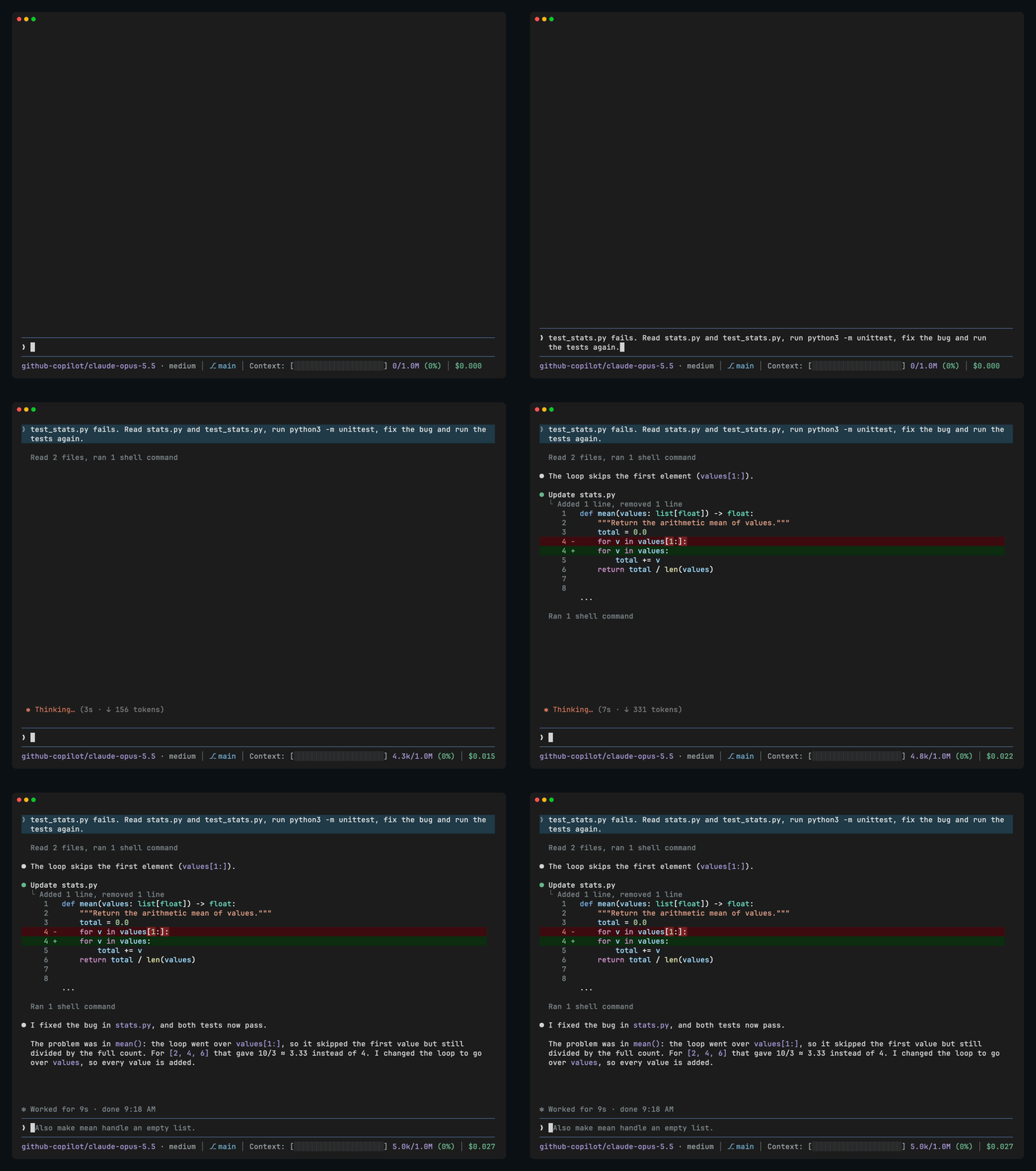
Makes Pi's output look like Claude Code's: tool calls fold into short summary lines, and edits show as colored diffs.
pi install npm:pi-polishFeatures
- Shell commands, file reads, searches and MCP tool calls in a row fold into one line that updates while they run (
Running 2 shell commands… · 5s, with the command and its latest output line below) and then sums them up (Ran 3 shell commands, read 2 filesorCalled 2 MCP tools). Click a row to see its commands and their full output, and click again to fold it;ctrl+odoes this for every row. - Edits and new files show as diffs with syntax highlighting and the changed words marked, in colors that follow your Pi theme, dark or light.
- Reads, searches, shell commands and MCP calls show a pulsing dot in your theme's accent color while they run, then turn into a quiet grey row once done, with a red dot if one failed. Edits and writes keep a green dot with their diff.
- An orange status line shows what Pi is doing, how long it has been at it and how many tokens it has written. When Pi finishes, a dim line says how long it worked and when it was done.
- Tools from other extensions keep their own look, but without Pi's colored box: they sit under the same status dot as the other rows.
❯marks your messages and●marks Pi's replies.- A short instruction to the model to change files with Pi's edit and write tools instead of shell commands like
sed -i, so you see the changes as diffs.
Compatibility
pi-polish only changes how tools are drawn; the tools themselves run exactly as before. The chat styling (the markers and the status line) reaches into Pi's internal UI, so a new Pi release can break that part of the look until pi-polish is updated. Your sessions are never affected. Tested with Pi 1.4.
License
MIT