pi-posher
Helps clankers keep code prim and proper with linters, formatters and security tools
Package details
Install pi-posher from npm and Pi will load the resources declared by the package manifest.
$ pi install npm:pi-posher- Package
pi-posher- Version
0.3.2- Published
- Jun 2, 2026
- Downloads
- 1,202/mo · 1,202/wk
- Author
- jeffphil
- License
- MIT
- Types
- extension
- Size
- 168.4 KB
- Dependencies
- 1 dependency · 2 peers
Pi manifest JSON
{
  "extensions": [
    "src/index.ts"
  ],
  "image": "https://raw.githubusercontent.com/jeff-phil/pi-posher/refs/heads/main/assets/pi-posher.webp"
}
Security note
Pi packages can execute code and influence agent behavior. Review the source before installing third-party packages.
README
pi-posher
Pi extension that helps agents and builders keep their code prim and proper.
pi-posher automatically runs configured tools such as: formatters, linters, SAST, file conversions, etc. after successful write / edit agent tool calls.
Users are also able to run /poshify slash command on-demand to validate changes to files in newly sourced repos, or for adding external files into a project that need to be posh.
Why
Many times IDEs automatically format, lint, reorganize imports, do security checks, convert files, and run many other tools when saving files, creating code outside of your standards. This allows users to immediately know issues and fix code issues when it's fresh, vs. going through an entire pipeline.
Agents need the same capabilities in order to format, adjust, check files after edits and write operations. And this may be even more of a need depending on the model being used, or the technology being built.
Install
pi install npm:pi-posher
Defaults and prerequisites
On first use, pi-posher seeds a global config (~/.pi/agent/extensions/pi-posher/poshifiers.json) with default poshifiers for many languages and formats such as go, python, typescript, javascript, svelte, json, yaml, and markdown. These defaults are a starting point — you should edit or remove any entry to match the set of tools and technology you actually use.
Note: The default
audit-toolsand most Python tooling rely onuvto run commands. For the best out-of-box experience, installuvso thatsemgrepandruffcommands work without modification. If you preferpip,npm,pnpm, or other runners, update thecmdandargsin the config to suit your environment.
Configuration
pi-posher automatically respects .gitignore and .ignore files in the project root ({workspace}) when scanning directories or matching files. Any paths listed in those files are skipped entirely — no tools are run against them, and they are pruned during recursive directory walks.
This means you don't need to duplicate .gitignore entries in every poshifier's exclude array. Only add exclude patterns for files that are tracked but should still be skipped by a specific tool (e.g. vendor/ for Go, but not node_modules/ which is already in .gitignore).
Each poshifier has an optional init-setup block with:
init-configs: Array of bundled config files, directories, or glob patterns to copy into the project root ({root}). Supports{name}placeholder for per-language variants.- Paths without
{name}/are copied to{root}directly (e.g.,.prettierrc). - Paths with
{name}/strip the{name}prefix and preserve any remaining subdirectories (e.g.,{name}/foo/bar.json→{root}/foo/bar.json). - Directory entries (e.g.,
{name}/foo/,{name}/foo/**) are copied recursively. Existing files in the destination are skipped; new files from the source are merged in. - Glob patterns are supported in the final path segment (e.g.,
{name}/configs/*.json,{name}/rules/*.{json,yaml}). The glob matches files in the directory part. Any matched file is copied with its parent subdirectory preserved. - Files already in the destination are skipped without error.
- Empty glob matches silently skip.
- Paths without
init-tools: Commands to run during init (e.g.,npm install --save-dev ...).fix-tools: Commands to run for/poshify --fix(same schema astools).audit-tools: Commands to run for/poshify --auditand atturn_endafter agent edits (same schema astools).maxFileSizeBytes: Optional limit in bytes; files larger than this are silently skipped (default 2 MB).
Every tool object (in tools, fix-tools, audit-tools, or init-tools) supports these fields:
| Field | Type | Description |
|---|---|---|
cmd |
string | Command to run |
args |
string[] | Arguments passed to the command |
cwd |
string | Working directory (supports placeholders) |
timeoutMs |
number | Timeout in milliseconds (default 15000) |
config |
string | Path to a config file; sets {config} and {configDir} placeholders |
env |
object | Key/value map merged into the command's environment |
Global config, trusted automatically:
~/.pi/agent/extensions/pi-posher/poshifiers.json
On first use, the pi-posher seeds this file with default "poshifiers" for go, python, typescript, javascript, svelte, json, yaml, and markdown. You can edit or remove any entry to fit your desired defaults, and add your own tools to run.
Project local configs can be placed in the project level .pi directory:
~/projects/my-project/.pi/poshifiers.json
Project entries override global entries with the same name (go, typescript, python, etc.), and entries must be explicitly trusted by the user before running.
Example config
Configuration examples for named python, json, and markdown poshifiers
{
  "poshifiers": [
    {
      "name": "python",
      "include": ["**/*.py"],
      "anchors": ["pyproject.toml", "ruff.toml"],
      "tools": [
        {
          "cmd": "uv",
          "args": ["run", "ruff", "format", "{files}"],
          "cwd": "{root}",
          "timeoutMs": 25000
        },
        {
          "cmd": "uv",
          "args": ["run", "ruff", "check", "{files}"],
          "cwd": "{root}",
          "timeoutMs": 30000
        }
      ],
      "fix-tools": [
        {
          "cmd": "uv",
          "args": ["run", "ruff", "check", "--fix", "{files}"],
          "cwd": "{root}",
          "timeoutMs": 30000
        }
      ],
      "audit-tools": [
        {
          "cmd": "uv",
          "args": [
            "run",
            "--with",
            "semgrep",
            "semgrep",
            "scan",
            "--json",
            "-q",
            "--error",
            "--config",
            "auto",
            "{files}"
          ],
          "cwd": "{root}",
          "timeoutMs": 60000
        }
      ]
    },
    {
      "name": "json",
      "include": ["**/*.json*"],
      "exclude": ["node_modules/**", "package-lock.json"],
      "anchors": ["package.json"],
      "init-setup": {
        "init-configs": [".prettierrc", ".prettierignore"],
        "init-tools": [
          {
            "cmd": "npm",
            "args": ["install", "--save-dev", "prettier", "node-jq"],
            "cwd": "{root}",
            "timeoutMs": 120000
          }
        ]
      },
      "tools": [
        {
          "cmd": "npm",
          "args": ["exec", "--", "prettier", "--parser=json", "--write", "{files}"],
          "cwd": "{root}",
          "timeoutMs": 15000
        },
        {
          "cmd": "npm",
          "args": ["exec", "--", "node-jq", "-e", ".", "{file}"],
          "cwd": "{root}",
          "timeoutMs": 15000
        }
      ],
      "audit-tools": [
        {
          "cmd": "uv",
          "args": [
            "run",
            "--with",
            "semgrep",
            "semgrep",
            "scan",
            "--json",
            "-q",
            "--error",
            "--config",
            "auto",
            "{files}"
          ],
          "cwd": "{root}",
          "timeoutMs": 60000
        }
      ]
    },
    {
      "name": "markdown",
      "include": ["**/*.md"],
      "exclude": ["node_modules/**"],
      "anchors": ["package.json"],
      "init-setup": {
        "init-configs": [".prettierrc", ".markdownlint.json"],
        "init-tools": [
          {
            "cmd": "npm",
            "args": ["install", "--save-dev", "prettier", "markdownlint-cli"],
            "cwd": "{root}",
            "timeoutMs": 120000
          }
        ]
      },
      "tools": [
        {
          "cmd": "npm",
          "args": ["exec", "--", "prettier", "--write", "{files}"],
          "cwd": "{root}",
          "timeoutMs": 15000
        },
        {
          "cmd": "npm",
          "args": ["exec", "--", "markdownlint", "{files}"],
          "cwd": "{root}",
          "timeoutMs": 15000
        }
      ],
      "fix-tools": [
        {
          "cmd": "npm",
          "args": ["exec", "--", "markdownlint", "--fix", "{files}"],
          "cwd": "{root}",
          "timeoutMs": 15000
        }
      ],
      "audit-tools": [
        {
          "cmd": "uv",
          "args": [
            "run",
            "--with",
            "semgrep",
            "semgrep",
            "scan",
            "--json",
            "-q",
            "--error",
            "--config",
            "auto",
            "{files}"
          ],
          "cwd": "{root}",
          "timeoutMs": 60000
        }
      ]
    }
  ]
}
Trust and security
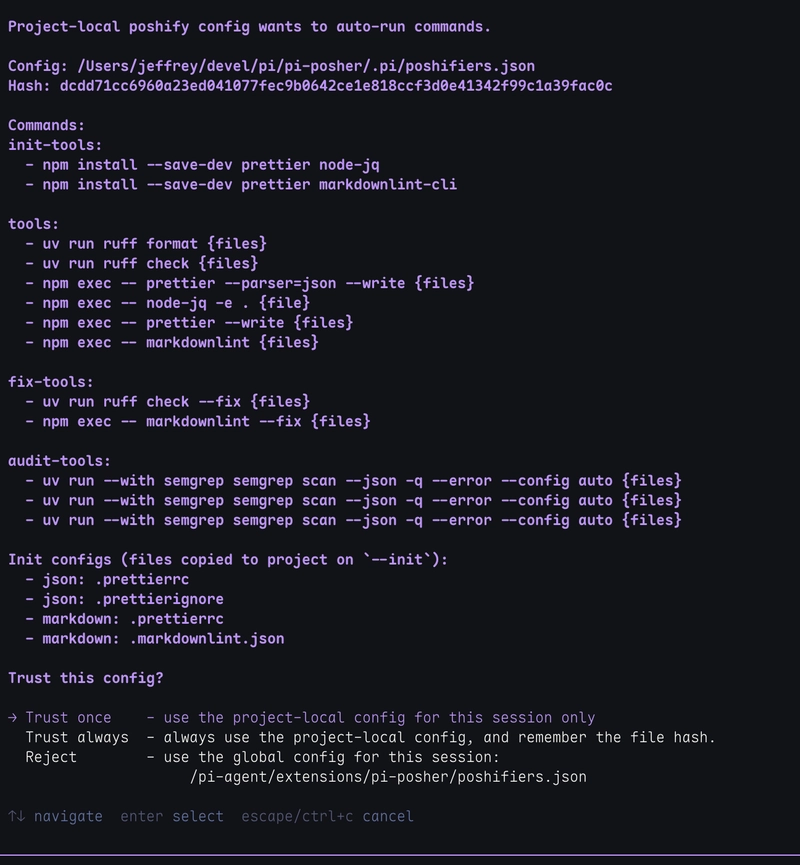
Project local configs (e.g. ~/projects/my-project/.pi/poshifiers.json), especially from unknown repositories, could run arbitrary commands on your machine that are evil in nature.
Here are the guardrails to prevent malicious configs and scripts:
- Project local config content is uniquely hashed
- Unknown hashes prompt for
Trust once,Trust always, orReject - The prompt shows every configured tool command in the project local config file
- The options
Trust onceandRejectare session specific, and won't prompt again during the current session while the config remains unchanged. Trust alwaysstores the hash in~/.pi/agent/extensions/pi-posher/trust/poshify.json- Changing the project local config changes the hash and asks again to trust or reject
- Non-interactive mode rejects project local config by default
- Commands run as
cmd&args[], so each can be validated against shell injection
Global config (~/.pi/agent/extensions/pi-posher/poshifiers.json) is considered trusted because it is user-owned agent configuration.
Behavior
After the agent successfully does a write or edit operation on a file:
- Pi Posher looks for poshifiers matching
include/excludefile and directory glob patterns - Extension uses
anchorsto find the{root}of the current project - Skips files above
maxFileSizeBytes - Runs each command in the
toolsarray sequentially, in order on the file. - Sends a compact summary for the tool, or error details if the tool fails that is also a
steermessage for the clanker to correct. - Tracks the file in a list of files that were written or edited during the turn.
- At the end of the turn, the list of tracked files will have the
audit-toolsbatch run on them together. This will be more efficient for deeper level, longer taking audit tools such assemgrepbecause the files and tools are batched.
Note: if files are modified by the clanker with
bashcommands, then the files are not tracked. For this, it would be a good idea to run the one of the/poshify ...slash commands manually to look for issues. Or you can askRun poshify on .orRun poshify on @src/from the prompt.
When a slash command (/poshify, /poshify --fix, /poshify --audit) is used, or when audit-tools run at turn_end, all matched files are collected and grouped by their resolved command configuration. Commands that contain a {files} placeholder are batched — all matching files sharing the exact same resolved command are passed together in one invocation by replacing {files} with the collected paths. This works for tools, fix-tools, and audit-tools.
To avoid shell ARG_MAX limits (the system's longest number of argument or parameter characters that can be passed to a command), batched files are further split into sub-batches of up to 100 files per invocation.
At turn_end, audit findings are deduplicated across turns (same finding is reported once per session), and all audit output is steered into the agent context so it can react to issues.
Agent write and edit operations still run tools per-file (not batched for the turn), so you get immediate feedback after each edit.
Note: Since there could be several
writeandeditoperations to files during an agent "turn" (which is the agent processing, thinking, working, and responding to a user prompt), you would not want long running tool commands (2+ secs) for each write and edit. That is the main reason in the default configuration,semgrepruns in batch at the end of the turn because it could take 5+ seconds even for a basic source file. The disadvantage of audit-tools being run atturn_endis you have to reprompt to fix the issues, since it completes after a turn has ended. But the advantage is any files that were written or edited can be batched all together at the end instead of each sequentially.
If the tool command and parameters are the same across names (e.g. python, typescript, markdown), then all of those files will be batched into the same run as well saving lots of time. Key point, try to keep tools as consistent as possible for long running commands like semgrep, but specialized tools such as svelte-check can also be run as a specific audit tool for any changed svelte files during the turn.
Context filtering
Successful poshify output is automatically filtered out of the agent's conversation context to reduce token usage. Only messages containing warnings, errors, or audit findings are retained, so the agent can focus on actionable issues rather than repeated "all good" confirmations.
Manually running
You can also trigger poshify manually with the slash command or the run_poshify custom tool.
/poshify slash command
 /poshify (file|dir)...         # Run configured tools for required file(s) or directory(ies)
 /poshify --init <name>         # Install init configs for a poshifier type
 /poshify --fix [file|dir]...   # Run configured fix-tools, default: current working directory
 /poshify --audit [file|dir]... # Run tools & audit-tools for file(s) or directory(ies), def: cwd
 /poshify --help                # Show this usage
/poshify with no arguments and /poshify --help shows help usage message, and includes the list of available --init names.
/poshify --init <name> copies the init-configs defined for that poshifier into the current project, seeds user-level overrides from bundled templates if absent, and runs the init-tools commands (typically npm install --save-dev ...). Existing files in the project are skipped. For example:
/poshify --init typescriptcopies.prettierrc,.prettierignore,eslint.config.mjs,eslint-ts.mjsto the project root and installs ESLint + Prettier./poshify --init markdowncopies.prettierrcto the project root and.markdownlint.jsonto the project root, then installs Prettier + markdownlint-cli.- A config like
{name}/foo/bar.jsonwould be placed atfoo/bar.jsonin the project.
/poshify --fix [file|dir] runs the fix-tools configured for each matching poshifier. Each poshifier can define its own fix commands (e.g., eslint --fix, ruff check --fix, markdownlint --fix). Files without configured fix-tools are silently skipped. Default: current working directory.
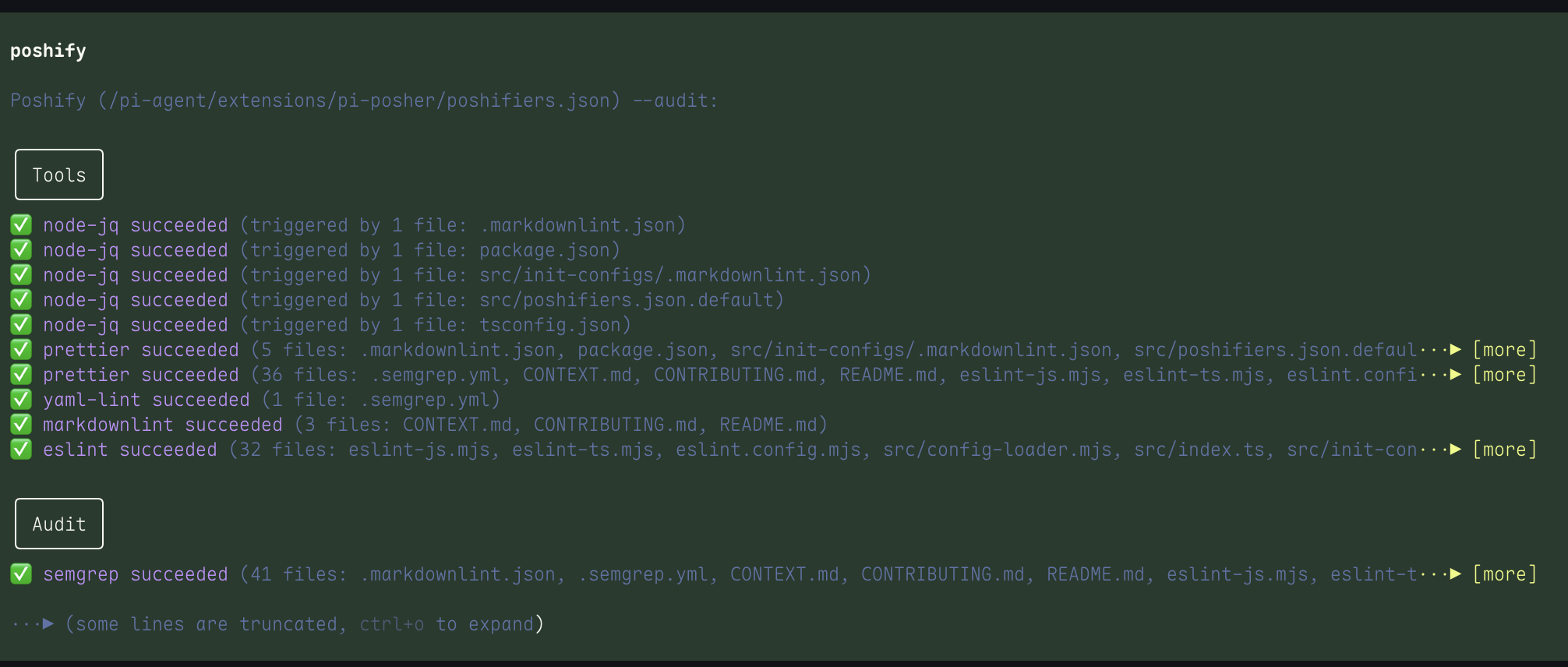
/poshify --audit [files|dir] runs both the tools and audit-tools for each matching poshifier, reporting them as separate sections under a combined Poshify Audit header. Files without configured audit-tools are silently skipped for that section. This is the same behavior used at turn-end for agent edits. Default: current working directory.
run_poshify tool
Callable by the LLM with a path argument. The model can invoke it when asked to "run poshify on X".
Both the slash command and the tool scan matching files recursively, run configured tools, and report results in the same output format as the automatic trigger.
Note:
run_poshifyor "run poshify on X" prompt only runs the standardtoolsand notaudit-tools. To manually run theaudit-toolsuse the/poshify --audit (file|dir)slash command.
Relative paths and placeholders
Path rules:
- Absolute paths are used as-is.
- Relative
cmd,config, andcwdvalues with/are resolved relative to{root}. - Bare command names are resolved through
PATH. - Passing paths to
/poshify ...commands can use standard "@" prefix such as@some/filefor file discovery.
Placeholders (template tags):
| Placeholder | Meaning | Example |
|---|---|---|
{workspace} |
Pi working directory, or directory containing .pi/poshifiers.json |
/Users/jeffrey/my-project |
{root} |
Nearest directory containing an anchor marker |
/Users/jeffrey/my-project |
{file} |
Absolute path to the file being processed | /Users/jeffrey/my-project/src/foo.go |
{files} |
All matched file paths (triggers batching; use in tools, fix-tools, or audit-tools) |
/Users/jeffrey/my-project/src/foo.go /Users/jeffrey/my-project/src/bar.go |
{relFile} |
{file} relative to {root} |
src/foo.go |
{dir} |
Absolute directory containing the file | /Users/jeffrey/my-project/src |
{relDir} |
That directory relative to {root} |
src |
{config} |
Resolved command config path (if set) | |
{configDir} |
Directory containing {config} |
|
{name} |
Poshifier name (useful in init-setup paths and args) |
typescript |
{root} is found by walking up from {file} looking for anchors. {workspace} is where Pi is running. They are usually the same, but in a monorepo where a file is in packages/bar/ and the anchor (package.json) is there, {root} = packages/bar/ while {workspace} = the repo root.
Note on
anchors: Ifanchorsis omitted or empty, it defaults to['.project', '.git']. The auto discovery behavior if no anchor defined:
- Walks up from the target file/directory
- Stops at the first directory containing either .project or .git
- .project still wins if intentionally placed in a subdir (e.g., monorepo package boundary)
- .git catches everything else as a universal fallback
- If neither exists anywhere up to root directory, error message lists both: anchors not found (.project, .git)
Screenshot and Output examples
Project local config file needing to be trusted:
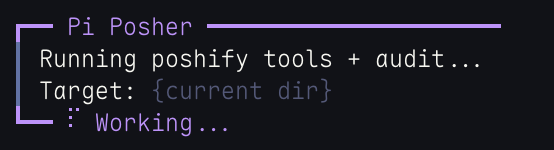
While running:
Successful run with details:
Failed run for full audit and details:
Disable a poshifier
Remove it from the config, or override with an empty object:
{
  "poshifiers": [{ "name": "go" }]
}
Acknowledgement
Security hashing aspects inspired by pi-code-quality.