pi-posthorse
Posthorse: fresh context, same journey. No-summary context rollover for Pi, with sparse budget reminders, handoffs, notes, and history.
Package details
Install pi-posthorse from npm and Pi will load the resources declared by the package manifest.
$ pi install npm:pi-posthorse- Package
pi-posthorse- Version
0.9.1- Published
- Oct 12, 2026
- Downloads
- 1,459/mo · 602/wk
- Author
- fitchmultz
- License
- MIT
- Types
- extension
- Size
- 145.5 KB
- Dependencies
- 0 dependencies · 3 peers
Pi manifest JSON
{
  "image": "https://raw.githubusercontent.com/fitchmultz/pi-posthorse/main/diagram.png",
  "extensions": [
    "./index.ts"
  ]
}
Security note
Pi packages can execute code and influence agent behavior. Review the source before installing third-party packages.
README
Posthorse
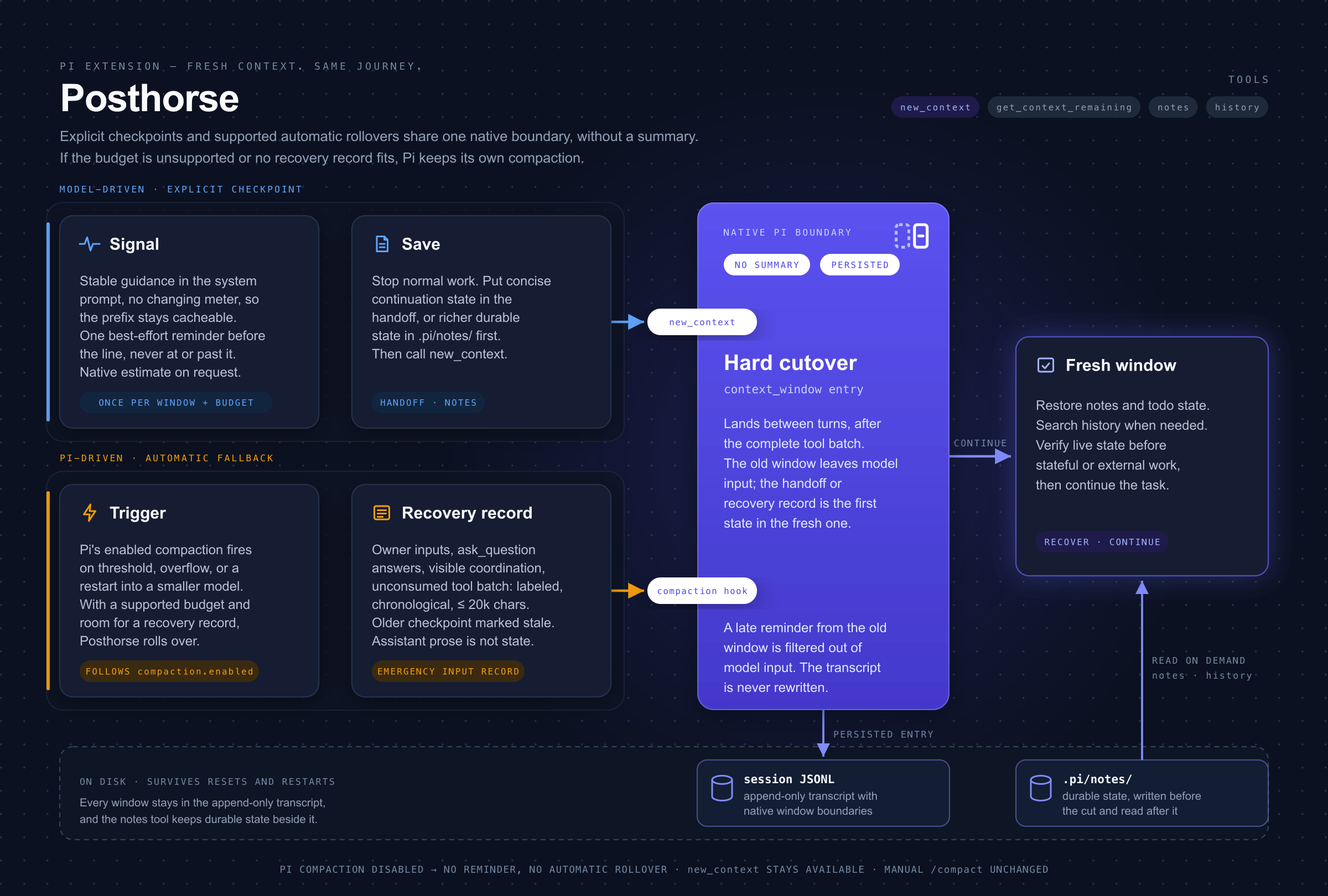
Posthorse starts fresh context windows for long Pi tasks and keeps earlier conversation recoverable. Each rollover uses a handoff or recovery record without a model-generated summary.

Install and start
Use Node 24.12.0 or later and Pi 1.0.0 or later. Posthorse supports official Pi and fitchmultz/pi.
Update an older Pi installation before you install Posthorse. Run these commands:
pi install npm:pi-posthorse
pi
Restart Pi after installation or an update. To try Posthorse for one session, run pi -e npm:pi-posthorse.
Give Pi your task. For example:
Save task state in a note. Start a fresh context window with the next steps.
How rollover works
Posthorse can remind the model to save task state before rollover. Large turns can reach rollover before this reminder. The reminder does not wake an agent after its final answer.
Automatic rollover creates a recovery record from session inputs and tool results. The model must restore notes and check live state before it continues. Manual /compact uses Pi's normal summarization.
See rollover and recovery details.
Tools
These tools are available to the model:
| Tool | Use |
|---|---|
new_context({ handoff? }) |
Request a fresh window after every foreground tool succeeds. Aborted turns and failed tools prevent the reset. |
get_context_remaining() |
Estimate tokens left until rollover and the configured context limit. Usage can be unknown before a model response. |
notes({ op, ... }) |
List, read, search, write, or append task notes. |
history({ op, ... }) |
Search earlier conversation and read entries, including images. all: true includes this project's other sessions and nested subagent runs. |
Expand a tool card with Ctrl+O. In fullscreen mode, click a tool card to expand it. A new_context card shows a request. Pi's Compacted from … tokens card confirms the rollover.
See tool examples and paging details.
Settings and limits
Posthorse uses Pi's effective compaction settings. It has no separate settings.
| Pi setting | Effect |
|---|---|
compaction.enabled |
Set to false to disable reminders and automatic rollover. new_context remains available. |
compaction.reserveTokens |
Automatic Posthorse rollover needs at least 10,000 tokens after this reserve. Smaller budgets use Pi's own compaction. Lower the reserve or choose a larger model. |
Two Posthorse copies can register the same tools and compete for rollover. Keep one copy loaded. Check installed sources with pi list.
Multiple compaction-policy extensions can make rollover depend on load order. Enable only one.
Oversized input and some overflow or truncated responses can reach the provider before automatic recovery. Save task state in notes. Background work outside the foreground tool batch continues across rollover.
See size limits and extension order. Check the legacy-session details before you move old fork sessions to official Pi.
Update or remove
pi update npm:pi-posthorse
pi remove npm:pi-posthorse
Removal leaves notes and Pi session history in place. See the installation reference for Git sources.
Data and privacy
Posthorse makes no network requests. Notes are plaintext files under .pi/notes/; linked Git worktrees share them. Add .pi/notes/ to .gitignore if the notes must stay private.
History can include user messages, assistant thinking, tool arguments, errors, and images. Content you retrieve enters the context of your selected model and provider.
See storage and privacy details. For cost diagnosis, see the cached-token investigation. It does not establish the cause of a production bill or a measured cost improvement.
Development
See development and host qualification for setup, tests, and releases. See code quality for the required checks.
License
MIT.