pi-pretty-tui
A beautiful, polished TUI for the Pi coding agent
Package details
Install pi-pretty-tui from npm and Pi will load the resources declared by the package manifest.
$ pi install npm:pi-pretty-tui- Package
pi-pretty-tui- Version
0.2.1- Published
- Sep 22, 2026
- Downloads
- 799/mo · 619/wk
- Author
- ykn0309
- License
- MIT
- Types
- extension
- Size
- 321.4 KB
- Dependencies
- 0 dependencies · 2 peers
Pi manifest JSON
{
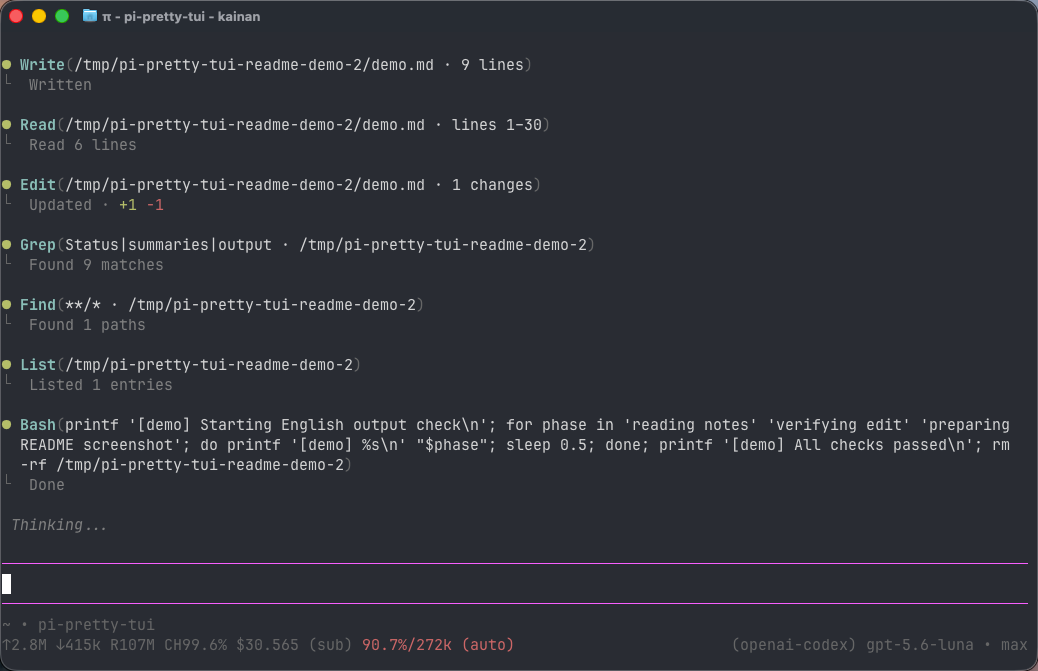
  "image": "https://unpkg.com/pi-pretty-tui@0.2.0/assets/screenshot.png",
  "extensions": [
    "./extensions/index.ts"
  ]
}
Security note
Pi packages can execute code and influence agent behavior. Review the source before installing third-party packages.
README
pi-pretty-tui
English | 简体中文
A beautiful, polished TUI for the Pi coding agent.
Features
- Collapsible activity timeline: instead of filling the conversation with individual calls, thoughts, tools, and ordinary
infonotifications share one chronological activity stream. Work appears beneath a singleRunning(...)row and settles into a quietDone(...)row. Parent rows count only tool calls and thoughts; expanding one reveals every ordered member with summaries retained above nested details. Thoughts and tools are peers: a turn that calls no tool still gets its ownRunning(1 thought)/Done(1 thought)parent row with the Thought as its child, so thinking is never dropped. - Transient UI status: one line above the editor shows direct Pi UI feedback such as Thinking/tool-output visibility changes. A newer UI status replaces it, and it disappears automatically after ten seconds without entering the transcript or session.
- Useful details on demand: tool-aware summaries keep paths, commands, results, diffs, file previews, and live shell output concise without removing access to the original content.
- A cohesive visual finish: rounded user messages and prompt input, theme-aware colors, a clear Markdown heading hierarchy, cleaner lists, and rounded syntax-highlighted code blocks make the entire TUI feel intentional. In fullscreen, each fenced code block also includes a native-feeling
[Copy]control.
Pi's built-in read, bash, edit, write, grep, find, and ls tools receive purpose-built compact views. Every third-party tool automatically receives a consistent compact row; opening it preserves its native renderer while removing conflicting terminal background colors. User and steering messages, compaction summaries, visible assistant text, warnings, errors, aborted/truncated responses, and displayed custom messages with a registered renderer create hard group boundaries. Pi's cursor, IME, autocomplete, mouse interaction, and tool execution behavior remain intact.
Install
pi install npm:pi-pretty-tui
Restart Pi or run /reload after installation.
Pi may warn that built-in tools are being overridden. This is expected: pi-pretty-tui re-registers Pi's built-in tools and delegates execution to their original implementations, changing only their TUI renderers.
Working with tool calls
Click a Running(...) or Done(...) row to keep it as a parent and reveal tools, completed ● thought entries, and extension updates beneath it. Click an individual tool or thought to reveal nested details without replacing its summary, or click the parent again to collapse the whole group. Press Ctrl+O at any time to use Pi's global expansion control for all tool output and thinking content. Tool names use each definition's label verbatim, falling back to its raw name; pi-pretty-tui does not rename or title-case them.
Extension calls to ctx.ui.notify(message, "info") (or with the type omitted) join an existing thought/tool group in chronological order; without existing work they remain independent and never attach to a future group. Warnings and errors stay standalone, use yellow ⚠ and red ✕, and are hard boundaries. Tool failures remain owned by their tool details. None of these extension notifications or errors appear in the transient UI-status line.
Displayed custom messages without their own renderer use one generic accent-coloured ◇ Markdown presentation: they join current thought/tool work when it exists, otherwise remain independent, and preserve their session persistence. Messages with a registered renderer remain completely native and form hard boundaries. These decisions use only Pi's notification type and renderer presence—never extension names, custom message names, or content heuristics.
Pi's direct internal showStatus() feedback is transient: it appears only in the status line above the editor, a newer status replaces it, and a ten-second timer removes it. It never enters the transcript or activity timeline and is cleared on reload. In clean mode, Ctrl+T leaves Pi's persisted Thinking setting unchanged and shows a short hint instead: thought details expand only when their own row is clicked, while Ctrl+O retains global activity expansion. In full and compact modes, Ctrl+T keeps Pi's native behaviour.
Settings and rendering modes
Run /pretty-tui to open the extension settings. The Enabled switch persists whether pi-pretty-tui installs its render patches and built-in tool renderers. Changing it automatically runs Pi's official reload flow, so no manual /reload is needed. You can also use /pretty-tui enable and /pretty-tui disable directly. While disabled, the settings command remains available and Pi uses its native rendering.
The extension supports three persistent rendering modes: clean (default), compact, and full. Choose one interactively, or use /pretty-tui clean, /pretty-tui compact, /pretty-tui full, and /pretty-tui status directly. Settings are stored in ~/.pi/agent/pretty-tui.json or under the directory selected by PI_CODING_AGENT_DIR.
Copy code blocks
In fullscreen TUI mode, fenced Markdown code blocks in user and assistant transcript messages include a clickable [Copy] control in the top rule:
pi --tui-mode fullscreen
Clicking it copies only the code content—not the rounded border—through Pi's native fullscreen clipboard path and shows the same transient Copied! or Copy failed flash used by direct text selection. The control is hidden in regular TUI mode because the terminal keeps mouse input for text selection and scrolling there.
Development
Run the committed regression suite before changing renderer state or transcript grouping:
npm install
npm test
The suite covers live and restored activity timelines, retries and terminal states, user/steering/compaction/native-renderer boundaries, ten-second UI-status replacement, stale-timer and flash cleanup on reload and shutdown, standalone severity styling, built-in and third-party tools, expandable thinking, parallel completion ownership, orphaned calls, duplicate-summary prevention, complete prototype-patch restoration, and fullscreen code-block copy hit regions. GitHub Actions runs the same checks on every push and pull request.
Compatibility notice
Tool rendering uses Pi's documented extension APIs. Active-tool state follows Pi's built-in execution transitions through its exported interactive components. Clean-mode thought details use the activity hierarchy's own disclosure state; full and compact modes retain Pi's built-in Thinking visibility control. Framing native user messages, rounding the native prompt editor, changing unordered-list markers, and enhancing fenced code blocks require reload-safe runtime patches because Pi does not currently expose public renderer hooks for those presentation details. Markdown enhancements are activated only while rendering user and assistant messages in the main transcript; Markdown created by extension overlays keeps Pi's native layout. Markdown parsing, syntax highlighting, and terminal semantic zones remain handled by Pi.
No Pi source files are modified. Runtime patches are removed during session shutdown, but a future Pi release may require this extension to be updated.
Uninstall
pi remove npm:pi-pretty-tui
Then restart Pi.
License
MIT