pi-pretty-tui
A beautiful, polished TUI for the Pi coding agent
Package details
Install pi-pretty-tui from npm and Pi will load the resources declared by the package manifest.
$ pi install npm:pi-pretty-tui- Package
pi-pretty-tui- Version
0.3.0- Published
- Oct 21, 2026
- Downloads
- 2,458/mo · 258/wk
- Author
- ykn0309
- License
- MIT
- Types
- extension
- Size
- 608.1 KB
- Dependencies
- 0 dependencies · 2 peers
Pi manifest JSON
{
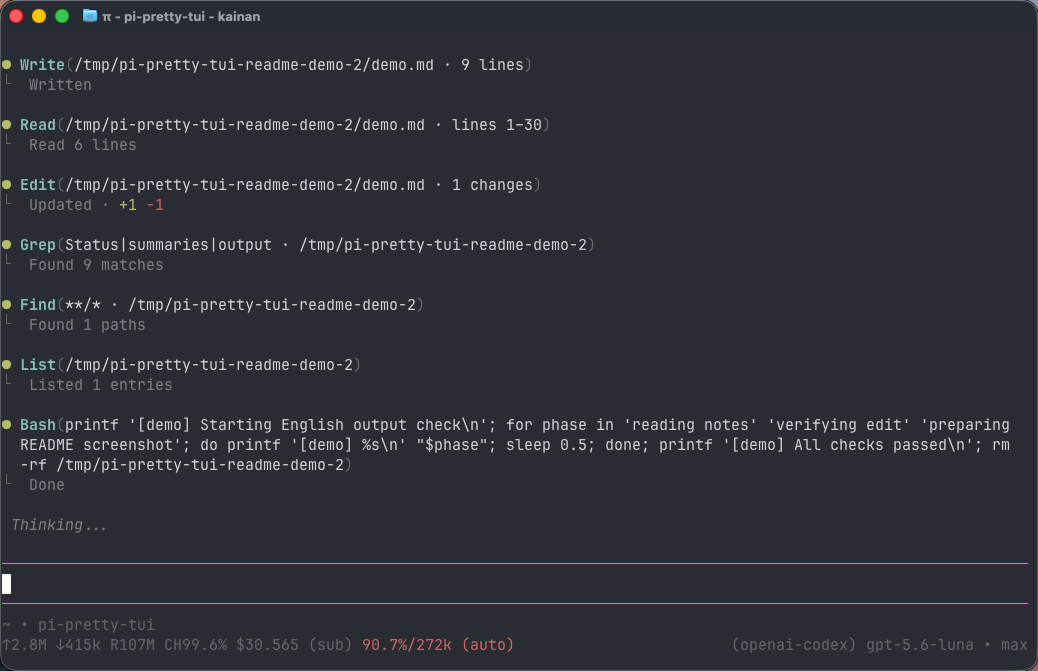
  "image": "https://raw.githubusercontent.com/ykn0309/pi-pretty-tui/main/assets/screenshot.png",
  "extensions": [
    "./extensions/index.ts"
  ]
}
Security note
Pi packages can execute code and influence agent behavior. Review the source before installing third-party packages.
README
pi-pretty-tui
English | 简体中文
A beautiful, polished TUI for the Pi coding agent.
Features
- Collapsible activity timeline: instead of filling the conversation with individual calls, thoughts, tools, and ordinary
infonotifications share one chronological activity stream. Work appears beneath a singleRunning(...)row and settles into a quietDone(...)row. Parent rows show a combined total of top-level and nested tool calls, plus thoughts; expanding one reveals every ordered member with summaries retained above nested details. Thoughts and tools are peers: a turn that calls no tool still gets its ownRunning(1 thought)/Done(1 thought)parent row with the Thought as its child, so thinking is never dropped. - Live working duration: in all three modes, elapsed time appears beside
Workingin the prompt editor's top border, using the border's own color. It shares the agent-run clock and duration format with the completion footer, includes automatic retries, and disappears when the run settles. Narrow editors omit the timer when it cannot fit. The clean-modeRunningparent dot alternates between the prompt editor’s current border color anddimabout every 800 ms; its label uses that same border color, and tool dots stay stable, and the pulse stops when the run settles. ExpandedDonetitles and markers use the theme'ssuccesscolor; collapsed summary dots, titles, and details usedim. - Transient UI status: one line above the editor shows direct Pi UI feedback such as Thinking/tool-output visibility changes. A newer UI status replaces it, and it disappears automatically after ten seconds without entering the transcript or session.
- Durable response footers: once the complete agent run settles—including tools, retries, and compaction—the final answer ends with one quiet gray divider containing the elapsed-work time and, in fullscreen, a
[Copy]control. It copies only the final visible answer, excluding thoughts, tools, statuses, and the footer itself; the footer survives reloads and session-tree navigation. - Useful details on demand: tool-aware summaries keep paths, commands, results, diffs, file previews, and live shell output concise without removing access to the original content.
- A cohesive visual finish: user messages use a rounded border in the theme's heading color (
mdHeading, warm amber in the default theme), distinct from bluemdLinkthoughts. Full and compact use background-filled, full-widthUserpanels matching Assistant cards. Clean keeps transparent, right-aligned, content-sized bubbles, wrapping long messages at 75% of the terminal width without aUserlabel. Together with the rounded prompt input, theme-aware colors, clear Markdown heading hierarchy, cleaner lists, and rounded syntax-highlighted code blocks, they make the entire TUI feel intentional. In fullscreen, each fenced code block also includes a native-feeling[Copy]control.
Clean uses purpose-built compact views for Pi's built-in read, bash, edit, write, grep, find, and ls tools. Compact uses concise summaries when folded and the same native detail cards as full when expanded. Third-party tools without nested calls automatically receive a consistent compact row; opening it preserves its native renderer while removing conflicting terminal background colors. User and steering messages, compaction summaries, visible assistant text, warnings, errors, aborted/truncated responses, and displayed custom messages with a registered renderer create hard group boundaries. Pi's cursor, IME, autocomplete, and tool execution behavior remain intact; fullscreen mouse additions are described below.
Install
pi install npm:pi-pretty-tuiRestart Pi or run /reload after installation.
Pi may warn that built-in tools are being overridden. This is expected: pi-pretty-tui re-registers Pi's built-in tools and delegates execution to their original implementations, changing only their TUI renderers.
Working with tool calls
Click a Running(...) or Done(...) row to keep it as a parent and reveal tools, completed ● thought entries, and extension updates beneath it. Click an individual tool or thought to reveal nested details without replacing its summary. The last item in each expanded tree, └─ [↑ Collapse], collapses just that group without scrolling back to its parent; clicking the parent also works. In clean mode, Ctrl+O only shows a hint to use these local disclosures; it does not expand or collapse content. Full and compact modes retain Pi's native global tool-output expansion. Third-party replacements for grep and find (such as FFF) use compact tree rows too, with their native details available when expanded. Compact tool names use bold text, parameters use muted, and running tool dots use dim; success/error dots keep their corresponding theme colors. Thought dots use mdLink, titles use bold text, and detail body text uses muted. Tool names use each definition's label verbatim, falling back to its raw name; pi-pretty-tui does not rename or title-case them.
In clean and compact, extension calls to ctx.ui.notify(message, "info") (or with the type omitted) use the same presentation. Clean joins them to current thought/tool work, while compact displays them independently. Warnings and errors stay standalone, use ⚠ and ✕, and form hard boundaries. Tool failures remain owned by their tool details. Full delegates info, warning, and error delivery to Pi's original methods, retaining its message text, individual occurrences, and status behavior.
In clean mode, Pi's native cache-miss notices join the thought/tool group of the assistant message that incurred the miss, as a yellow ⚠ child. They hide and reveal with the group and do not interrupt subsequent tool calls. If that message has no associated work (for example, a text-only final answer), the notice remains independent. Pi still decides whether a notice should appear and formats its token count, cost, model-switch and idle-gap labels; the integration hooks addCacheMissNotice() rather than matching text. Historical notices are re-derived on rebuild, not written as extra session entries. Full and compact show the same warning independently, without an activity-group wrapper.
In clean and compact, displayed custom messages without their own renderer use one generic accent-coloured ◇ Markdown presentation: they join current thought/tool work when it exists, otherwise remain independent, and preserve their session persistence. Messages with a registered renderer remain completely native and form hard boundaries. Full retains native custom-message rendering as well. These decisions use only Pi's notification type and renderer presence—never extension names, custom message names, or content heuristics.
In clean and compact, Pi's direct internal showStatus() feedback is transient: it appears only in the status line above the editor, a newer status replaces it, and a ten-second timer removes it. It never enters the transcript or activity timeline and is cleared on reload. In clean mode, Ctrl+T and Ctrl+O only show short hints to click the corresponding disclosure; neither changes visibility or Pi's Thinking setting. In full and compact modes, both shortcuts keep Pi's native behaviour. Full also preserves native showStatus() delivery instead of removing transcript feedback on a ten-second timer.
Visible assistant text remains outside activity trees even when a later update to the same message introduces thinking. Repeated updates do not close a separate, subsequent tool group.
read range labels accept numeric strings and omitted/null fields without concatenating line numbers; malformed range values omit the label. Expanded edit diffs use a fixed, right-aligned line-number gutter followed by a separate +/- column. Wrapped code aligns with the content column, preserving code indentation and theme diff colors.
Error presentation
In clean and compact modes, standalone errors keep their original title and complete text in a compact ✕ Error · reason layout. Consecutive errors with exactly the same source type, title, and full text share one visible row with a dim ×2 / ×3 count. Other transcript components break the run; errors carrying thought/tool/visible-response content are not folded. This is UI-only: session records and original message components remain unchanged. Long errors wrap without an added preview truncation. Full mode keeps native assistant error text and individual occurrences; it does not merge errors into a repetition count.
Codemode and nested tools
Clean and compact modes share the same nested-tool presentation. Tools that call other tools through Pi's nested execution API keep their own parent node. In clean mode, expand the activity group first; in compact mode, each parent appears independently without an activity-group wrapper. Both show each internal call, its status, compact arguments, duration, and result summary. Click an internal call to inspect its arguments and text result independently. Click its expanded body to collapse just that call. Script and script-output bodies also collapse their own sections when clicked. Tool calls use a ● marker: dim while running, success-colored when successful, and error-colored when failed. Tool names use bold theme text. [Script] and [Script output] are separate disclosures; the nested parent title is informational and clicking it does not expand or collapse details. Use each section or child to expand and collapse its own details; Ctrl+O only shows a hint in clean mode. Extensions can still use Pi's setToolsExpanded() API for global control; local disclosures remain usable afterward, and another global API call resets the local overrides. Calls retain their start order even when they finish in parallel. A handled child failure remains marked as failed even if the script succeeds.
The activity-group summary combines top-level and nested calls: one parent call plus three internal calls displays as 4 tool calls. The parent call itself counts once, while its node retains the nested-call count and tree structure. Internal calls never become phantom transcript members or displace the end-of-tree collapse action. Ownership uses Pi's parentToolCallId, not tool names or JavaScript parsing; wrappers other than codemode benefit too. This requires a Pi version with nested execution events (0.99.0 or later); older Pi keeps its existing display. Full mode uses codemode's own native renderer inside a tool card. It does not append additional child details from pretty-tui snapshots; visible information, native disclosures, and keyboard controls follow Pi. Clean and compact share nested execution state, history snapshots, status handling, and local child disclosures; global expansion resets their local overrides.
Child text results and edit diffs are saved in hidden, UI-only session entries for reload and branch navigation. Each root retains at most 256 calls, 4,096 characters of arguments per call, 8,192 characters of text per result, and 131,072 characters of arguments/results in total; truncation is indicated. Detail previews also have a 200-line limit, and nested trees display up to eight levels below the root. Old sessions without a snapshot explicitly show that only call metadata was retained. Nested results currently use a generic text presentation, not each third-party renderer, and images are not stored in these snapshots. Root media and the parent's original renderer remain available in full mode.
These UI entries do not change the script's output or the model's tool results. They do save child text that a script may never have printed: treat session files as potentially sensitive. Common credential argument keys are redacted; tool output is not guaranteed to be free of secrets.
Settings and rendering modes
Run /pretty-tui to open the extension settings. The Enabled switch persists whether pi-pretty-tui installs its render patches and built-in tool renderers. Changing it automatically runs Pi's official reload flow, so no manual /reload is needed. You can also use /pretty-tui enable and /pretty-tui disable directly. While disabled, the settings command remains available and Pi uses its native rendering.
All modes retain the working timer, completion footer, and copy enhancements. Clean/compact use transient status feedback; full retains native status delivery. Clean places ● thought entries in activity groups. Compact uses separate thought panels, collapsed by default with a first-line content preview (truncated to one terminal row) and a ▸ title indicator; click the title to reveal Markdown details (▾). Full preserves native thinking runs, their original order among answers, Markdown transforms, and per-run clicks; each run is decorated with a titled frame. Thoughts start expanded in full even if a saved compact/native setting was hidden. Manual folding and subsequent Ctrl+T visibility updates remain available.
Full presents native Pi information and behavior in one consistent, theme-backed panel style. User, Assistant, thought and tool panels derive their fill from the corresponding outline color. Dark themes use the same hue with much lower lightness and chroma: blue, purple, green and red outlines produce deep matching tints, while neutral Assistant outlines produce a deep gray. Light themes use pale matching tints to preserve native dark-text contrast. Titles, outlines and bottom-border timing keep their semantic theme colors; color conversion is cached and follows theme/color-mode changes. Foreground syntax/diff colors survive, including ANSI resets inside native content, and native image protocol rows remain verbatim.
Full and compact panels leave one terminal column of outer space on each side (none in very narrow terminals). These gutters retain the terminal background and apply consistently to User, Assistant, thought and tool panels.
Each tool is one panel spanning the remaining width with the native call above an Output divider and the visible result below it. There are no separate result cards, connectors or result indentation. The output section appears only when native result content exists. Exterior layout whitespace is trimmed, while internal blank lines and image reservation rows remain. Separate tools retain two blank lines between panels. User cards fill the available width with a User title; adjacent answer blocks share one expanded Assistant card; thought cards remain expanded by default with local/native visibility controls.
Built-in tools use Pi's original renderers, including previews, truncation/expansion controls and error details. Full-mode bash commands additionally use Pi's shell syntax highlighter for variables, strings, keywords and comments. Highlighting is cached by command and syntax palette; the native $ prompt, original command text, timeout annotation and result output are preserved. Shell/codemode Took/Elapsed timing lives on the bottom border in the outline color; narrow panels keep native timing in the body when it cannot fit. Third-party renderers, media and native mouse handlers remain intact. Clean retains its activity grouping and transparent user bubbles. Compact shares the same panel surfaces, outline colors, gutter and User/Assistant cards, but defaults to concise tool parameters and result summaries. Standalone tool panel titles show ▸ when collapsed and ▾ when expanded. Click the title to toggle details, and use native Ctrl+O for global expansion. User/Assistant panels and informational nested-parent titles have no disclosure arrow. Expanded standalone tools use the same native renderer and panel projection as full, including shell highlighting, output boundaries and native timing, without compact tree connectors or result indentation. Nested wrappers retain independent script/output/child disclosures. Compact records Took on the border when a final duration is supplied by Pi; it does not invent missing timings. Extremely narrow terminals omit the outline while retaining the panel background.
The extension supports three persistent rendering modes: clean (default), compact, and full. Choose one interactively, or use /pretty-tui clean, /pretty-tui compact, /pretty-tui full, and /pretty-tui status directly. Settings are stored in ~/.pi/agent/pretty-tui.json or under the directory selected by PI_CODING_AGENT_DIR.
| Mode | Third-party tools | Codemode and other nested callers |
|---|---|---|
clean |
Compact summaries inside activity groups; native details on expansion | Nested tree inside the group, with local disclosures |
compact |
Concise independent panels; title toggles native details | Independent panel with parent/child tree and local script/output/child disclosures |
full |
Native content and interactions in a titled card | Native codemode content and disclosures in a titled card; no added snapshot-only details |
Full and compact keep Pi's native Ctrl+O global expansion. Shared projected rows preserve local controls afterward. These modes do not create clean-mode Running/Done activity wrappers.
In fullscreen, interactive activity/tool rows and copy controls tolerate same-row horizontal pointer jitter of up to two terminal columns. Larger or vertical movement remains a drag; ordinary text selection, links, and Pi's double/triple-click behavior are unchanged.
In compact and full, compaction summaries use a theme-colored compaction ▸/▾ card. The original token count, shortcut hint and complete summary remain available; click the title/body or use native Ctrl+O to toggle expansion. Compaction cost notices remain separate. Clean retains Pi’s original compaction box.
Copy user messages
In fullscreen mode, left-click a user bubble's body or border to copy its complete original text, preserving Markdown, indentation, and line breaks without the bubble frame. Existing links and code-block [Copy] controls retain priority; dragging to select text does not trigger whole-message copy. Pi's native clipboard path provides copy feedback. This copies text, not image attachments. Regular mode keeps terminal-owned mouse selection and copying.
Copy code blocks
Rounded code-block lines and corners use borderMuted; language labels, [Copy], and code text retain their existing colors.
In fullscreen TUI mode, fenced Markdown code blocks in user and assistant transcript messages include a clickable [Copy] control in the top rule:
pi --tui-mode fullscreenClicking it copies only the code content—not the rounded border—through Pi's native fullscreen clipboard path and shows the same transient Copied! or Copy failed flash used by direct text selection. The control is hidden in regular TUI mode because the terminal keeps mouse input for text selection and scrolling there.
Development
Run the committed regression suite before changing renderer state or transcript grouping:
npm install
npm test
The suite covers live and restored activity timelines, retries and terminal states, user/steering/compaction/native-renderer boundaries, ten-second UI-status replacement, stale-timer and flash cleanup on reload and shutdown, standalone severity styling, built-in and third-party tools, expandable thinking, parallel completion ownership, orphaned calls, duplicate-summary prevention, durable response timing and answer-only copy controls, adaptive user chat bubbles, complete prototype-patch restoration, and fullscreen code-block copy hit regions. GitHub Actions runs the same checks on every push and pull request.
Compatibility notice
The current development and regression-test baseline is Pi 1.3.0. User chat bubbles support its direct Markdown layout, using themed, full-width User panels in full/compact and transparent, content-sized bubbles in clean. Nested execution requires Pi 0.99.0 or later; this is a feature requirement, not a promise that every older Pi release is tested.
Tool rendering uses Pi's documented extension APIs. Active-tool state follows Pi's built-in execution transitions through its exported interactive components. Clean-mode thought details use the activity hierarchy's own disclosure state; full and compact modes retain Pi's built-in Thinking visibility control. Rendering native user messages as adaptive chat bubbles, rounding the native prompt editor, changing unordered-list markers, and enhancing fenced code blocks require reload-safe runtime patches because Pi does not currently expose public renderer hooks for those presentation details. Markdown enhancements are activated only while rendering user and assistant messages in the main transcript; Markdown created by extension overlays keeps Pi's native layout. Markdown parsing, syntax highlighting, and terminal semantic zones remain handled by Pi.
No Pi source files are modified. Runtime patches are removed during session shutdown, but a future Pi release may require this extension to be updated.
Uninstall
pi remove npm:pi-pretty-tuiThen restart Pi.
License
MIT