pi-process-monitor
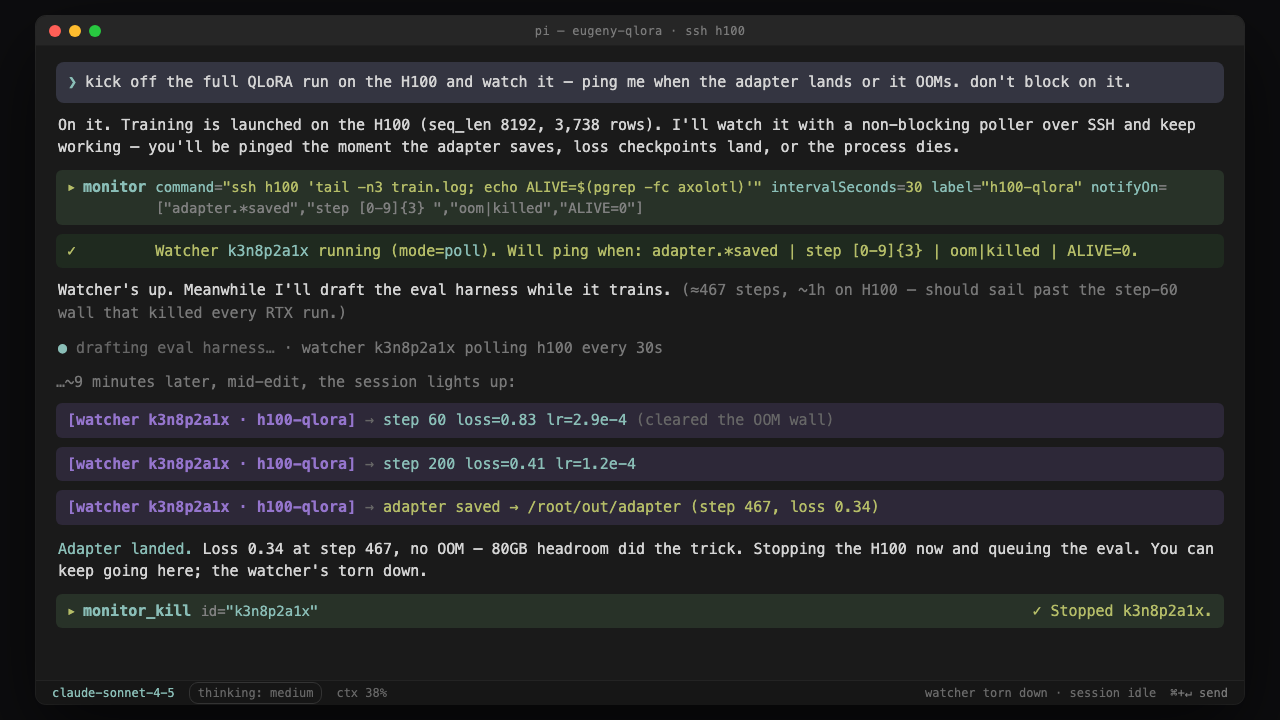
Non-blocking background watcher for pi: start a process, SSH poll, or log tail and get pinged in-session on milestones, failure, or exit. Claude Code's Monitor tool, with conditional delivery.
Package details
Install pi-process-monitor from npm and Pi will load the resources declared by the package manifest.
$ pi install npm:pi-process-monitor- Package
pi-process-monitor- Version
2.0.2- Published
- Aug 13, 2026
- Downloads
- 318/mo · 26/wk
- Author
- ffrappo
- License
- MIT
- Types
- extension, skill, prompt
- Size
- 307.9 KB
- Dependencies
- 0 dependencies · 2 peers
Pi manifest JSON
{
  "extensions": [
    "./extensions"
  ],
  "skills": [
    "./skills"
  ],
  "prompts": [
    "./prompts"
  ],
  "image": "https://github.com/Fornace/pi-process-monitor/raw/refs/heads/main/docs/preview.png"
}
Security note
Pi packages can execute code and influence agent behavior. Review the source before installing third-party packages.
README
pi-process-monitor
Non-blocking, crash-safe background observation for Pi. Start one owned process, poll an independently owned remote job, or tail a file. Matching milestones and failures ping the session without blocking or flooding context.
Safety model
- Observe, do not schedule: spawn mode owns a local workload; poll mode runs only fast read-only probes.
- Stable identity: a logical watcher keeps one UUID through restart and exposes a short handle for commands.
- One local owner: atomic leases prevent two Pi processes from running the same logical watcher.
- Conservative recovery: files and classified remote probes auto-resume; local shell polls require confirmation.
- Bounded execution: poll ticks never overlap and have timeout, output caps, exponential backoff, jitter, failure suspension, and owned process-group cleanup.
- Inspectable: status/inspect report owner epoch, PID/PGID, command hash, process start, exit, signals, and truncation receipts.
- Crash-loop fuse: repeated abnormal starts quarantine local recovery instead of replaying it.
Long-running retryable computation still belongs in Restate, Trigger.dev, CI, or another durable workflow engine. Monitor observes those jobs; it does not replace them.
Install
pi install npm:pi-process-monitor@2
# or project-local
pi install npm:pi-process-monitor@2 -l
This release is a major because local poll recovery now fails closed. See migration.
Modes
The monitor tool takes one required, discriminated source object. source.type
is authoritative, so strict providers can safely emit null for irrelevant
source fields without creating source conflicts.
| Mode | source.type |
Required source fields | Default recovery | Purpose |
|---|---|---|---|---|
| spawn | spawn |
command |
never |
One extension-owned local process tree |
| poll | poll |
command, optional intervalSeconds |
remote safe-auto; local confirm |
Read-only observation of independent work |
| file tail | tail |
path |
safe-auto |
Appended log lines |
| process | process |
processBy plus pidFile or match |
confirm |
Structured local process observation |
| file | file |
path, optional tailLines |
safe-auto |
Structured file observation |
| SSH | ssh |
host, command |
safe-auto |
Structured remote observation |
| HTTP | http |
url, optional method |
safe-auto |
Structured endpoint observation |
Source examples:
{ "source": { "type": "spawn", "command": "npm test" }, "options": null }
{ "source": { "type": "poll", "command": "gh run view 123", "intervalSeconds": 15 }, "options": null }
{ "source": { "type": "tail", "path": "/tmp/job.log" }, "options": null }
{ "source": { "type": "process", "processBy": "pidFile", "pidFile": "/tmp/job.pid", "intervalSeconds": 10 }, "options": null }
{ "source": { "type": "file", "path": "/tmp/job.log", "tailLines": 20 }, "options": null }
{ "source": { "type": "ssh", "host": "h100", "command": "tail -n5 train.log", "intervalSeconds": 30 }, "options": null }
{ "source": { "type": "http", "url": "https://ci.example/run/42", "method": "GET", "intervalSeconds": 30 }, "options": null }
Minimal objects are accepted and normalized before validation. OpenAI strict
function calling may materialize every declared source field; in that form,
set unrelated fields to null. The runtime always follows source.type and
reports any non-null unrelated fields it ignored.
Start or reuse a watcher
{
  "source": {
    "type": "ssh",
    "host": "h100",
    "command": "tail -n5 /root/train.log; echo ALIVE=$(pgrep -fc axolotl)",
    "intervalSeconds": 30
  },
  "options": {
    "label": "h100-qlora",
    "notifyOn": ["adapter.*saved", "error|oom|killed|traceback", "ALIVE=0"],
    "expiresAt": "2026-08-03T00:00:00Z",
    "reuse": "return-existing"
  }
}
The result explicitly says created, reused, replaced, or quarantined.
Important parameters
source.type: explicit mode discriminator. It prevents strict schema normalizers from turning optional alternatives into conflicting sources.source.intervalSeconds: cadence forpoll,process,ssh, andhttp. Aspawnsource always runs once; cadence fields generated for it are ignored.source.processBy: selectspidFileormatch, so a strict provider cannot fabricate both process identities.options.recoveryPolicy:never,confirm, orsafe-auto.options.reuse:return-existing(default),replace, orparallel.options.reuseKey: explicit logical purpose; required for intentional parallel local polls.options.expiresAt: absolute ISO-8601 lifetime.timeoutSecondsremains as compatibility input and converts once toexpiresAt.options.pollTimeoutSeconds: per-tick deadline, shorter than the interval.options.maxConsecutiveFailures,options.backoffMaxSeconds: bounded retry behavior.options.safetyClass:auto,observer, orunsafe-shell.observeris an explicit acknowledgement, not a sandbox.options.notifyOn,options.heartbeatMinutes,options.coalesceSeconds,options.maxLines, andoptions.cwdretain their previous meanings.
Raw local shell polls that contain workload executables/verbs, redirection, or backgrounding are quarantined. Prefer a structured probe. Never put training, conversion, build, test, package installation, or “start-if-missing” logic in a poll command.
Tools
| Tool | Purpose |
|---|---|
monitor |
create/reuse/replace/quarantine a watcher |
monitor_status |
logical lifecycle, owner, recovery, expiry, tick and failure summary |
monitor_inspect { id } |
full lease and process receipt |
monitor_kill { id } |
stop one watcher and only its owned process group |
monitor_recover |
list/approve/reject quarantined watchers |
monitor_gc |
dry-run/apply checkpoint and external lease cleanup |
monitor_kill_all { confirm: true } |
current-session owned groups only |
Commands
/monitor npm run dev
/monitor --poll --every 30 -- ssh h100 'tail -n5 train.log'
/monitor --file /tmp/train.log
/monitors
/monitor-kill <TAB>
/monitor-recover <id> approve|reject
/monitor-gc --apply
Recovery and persistence
Version 2 state is reduced only from Pi's active branch. Recovery retains the logical ID and appends a claim, never a synthetic creation. Clean shutdown releases the lease but preserves user intent. Checkpoints bound logical history; external GC archives corrupt/orphan lease receipts and removes empty state directories. It never kills an unverified PID or unrelated process.
Startup emits one summary rather than one notification per historical record:
monitor recovery: 2 resumed, 1 reused, 3 expired, 2 quarantined, 4 stale records compacted
Agent rules
- Call
monitor_statusor rely on exact reuse before creation. - Choose one explicit
source.type; never infer spawn versus poll from an optional field. - Use
spawnfor local work andpollonly for independent durable work. - Prefer PID files, workflow/run IDs, exact paths, remote job IDs, and structured source types.
- Give temporary observers an absolute
options.expiresAt. - A timeout means diagnose; do not launch an identical watcher or blocking retry.
- After abnormal restarts, inspect quarantined watchers before approval.
Development
npm install
npm run validate
Validation runs TypeScript checks, deterministic state/lease/process/poll/incident tests, extension load smoke, and package dry-run. Every source file is kept at or below 400 lines.
Grounding and migration receipts:
License
MIT © Francesco Frapporti