pi-provider-fallback
Cross-provider model fallback for pi, with an interactive TUI config
Package details
Install pi-provider-fallback from npm and Pi will load the resources declared by the package manifest.
$ pi install npm:pi-provider-fallback- Package
pi-provider-fallback- Version
1.0.4- Published
- Jun 22, 2026
- Downloads
- 850/mo · 25/wk
- Author
- c37o
- License
- MIT
- Types
- extension
- Size
- 104.9 KB
- Dependencies
- 0 dependencies · 2 peers
Pi manifest JSON
{
  "extensions": [
    "./provider-fallback.ts"
  ],
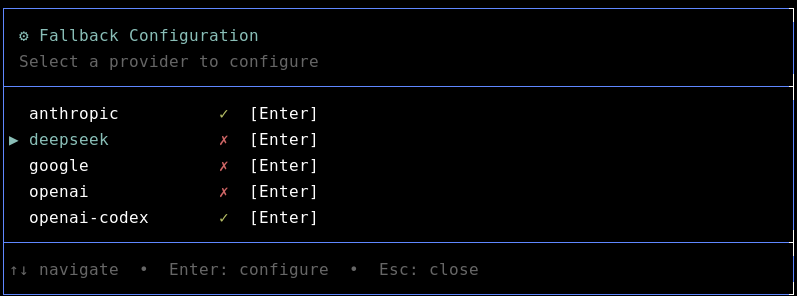
  "image": "https://raw.githubusercontent.com/37/pi-provider-fallback/master/assets/fallback-config.png"
}
Security note
Pi packages can execute code and influence agent behavior. Review the source before installing third-party packages.
README
pi-provider-fallback
A simple cross-provider model fallback extension for pi, with an interactive TUI config.
When the active model hits a terminal transient, quota, or model-unavailable error, the extension swaps to the next configured fallback model (trying the same provider first, then other providers) and re-issues the failed prompt. If fallback switches to a model with a smaller context window, the extension triggers pi compaction first when the current context would be too large. The swap is sticky for the session; the original model is restored on shutdown or at /reload.
At a glance:
- This is a pi extension. It adds the
/fallback-configand/fallback-statuscommands. - Options draw from your available providers (those in
pi --list-models). - Providers are enabled for fallback per your preference: opt each one in or out.
- Up to two models per provider can be set as your 1st and 2nd fallback preference.
Install
# via npm
pi install npm:pi-provider-fallback

# via git
pi install git:github.com/37/pi-provider-fallback
This adds the extension to ~/.pi/agent/settings.json (use -l to write project-local .pi/settings.json instead).
Alternatively you can install from local, or remote using specific versions pinned to a tag or commit:
# specific git version
pi install git:github.com/37/pi-provider-fallback@v1.0.3

# Local / dev
pi -e ./provider-fallback.ts   # run once from a clone, no settings change
Usage
Configure interactively in pi:
/fallback-config      # interactive TUI to set fallback models per provider
/fallback-status      # view current config
Configuration / setup with TUI
No JSON editing required. The TUI only shows providers and models present in your registry (pi --list-models).
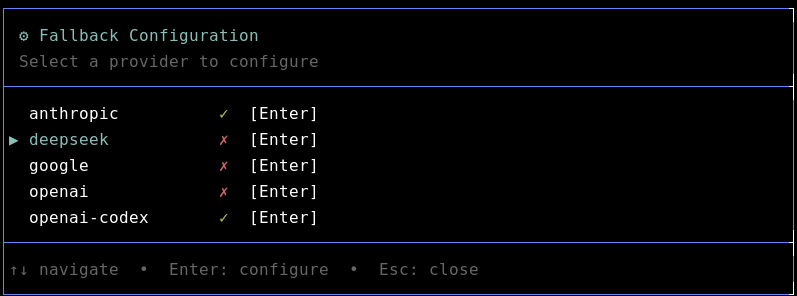
A ✓ marks a provider enabled for fallback, ✗ disabled. Press Enter on a provider to pick up to two fallback models and assign them priority 1 / 2.
Note: /fallback-config automatically saves changes on every action. No ctrl+s required.
How fallback works
On an eligible error for providerA/modelX:
- Try
providerA's other configured fallbacks (priority 1, then 2). - If exhausted, try other enabled providers' fallbacks.
- If nothing is available:
[fallback] no fallback available.
The pointer is forward-only per session (never retries an already-failed fallback). If the target fallback has a smaller context window and the current context is too large, compaction runs before the retry.
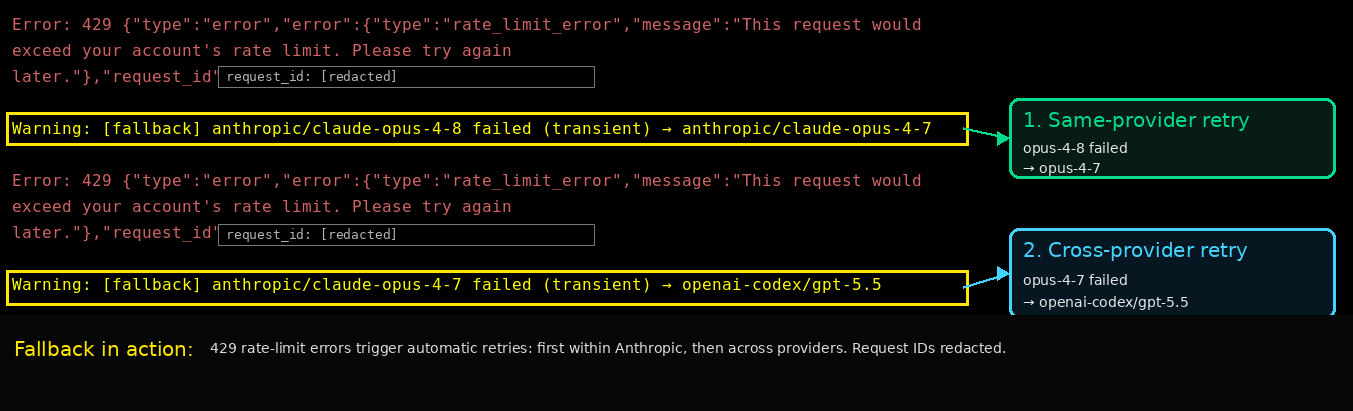
The screenshot shows a rate-limit error falling back first within Anthropic, then across providers after the second rate-limit. Request IDs are redacted.
Error classification
| Bucket | Triggers fallback | Examples |
|---|---|---|
| transient | yes | overloaded, rate-limit, 429/5xx, network/timeout |
| quota | yes | usage limit, billing, insufficient quota |
| unavailable | yes | 404 not_found, "model is not available", invalid model |
| ignore | no | context overflow, user abort |
Config
Stored at ~/.pi/agent/extensions/provider-fallback.json (override with PI_PROVIDER_FALLBACK_CONFIG). Managed by the TUI; see provider-fallback.example.json for the shape.
Testing fallback
Set your default model to anthropic/claude-fable-5 and send a prompt. As of 2026-06-21 this is a convenient deterministic test: Anthropic has disabled the model, so it always 404s and reliably triggers fallback. This may change in future; if the model is re-enabled or removed, pick any other unavailable model id.
You should see:
[fallback] anthropic/claude-fable-5 failed (unavailable) → anthropic/claude-opus-4-8
Note: the
→ anthropic/claude-opus-4-8target appears only ifclaude-opus-4-8is configured as ananthropicfallback model. With a different anthropic fallback (or none, falling through to another provider) the target reflects whatever you configured.
Self-check the classifier: npx tsx provider-fallback.ts --selfcheck
License
MIT