pi-quiz
Active quiz for code and document understanding in pi
Package details
Install pi-quiz from npm and Pi will load the resources declared by the package manifest.
$ pi install npm:pi-quiz- Package
pi-quiz- Version
0.5.0- Published
- Apr 15, 2026
- Downloads
- 625/mo · 15/wk
- Author
- omacl
- License
- MIT
- Types
- extension, skill
- Size
- 606.6 KB
- Dependencies
- 6 dependencies · 3 peers
Pi manifest JSON
{
  "extensions": [
    "./extensions"
  ],
  "skills": [
    "./skills"
  ],
  "image": "https://raw.githubusercontent.com/omaclaren/pi-quiz/main/assets/screenshots/quiz-window.png"
}
Security note
Pi packages can execute code and influence agent behavior. Review the source before installing third-party packages.
README
pi-quiz
Active quiz for code and document understanding in pi.
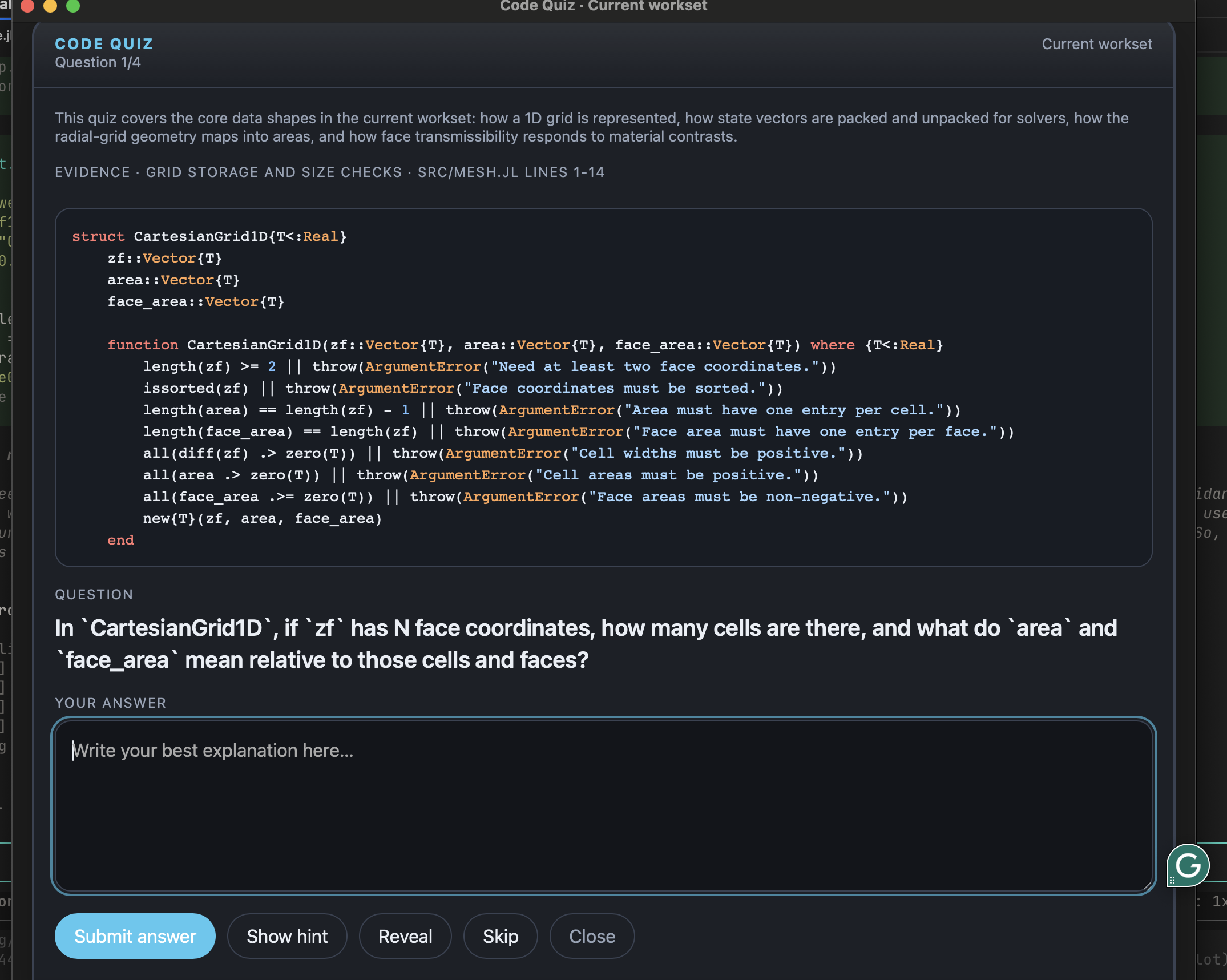
Instead of summarizing material for you, pi-quiz shows a real snippet, asks a question, lets you answer in your own words, gives feedback, and lets you discuss that question further.
Screenshot

What it does
- Opens a Glimpse quiz window with a snippet, question, and answer box
- Builds quizzes from the current
workset(inferred active files),session,repo, or a specific file - Works with code files, Markdown, LaTeX, PDF, and DOCX
- Uses pi's active model; thinking level defaults to the current setting, capped at
high, but can be overridden - Keeps questions anchored to visible snippets
- Gives short feedback plus an ideal answer after you submit
- Lets you open a per-question discussion thread, using broader local source context and recent session context when available
- Can generate an optional end-of-quiz wrap-up report summarising what seems solid, what to revisit, and a suggested next focus
- Supports audience profiles:
general,scientist,developer, andreviewer
Commands
/quiz— quiz the current workset (inferred active files)/quiz workset— explicitly quiz the current workset/quiz session— quiz files strongly associated with the current session/quiz repo— quiz repo-level structure and central code/quiz file <path>— quiz a specific file/quiz --file <path>— alias for specifying a file explicitly/quiz <path>— shorthand for/quiz file <path>when the path exists/quiz ... --thinking off|minimal|low|medium|high— override the model thinking level/quiz ... --audience general|scientist|developer|reviewer— bias the question style for a particular audience/quiz ... --mode gen|sci|dev|rev— short alias for--audience/quiz ... --focus "the introduction and model formulation"— steer questions toward specific sections or topics/quiz-close— close the active quiz window
Audience profiles
general/gen— balanced, accessible questions mixing concept and mechanicsscientist/sci— focuses on quantities, state representations, transformations, assumptions, perturbations, and intuitive meaningdeveloper/dev— focuses on interfaces, control flow, contracts, extension points, and debugging/refactoring consequencesreviewer/rev— focuses on claims, methodology, evidence, assumptions, argument structure, and implications; designed for reading academic papers and theses
scientist mode is meant to push the quiz away from software-trivia or pure contract-checking and toward the meaning of the model and what the code is representing.
reviewer mode is designed for critical reading of academic documents — it probes what the authors actually claimed, what assumptions underpin the results, where the argument is strongest or weakest, and what would change if an assumption were relaxed.
Document support
.mdand.texfiles are read directly as text — first-class support.pdffiles are extracted viapdftotext(from poppler); install withbrew install poppleror equivalent.docxfiles are extracted viapandoc; install withbrew install pandocor equivalent- If equations, tables, or figures look garbled after automatic extraction, consider converting to
.mdor.texfirst for better results
Focus
The --focus flag lets you steer quiz questions toward specific sections or topics without needing to extract them manually. It affects both source selection and question generation, so repo-level quizzes can narrow toward a specific mechanism, theme, or section family:
/quiz --file thesis.pdf --focus "the introduction and model formulation"
/quiz --file paper.tex --focus "the methods section and assumptions"
/quiz --file solver.jl --focus "the time-stepping logic"
/quiz repo --focus "how the solver advances the flow front"
/quiz repo --mode reviewer --focus "common themes in the abstracts"
Install
From GitHub:
pi install https://github.com/omaclaren/pi-quiz
From npm:
pi install npm:pi-quiz
Try it without installing:
pi -e https://github.com/omaclaren/pi-quiz
After installing, reload or restart pi.
Notes
pi-quizis for active recall and understanding, not passive summaries.- Questions are intended to be answerable from the snippet shown in the quiz window.
- After feedback is shown, you can open a short discussion thread for that card.
- After a set is finished, you can generate more questions from the same scope.
- At completion you can also request a short wrap-up report based on your answers and feedback, then save it to
quiz-feedback/. - Quiz packets and quiz runs are stored as hidden session entries.
Migrating from pi-code-quiz
pi remove npm:pi-code-quiz
pi install npm:pi-quiz
License
MIT