pi-recap
Session recap panel for pi coding agent. Always-visible widget showing the current goal and last few conversation turns with live streaming updates. Auto-selects the fastest, cheapest summarization model using pi-bench benchmark data.
Package details
Install pi-recap from npm and Pi will load the resources declared by the package manifest.
$ pi install npm:pi-recap- Package
pi-recap- Version
0.8.21- Published
- May 11, 2026
- Downloads
- 343/mo · 343/wk
- Author
- ffrappo
- License
- MIT
- Types
- extension
- Size
- 236.1 KB
- Dependencies
- 1 dependency · 3 peers
Pi manifest JSON
{
  "extensions": [
    "./index.ts"
  ]
}Security note
Pi packages can execute code and influence agent behavior. Review the source before installing third-party packages.
README
pi-recap
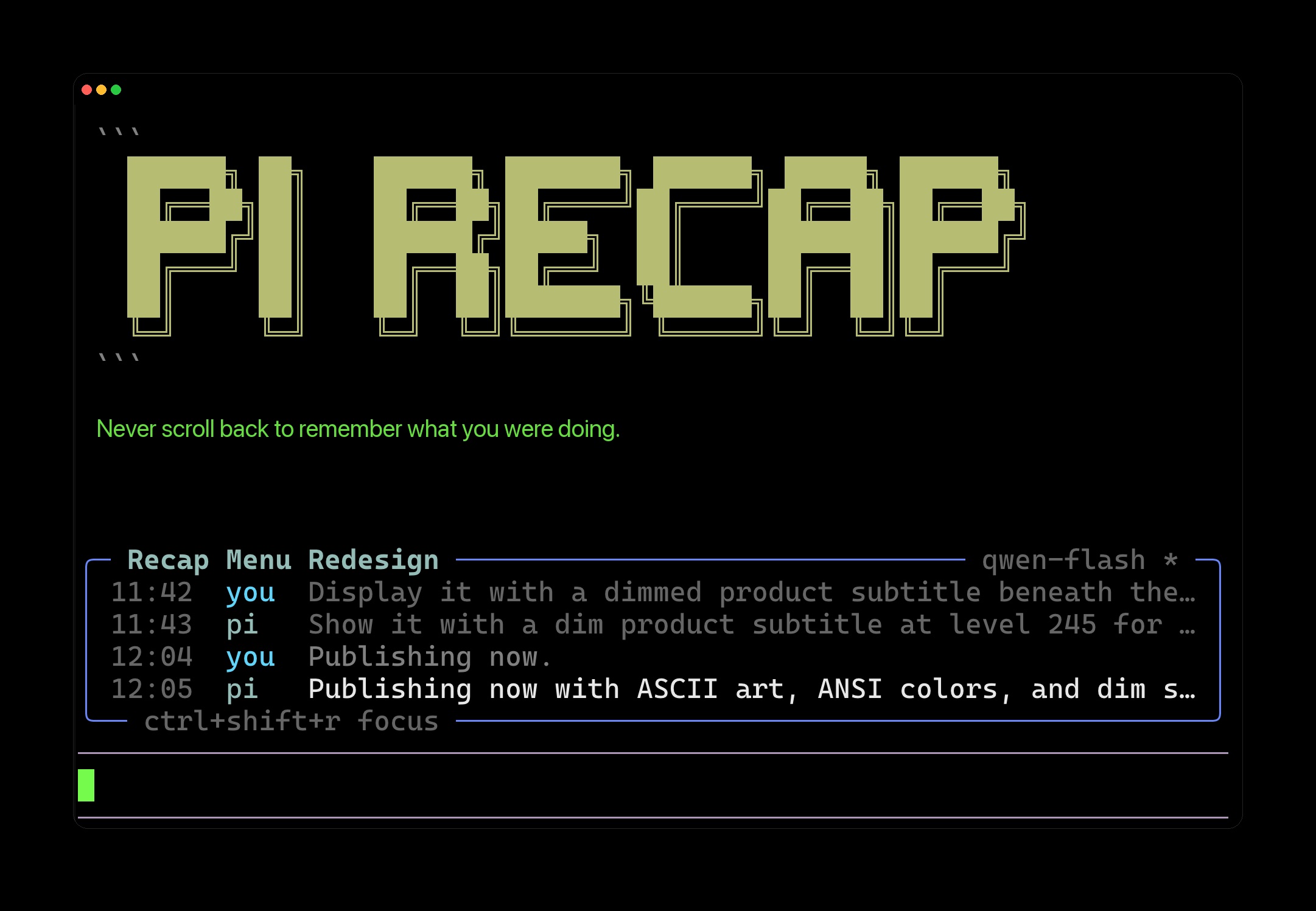
Never scroll back to remember what you were doing.
An always-visible session recap panel for pi coding agent showing the current goal and last few conversation turns with live streaming updates.

Banner and screenshot images created with pi-banana.
Features
- Auto-derived session goal — the title updates automatically after the first turn using a fast LLM
- Turn history — last 4 recaps with timestamps, speaker tags (
you/pi), and fade-to-dim for older entries - Live streaming — breathing dot while thinking, caret blink during token arrival, 180ms settle animation on completion
- Keyboard navigation —
Ctrl+Shift+Rto focus,↑↓to scroll older entries,Escto release - Slash commands —
/goalto override the title,/recap-modelto pick the summarization model,/recap-blacklistto manage the model skip-list - Theme-agnostic text colors — recap headline and body use hardcoded high-contrast colors that work on any theme (light or dark)
- Cheap summarization — auto-selects the fastest/cheapest available model (flash/mini/haiku/turbo) to keep costs near zero. Curated chain and blacklist seed are imported from pi-bench, the source of truth for bench data.
Installation
Pi auto-discovers extensions from ~/.pi/agent/extensions/. Clone the repo there:
git clone https://github.com/fornace/pi-recap.git ~/.pi/agent/extensions/pi-recap
cd ~/.pi/agent/extensions/pi-recap
npm install
Restart pi. The recap panel appears above the editor after your first message.
Usage
The panel is passive — it just shows the last few turns. No configuration needed.
| Shortcut | Action |
|---|---|
Ctrl+Shift+R |
Focus the recap panel |
↑ / ↓ |
Navigate older entries (while focused) |
Esc |
Release focus |
Slash commands
Type /recap for the interactive menu. No arguments needed — everything is selection-based.
| Menu path | Description |
|---|---|
/recap → goal: ... |
Set/override the session goal (text input) |
/recap → clear goal |
Remove override, return to auto-derivation |
/recap → model: ... |
Pick from available fast models (select list) |
/recap → clear model |
Remove model override |
/recap → blacklist: N entries → view / add / remove / reset / re-seed |
Manage the model skip-list |
Architecture
pi-recap/
├── index.ts           # Extension entry point (hooks, slash commands, state management)
├── state/
│   ├── state.ts       # HistoryEntry type, speaker enum
│   ├── store.ts       # In-memory state + persistence (session branch entries)
│   ├── replay.ts      # Restore state from session entries on restart
│   └── blacklist.ts   # Persistent model skip-list
├── subagent/
│   ├── recap.ts       # User & agent recap generation (streams from cheap model)
│   ├── goal.ts        # Session goal derivation (streams from cheap model)
│   └── picker.ts      # Model selection chain: override → cache → curated → ctx.model
├── ui/
│   ├── status-widget.ts  # TUI component (rendered above editor)
│   └── anim.ts        # Animation primitives (streaming dot, settle sweep, color utilities)
└── util/
    ├── date.ts        # Timestamp formatting ("now", "14m", "14:30")
    └── log.ts         # Best-effort debug logging
Model picker chain
The summarization model is selected through a 4-layer chain (top wins):
- User override — set via
/recap-model <id> - Cached winner — 24h TTL from last successful run
- Curated chain — fast/cheap models imported from pi-bench, ordered by bench rank
- Session model — pi's configured model (sacred fallback, never blacklisted)
Development
cd ~/.pi/agent/extensions/pi-recap
npm install        # types + typescript
npx tsc            # type-check (no emit, jiti loads .ts directly)
Pi loads .ts files via jiti — no build step needed during development.
Testing
npx tsx test-recap.ts            # test recap/goal generation with mock registry
npx tsx test-recap-models.ts     # test model picker chain against real registry
License
MIT
From the same author
By Francesco Frapporti at Fornace.
- pi-bench — LLM benchmark toolkit for pi. Probes every model to find the fastest and cheapest. This extension uses pi-bench data to pick summarization models.
- pi-banana — Generate and edit images inside pi using Google Nano Banana. The banner and screenshot images above were created with pi-banana.
- pi-alibaba-models — Complete Alibaba provider for pi: Qwen, DeepSeek, Kimi, GLM, MiniMax with native thinking levels.
- pi-notte-theme — Notte: a true-dark pi theme where darkness has color and text glows like terminal phosphor.
Changelog
0.8.16
- Fixed double-render of the recap panel during pi-tui startup. The widget now registers on first user input (
before_agent_start) instead ofsession_start, preventing the panel from appearing twice when pi first launches. - Added raw Enter keypress listener via
onTerminalInputto bump the decoy row at the earliest possible moment, before pi processes the submit. This gives maximum time for the decoy to clear orphaned border fragments in scrollback. The listener skips when the recap widget has focus and never consumes the keypress.