pi-render-btw
A pi extension for parallel side conversations with /btw — with markdown rendering in the floating window
Package details
Install pi-render-btw from npm and Pi will load the resources declared by the package manifest.
$ pi install npm:pi-render-btw- Package
pi-render-btw- Version
0.6.17- Published
- Sep 18, 2026
- Downloads
- 701/mo · 567/wk
- Author
- esso0428
- License
- MIT
- Types
- extension
- Size
- 519.3 KB
- Dependencies
- 0 dependencies · 3 peers
Pi manifest JSON
{
  "image": "https://raw.githubusercontent.com/ESSO0428/pi-render-btw/main/docs/btw-overlay.png",
  "skills": [],
  "extensions": [
    "./extensions/btw.ts"
  ]
}
Security note
Pi packages can execute code and influence agent behavior. Review the source before installing third-party packages.
README
pi-render-btw
Fork of pi-btw with markdown rendering in the floating window.
A pi extension that adds a /btw side conversation channel
with full markdown rendering (syntax highlighting, bold, code blocks, lists, etc.) inside the overlay.
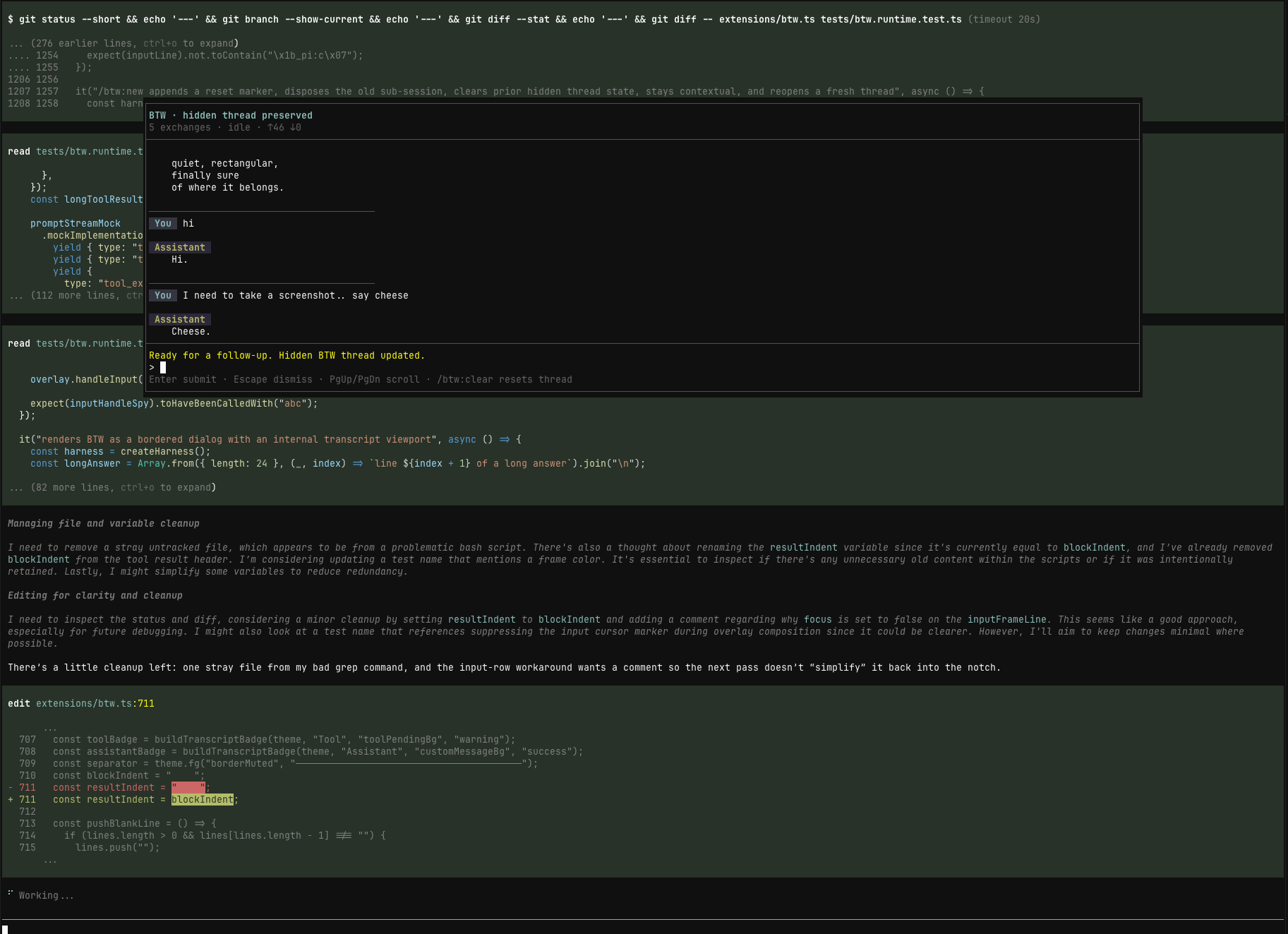
/btw opens a real pi sub-session with coding-tool access, and it runs immediately even while the main agent is still busy.
What it does
- opens a parallel side conversation without interrupting the main run
- runs that side conversation as a real pi sub-session with
read/bash/edit/writetool access - keeps a continuous BTW thread by default
- supports
/btw:tangentfor a contextless side thread that does not inherit the current main-session conversation - opens a focused BTW modal shell with its own composer and transcript
- keeps the BTW overlay open while you switch focus back to the main editor with
Alt+/ - keeps BTW thread entries out of the main agent's future context
- supports BTW-only model and thinking overrides without changing the main thread settings
- lets you inject the full thread, or a summary of it, back into the main agent
- optionally saves an individual BTW exchange as a visible session note with
--save - includes an internal Peek mode for browsing the current BTW side thread
- uses a consistent Cc-style Input/Output card renderer in Peek and read-only Tool Output, while keeping BTW's native-style right-hand scrollbar with
↑ N more/↓ N moreaffordances at the viewport edges
✨ Markdown rendering
Unlike the original pi-btw, pi-render-btw renders assistant responses inside the floating
window using pi TUI's built-in Markdown component. This means:
- Bold, italic,
strikethrough,inline code, andcode blockswith syntax highlighting - Lists (ordered & unordered), blockquotes, horizontal rules
- Headings and links
- Cached rendering for performance — markdown is only re-rendered when the content or terminal width changes
- Streaming responses fall back to plain text for speed; completed turns are rendered as markdown
Install
From npm
pi install npm:pi-render-btw
From git
pi install git:github.com/ESSO0428/pi-render-btw
Then reload pi:
/reload
From a local checkout
pi install /path/to/pi-render-btw
Usage
/btw what file defines this route?
/btw how would you refactor this parser?
/btw --save summarize the last error in one sentence
/btw:new let's start a fresh thread about auth
/btw:tangent brainstorm from first principles without using the current chat context
/btw:model openai gpt-5-mini openai-responses
/btw:thinking low
/btw:inject implement the plan we just discussed
/btw:summarize turn that side thread into a short handoff
/btw:peek browse the current BTW side thread
/btw:clear
Commands
/btw [--save] <question>
- runs right away
- works while pi is busy
- creates or reuses a real BTW sub-session instead of a one-off completion call
- continues the current BTW thread
- opens or refreshes the focused BTW modal shell with markdown rendering
- streams into the BTW modal transcript/status surface
- persists the BTW exchange as hidden thread state
- with
--save, also saves that single exchange as a visible session note
Overlay controls
Alt+/toggles focus between BTW and the main editor without closing the overlayCtrl+Alt+Wis a fallback focus toggle for terminals that do not deliverAlt+/as a usable shortcutCtrl+Gopens the current BTW draft in$VISUAL/$EDITOR(falling back tonano) and reads it back when the editor exits successfully- the composer uses Pi's native editor behavior for undo, paste, prompt history, and Tab file-path completion (including
@prefixes) relative to the BTW working directory;Alt+Up(a-up/alt+up) recalls a submitted draft Escstill dismisses BTW immediately while the overlay is focused- hovering and left-clicking a transcript row focuses one shared USER/ASSISTANT/Tool target; clicking a Tool row toggles its compact details and double-clicking collapses it
- with a focused Tool row,
Ctrl+Oopens a read-only Input/Output viewer using the same structured card style as Peek; while the runtime emits partial tool updates it shows the latest provided data with aSTREAMINGmarker, and after tool completion it switches to the final result - if the runtime has not provided tool output yet, the viewer shows an explicit no-output state rather than inventing content; its wheel,
j/k, arrows,g/G, PageUp/PageDown, andEsccontrols stay inside the viewer - BTW opens top-centered so the main session remains visible underneath it
/btw:new [question]
- clears the current BTW thread
- starts a fresh thread that still inherits the current main-session context
- optionally asks the first question in the new thread immediately
- if no question is provided, opens a fresh BTW modal ready for the next prompt
/btw:tangent [--save] <question>
- starts or continues a contextless tangent thread
- does not inherit the current main-session conversation
- if you switch from
/btwto/btw:tangent(or back), the previous side thread is cleared so the modes do not mix - opens or refreshes the same focused BTW modal shell
- with
--save, also saves that single exchange as a visible session note
/btw:peek
- switches the BTW overlay into Peek mode for the current side thread
Ctrl+Penters Peek mode from the BTW composer, even when it contains a draftj/kscroll one rendered line,J/Kjump between USER/THINKING/ASSISTANT messages, andg/Ggo to the top/bottom- arrow keys and PageUp/PageDown provide the corresponding line/page scrolling
/searches with smartcase;n/Nmoves between matchesttoggles tool messageswopens a read-only tool Input/Output preview when the selected tool has data;Enterexpands a tool card and a host double-click collapses it- normalized mouse hover highlights a block and a left click selects it; press/release events do not change selection
Mcopies the selected message;oopens it read-only in nvimEsc,q, orCtrl+Creturns to the BTW composer; pressEscagain in the composer to dismiss BTW- the Peek and Tool Output headers show a hoverable
[Esc]close/back affordance; wheel input is handled locally without changing the main viewport - the BTW transcript, Peek, and Tool Output keep their scroll thumb in the rightmost cell, show hidden-line counts above/below the viewport, and support line/page/top/bottom navigation without entering the composer
/btw:clear
- dismisses the BTW modal/widget
- clears the current BTW thread
/btw:inject [instructions]
- sends the full BTW thread back to the main agent as a user message
- if pi is busy, queues it as a follow-up
- clears the BTW thread after sending
/btw:summarize [instructions]
- summarizes the BTW thread with the current effective BTW model
- always runs summarize with thinking off, even if BTW chat is using a thinking override
- injects the summary into the main agent
- if pi is busy, queues it as a follow-up
- clears the BTW thread after sending
/btw:model [<provider> <model> <api> | clear]
- with no args, shows the current effective BTW model and whether it is inherited or overridden
- with values, sets a BTW-only model override
clearremoves the override and returns BTW to inheriting the main thread model- if the configured BTW model has no credentials, BTW warns and falls back to the main thread model
/btw:thinking [<level> | clear]
- with no args, shows the current effective BTW thinking level and whether it is inherited or overridden
- with a value, sets a BTW-only thinking override for normal BTW chat
clearremoves the override and returns BTW to inheriting the main thread thinking level- changing
/btw:modelor/btw:thinkingdisposes the current BTW sub-session and applies the new settings on the next BTW prompt while preserving the hidden thread
Behavior
Real sub-session model
BTW is implemented as an actual pi sub-session with its own in-memory session state, transcript events, and tool surface.
- contextual
/btwthreads seed that sub-session from the current main-session branch while filtering out BTW-visible notes from the parent context /btw:tangentstarts the same BTW UI in a contextless mode with no inherited main-session conversation- BTW can inherit the main thread model/thinking settings or use BTW-only overrides via
/btw:modeland/btw:thinking /btw:summarizeuses the current effective BTW model but keeps thinking off- the overlay transcript/status line is driven from sub-session events, so tool activity, streaming deltas, failures, and recovery are all visible without scraping rendered output
- handoff commands (
/btw:injectand/btw:summarize) read from the BTW sub-session thread rather than maintaining a separate manual transcript model
In-modal slash behavior
Inside the BTW modal composer, slash handling is split at the BTW/session boundary:
/btw:new,/btw:tangent,/btw:clear,/btw:model,/btw:thinking,/btw:inject, and/btw:summarizestay owned by BTW because they control BTW lifecycle, configuration, or handoff behavior- any other slash-prefixed input is routed through the BTW sub-session's normal
prompt()path - this means ordinary pi slash commands like
/helpare handled by the sub-session instead of being rejected by a modal-only fallback - if the sub-session cannot handle a slash command, BTW surfaces the real sub-session failure through the transcript/status state instead of inventing an "unsupported slash input" warning
This keeps BTW-owned lifecycle commands explicit while giving the side conversation the same slash-command surface as the underlying sub-session.
Hidden BTW thread state
BTW exchanges are persisted in the session as hidden custom entries so they:
- survive reloads and restarts
- rehydrate the BTW modal shell for the current branch
- preserve whether the current side thread is a normal
/btwthread or a contextless/btw:tangent - preserve the current BTW-only model and thinking overrides for that session history
- stay out of the main agent's LLM context
Durable BTW transcript and tool artifacts
In addition to the small hidden session locators, BTW stores its immutable transcript snapshots and complete tool payloads under:
<project>/.pi-subagents/btw/threads/<session-id>/
Tool input, output, details, and available unified diffs are kept outside the main LLM context. On reload, the active branch locator rehydrates the transcript; missing or corrupt records are ignored safely rather than replaced with fabricated output.
Visible saved notes
If you use --save, that one BTW exchange is also written as a visible custom message in the session transcript.
Why
Sometimes you want to:
- ask a clarifying question while the main agent keeps working
- think through next steps without derailing the current turn
- explore an idea, then inject it back once it's ready
Development
The extension entrypoint is:
extensions/btw.ts
To use it without installing:
pi -e /path/to/pi-render-btw
Differences from pi-btw
| Feature | pi-btw | pi-render-btw |
|---|---|---|
| Markdown rendering in overlay | ❌ Plain text only | ✅ Full markdown with syntax highlighting |
| Cached markdown lines | — | ✅ Per-entry cache, cleared on theme change |
| Streaming fallback | — | ✅ Plain text during streaming for speed |
invalidate() on theme change |
❌ No override | ✅ Clears markdown cache for proper theme refresh |
License
MIT — see LICENSE.