pi-repl
Collaborative tmux-backed REPL sessions for pi
Package details
Install pi-repl from npm and Pi will load the resources declared by the package manifest.
$ pi install npm:pi-repl- Package
pi-repl- Version
0.3.0- Published
- Mar 9, 2026
- Downloads
- 58/mo · 9/wk
- Author
- omacl
- License
- MIT
- Types
- extension
- Size
- 370.3 KB
- Dependencies
- 0 dependencies · 2 peers
Pi manifest JSON
{
  "extensions": [
    "./index.ts"
  ]
}
Security note
Pi packages can execute code and influence agent behavior. Review the source before installing third-party packages.
README
pi-repl
Minimal pi extension for collaborative REPL sessions using tmux.
pi-repl starts a shared Python, IPython, Julia, R, Haskell (GHCi), or Clojure REPL in tmux that you can attach to from another terminal window. You can work in the REPL directly, or ask pi to send and execute code there.
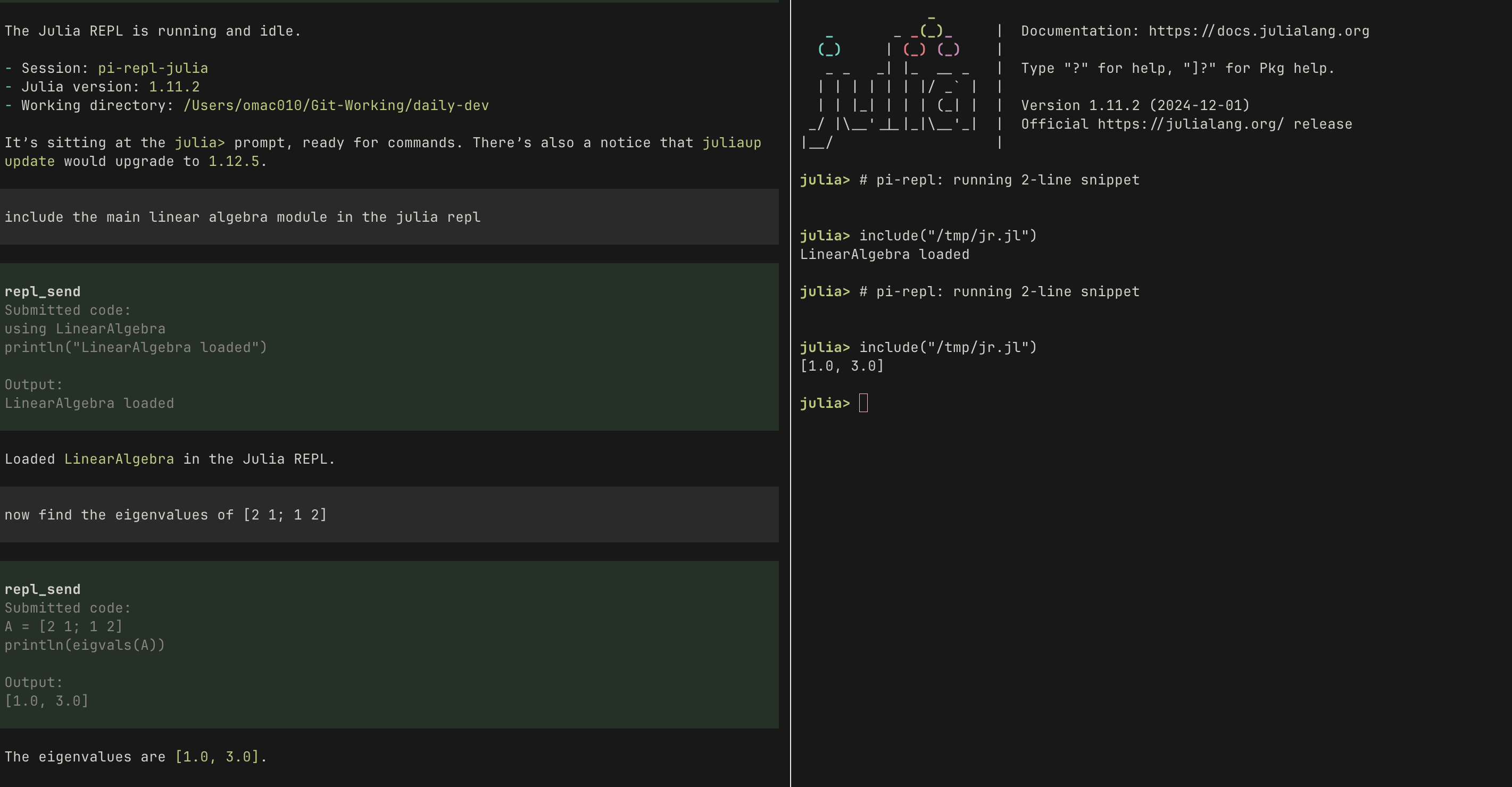
Interacting with a shared Julia REPL.
Current scope
Currently, pi-repl supports Python/IPython, Julia, R, Haskell (GHCi), and Clojure.
With pi-repl you can:
- start a shared REPL from pi
- attach to that REPL from another terminal window
- work in the REPL yourself as normal
- ask pi, in natural language, to run code in the shared Python/IPython, Julia, R, Haskell (GHCi), or Clojure REPL
- start, attach to, inspect, and stop a shared R REPL
- start, attach to, inspect, and stop a shared Haskell (GHCi) REPL
- start, attach to, inspect, and stop a shared Clojure REPL
- let pi read the raw shared REPL transcript for extra context when needed
- check which shared REPL sessions are running
- inspect which Python interpreter and environment the shared Python/IPython REPL is using with
/repl env - stop the shared REPL when you are done
Use /lab as a short alias for /repl.
Install
From npm:
pi install npm:pi-repl
From GitHub:
pi install https://github.com/omaclaren/pi-repl
Restart pi after installing.
Commands
| Command | Description |
|---|---|
/repl |
Show usage |
/lab |
Alias for /repl |
/repl python |
Start the shared Python/IPython session with python |
/repl ipython |
Start the shared Python/IPython session with ipython |
/repl julia |
Start the shared Julia session with julia |
/repl r |
Start the shared R session with R |
/repl ghci |
Start the shared Haskell (GHCi) session with ghci |
/repl clojure |
Start the shared Clojure session with clojure |
/lab python |
Same as /repl python |
/lab ipython |
Same as /repl ipython |
/lab julia |
Same as /repl julia |
/lab r |
Same as /repl r |
/lab ghci |
Same as /repl ghci |
/lab clojure |
Same as /repl clojure |
/repl status |
Show running shared REPL sessions |
/repl status python |
Show status for the shared Python/IPython session |
/repl status julia |
Show status for the shared Julia session |
/repl status r |
Show status for the shared R session |
/repl status ghci |
Show status for the shared Haskell (GHCi) session |
/repl status clojure |
Show status for the shared Clojure session |
/repl env |
Show which interpreter and environment the shared Python/IPython REPL is using |
/repl attach |
Show how to attach from a new terminal window |
/repl attach julia |
Show how to attach to the shared Julia session |
/repl attach r |
Show how to attach to the shared R session |
/repl attach ghci |
Show how to attach to the shared Haskell (GHCi) session |
/repl attach clojure |
Show how to attach to the shared Clojure session |
/repl stop |
Stop the shared session if only one is running |
/repl stop python |
Stop the shared Python/IPython session |
/repl stop julia |
Stop the shared Julia session |
/repl stop r |
Stop the shared R session |
/repl stop ghci |
Stop the shared Haskell (GHCi) session |
/repl stop clojure |
Stop the shared Clojure session |
For R, both /repl R and /repl r work. The same applies to /lab, /repl status, /repl attach, and /repl stop.
For Clojure, /repl clojure is canonical and /repl clj also works. The same applies to /lab, /repl status, /repl attach, and /repl stop.
Tools used by pi
pi-repl also exposes tools that pi can use internally. In normal use, you can just ask pi to run code in the shared REPL or use the /repl commands directly.
| Tool | Description |
|---|---|
repl_status |
Inspect shared Python/IPython, Julia, R, Haskell (GHCi), and Clojure REPL state |
repl_send |
Execute code in the running shared Python/IPython, Julia, R, Haskell (GHCi), or Clojure session |
Notes:
repl_statusis what pi uses to check which shared REPL sessions are currently running- while a shared REPL is running,
repl_statusalso exposes the raw session history log path - pi can read that history file for context about what has already happened in the shared REPL
- the relevant shared session must already be running before
repl_send - you can ask pi naturally to run code in Python, IPython, Julia, R, Haskell, or Clojure; pi chooses the tool parameters internally
- for plain Python,
print(...)is the safest way to get values back reliably - in Haskell (GHCi), use normal interactive syntax such as
letbindings or:{ ... :}blocks for multiline declarations - in Clojure, use normal interactive syntax such as
let,def/defn, ordoforms for multiline code - tool output includes both the submitted code and the captured output
Shared sessions
The default shared tmux session names are:
pi-repl-pythonfor Python/IPythonpi-repl-juliafor Juliapi-repl-rfor Rpi-repl-ghcifor Haskell (GHCi)pi-repl-clojurefor Clojure
The Python/IPython session can currently be launched in either:
pythonmodeipythonmode
Attaching
After running /repl attach, open a new terminal window and run the tmux command shown by pi. For example:
tmux attach -t pi-repl-python
Example workflow
/repl ipython
/repl env
/repl status
/repl attach

/repl julia
/repl status julia
/repl attach julia

/repl R
/repl status r
/repl attach r

/repl ghci
/repl status ghci
/repl attach ghci

/repl clojure
/repl status clojure
/repl attach clojure
Example requests once the REPL is running:
run print(sys.executable) in the shared Python REPLinspect the current globals in the shared Python REPLin the shared Julia REPL, load LinearAlgebranow find the eigenvalues of [2 1; 1 2] in the shared Julia REPLin the shared R REPL, run mean(c(1, 2, 3, 4))in the shared Haskell REPL, run map (+1) [1,2,3]in the shared Clojure REPL, run (map inc [1 2 3])
Notes
tmuxis required.- While a shared REPL is running,
pi-replkeeps a raw transcript log of the tmux pane output for that session. - That transcript is plain text and may include prompts, echoed input, output, and errors.
/repl envis currently implemented for Python/IPython only.
Related extensions
pi-interactive-shell offers related but distinct functionality for interactive CLI sessions in pi, including overlay-based interaction and user take-over. pi-repl is focused specifically on shared tmux-backed REPL sessions.
License
MIT