pi-sap-aicore
SAP AI Core (orchestration + foundation) provider for the pi coding agent
Package details
Install pi-sap-aicore from npm and Pi will load the resources declared by the package manifest.
$ pi install npm:pi-sap-aicore- Package
pi-sap-aicore- Version
0.2.0- Published
- Jun 6, 2026
- Downloads
- not available
- Author
- timpearson
- License
- MIT
- Types
- extension
- Size
- 127.4 KB
- Dependencies
- 3 dependencies · 2 peers
Pi manifest JSON
{
  "extensions": [
    "./index.ts"
  ],
  "image": "https://raw.githubusercontent.com/ttiimmaahh/pi-sap-aicore/main/docs/sap-model-list.jpg"
}
Security note
Pi packages can execute code and influence agent behavior. Review the source before installing third-party packages.
README
pi-sap-aicore
A custom provider extension for the pi coding agent that routes inference through SAP AI Core — via the orchestration service (every model from a single deployment) and/or direct foundation deployments (per-model Azure OpenAI endpoints with native streaming). Both register at once and share one login, so you pick the route per model. See Orchestration vs. Foundation.
Prerequisites
- pi 0.78.0 or newer installed (
npm install -g @earendil-works/pi-coding-agent) - An SAP BTP account with AI Core entitlement and an orchestration deployment
- (optional, for the foundation provider) one or more foundation-models deployments — one per OpenAI model you want to route directly
- The service key JSON for your AI Core service binding
Credentials
The extension looks for the SAP BTP service-key JSON in this order:
- Pi's auth store —
~/.pi/agent/auth.json, populated by/login(see below). Persisted across sessions, file-permission-locked by pi. AICORE_SERVICE_KEYenvironment variable — per-shell override. Useful for testing against a different tenant for one session without re-running/login.
If neither is present, inference fails with a clear "no service key configured" error.
Both providers — sap-aicore (orchestration) and sap-aicore-foundation — use the
same service key, so a single /login (or one AICORE_SERVICE_KEY) covers
both. pi keys stored credentials per provider, so the foundation provider reads the
shared login from pi's auth store directly; you never log in twice.
Recommended: /login
From inside pi:
/login
Then:
- Pick Use a subscription.
- Pick SAP AI Core.
- At the prompt, paste your BTP service-key JSON as a single line and hit enter.
It's validated immediately — if anything is missing or malformed, you'll get a
specific error pointing at the field, so you can re-run
/loginand fix it.
Pi stores the JSON in ~/.pi/agent/auth.json for future sessions.
To get the JSON: BTP cockpit → your AI Core service instance → Service Keys → View. Copy the entire JSON object.
Why "Use a subscription" and not "Use an API key"? SAP service keys contain a
$in theirclientsecret. Since pi 0.77, keys stored via "Use an API key" are run through a$-interpolating template resolver that mangles them. The extension registers credentials through pi'soauthmechanism instead, which stores and returns the key verbatim. It's not real OAuth — it's just the path that keeps your key intact. (See pi issue #5095.)
Upgrading from an older install? If you previously logged in via "Use an API key" (stored as
{"type":"api_key"}inauth.json), re-run/loginonce via Use a subscription to convert the stored credential. A single re-login is all that's needed.
Alternative: AICORE_SERVICE_KEY env var
export AICORE_SERVICE_KEY='{"clientid":"...","clientsecret":"...","url":"https://...authentication.sap.hana.ondemand.com","serviceurls":{"AI_API_URL":"https://api.ai.<region>.ml.hana.ondemand.com"}}'
The @sap-ai-sdk/orchestration SDK reads this directly for XSUAA auth, token
caching, and deployment resolution — no manual token plumbing needed.
Install
From npm (recommended)
pi install npm:pi-sap-aicore
pi downloads the package under ~/.pi/agent/npm/, runs npm install to pull the
SAP AI SDKs, and auto-loads the extension on every startup. Run the one command on
each machine; pi update keeps it current. Pin a version with
pi install npm:pi-sap-aicore@<version> (pinned specs are skipped by pi update).
Then configure credentials with /login (see Credentials) and
confirm the models are visible:
pi --list-models | grep sap-aicore
Local development (this repo)
npm install
pi -e ./index.ts --list-models
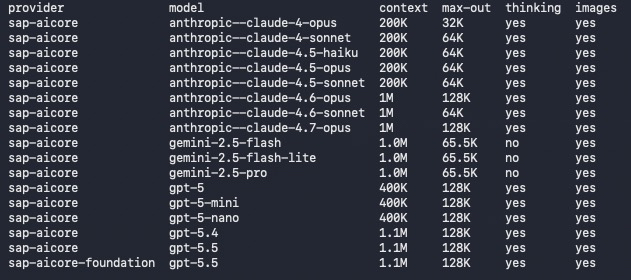
You'll see the orchestration models under sap-aicore/ (Claude, GPT-5*, Gemini),
plus any direct foundation models under sap-aicore-foundation/:
sap-aicore/anthropic--claude-4.7-opus— Claude Opus 4.7 (orchestration)sap-aicore/gpt-5.5— GPT-5.5 via orchestrationsap-aicore-foundation/gpt-5.5— GPT-5.5 via its direct foundation deployment
Run pi -e ./index.ts to launch pi with the local extension loaded; this
overrides any globally-installed version for the session, which is the fastest
iteration loop while developing.
Alternative: install from git
For an unpublished fork or a branch you want to track directly:
pi install git:github.com/ttiimmaahh/pi-sap-aicore@main
pi clones to ~/.pi/agent/git/…, runs npm install, and auto-loads on startup.
Note: an @main git install is not moved to newer commits by pi update (it
only reconciles to the pinned ref) — prefer the npm install above for hands-off
updates.
Orchestration vs. Foundation
The extension registers two providers, both backed by the same service key:
sap-aicore (orchestration) |
sap-aicore-foundation (direct) |
|
|---|---|---|
| SAP deployment | one orchestration deployment fronts every model | one foundation deployment per model |
| Models | Claude, GPT-5*, Gemini | OpenAI (gpt-*) only |
| Streaming | subject to orchestration's per-model allow-list — new models can 400 Streaming is not supported (we fall back to non-streaming) |
native — streams straight from the Azure OpenAI endpoint |
| Reasoning effort | tunable (reasoning_effort / thinking) |
model default only (SDK pins Azure API 2024-10-21, which has no reasoning_effort) |
| Content filter / grounding / templating | yes | no — raw model access |
| SDK | @sap-ai-sdk/orchestration |
@sap-ai-sdk/foundation-models (AzureOpenAiChatClient) |
Both routes appear in the model list simultaneously, so you choose per model. The
foundation route exists mainly to get native streaming for new OpenAI models
that orchestration hasn't enabled streaming for yet (e.g. gpt-5.5).
Adding a foundation model: it needs its own foundation-models deployment in
SAP AI Core — one per (model, version, resource group); the SDK resolves it by
model name, so no deployment IDs to wire in. Then add its id to the per-machine
extension overlay at ~/.pi/agent/pi-sap-aicore/models.json:
{
  "foundation": { "enabledModelIds": ["gpt-5.5"] }
}
Definitions are reused from the shared catalog, so an id only has to be present
there. An id with no matching deployment 404s at call time. Run
/sap-models discover in pi (or node scripts/list-sap-models.mjs from this
repo) to see what your tenant actually deploys.
Models
The model list is composed of three sources, merged at startup:
src/models-snapshot.json— packaged fallback catalog, auto-generated from models.dev's SAP AI Core catalog. Maintainers refresh it with:npm run update-modelsThis re-fetches the live catalog, applies our family-specific filters (currently anthropic claude-4.x, gpt-5*, gemini-2.5*), and writes the snapshot to disk. Commit the result.
~/.pi/agent/pi-sap-aicore/models-cache.json— per-machine public catalog cache. Users refresh it inside pi with:/sap-models updateThis does not edit the installed npm package and is safe across extension updates. The command re-registers the SAP providers for the current session; restart pi or
/reloadif another session should pick it up.~/.pi/agent/pi-sap-aicore/models.json— per-machine tenant overlay. Use it for models in your tenant that are not in the public catalog yet, model overrides, exclusions, and foundation-route enablement. Overlay models win over cache/snapshot on duplicateid.
Example overlay:
{
  "models": [
    {
      "id": "some-preview-model",
      "name": "Some Preview Model",
      "reasoning": true,
      "tool_call": true,
      "temperature": true,
      "modalities": { "input": ["text"], "output": ["text"] },
      "limit": { "context": 200000, "output": 32000 },
      "cost": { "input": 0, "output": 0, "cacheRead": 0, "cacheWrite": 0 },
      "thinkingLevelMap": {
        "minimal": "low",
        "low": "low",
        "medium": "medium",
        "high": "high",
        "xhigh": "high"
      }
    }
  ],
  "overrides": {
    "gemini-2.5-pro": { "reasoning": false }
  },
  "exclude": ["gpt-5.5"],
  "foundation": {
    "enabledModelIds": ["some-preview-model"]
  }
}
Use /sap-models paths to print the exact cache and overlay paths, and
/sap-models discover to compare the loaded catalog against the models your SAP
tenant reports.
/sap-models commands
Run these inside pi after installing/loading the extension:
| Command | What it does |
|---|---|
/sap-models update |
Fetches the latest public SAP AI Core model metadata from models.dev, writes ~/.pi/agent/pi-sap-aicore/models-cache.json, and re-registers the SAP providers for the current session. |
/sap-models discover |
Uses your configured SAP service key to query the tenant's foundation-models scenario, then reports models that are missing from the local catalog and catalog entries absent from the tenant. Honors AICORE_RESOURCE_GROUP / service-key resourceGroup. |
/sap-models list |
Shows how many orchestration models and foundation-enabled models are currently loaded after snapshot/cache/overlay merging. |
/sap-models paths |
Prints the cache and overlay file paths for this machine. |
/sap-models help |
Shows the command summary in pi. |
A typical refresh workflow is:
/sap-models update
/sap-models discover
/model
If discover reports a tenant model that is missing from the catalog, add it to
~/.pi/agent/pi-sap-aicore/models.json under models. If it reports a catalog
model that is absent from your tenant and selection causes SAP 400s, add the id
to exclude.
Overlay reference
~/.pi/agent/pi-sap-aicore/models.json supports these top-level fields:
| Field | Type | Purpose |
|---|---|---|
models |
SapModel[] |
Adds tenant-only/pre-release models or replaces catalog models with the same id. |
overrides |
object keyed by model id | Partially overrides an existing model. Nested limit, cost, modalities, and thinkingLevelMap fields are merged. Unknown ids are ignored. |
exclude |
string[] |
Removes model ids after snapshot/cache/overlay merging. Useful for public catalog entries your SAP tenant does not deploy. |
foundation.enabledModelIds |
string[] |
Also exposes matching model ids through sap-aicore-foundation/*. Each id must exist in the merged catalog and have a foundation deployment in the selected resource group. |
Minimal tenant-only model:
{
  "models": [
    {
      "id": "gpt-5.4-nano",
      "name": "GPT-5.4 Nano",
      "reasoning": true,
      "tool_call": true,
      "temperature": true,
      "modalities": { "input": ["text", "image"], "output": ["text"] },
      "limit": { "context": 1050000, "output": 128000 },
      "cost": { "input": 0, "output": 0, "cacheRead": 0, "cacheWrite": 0 },
      "thinkingLevelMap": {
        "minimal": "low",
        "low": "low",
        "medium": "medium",
        "high": "high",
        "xhigh": "high"
      }
    }
  ]
}
Minimal foundation enablement for a model already in the catalog:
{
  "foundation": { "enabledModelIds": ["gpt-5.5"] }
}
The cost fields are vendor list prices (USD per million tokens) from
models.dev. Used only for pi's in-UI cost display — your actual SAP
BTP invoice is contract-based and will differ.
Thinking levels
Models with reasoning: true honor pi's thinking-level cycle (default
keybind Shift+Tab): off, minimal, low, medium, high, xhigh.
- Anthropic 4.6+ models (
anthropic--claude-4.6-*,4.7-*) use adaptive thinking —thinking: {type: "adaptive"}+output_config: {effort}. The model decides the budget; the level only nudges depth. - Older Anthropic models (
anthropic--claude-4-*,4.5-*) use budget-token thinking —thinking: {type: "enabled", budget_tokens: N}. Each pi level maps to a token count (1k / 4k / 8k / 16k / 32k for minimal/low/medium/high/xhigh), clamped down somax_tokensalways has at least 1024 tokens of headroom for the response. SAP rejects the adaptive shape on these models ("adaptive thinking is not supported on this model"), which is why we split.
Note on reasoning visibility: SAP orchestration does NOT pass
structured reasoning/thinking content through to streaming clients.
The model genuinely reasons (you'll see step-by-step structure leak
into the visible answer text, and the tokens are billed via
completion_tokens_details.reasoning_tokens), but pi's dedicated
"thinking" panel will stay empty for SAP-routed models — there's no
client-side fix. If SAP exposes a server-side flag for this in the
future, our pickReasoning probe is wired and ready in stream.ts.
- OpenAI models (
gpt-*) usereasoning_effort: "minimal" | "low" | "medium" | "high".xhighis omitted — OpenAI has no equivalent tier; pi will skip it when cycling. - Gemini models (
gemini-2.5-*) ship withreasoning: false— SAP's gemini reasoning passthrough is undocumented, so we keepShift+Taboff the cycle for these models rather than send a request shape SAP may reject. Wire-up (likelythinking_config.thinking_budget) is a future TODO insrc/stream.ts:reasoningParams.
Foundation route caveat: on sap-aicore-foundation/* the direct Azure
OpenAI SDK pins API version 2024-10-21, which has no reasoning_effort
field — so gpt-5* reason at their default effort and pi's thinking-level
cycle is a no-op there. The models still reason (reasoning tokens are billed
and show in output); the depth just isn't tunable. Use the orchestration
route (sap-aicore/*) when you need to set the effort level.
To override budgets per model, edit thinkingLevelMap on the relevant entry in
~/.pi/agent/pi-sap-aicore/models.json.
AI Resource Group
Resolved in this order:
AICORE_RESOURCE_GROUPenv var — per-shell override. Example:export AICORE_RESOURCE_GROUP=my-team-rgresourceGroupfield on the service-key JSON — convenient for teams who manage multiple groups and want to bake the default into the key. Non-standard, so add it yourself before pasting into pi:{ "clientid": "...", "clientsecret": "...", "resourceGroup": "my-team-rg", ... }- SAP's server-side default (
default) — if neither of the above is set.
The value is passed via SAP's OrchestrationClient(..., {resourceGroup})
constructor arg, which is the only supported channel — AI-Resource-Group
as a request header is explicitly rejected by SAP's typings. The foundation
provider applies the same resolved group via
AzureOpenAiChatClient({ modelName, resourceGroup }); both a model's foundation
deployment and the orchestration deployment must live in the resolved group for
name-based resolution to find them.
Prompt caching & cost reporting
Cache read/write tokens always report 0 on SAP-routed turns. SAP
orchestration strips all detail fields from the TokenUsage response
— we only get prompt_tokens, completion_tokens, and total_tokens
across every route. There's no prompt_tokens_details.cached_tokens
(OpenAI) and no top-level cache_read_input_tokens (Anthropic) for
the client to read.
Whether the backend actually caches is invisible to pi. SAP's contract billing may give you a discount on cached tokens that this extension can't surface — check your BTP invoice if cache savings matter.
Experimental: PI_SAP_AICORE_CACHE_CONTROL=1 tags the system
prompt and last user message with Anthropic's cache_control: {type:"ephemeral"}. SAP may forward it (saving SAP money on the
backend, possibly passed through via your contract) or may 400 the
request. Either way, you won't see cacheRead become non-zero in pi's
diagnostics — that requires SAP to expose detail fields, which they
currently don't.
OpenAI/Gemini routes ignore the flag — they have their own automatic caching with no breakpoint API.
Foundation route: because it talks to the Azure OpenAI endpoint directly
(not through orchestration's usage-stripping), prompt_tokens_details.cached_tokens
may come back populated — mapUsage reads it, so cacheRead could be non-zero
on sap-aicore-foundation/* turns where orchestration always reports 0. Unverified
against SAP's proxy; treat as best-effort.
Releasing (maintainers)
Releases are tag-driven and published to npm by GitHub Actions. There is no
build step — pi loads the .ts sources directly via jiti — so a release is just
verify + publish.
- Update
CHANGELOG.md: move items from[Unreleased]into a new version heading. - Bump the version (this commits
package.jsonand creates avX.Y.Ztag):npm version patch # or minor / major git push --follow-tags - The
Publishworkflow fires on thev*tag, asserts the tag matchespackage.json, typechecks, and publishes.
Every push to main and every PR also runs the CI
typecheck gate.
One-time setup: npm Trusted Publishing (OIDC)
Publishing is tokenless — no NPM_TOKEN secret. Authorize this repo once on
npmjs.com:
- npmjs.com → the
pi-sap-aicorepackage → Settings → Trusted Publisher. - Choose GitHub Actions and enter (case-sensitive, exact match):
- Organization or user:
ttiimmaahh - Repository:
pi-sap-aicore - Workflow filename:
publish.yml - Allowed actions:
npm publish
- Organization or user:
- Save. The next
v*tag publishes automatically, with provenance attestations.
The first CI release must be a version newer than the last manually published one (
0.1.0) — npm rejects republishing an existing version.
Repo layout
.
├── package.json              # pi-package manifest + deps + scripts
├── tsconfig.json             # editor support; pi runs the .ts directly
├── CHANGELOG.md              # Keep a Changelog; updated per release
├── LICENSE                   # MIT
├── .github/workflows/
│   ├── ci.yml                # typecheck gate on push to main + PRs
│   └── publish.yml           # tag-driven npm publish via OIDC trusted publishing
├── index.ts                  # ExtensionAPI factory + registerProvider calls (both providers)
├── scripts/
│   ├── update-models.mjs     # maintainer script: fetches models.dev, writes models-snapshot.json
│   ├── list-sap-models.mjs   # lists models your tenant actually deploys (diff vs snapshot)
│   └── diagnose-streaming.mjs # probes orchestration streaming support per model
└── src/
    ├── auth.ts                  # service-key validation + pi oauth registration
    ├── model-catalog.ts         # loads snapshot/cache/overlay and adapts models.dev metadata
    ├── models-config.ts         # exposes merged MODELS and FOUNDATION_MODELS
    ├── models-snapshot.json     # auto-generated from models.dev (committed)
    ├── sap-model-commands.ts    # /sap-models update/discover/list/paths
    ├── to-pi-model.ts           # SapModel → pi's ProviderModelConfig mapper
    ├── stream.ts                # orchestration streamSimple adapter + shared helpers (auth, usage, errors)
    ├── translate.ts             # pi Context ↔ orchestration message shape
    ├── foundation-params.ts     # Azure OpenAI request params (max_completion_tokens, temperature gating)
    ├── stream-foundation.ts     # foundation streamSimple adapter (AzureOpenAiChatClient, native streaming)
    └── translate-foundation.ts  # pi Context ↔ Azure OpenAI message shape