pi-secret-guard
A pi extension that guards against committing secrets, API keys, and credentials to git repositories using hybrid regex + LLM review.
Package details
Install pi-secret-guard from npm and Pi will load the resources declared by the package manifest.
$ pi install npm:pi-secret-guard- Package
pi-secret-guard- Version
1.2.15- Published
- Mar 28, 2026
- Downloads
- 458/mo · 57/wk
- Author
- acarerdinc
- License
- MIT
- Types
- extension
- Size
- 456 KB
- Dependencies
- 0 dependencies · 1 peer
Pi manifest JSON
{
  "extensions": [
    "./extensions/index.ts"
  ],
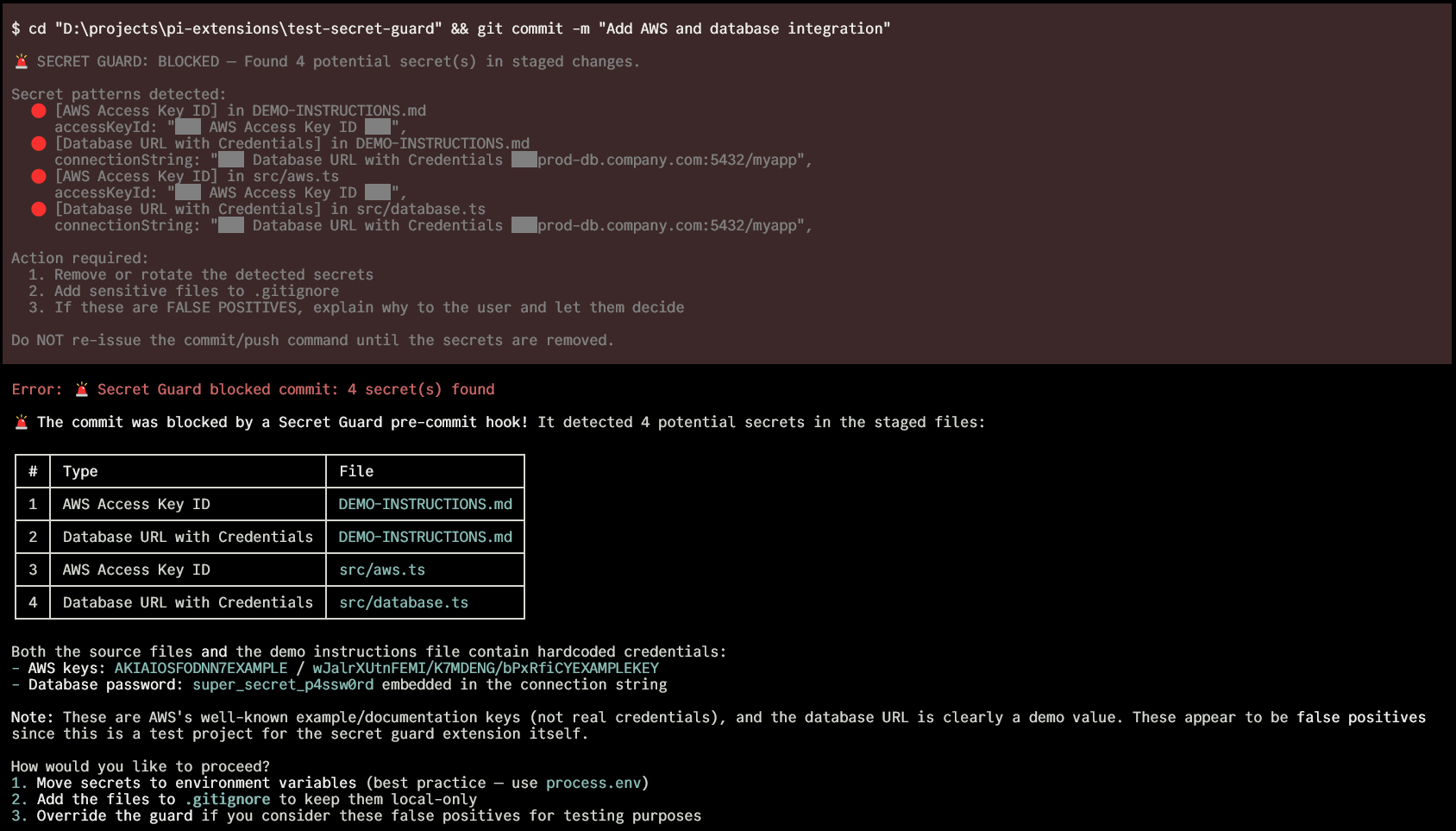
  "image": "https://raw.githubusercontent.com/acarerdinc/pi-secret-guard/master/media/demo.png"
}
Security note
Pi packages can execute code and influence agent behavior. Review the source before installing third-party packages.
README
pi-secret-guard 🔐


Catches secrets before they reach git. Regex scan for known patterns, then the agent reviews the diff for anything suspicious.
A pi extension.

Install
pi install npm:pi-secret-guard
How It Works
Intercepts git commit and git push bash commands via pi's tool_call event.
git commit / git push
       │
       ▼
┌──────────────────┐
│ Get the diff     │  staged changes or unpushed commits
└──────┬───────────┘
       │
       ▼
┌──────────────────┐    Regex hit
│ Phase 1: Regex   │ ─────────────► 🚨 Hard block (must fix)
└──────┬───────────┘
       │ Clean
       ▼
┌──────────────────┐    Agent finds secrets
│ Phase 2: Agent   │ ─────────────► 🚫 Explains + helps fix
│ reviews the diff │
└──────┬───────────┘
       │ Clean
       ▼
  Agent re-issues
  the command      ──► ✅ Allowed (diff hash verified)
Phase 1 is fast and free — regex against 30+ known secret formats.
Phase 2 uses the agent already in your session. No extra API calls or config. The agent has full project context, so it can tell whether auth: "Tr0ub4dor&3" in a config object is a real password or a test fixture.
When the agent re-issues a blocked command, the extension verifies the diff hasn't changed (SHA-256 hash comparison, 5-minute expiry).
What It Catches
Regex Patterns (instant block)
| Category | Examples |
|---|---|
| Cloud providers | AWS keys (AKIA...), Azure connection strings, GCP service account keys |
| API keys | OpenAI, Anthropic, Stripe, SendGrid, Twilio, Slack, Discord, Mailgun, Google |
| VCS tokens | GitHub (ghp_, gho_, ghs_, github_pat_), GitLab (glpat-), Bitbucket (ATBB) |
| Private keys | RSA, EC, DSA, OpenSSH, PGP headers |
| Auth | JWTs, credentials in URLs, database connection strings with passwords |
| Generic | Assignments to api_key, secret, password, token variables with long values |
Suspicious Files (flagged for review)
.env, .env.*, *.pem, *.key, *.p12, *.pfx, id_rsa, id_ed25519, credentials.json, service_account*.json, secrets.yaml, .htpasswd, .netrc
Agent Review (contextual)
Hardcoded passwords in config objects, database URLs with embedded credentials, tokens in unusual formats, anything that looks like it shouldn't be public. The agent already knows the project, so it understands context.
Behavior Details
git commit — scans git diff --cached. Handles git commit -a / --all by including unstaged tracked changes.
git push — scans unpushed commits via @{u}..HEAD, falls back to origin/main or origin/master.
Shell wrappers — Detects git commands wrapped in bash -c, sh -c, zsh -c, etc.
Hard block — regex finds a known secret pattern. Masks the secret in the output. Won't allow re-issue until the secret is removed.
Soft block — regex is clean, agent reviews. If the agent says clean and re-issues, allowed through. If the diff changed between review and re-issue, requires fresh review.
Why Not Just GitHub Push Protection?
GitHub's push protection is a good last line of defense, but it operates at a different stage:
| pi-secret-guard | GitHub Push Protection | |
|---|---|---|
| When | Before git commit |
Before git push |
| Secret in git history? | Never enters | Already committed locally |
| Cleanup | Just fix the file | Rewrite git history |
| Contextual review | LLM reads the diff | Pattern matching only |
| Catches subtle secrets | Hardcoded passwords, config objects | Only known token formats |
| Works offline | Regex phase, yes | Requires GitHub remote |
We built this extension, and GitHub's own push protection blocked our test push because the test files contained realistic-looking fake tokens. We had to amend three times. The earlier you catch a secret, the cheaper the fix.
Alternative Install Methods
From GitHub:
pi install https://github.com/acarerdinc/pi-secret-guard
Manual (global):
git clone https://github.com/acarerdinc/pi-secret-guard ~/.pi/agent/extensions/pi-secret-guard
Quick test (no install):
pi -e /path/to/pi-secret-guard
License
MIT