pi-semantic
Semantic density modes + workflow helpers for Pi (toggle via /sem).
Package details
Install pi-semantic from npm and Pi will load the resources declared by the package manifest.
$ pi install npm:pi-semantic- Package
pi-semantic- Version
0.1.1- Published
- Apr 21, 2026
- Downloads
- 225/mo · 6/wk
- Author
- jrryfn
- License
- MIT
- Types
- extension
- Size
- 89 KB
- Dependencies
- 0 dependencies · 2 peers
Pi manifest JSON
{
  "extensions": [
    "./index.ts"
  ],
  "image": "https://raw.githubusercontent.com/jerryfan/pi/main/public/pi-semantic/docs/demo.gif"
}
Security note
Pi packages can execute code and influence agent behavior. Review the source before installing third-party packages.
README
pi-semantic



Semantic-density modes + workflow helpers for Pi.
If this saves you tokens/time, please star the repo — it’s how this stays maintained.
- Single command surface:
/sem(no command-menu pollution) - Modes:
off | prose | terse | dense | ooga | wenyan - Workflows:
/sem commit,/sem review,/sem compress - Safety: preserves identifiers verbatim + Auto-Clarity for destructive/security steps
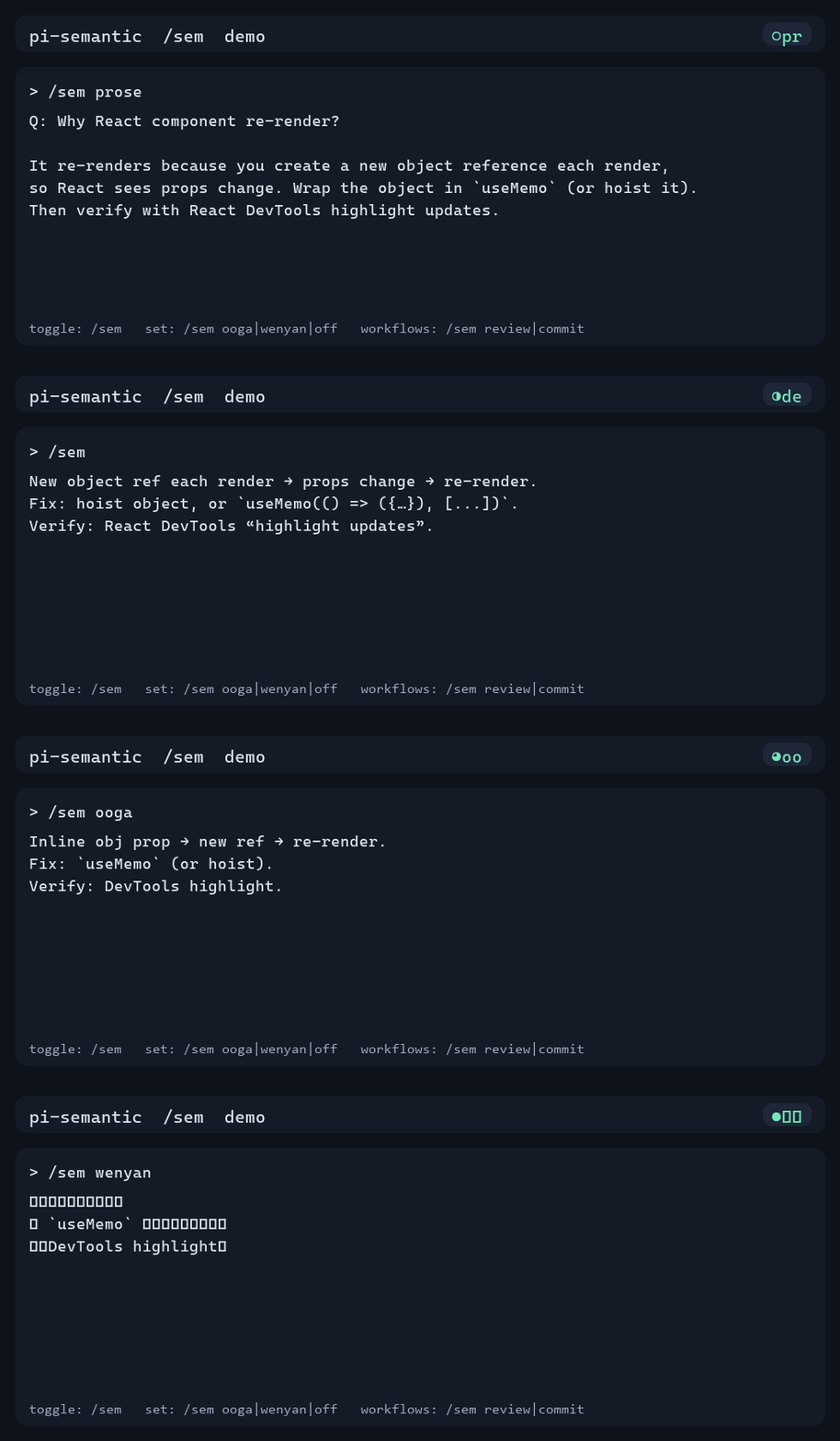
Demo
Why this is worth starring
- One command:
/sem - Immediate win: compact answers without losing correctness
- Safe: never rewrites code/tool output; Auto-Clarity for destructive/security steps
- Practical workflows:
/sem commit+/sem reviewuse your git diff (no paste)
Measured compression (transparent + reproducible)
Same underlying answer, different modes (character count / rough word count):
| mode | sample badge | chars | words | Δ chars vs prose |
|---|---|---|---|---|
| prose | ○pr |
191 | 31 | baseline |
| dense | ◑de |
151 | 23 | -20.9% |
| ooga | ◕oo |
93 | 15 | -51.3% |
| wenyan | ●文言 |
54 | 6 | -71.7% |
Reproduce:
cd public/pi-semantic
python docs/readme_metrics.py
Notes: these are simple counts (not tokenized). Code/identifiers remain verbatim by design.
Quick start
- Install (see below)
- In Pi:
/reload - Toggle on/off:
/sem
Then try:
/sem ooga
/sem wenyan
/sem off
Copy/paste examples (what you’ll actually use)
1) Dense answers (daily driver)
/sem
Why does my React component re-render?
Example output (◑de):
New object ref each render → props change → re-render.
Fix: hoist object, or `useMemo(() => ({…}), [...])`.
Verify: React DevTools “highlight updates”.
2) One-line PR review (no paste)
/sem review
Example output:
Summary: 3 findings (1 bug, 1 risk, 1 nit).
src/auth.ts:L42: bug: null user deref. Guard before `.email`.
src/api.ts:L23: risk: no retry on 429. Add backoff(3).
src/ui.ts:L88-140: nit: 50-line fn does 4 things. Extract validate/normalize/persist.
3) Conventional Commit message from staged diff
/sem commit
Example output:
feat(api): add GET /users/:id/profile

Mobile client needs profile data without the full user payload
on cold launch.
Status badge (always visible)
When UI/status is available, pi-semantic shows a compact one-liner badge:
×of= off (red + bold)○pr= prose (yellow)◔te= terse (green)◑de= dense (green)◕oo= ooga (green)●文言= wenyan (green)
If your terminal doesn’t like ANSI styling:
PI_SEMANTIC_STATUS_ANSI=0
Troubleshooting
Badge looks like weird squares / missing glyphs
- Your font may not support
○◔◑◕●. (This is cosmetic.) - Future work: ASCII fallback badge.
- Your font may not support
I see
\x1b[...mescape codes- Disable ANSI styling:
PI_SEMANTIC_STATUS_ANSI=0
- Disable ANSI styling:
/sem commitsays “Nothing staged”- Stage changes first:
git add -A.
- Stage changes first:
/sem reviewoutputs nothing- No diff to review. Make changes (or stage them) and try again.
Git commands fail
- Ensure you’re inside a git repo and
gitis on PATH.
- Ensure you’re inside a git repo and
Still stuck?
- Run:
/sem doctor - Paste the one-line output into an issue.
- Run:
Design guarantees (why this is safe)
Borrowed from (and improving on) the best ideas in caveman:
- Technical substance exact. Only fluff die.
- Identifiers verbatim: code blocks, inline code, paths, flags, env vars.
- Tool-output boundary: never rewrite tool output; quote it verbatim.
- Auto-Clarity: for destructive/irreversible/security/migrations/order-sensitive procedures, temporarily write clear structured steps + warnings, then resume the chosen level.
- No surprise activation: v1 does not auto-enable from natural language; only
/sem …changes state.
Install
Option A: Pi package install (recommended)
Pi has first-class package support:
pi install npm:pi-semantic
Update later:
pi update
Project-local:
pi install -l npm:pi-semantic
Option B: Installer (curl/irm)
If you don’t want npm (or want to vendor a single file), use the installer.
macOS/Linux (bash):
curl -fsSL https://raw.githubusercontent.com/jerryfan/pi/main/public/pi-semantic/install/install.sh | bash
Windows (PowerShell):
irm https://raw.githubusercontent.com/jerryfan/pi/main/public/pi-semantic/install/install.ps1 | iex
Then in Pi: /reload.
Option C: Manual
Copy index.ts to one of:
- Global:
~/.pi/agent/extensions/pi-semantic/index.ts - Project:
.pi/extensions/pi-semantic/index.ts
Benchmarks
See evals/ for a small benchmark harness:
- generate snapshots (optional):
python evals/run_openai.py --all - measure:
python evals/measure.py
The OpenAI runner is optional and requires
OPENAI_API_KEY.
Spec
The implementation follows ../../SPEC.md (repo root).
License
MIT (see LICENSE).