pi-session-minimap
A live semantic map and diagnostics dashboard for long-running pi sessions
Package details
Install pi-session-minimap from npm and Pi will load the resources declared by the package manifest.
$ pi install npm:pi-session-minimap- Package
pi-session-minimap- Version
0.1.9- Published
- Sep 10, 2026
- Downloads
- 1,116/mo · 167/wk
- Author
- alexkarpandrus
- License
- MIT
- Types
- extension
- Size
- 80.4 KB
- Dependencies
- 0 dependencies · 3 peers
Pi manifest JSON
{
  "extensions": [
    "./extensions/minimap.ts"
  ],
  "image": "https://raw.githubusercontent.com/alexkarpandrus/pi-session-minimap/main/assets/overview.png",
  "video": "https://raw.githubusercontent.com/alexkarpandrus/pi-session-minimap/main/assets/demo.mp4"
}
Security note
Pi packages can execute code and influence agent behavior. Review the source before installing third-party packages.
README
pi-session-minimap keeps the current task, completed steps, context use, cost, tools, and failures visible beside a long pi session.
Install
pi install npm:pi-session-minimap
The compact pane opens automatically in interactive terminals at least 110 columns wide. Start a new session or run /reload after installing. Use /minimap to show or hide it.
Features
- Groups related turns into semantic milestones
- Shows context use, compactions, and overflow
- Reports session, agent, and minimap token costs separately
- Breaks down tools, skills, failures, and recovered errors
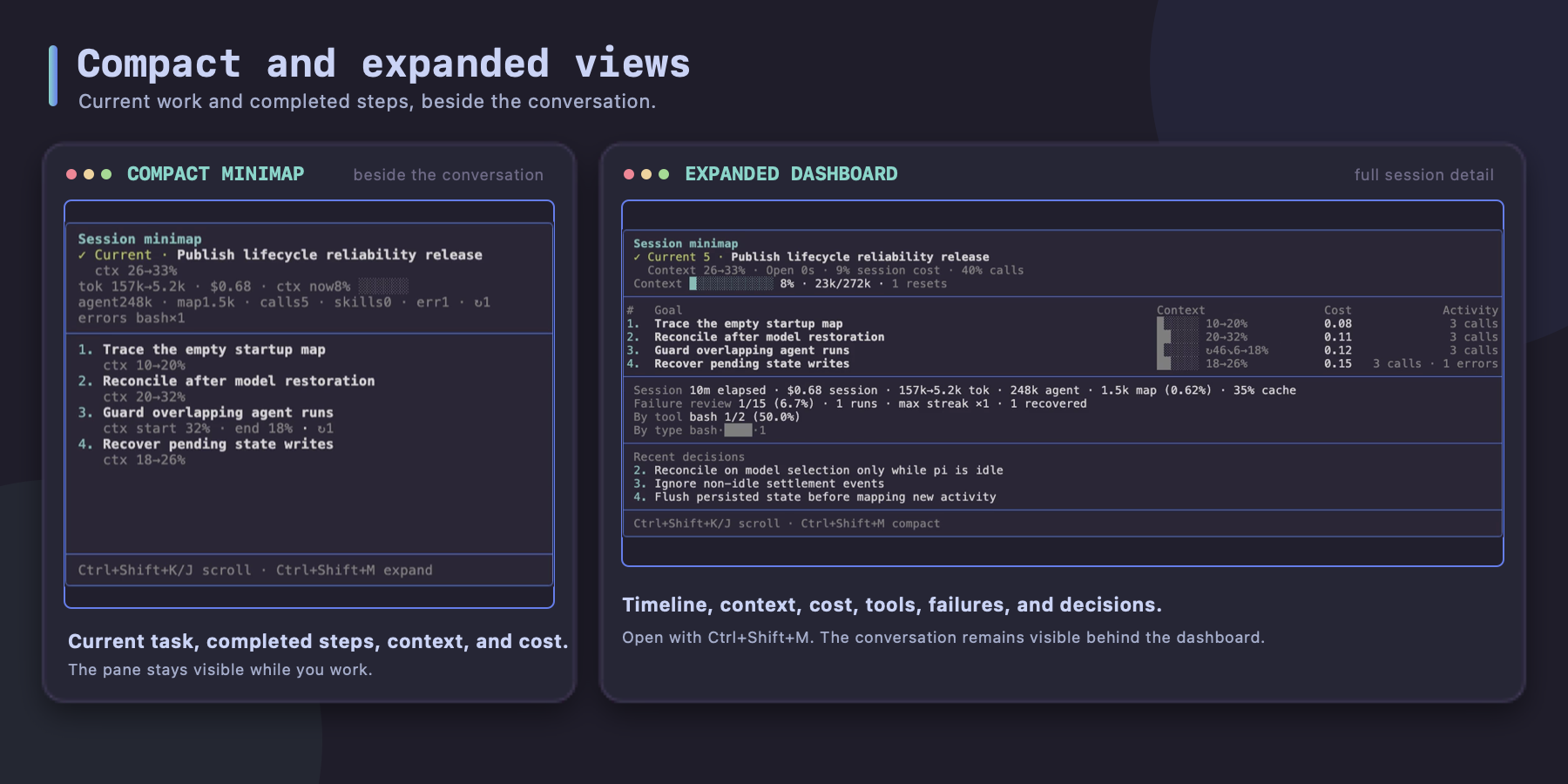
- Provides compact and expanded views without taking terminal focus
Two views
Compact
The current goal, session totals, context state, and recent history stay beside the conversation.
Expanded
The dashboard adds a five-column timeline, nested tool tokens, invoked skill totals, failure analysis, and up to three consequential decisions.
Controls
| Action | Key |
|---|---|
| Hide or show | /minimap |
| Switch compact/expanded | Ctrl+Shift+M |
| Scroll up | Ctrl+Shift+K |
| Scroll down | Ctrl+Shift+J |
↻ marks compaction. ▲ marks overflow.
How semantic history works
Related follow-ups, retries, and refinements stay in one milestone. A new milestone starts when the deliverable or phase changes materially.
After each settled run, the extension re-reviews the latest five completed milestones, the open milestone, and the new activity. It can rename or merge adjacent milestones while older history stays fixed. Revised metrics are recomputed from their original session entries.
The extension uses your selected pi model and stores compact revision metadata in the pi session file. It needs no separate account or API key. Its summary calls use tokens from your active model provider; the minimap reports that spend separately.
Try from source
git clone https://github.com/alexkarpandrus/pi-session-minimap.git
cd pi-session-minimap
npm install
npm run check
pi -e ./extensions/minimap.ts
Development
npm run check runs strict TypeScript checks and model-free prompt-evaluator tests. Known-good outputs must pass, and negative controls must fail for source IDs, grouping, title length, rejected approaches, and decisions.
Load the API key without putting it in shell history:
read -rsp "OpenAI API key: " OPENAI_API_KEY && export OPENAI_API_KEY
echo
EVAL_ATTEMPTS=3 npm run eval:prompt
unset OPENAI_API_KEY
Each attempt makes six paid API calls with gpt-5-mini at low reasoning effort. EVAL_ATTEMPTS accepts 1–5 and defaults to 1. Set OPENAI_MODEL to test another model.
License
MIT © pi-session-minimap contributors