pi-session-switch
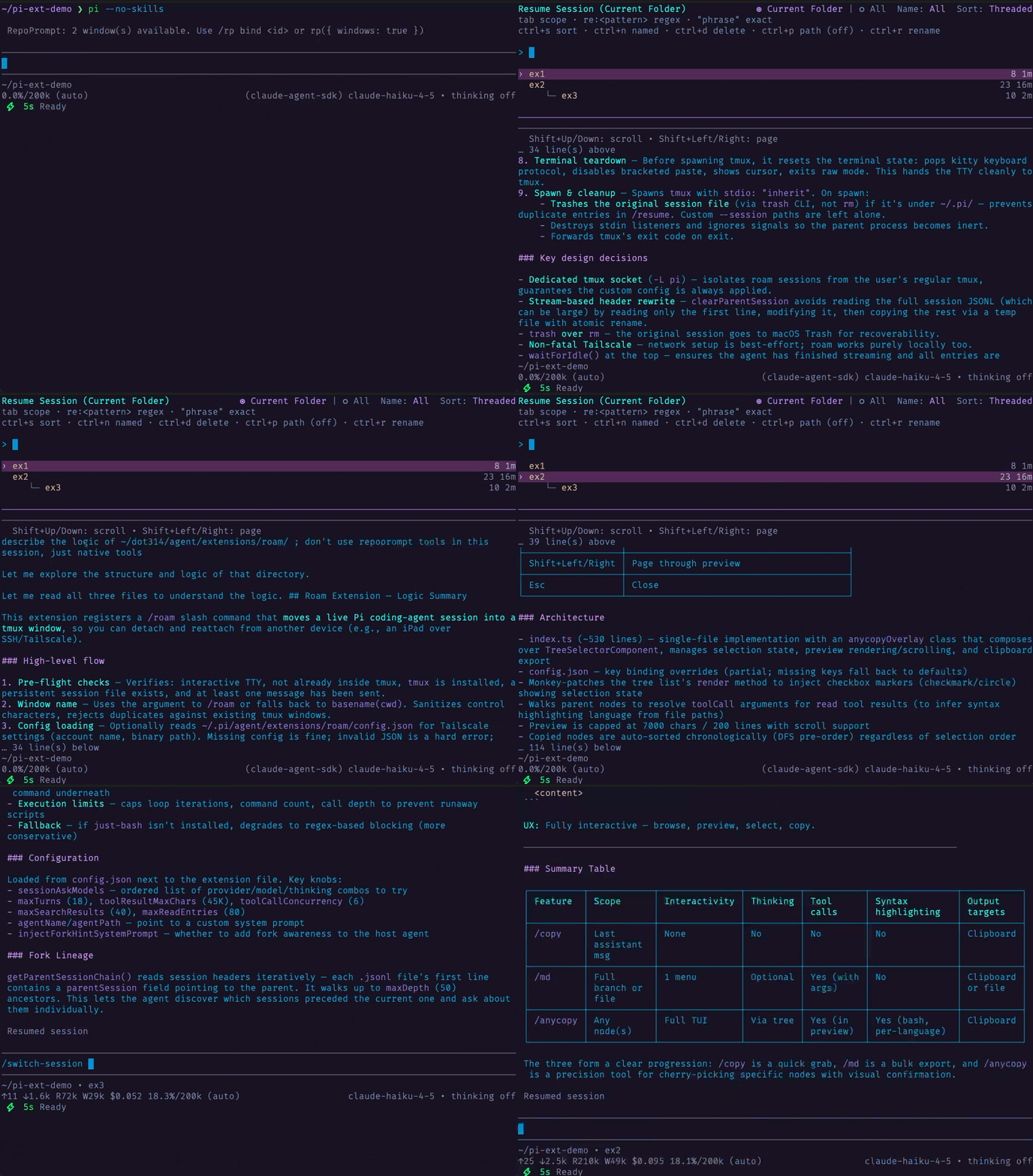
Preview each session before switching in a mirror of Pi's native `/resume`-picker UI
Package details
Install pi-session-switch from npm and Pi will load the resources declared by the package manifest.
$ pi install npm:pi-session-switch- Package
pi-session-switch- Version
0.2.0- Published
- Apr 7, 2026
- Downloads
- 381/mo · 18/wk
- Author
- w-winter
- License
- MIT
- Types
- extension
- Size
- 26.3 KB
- Dependencies
- 0 dependencies · 2 peers
Pi manifest JSON
{
  "extensions": [
    "extensions/session-switch/index.ts"
  ],
  "image": "https://raw.githubusercontent.com/w-winter/dot314/main/assets/switch-session-demo.gif"
}Security note
Pi packages can execute code and influence agent behavior. Review the source before installing third-party packages.
README
Session Switch for Pi (pi-session-switch)
Switch between Pi sessions with /switch-session, or open the same picker after interactive startup with pi --switch-session, using the same layout and affordances as Pi's native /resume picker plus a live preview of the currently highlighted session beneath the picker.
Install
From npm:
pi install npm:pi-session-switch
From the dot314 git bundle (filtered install):
{
  "packages": [
    {
      "source": "git:github.com/w-winter/dot314",
      "extensions": ["extensions/session-switch/index.ts"],
      "skills": [],
      "themes": [],
      "prompts": []
    }
  ]
}
Command
/switch-session
Startup flag
pi --switch-session
Opens the same picker after interactive startup, then relaunches Pi into the selected session.
This is an extension-only workaround for startup switching. Unlike native pi --resume, it does not provide missing-cwd recovery for sessions whose recorded cwd no longer exists, and it does not reuse Pi's normal in-process session-switch lifecycle or guarantee the same shutdown-hook cleanup semantics.
Behavior
/switch-sessionstays on Pi's native in-process session switch pathpi --switch-sessionreuses the same picker UI, then relaunches Pi into the selected session- Mirrors the native
/resumepicker layout, behaviors, and keybindings for the command path - Shows a live preview of the highlighted session below the picker
Shift+Up/Shift+Downscroll the preview by lineShift+PageUp/Shift+PageDownpage the preview- Preserves the native inline rename and delete-confirmation flows
Optionally replacing native --resume
If you want pi -r and pi --resume to use this extension's picker instead of Pi's built-in resume, add this wrapper to your .bashrc or .zshrc:
pi() {
  local -a args=()

  while (($#)); do
    case "$1" in
      --)
        args+=("$@")
        break
        ;;
      -r|--resume)
        if (($# > 1)) && [[ "$2" != -* ]]; then
          args+=(--session "$2")
          shift 2
        else
          args+=(--switch-session)
          shift
        fi
        ;;
      --resume=*)
        args+=(--session "${1#--resume=}")
        shift
        ;;
      *)
        args+=("$1")
        shift
        ;;
    esac
  done

  command pi "${args[@]}"
}
This rewrites:
pi -r/pi --resumetopi --switch-session(opens the picker)pi -r <path>/pi --resume <path>topi --session <path>(opens that session directly)
Compared with upstream
Derived from Damian Pedroza's pi-thread-switcher. This version has a few additions that I found helpful for readability: the session preview lives in a dedicated pane below the picker with syntax-highlighted Markdown rendering, and Shift+PageUp / Shift+PageDown are also offered for paging through the preview. The picker itself uses Pi's native SessionSelectorComponent, matching the /resume interaction model.
See THIRD-PARTY-NOTICES.md for full attribution.