pi-sessions
Pi session search, ask, handoff, messaging, auto-titling, and indexing tools
Package details
Install pi-sessions from npm and Pi will load the resources declared by the package manifest.
$ pi install npm:pi-sessions- Package
pi-sessions- Version
0.23.0- Published
- Nov 4, 2026
- Downloads
- 3,768/mo · 824/wk
- Author
- thurstonsand
- License
- MIT
- Types
- extension
- Size
- 1.3 MB
- Dependencies
- 0 dependencies · 5 peers
Pi manifest JSON
{
  "extensions": [
    "./extensions/pi-sessions.ts"
  ]
}
Security note
Pi packages can execute code and influence agent behavior. Review the source before installing third-party packages.
README
pi-sessions
pi-sessions turns your old Pi sessions into something you can actually reuse. It gives you search, follow-up Q&A, deliberate handoffs into new child sessions, automatic session titles, and a local index that keeps future sessions searchable.
Screenshots
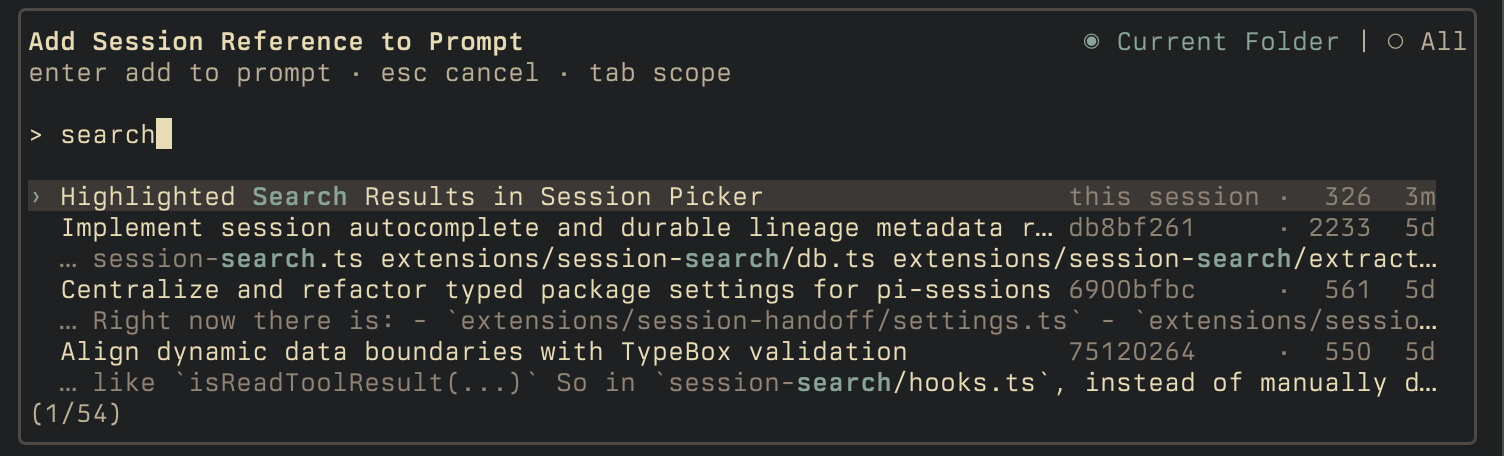
Session lookup
Handoff board


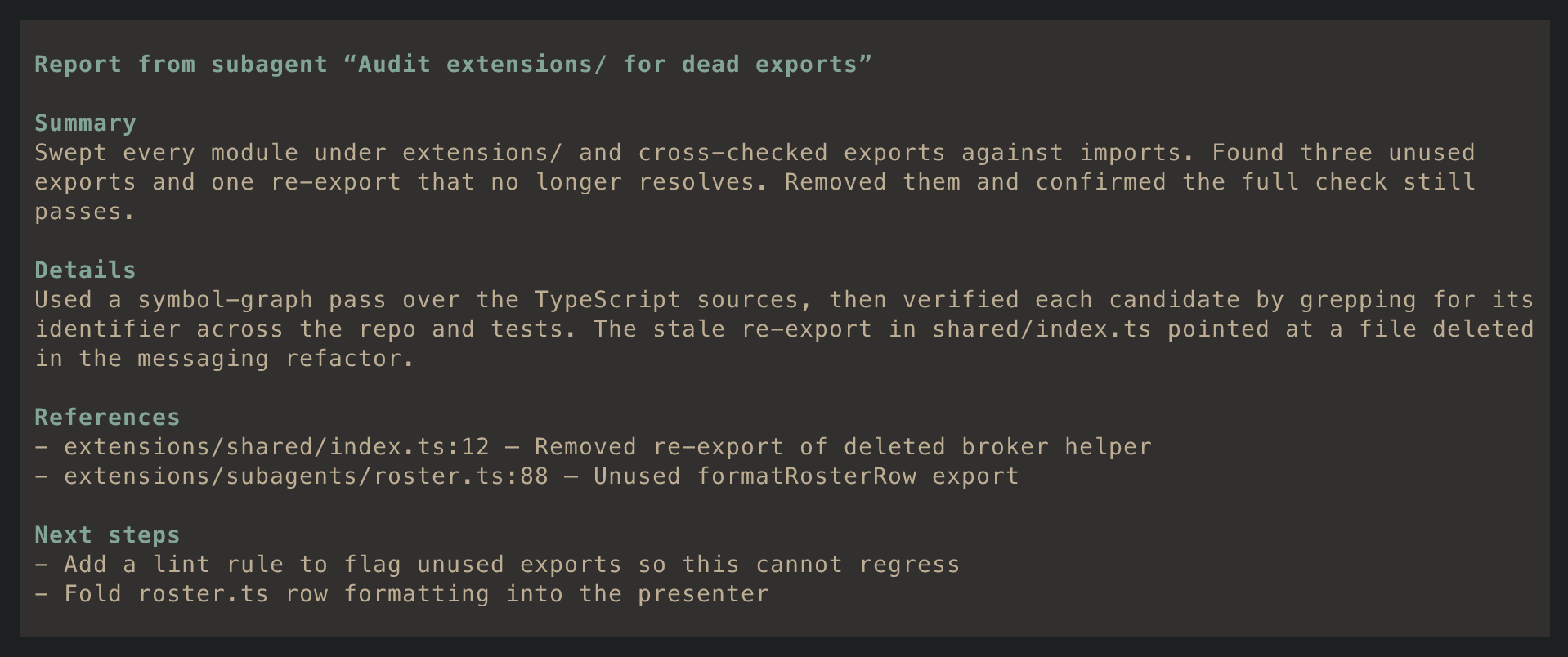
Subagent report
Session handoff

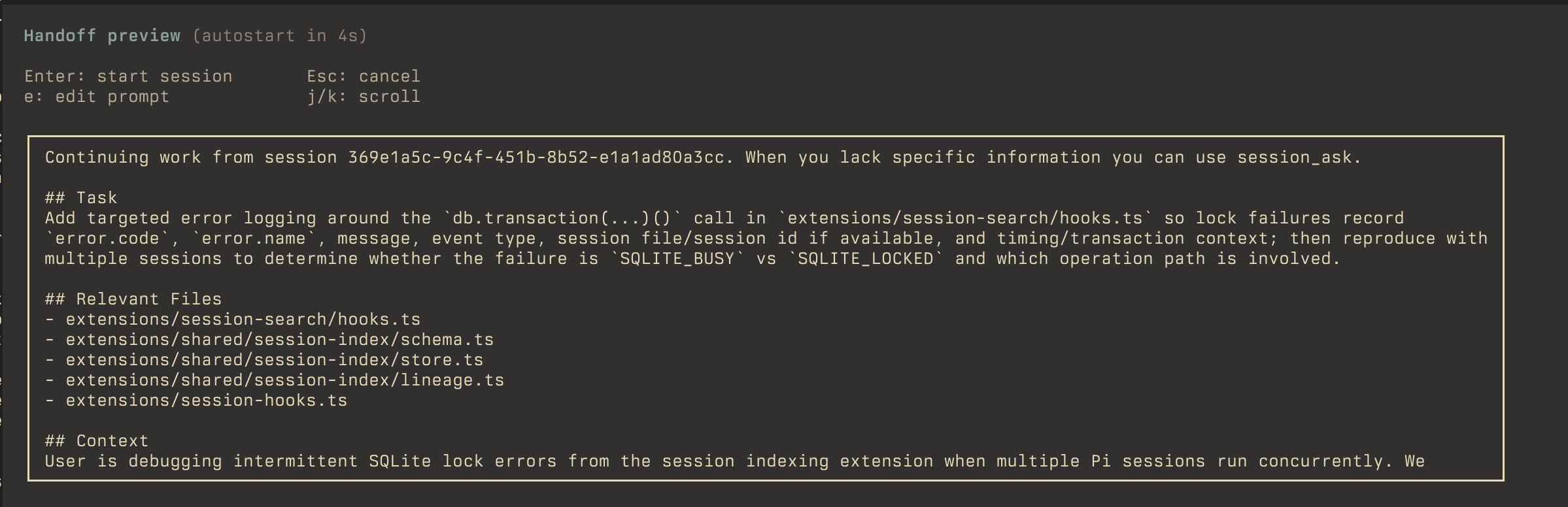
Handoff prompt review
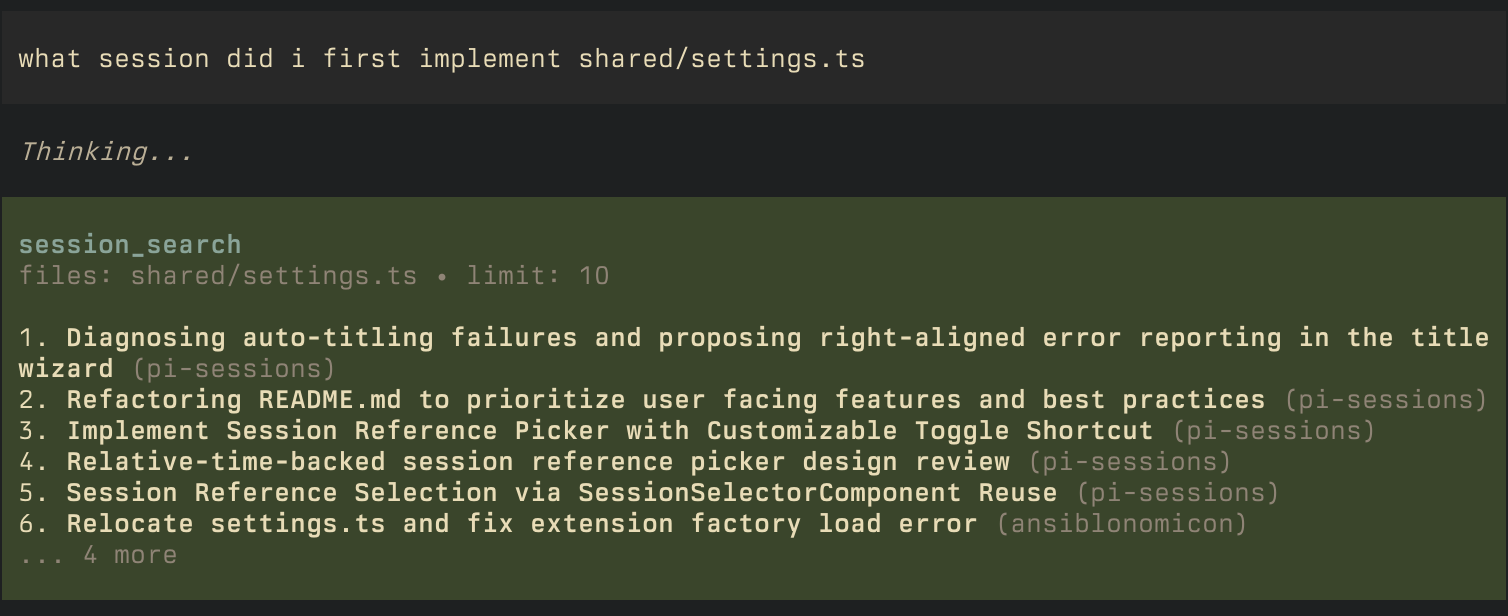
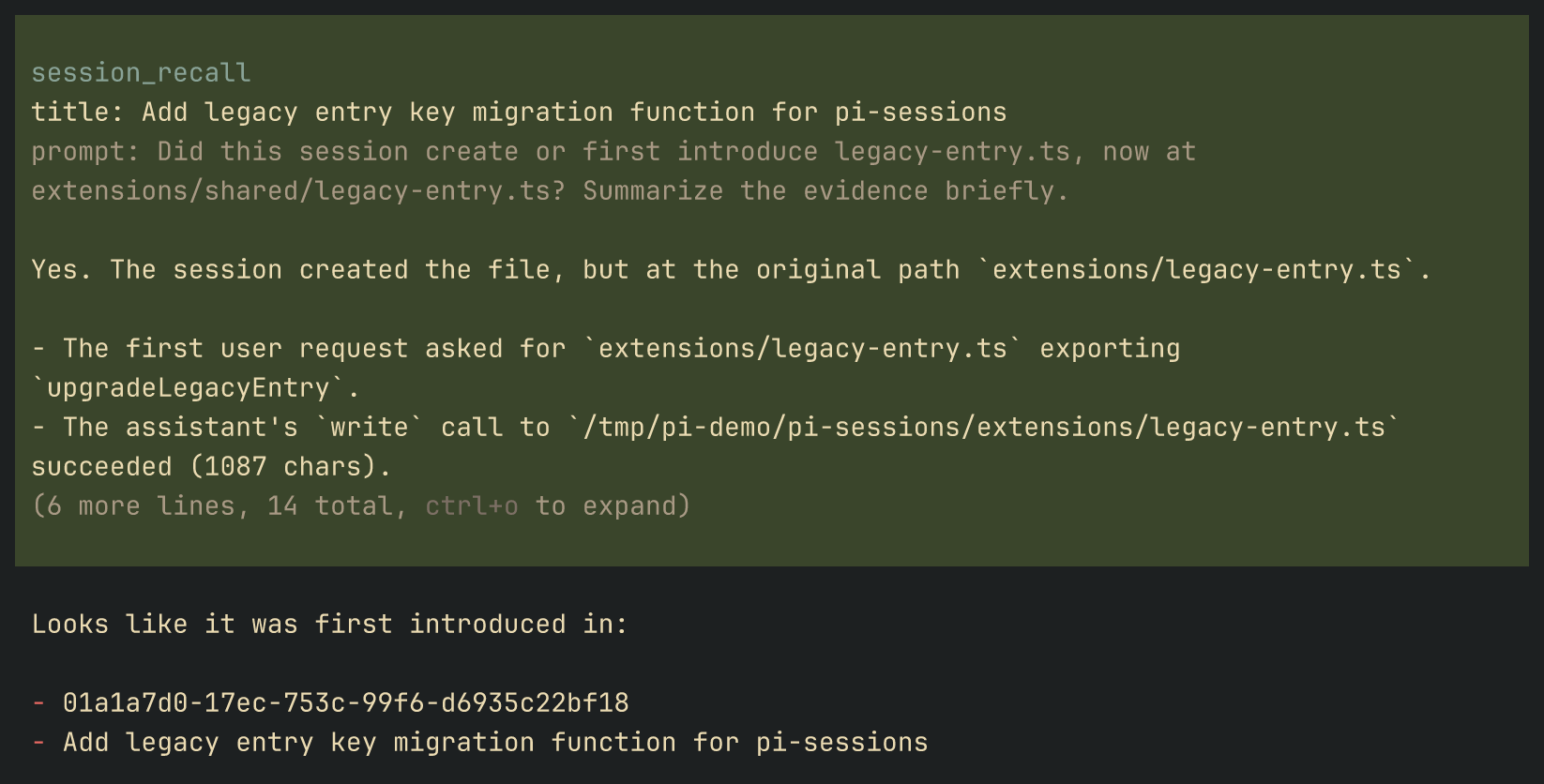
Ask about old sessions
Install
Requires Pi 0.99.1 or newer and Node >=24.
From npm (recommended):
pi install npm:pi-sessionsIf you want to run directly from a local clone while developing:
pi -e /absolute/path/to/pi-sessionsQuick start
- Install the package.
- Open Pi. Your prior sessions are indexed automatically in the background.
- Try the main flows:
What session did I implement the db layer?Open the frontend implementation task in a session to the right.Features
| Extension | Surface | What it does |
|---|---|---|
| Session Search | session_search pi tool |
Search through old sessions |
| Session Recall | session_recall pi tool |
Ask questions about old sessions |
| Session Handoff | session_handoff pi tool, /handoff board |
Start user-facing child sessions |
| Session Messaging | session_list, session_send_message, session_cancel_turn pi tools |
Coordinate between live user-facing Pi sessions |
| Subagents | subagent_list, subagent_send, subagent_cancel, subagent_launch, submit_task_report |
Delegate and manage background work |
| Session Picker | Alt+O |
Reference old sessions in your prompt |
| Session Index | /session-index slash command |
Shows index status and rebuilds the local session index |
| Session Auto Title | in background, /title slash command |
Give sessions titles |
Settings live under sessions in ~/.pi/agent/settings.json. A project's .pi/settings.json overrides them the way pi merges its own settings: nested objects merge key by key, and the project wins.
Every feature is on by default. Turn one off with enable: false under its own settings namespace. Index recovery and startup/switch sync always run, including when search is disabled. hooks.enable controls turn, tree, and compaction sync, not startup recovery.
{
  "sessions": {
    "messaging": { "enable": true },
    "subagents": { "enable": true },
    "handoff": { "enable": true },
    "search": { "enable": true },
    "recall": { "enable": true },
    "autoTitle": { "enable": true },
    "hooks": { "enable": true }
  }
}
Session Search
session_search searches the local session index by text, repo, cwd, time range, and file evidence.
Queries support regular text for normal usage, quoted phrases, AND / OR / NOT, parentheses, and -term negation when matching needs to be stricter. Unquoted terms use prefix matching, quoted terms are exact. A search with no query returns matching sessions chronologically, newest first.
File filters distinguish read-or-write evidence from write-only evidence:
files.touched: sessions that read or changed a pathfiles.changed: sessions that changed a path
Use kind: "user" or kind: "subagent" to filter by session type across the whole index. Searching for sessions that can be addressed right now is a different question, answered by session_list.
Session Handoff
The session_handoff tool creates a user-facing child session with a self-contained task. Ask for a direction when you want a visible split, or a deferred handoff when you only want the prepared session. Use subagent_launch to delegate suitable independent work to a background subagent.
Directional launches use Herdr when pi runs in a Herdr pane, then tmux when the current terminal is inside tmux, or Ghostty on macOS. Deferred launches create the child without starting it and copy its resume command to the clipboard. A background subagent runs in a detached tmux window, or in its own background tab in the parent's workspace when pi runs in a Herdr pane (launched through the same bash as Pi's bash tool, which is Git Bash on Windows), and reports back when finished; note that subagents are started with --approve, meaning pi will always start in the directory as trusted.
When a host claims peers, pi-sessions leaves all user-facing coordination and launches to it. Subagent tools remain available; external-host launch targets are not part of pi-sessions.
Run /handoff to open the Handoffs board. The Subagents and User sessions tabs show status, age, launch details, and the actions currently available: stop, copy an observation command, or copy a resume command. With a peer-claiming host, only Subagents are shown.
Both launch tools take briefing, title (at most 64 characters), and report_back, with optional cwd, provider, model, and thinking_level (off, minimal, low, medium, high, xhigh). session_handoff additionally requires launch (left, right, up, down when a split backend is available, or deferred when enabled). subagent_launch has no launch parameter, but takes an optional agent naming an agent profile. Provider and model must be supplied together.
Session Messaging
Standalone agents can coordinate with live user-facing Pi sessions:
session_list({})lists live user sessions only; there is no scope parametersession_send_message({ session, message, report_back })sends a message to a live user sessionsession_cancel_turn({ session })aborts another live user session's current turn
Subagent coordination is a separate addressable directory:
subagent_list({ scope? })lists the ledger/roster withbranch(default) ortreescopesubagent_send({ session, message, report_back })sends to a live subagent (including siblings) or a dormant owned worker, waking owned workers automaticallysubagent_cancel({ session })stops a subagent, recording owned cancellation intent before teardownsubagent_launchcreates a delegated background worker (parameters above)submit_task_report({ status, summary, details?, references?, next_steps? })reports to the parent; available only in a subagent session
Pass bare session UUIDs, not @session: tokens. A subagent cannot message or cancel its parent; it reports through submit_task_report. Incoming messages start an idle recipient and steer a running one. Other dormant sessions cannot receive messages, but remain searchable with session_search and session_recall. Cancellation results describe delivery and, when available, the resulting worker state; they do not expose transport/managed subsystem tags.
Host extension API
A host claims ownership of peer coordination and optionally recall, rather than supplying launch, listing, or wake callbacks. External extensions register over pi.events; neither extension imports the other.
Install a listener during extension initialization, not in your session_start handler:
pi.events.on("pi-sessions:hosts", (request) => {
  const { register } = request as HostRegistrationRequest;
  register({ name: "swb", peers: true, recall: true });
});
The structural types below are the public contract; copy them into your extension or define compatible types locally:
interface HostRegistrationRequest {
  register(host: Host): void;
}

interface Host {
  name: string;
  peers: true;
  recall?: true;
}- Registration: pi-sessions emits
pi-sessions:hostsat everysession_start, including reloads and switches. Register synchronously before returning or awaiting anything. Registration freezes whenemitreturns; late calls throw. Names must match[a-z][a-z0-9-]*, be unique, and cannot beleft,right,up,down,deferred,subagent,tmux,ghostty, orherdr. TypeBox validates{ name, peers: true, recall?: true }; unknown properties andrecall: falseare rejected. Existing peer-only hosts remain supported. - Ownership: any registered claim suppresses pi-sessions'
session_list,session_send_message,session_cancel_turn, andsession_handoff. Peer tools are never registered at extension load, so a host may register its own tools at load without conflicts. Discovery runs before late registration. Pi currently has no tool-unregistration API: definitions retained from a prior standalone session are deactivated withsetActiveToolsand execution-guarded; reload rebuilds registrations. A new standalone session reactivates pi-sessions' tools. - Recall:
recall: trueadditionally suppressessession_searchandsession_recall. These tools register only after host discovery, so a host can provide the same names at load time. Retained standalone definitions are deactivated and execution-guarded just like peer tools. Without a recall claim, enabled recall tools are active from the first turn. Indexing, handoff, and the subagent directory keep using pi-sessions' index regardless of recall ownership. Older pi-sessions releases reject the new field; upgrade pi-sessions before enabling a host's recall claim. - Subagents:
subagent_list,subagent_send,subagent_cancel,subagent_launch, andsubmit_task_reportremain pi-sessions-owned under a host. Availability still follows feature settings, a Herdr pane or tmux installation, delegation depth, and whether the caller is a subagent. The host supplies no waker; owned-worker recovery retains its two 30-second broker-registration waits.
Durable lineage entry
Any extension may append this custom entry to a child session:
{
  type: "custom",
  customType: "pi-sessions.lineage",
  data: {
    parentSessionId: "parent-session-uuid",
    parentSessionFile: "/absolute/path/to/parent.jsonl", // optional
  },
}
Using Pi's extension API, call pi.appendEntry("pi-sessions.lineage", { parentSessionId, parentSessionFile? }) in the child (Pi supplies the entry id, timestamp, and tree link). The index uses the first TypeBox-valid lineage entry only when the session header has no parentSession; the header takes precedence. The parent id works even without an accessible parent file. This durable relation survives leaving a host; the SQLite index is only its rebuildable cache.
Session picker
Directly reference prior sessions by looking them up by contents.
- shortcut:
Alt+O - press
Tabto switch between current folder and all sessions - type to filter results
- press
Enterto insert a session id into your prompt
Handoff setting
If you want to override the shortcut, put this in your ~/.pi/agent/settings.json:
{
  "sessions": {
    "handoff": {
      "pickerShortcut": "alt+p",
      "model": "openai-codex/gpt-5.6-terra",
      "thinkingLevel": "low",
      "roster": ["anthropic/*", "openai-codex/gpt-5.6-terra:high"],
      "deferred": {
        "enable": true,
        "copyToClipboard": true
      }
    }
  }
}
model and thinkingLevel configure the agent that builds handoff prompts. They default to the new session's values when absent.
roster limits which models a handoff may launch a child session on. Defaults to pi's own enabledModels scoping, then to all configured models. May optionally include a thinking level; listing a model more than once adds to the levels it allows.
deferred.enable (default true) offers the deferred peer launch. Turn it off to leave only split launches. Hosts own their own launch policy.
deferred.copyToClipboard (default true) controls whether deferred handoffs copy the resume command to the clipboard. When off, the resume command is only shown in the tool call.
Subagents require the handoff and messaging features. Limit recursive delegation depth with sessions.subagents.maxDepth (default 2), or cap the context a subagent runs in with sessions.subagents.contextLimit:
{
  "sessions": {
    "subagents": {
      "maxDepth": 2,
      "contextLimit": 400000
    }
  }
}
contextLimit sets a max context limit before compaction is triggered. It works identically to setting a global value in pi itself, but only applies to subagents.
Agent profiles
An agent profile lets subagent_launch start a subagent with extra instructions, a pinned model, and a thinking level, by name. Profiles are Markdown files in ~/.pi/agent/agents/, in Claude Code's subagent format, so the same file works in both:
---

name: oracle
description: Read-only second opinion on a plan, diff, or hard bug. Use for reviews and high-impact judgment calls.
model: anthropic/claude-fable-5-1:high
---

You are the Oracle: a read-only reviewer. Do not modify files. ...namemust match the file name, anddescriptiontells the calling agent when to use the profile; both are required. Thesubagent_launchprompt guidelines list every valid profile with its description.modelis a pi model pattern (provider/idor a bare id, optionally with:<thinking>), andthinkingLevelsets the level separately. Explicitprovider/modelandthinking_levelon the launch win, and the resolved model must still be on the handoff roster.toolsis a comma-separated allowlist passed to--tools;submit_task_reportis always kept. Without it, the subagent has every tool.- The body is added to the subagent's system prompt, in the subagent section after its standard instructions;
AGENTS.md, extensions, and the report flow are unchanged. The instructions are stored in the child session when it launches, so later edits to the file don't change a running subagent.
Naming a missing or malformed profile fails the launch with the reason. Profiles apply only to subagents, not to session_handoff. Move the directory with sessions.subagents.agentsDir (an absolute path or one starting with ~/).
Session Index
The index is a shared cache of your transcripts, used by search, messaging, and the other session features. Pi checks transcripts at startup and syncs files that changed, including sessions run without pi-sessions loaded. Missing, older-schema, or unreadable indexes rebuild automatically in the background; unreadable databases are moved aside rather than overwritten. A malformed transcript is skipped and reported.
During recovery, a tool may say "Session indexing in progress; try again shortly." Only one process rebuilds at a time, and readers retain the old index until its replacement is ready. Failed attempts share a backoff of 1 minute, then 5 minutes, then 30 minutes. /session-index shows status; press r to rebuild now, ignoring the backoff.
If another Pi writes a newer index schema, the older process stops using the index and displays "pi-sessions was updated; /reload to use it". Reload instead of rebuilding: older code cannot replace a newer schema.
By default the index lives at:
~/.pi/agent/pi-sessions/index.sqlitebut you can change the location in ~/.pi/agent/settings.json:
{
  "sessions": {
    "index": {
      "dir": "~/.pi/agent/pi-sessions"
    }
  }
}
Session Auto Title
The auto-title extension keeps your session list readable by:
- Setting a title based on initial prompt
- Reevaluating the title every 4 turns to see if it should be updated
To manage existing titles, run /title, where you can:
- Regenerate a title for the current session
- Generate titles for all sessions in the folder
- Generate titles for all sessions across pi
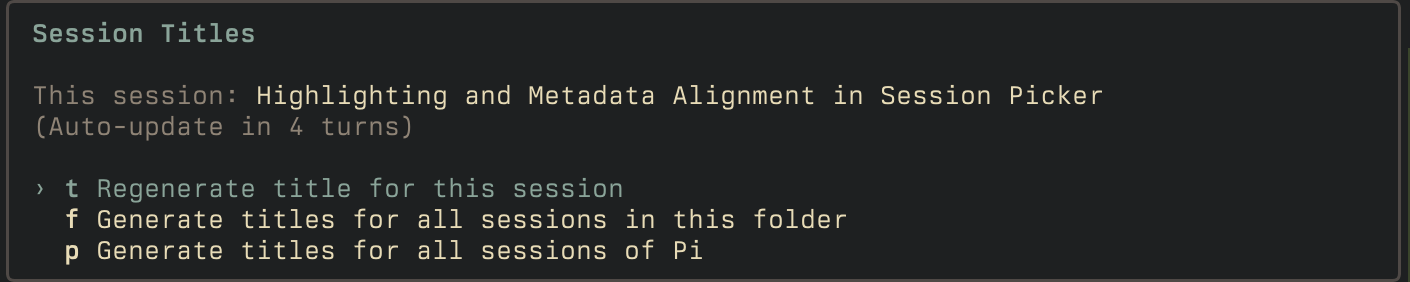
Note that generating titles for all sessions can take some time, and will hit your configured model with the full contents of all sessions.
- automatic retitles run every few turns
- if you manually rename a session with
/name, automatic retitling pauses for that session - Regenerate the title for the current session to resume automatic retitling
- if unconfigured, it will attempt to use these models in order, first one that is available:
openai-codex/gpt-5.6-lunaopenai/gpt-5.6-lunaanthropic/claude-haiku-4-5google/gemini-flash-lite-latest- your currently configured model
To change auto-titling settings, edit ~/.pi/agent/settings.json:
{
  "sessions": {
    "autoTitle": {
      "refreshTurns": 4,
      "timeoutSecs": 15,
      "tokenBudget": 512,
      "model": "anthropic/claude-haiku-4-5",
      "thinkingLevel": "off",
      "prompt": "Custom prompt that overrides the default.",
      "persistRuns": false
    }
  }
}
persistRuns records each title request as its own session file under ~/.pi/agent/pi-sessions/session-auto-title/, holding the exact prompt and response. Open one with pi --session <file> to see what the titling model was sent.
Development
mise trust && mise bootstrap
mise run check
mise run test
For an end-to-end manual flow, see SMOKE.md.