pi-sidebar
Floating right sidebar for pi with git diff/status and session metadata.
Package details
Install pi-sidebar from npm and Pi will load the resources declared by the package manifest.
$ pi install npm:pi-sidebar- Package
pi-sidebar- Version
0.1.0- Published
- May 30, 2026
- Downloads
- not available
- Author
- jrimmer
- License
- BSD-3-Clause
- Types
- extension
- Size
- 118.7 KB
- Dependencies
- 0 dependencies · 2 peers
Pi manifest JSON
{
  "extensions": [
    "./extensions/sidebar.ts"
  ],
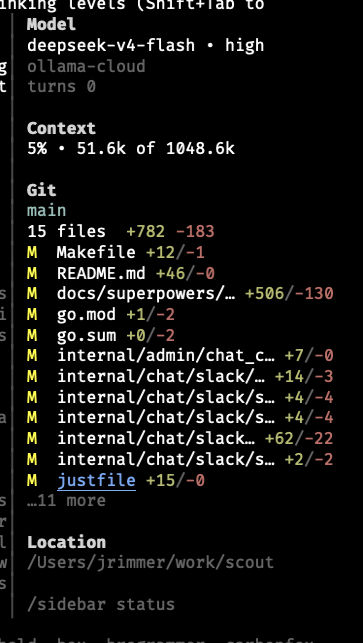
  "image": "https://raw.githubusercontent.com/jrimmer/pi-sidebar/main/assets/sidebar-screenshot.png"
}
Security note
Pi packages can execute code and influence agent behavior. Review the source before installing third-party packages.
README
pi-sidebar
Floating right sidebar for the pi coding harness with model, context, git, and session metadata.
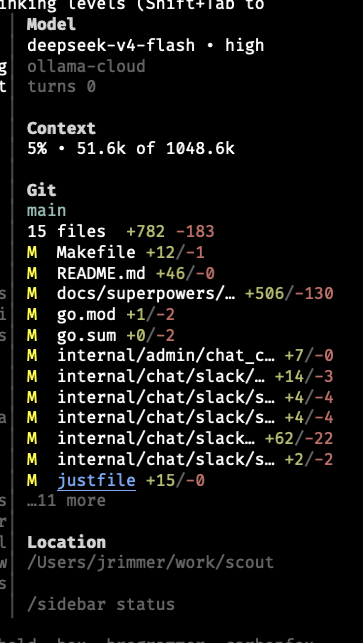
pi-sidebar is an installable package for the pi coding harness. It renders a non-capturing right sidebar overlay, defaults to a vertically centered floating mode on the right side, and auto-hides while the LLM is working so it does not obscure review of in-progress model output. An optional full-height mode is available for a more fixed-window look.
A true fixed sidebar that reserves space and reflows pi's transcript/editor/footer requires native Pi TUI window-region support. See Future native Pi TUI window regions.
Features
- Floating sidebar by default — right-anchored, non-capturing overlay positioned near the visual middle of the screen.
- Optional full-height mode —
/sidebar fullorPI_SIDEBAR_FULL_HEIGHT=1renders a fixed right window with a small gutter. - Auto-hide while the LLM is working — hides on turn start and reappears when the turn ends. Disable with
PI_SIDEBAR_AUTOHIDE_WORKING=0. - Compact model section — shows model + reasoning level on one line, provider underneath.
- Compact context usage — shows percentage first, then used/available context, e.g.
13% • 1.5k of 200.0k. - Git branch and diff summary — shows current branch, changed file count, and total
+/-stats. - Per-file git deltas — changed-file rows preserve room for deltas and color additions/deletions separately.
- Truncated git list — changed-file rows are capped so the centered sidebar does not grow too tall; overflow renders as
…N more. - Configurable git detail — toggle longer/reduced changed-file lists with
/sidebar-git-detail. - No footer replacement — leaves pi's native footer alone.
- Responsive visibility — auto-hides below a configurable terminal width.
Example layout:
Model
gpt-5.5 • medium
openai-codex
turns 4
last tool use bash

Context
5% • 49.2k of 1048.6k

Git
main
3 files  +507 -134
M  docs/superpowers/… +506/-130
M  go.mod +1/-2
M  go.sum +0/-2

Location
/path/to/project

/sidebar status
Install
Install globally for all pi coding harness instances on this computer:
pi install git:github.com/jrimmer/pi-sidebar
This repository also works with pi's raw GitHub URL install form:
pi install https://github.com/jrimmer/pi-sidebar
For local development from a checkout:
cd /path/to/pi-sidebar
pi install ./
Test for one run without installing:
pi -e git:github.com/jrimmer/pi-sidebar
Reload an already-running pi after installation:
/reload
Verify installation inside pi:
/sidebar status
Manage the installed package:
pi list
pi update --extensions
pi remove git:github.com/jrimmer/pi-sidebar
Use project-local install only when you want .pi/settings.json in the current project to carry the dependency:
pi install -l git:github.com/jrimmer/pi-sidebar
Note: local path installs reference this directory directly. Keep the directory around, or install from a git/npm source later.
Commands
/sidebar— toggle sidebar visibility/sidebar on— show sidebar/sidebar off— hide sidebar/sidebar status— show enabled/layout/autohide/git-detail state/sidebar full— use full-height fixed-window sidebar mode/sidebar floating— use the default floating overlay window/sidebar-refresh— refresh git/status data/sidebar-git-detail— toggle longer changed-file list
Shortcut:
ctrl+shift+s— toggle sidebar
Configuration
Set environment variables before starting pi:
| Variable | Default | Description |
|---|---|---|
PI_SIDEBAR_ENABLED |
1 |
Start enabled. Use 0 to start hidden. |
PI_SIDEBAR_WIDTH |
34 |
Sidebar content columns. |
PI_SIDEBAR_FULL_HEIGHT |
0 |
Use full-height fixed-window mode instead of floating mode. |
PI_SIDEBAR_BUFFER |
1 |
Blank gutter columns before the sidebar border in full-height mode. |
PI_SIDEBAR_FILL_ROWS |
200 |
Rows emitted to visually fill tall terminals in full-height mode. |
PI_SIDEBAR_MIN_TERM_WIDTH |
110 |
Auto-hide below this terminal width. |
PI_SIDEBAR_OFFSET_Y |
-6 |
Floating-mode vertical offset. Negative moves up; 0 uses the TUI's exact right-center anchor. |
PI_SIDEBAR_AUTOHIDE_WORKING |
1 |
Hide while the LLM is working. |
PI_SIDEBAR_REFRESH_MS |
5000 |
Git polling interval. |
PI_SIDEBAR_GIT_LINES |
12 |
Max changed-file rows rendered in detailed mode; overflow shows …N more. |
PI_SIDEBAR_MAX_FILES |
12 |
Legacy alias used only when PI_SIDEBAR_GIT_LINES is unset. |
PI_SIDEBAR_GIT_DETAIL |
1 |
Start with detailed changed-file list. Reduced mode shows up to 5 rows. |
Example:
PI_SIDEBAR_WIDTH=40 PI_SIDEBAR_AUTOHIDE_WORKING=0 pi
Git data
The sidebar uses pi's pi.exec helper to run static git commands in the current working directory:
git rev-parse --is-inside-work-treegit branch --show-currentgit diff --shortstatgit status --porcelain=v1git diff --numstat HEAD --
No shell strings are assembled from user input. The sidebar displays file paths and diff counts, not file contents.
Docs
Development
npm install --ignore-scripts
npm run verify
npm run verify runs TypeScript checks, unit tests, and npm pack --dry-run to confirm package contents.
Adding a sidebar section
Sections are intentionally lightweight and local to this package. There is no nested Pi-package plugin system.
To add a section:
- Add a self-contained renderer in
extensions/sidebar/sections/<name>.ts. - Accept a
SidebarSectionContextfromextensions/sidebar/types.ts. - Register the renderer in the
SIDEBAR_SECTIONSarray inextensions/sidebar.ts. - Add or update tests in
tests/sidebar.test.ts.
Existing examples: model.ts, context.ts, git.ts, location.ts, and hint.ts.
Current limitation
This plugin uses pi's supported overlay API. Floating mode is the default. Optional full-height mode renders a fixed right window plus gutter and covers the right edge of the transcript/footer. It approximates pushing content left visually, but true layout reservation/reflow still requires pi core support. See Future native Pi TUI window regions for the proposed core direction.