pi-skill-deck
Two-pane categorized skill browser for Pi with bookmarks, tags, frecency tracking, source attribution, and 8 group-by modes (category, source, framework, creator, location, tag, usage, flat)
Package details
Install pi-skill-deck from npm and Pi will load the resources declared by the package manifest.
$ pi install npm:pi-skill-deck- Package
pi-skill-deck- Version
0.2.1- Published
- May 28, 2026
- Downloads
- 119/mo · 119/wk
- Author
- bengovernale
- License
- MIT
- Types
- extension
- Size
- 354.7 KB
- Dependencies
- 0 dependencies · 2 peers
Pi manifest JSON
{
  "extensions": [
    "./index.ts"
  ]
}Security note
Pi packages can execute code and influence agent behavior. Review the source before installing third-party packages.
README
🎴 pi-skill-deck
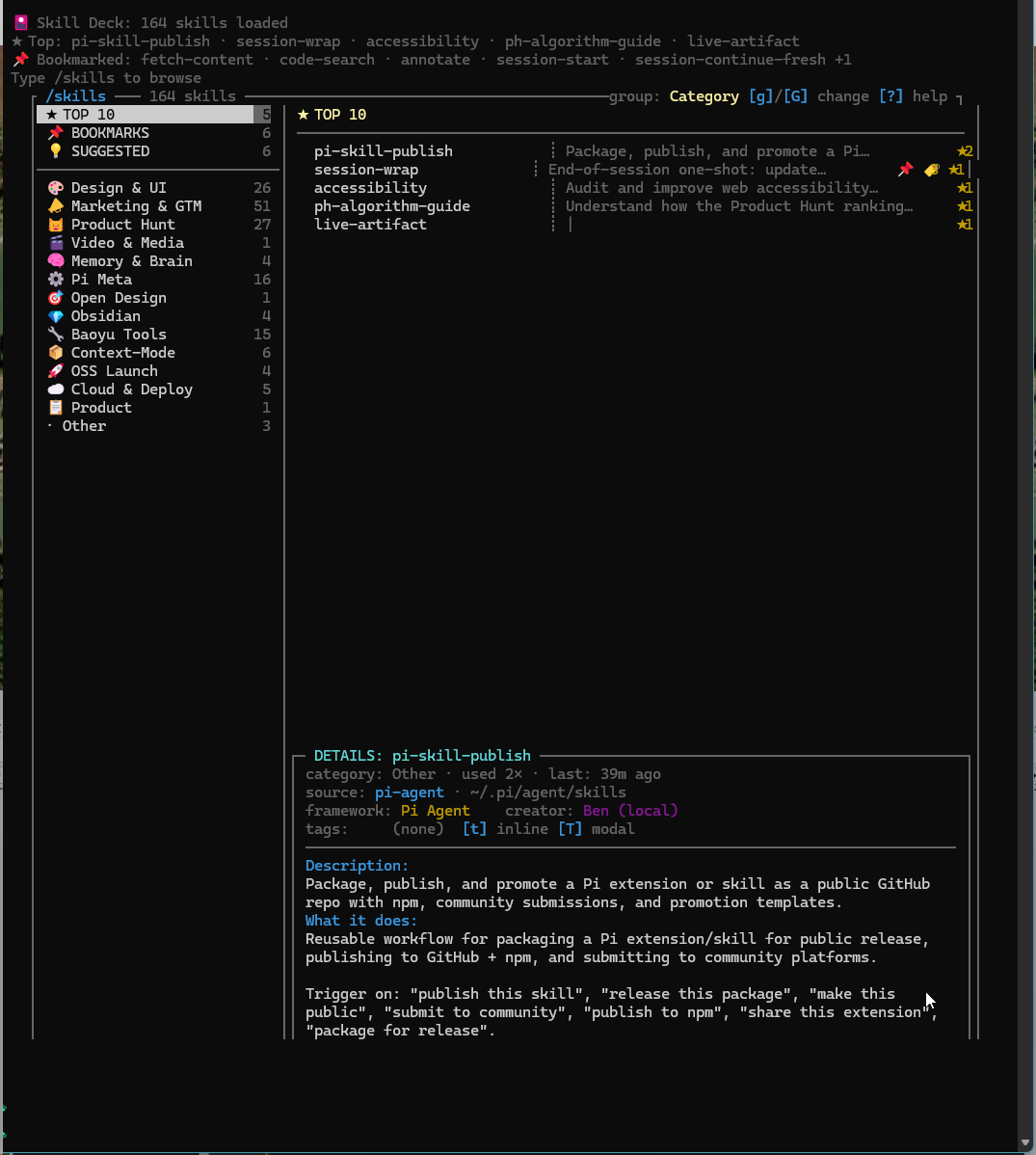
Two-pane categorized skill browser for Pi — replaces the flat alphabetical wall of 150+ skills with a navigable, categorized TUI overlay.



✨ Features
- Two-pane browser — sections on the left, skills + detail on the right
- 8 group-by modes —
gcycles,Gopens a picker: Category · Source · Framework · Creator · Location · Tag · Usage Tier · Flat - Source attribution — every skill carries
source(pi-agent / claude / codex / npm / agents-pack / project-local),framework(SuperClaude / Baoyu / Marketing pack / npm:<pkg>/ …), andcreator(baoyu / Anthropic / Corey Haines / Mario Zechner / Ben / …) - Inline short summaries — each row shows skill name + a one-line summary (derived from the SKILL.md description) so you can scan without selecting
- Expanded DETAILS box — boxed pane shows category · usage · source · location · framework · creator · tags · full Description block · "What it does" body excerpt
⚠Thin-body flag — surfaces skills whose SKILL.md body is missing / sparse so you know which ones still need an explanation written- Per-skill tags —
t(inline editor) orT(modal editor) to apply free-form tags; can be used as a group-by mode - ★ Top 10 most used — pinned at the top, ranked by frecency (frequency × recency)
- 📌 Bookmarks —
Ctrl+Bto save skills for quick access - 💡 Daily suggestions — 1–3 underused skills that match your activity patterns, refreshed daily
- Search — press
/to filter skills by name or description in real time - Skill queueing — selected skill is injected alongside your next message
- Zero config — scans all standard skill locations automatically
📦 Installation
Requires: Pi ≥ 0.1 and Node.js ≥ 18.
The same pi install command works in any shell (bash, zsh, PowerShell, cmd.exe, fish, Git Bash, WSL):
Option 1 — from npm (recommended)
pi install pi-skill-deck
Pi resolves the package name against the npm registry, downloads it, and wires the /skills command automatically.
Option 2 — from GitHub directly
For the very latest commit (may be ahead of npm):
pi install CymatiStatic/pi-skill-deck
Option 3 — manual settings
If you prefer to edit ~/.pi/agent/settings.json yourself, add one of these to the packages array and restart Pi:
{
  "packages": [
    "npm:pi-skill-deck"
  ]
}
or
{
  "packages": [
    "github:CymatiStatic/pi-skill-deck"
  ]
}
Verify the install
| Shell | Command |
|---|---|
| bash / zsh / Git Bash / WSL | pi --version && pi extensions list | grep pi-skill-deck |
| PowerShell / pwsh | pi --version; pi extensions list | Select-String pi-skill-deck |
| cmd.exe | pi --version && pi extensions list | findstr pi-skill-deck |
Then start a new Pi session and type /skills. You should see a one-line 🎴 Skill Deck: N skills loaded notice at session start.
Uninstall
pi uninstall pi-skill-deck
or remove the corresponding entry from ~/.pi/agent/settings.json packages array.
Updating
pi install pi-skill-deck@latest
or pull a specific version (e.g., pi install pi-skill-deck@0.1.1).
🚀 Usage
Type /skills inside any Pi session to open the browser.
Keyboard shortcuts (inside overlay)
Key hints are always visible in three places so you never have to remember them:
- Inline in the header — the current group-by mode shows
[g]/[G] change [?] helpright next to it - Inline in the DETAILS box — the tags row shows
[t] inline [T] modal - In the footer status bar — every key is in a cyan
[...]chip
And ? opens a full Keyboard reference panel from anywhere.
| Key | Action |
|---|---|
Tab / ← → |
Switch focus between panes |
↑ ↓ |
Navigate within the focused pane |
Enter |
Queue the selected skill for your next message |
Ctrl+B |
Toggle bookmark on highlighted skill |
g |
Cycle group-by mode (Category → Source → Framework → Creator → Location → Tag → Usage Tier → Flat) |
G |
Open group-by picker menu |
t |
Inline tag editor (replaces footer bar) |
T (shift+t) |
Modal tag editor (floating centered box) |
/ |
Start search (filters by name or description) |
? |
Toggle the full keyboard reference panel |
Esc |
Close overlay (or exit search / tag editor / picker / help) |
Backspace |
Delete search / tag-editor character |
Group-by modes
| Mode | What it groups on |
|---|---|
| Category (default) | Semantic buckets (Design & UI, Marketing & GTM, Product Hunt, …) |
| Source | Where the skill is installed from — Pi Agent / Pi User / Claude / Codex / npm / Agents Pack / Project-local |
| Framework | Skill library — SuperClaude / Baoyu Skills / Marketing Sub-Library / ProductHunt Sub-Library / context-mode / npm:<pkg> |
| Creator | Author — baoyu / Anthropic / Corey Haines / yoanbernabeu / gingiris / Mario Zechner / CymatiStatic / Ben (local) |
| Location | Physical install path (~/.pi/agent/skills, ~/.claude/skills, ~/.agents/skills/marketing, etc.) |
| Tag | Your applied tags |
| Usage Tier | Power (10+ uses) · Active (3–9) · Tried (1–2) · Unused |
| Flat | Single sorted list, no grouping |
The selected mode is persisted to ~/.pi/agent/skill-deck-prefs.json and restored next session.
Tag editor — two styles
v0.2.0 ships both editor styles simultaneously so you can pick what feels best:
t— Inline · a text input replaces the footer hint bar. Fastest to type. Comma- or space-separated tags.↵saves,Esccancels.T— Modal · a floating box centered over the right pane shows the skill name + input field. More visible / less ambiguous. Same input format and controls.
Tags are stored in ~/.pi/agent/skill-tags.json and survive restarts.
🔍 How it works
Skill scanning
Automatically discovers skills from all standard Pi skill locations:
| Location | Format |
|---|---|
~/.pi/agent/skills/ |
Recursive (SKILL.md) |
~/.pi/skills/ |
Recursive |
./.pi/skills/ |
Project-local |
~/.codex/skills/ |
Codex-compatible |
~/.claude/skills/ |
Claude-compatible |
./.claude/skills/ |
Project-local Claude |
~/.agents/skills/ |
Shared agent skills |
npm global node_modules/*/skills/ |
Installed packages |
Categorization
Skills are categorized using a multi-layer strategy (applied in order):
- Parent directory — e.g., skills under
marketing/→ Marketing & GTM - Name prefix —
baoyu-*→ Baoyu Tools,ph-*→ Product Hunt,ctx-*→ Context-Mode - Explicit overrides — hardcoded map for non-obvious skills
- Description keywords — fallback keyword matching
- "Other" — last resort
Source detection
Every skill is also tagged with { origin, location, framework, creator }:
- npm package — path matches
node_modules/<pkg>/skills/…, framework =npm:<pkg>, creator pulled frompackage.jsonauthorfield - Known path root —
~/.pi/agent,~/.claude,~/.codex,~/.agents, etc. - Agents Pack sub-library —
~/.agents/skills/marketing/→ Marketing Sub-Library (Corey Haines),producthunt/→ yoanbernabeu,oss-launch/→ gingiris - Name-prefix hint —
baoyu-*→ creator: 宝玉 (baoyu);ctx-*→ creator: Mario Zechner / framework: context-mode - Fallback —
framework: —,creator: —
Frecency tracking
Usage is tracked per-skill with a frecency score: count × 0.5^(age_days / 7). This means a skill used 10 times last week ranks higher than one used 50 times last month. The Top 10 section reflects this ranking.
Daily suggestions
Each day, 1–3 skills are suggested from categories you use but haven't fully explored. The algorithm picks underused skills from your most active categories — no AI needed, just simple heuristics.
📁 State files
All persisted in ~/.pi/agent/:
| File | Purpose |
|---|---|
skill-usage.json |
Per-skill { count, lastUsedAt } |
skill-bookmarks.json |
Array of bookmarked skill names |
skill-suggestion.json |
{ date, picks: [{ name, reason }] } |
skill-tags.json |
Per-skill tag arrays ({ "baoyu-imagine": ["fav", "image"], … }) |
skill-deck-prefs.json |
Group-by mode + last-used tag editor style |
📖 DETAILS box — anatomy
┌─ DETAILS: baoyu-imagine ────────────────────────────────────┐
│ category: Baoyu Tools · used 3× · last: 2d ago             │
│ source: claude-user · ~/.claude/skills                     │
│ framework: Baoyu Skills    creator: 宝玉 (baoyu)             │
│ tags:     #fav #image                                      │
│ ───────────────────────────────────────────────────────────── │
│ Description:                                               │
│ AI image generation with OpenAI GPT Image 2, Azure         │
│ OpenAI, Google, OpenRouter, DashScope, …                   │
│ What it does:                                              │
│ Generates images from text prompts using multiple AI       │
│ providers. Supports reference images, aspect ratios, …     │
└───────────────────────────────────────────────────────────────┐
When a skill's SKILL.md body is empty or too sparse, the "What it does" section shows:
│ What it does:                                              │
│ ⚠ No body content in SKILL.md — frontmatter description    │
│   only.                                                    │
The ⚠ indicator also appears next to skills in the list, so you can spot at a glance which skills still need their bodies written.
⚙️ Configuration
Custom category overrides
Edit categories.ts to add your own categories or remap skills. The EXPLICIT_MAP object maps skill names to category labels.
🤝 Contributing
PRs welcome! If you have skills that don't categorize well, open an issue or add an entry to the EXPLICIT_MAP in categories.ts.
📜 Changelog
See CHANGELOG.md for the full version history.
🌐 Distribution
| Channel | Identifier |
|---|---|
| npm | pi-skill-deck |
| GitHub Packages | @cymatistatic/pi-skill-deck |
| Source | github.com/CymatiStatic/pi-skill-deck |
| Releases | GitHub Releases |
📄 License
MIT — built by @CymatiStatic