pi-skill-deck
Two-pane categorized skill browser for Pi with bookmarks, frecency tracking, and daily suggestions
Package details
Install pi-skill-deck from npm and Pi will load the resources declared by the package manifest.
$ pi install npm:pi-skill-deck- Package
pi-skill-deck- Version
0.1.0- Published
- May 22, 2026
- Downloads
- not available
- Author
- bengovernale
- License
- MIT
- Types
- extension
- Size
- 237.6 KB
- Dependencies
- 0 dependencies · 0 peers
Pi manifest JSON
{
  "extensions": [
    "./index.ts"
  ]
}
Security note
Pi packages can execute code and influence agent behavior. Review the source before installing third-party packages.
README
🎴 pi-skill-deck
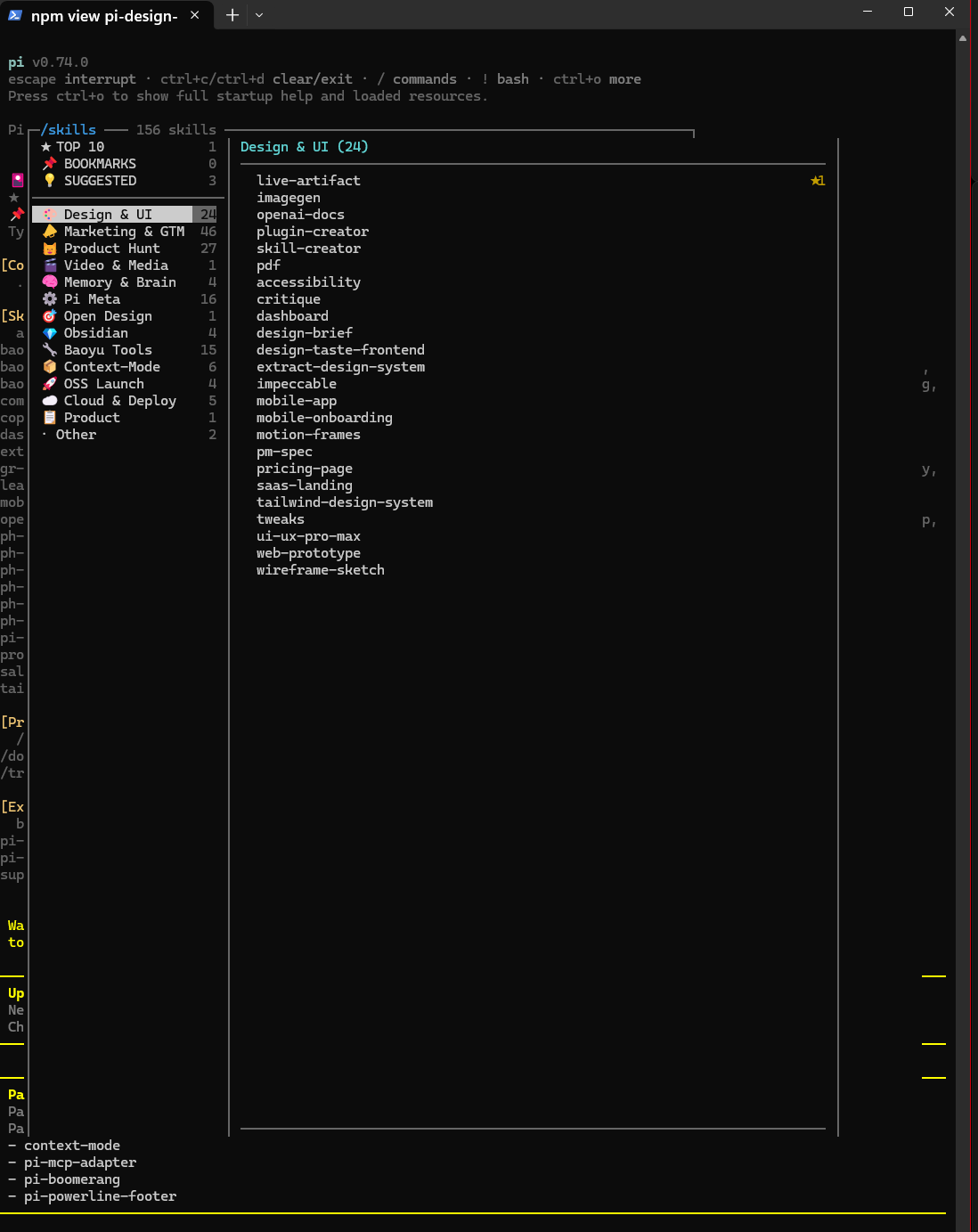
Two-pane categorized skill browser for Pi — replaces the flat alphabetical wall of 150+ skills with a navigable, categorized TUI overlay.
✨ Features
- Two-pane browser — categories on the left, skills + detail on the right
- ★ Top 10 most used — pinned at the top, ranked by frecency (frequency × recency)
- 📌 Bookmarks —
Ctrl+Bto save skills for quick access - 💡 Daily suggestions — 1–3 underused skills that match your activity patterns, refreshed daily
- 13+ auto-categories — Design & UI, Marketing & GTM, Product Hunt, Video & Media, Memory & Brain, Pi Meta, Open Design, Obsidian, Context-Mode, OSS Launch, Cloud & Deploy, Product, and more
- Search — press
/to filter skills by name or description in real time - Skill queueing — selected skill is injected alongside your next message
- Zero config — scans all standard skill locations automatically
📦 Installation
pi install CymatiStatic/pi-skill-deck
Or add manually to your ~/.pi/agent/settings.json:
{
  "packages": [
    "github:CymatiStatic/pi-skill-deck"
  ]
}
Then restart Pi.
🚀 Usage
Type /skills inside any Pi session to open the browser.
Keyboard shortcuts (inside overlay)
| Key | Action |
|---|---|
Tab / ← → |
Switch focus between panes |
↑ ↓ |
Navigate within the focused pane |
Enter |
Queue the selected skill for your next message |
Ctrl+B |
Toggle bookmark on highlighted skill |
/ |
Start search (filters by name or description) |
Esc |
Close overlay (or exit search mode) |
Backspace |
Delete search characters |
🔍 How it works
Skill scanning
Automatically discovers skills from all standard Pi skill locations:
| Location | Format |
|---|---|
~/.pi/agent/skills/ |
Recursive (SKILL.md) |
~/.pi/skills/ |
Recursive |
./.pi/skills/ |
Project-local |
~/.codex/skills/ |
Codex-compatible |
~/.claude/skills/ |
Claude-compatible |
./.claude/skills/ |
Project-local Claude |
~/.agents/skills/ |
Shared agent skills |
npm global node_modules/*/skills/ |
Installed packages |
Categorization
Skills are categorized using a multi-layer strategy (applied in order):
- Parent directory — e.g., skills under
marketing/→ Marketing & GTM - Name prefix —
baoyu-*→ Baoyu Tools,ph-*→ Product Hunt,ctx-*→ Context-Mode - Explicit overrides — hardcoded map for non-obvious skills
- Description keywords — fallback keyword matching
- "Other" — last resort
Frecency tracking
Usage is tracked per-skill with a frecency score: count × 0.5^(age_days / 7). This means a skill used 10 times last week ranks higher than one used 50 times last month. The Top 10 section reflects this ranking.
Daily suggestions
Each day, 1–3 skills are suggested from categories you use but haven't fully explored. The algorithm picks underused skills from your most active categories — no AI needed, just simple heuristics.
📁 State files
All persisted in ~/.pi/agent/:
| File | Purpose |
|---|---|
skill-usage.json |
Per-skill { count, lastUsedAt } |
skill-bookmarks.json |
Array of bookmarked skill names |
skill-suggestion.json |
{ date, picks: [{ name, reason }] } |
⚙️ Configuration
Custom category overrides
Edit categories.ts to add your own categories or remap skills. The EXPLICIT_MAP object maps skill names to category labels.
🤝 Contributing
PRs welcome! If you have skills that don't categorize well, open an issue or add an entry to the EXPLICIT_MAP in categories.ts.
📄 License
MIT — built by @CymatiStatic