pi-skill-gate
Interactive skill visibility manager for pi coding agent — browse, toggle, and invoke skills from a keyboard-driven TUI overlay.
Package details
Install pi-skill-gate from npm and Pi will load the resources declared by the package manifest.
$ pi install npm:pi-skill-gate- Package
pi-skill-gate- Version
0.1.1- Published
- Jun 12, 2026
- Downloads
- not available
- Author
- cullendotdev
- License
- MIT
- Types
- extension
- Size
- 30.7 KB
- Dependencies
- 0 dependencies · 2 peers
Pi manifest JSON
{
  "extensions": [
    "./index.ts"
  ]
}
Security note
Pi packages can execute code and influence agent behavior. Review the source before installing third-party packages.
README
Skill Gate
Interactive skill visibility manager for pi coding agent
Features • Installation • Usage • Configuration • How It Works
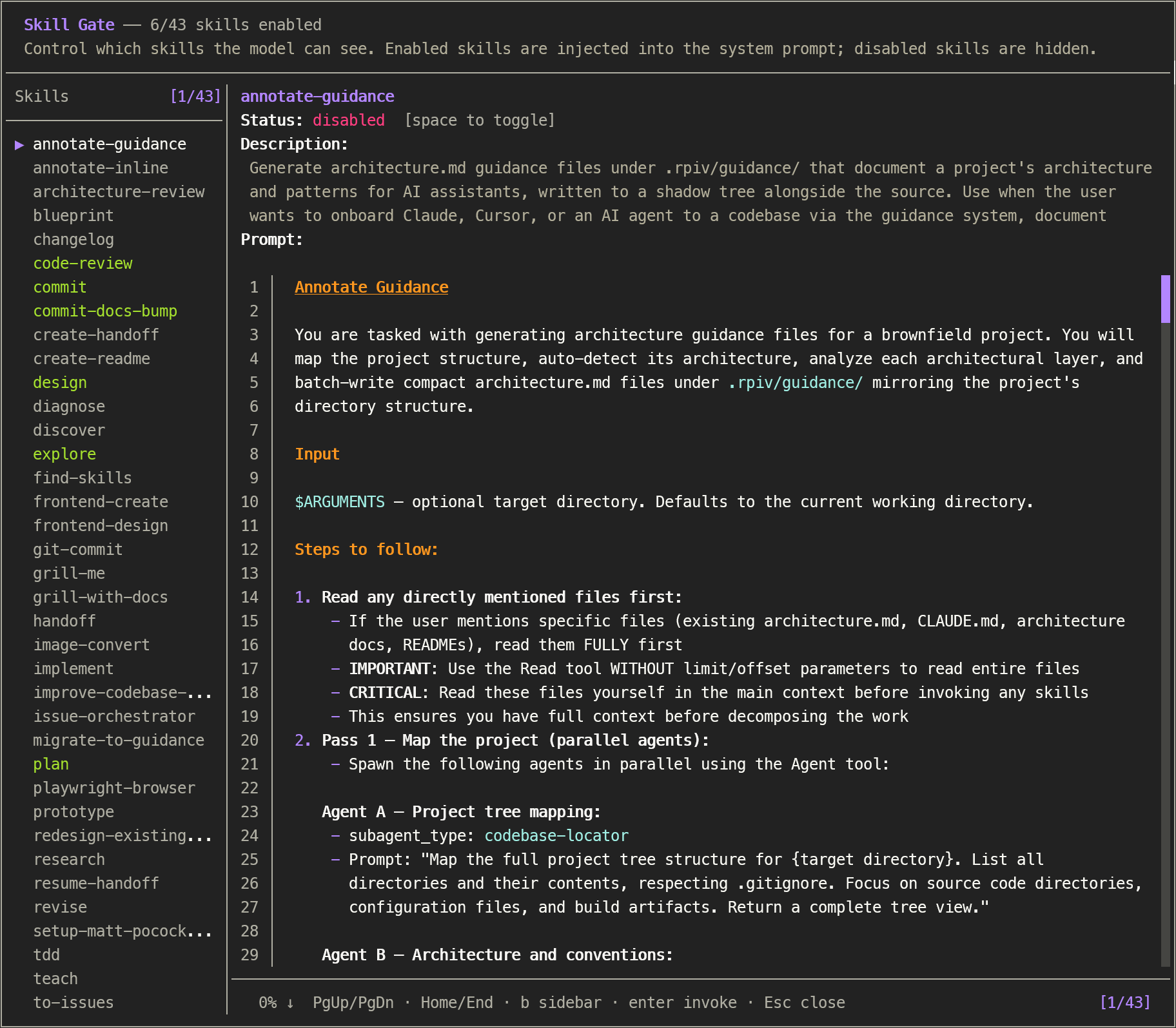
Control which skills are injected into the initial system prompt with /skill-gate. Browse full skill content, toggle visibility on or off, and invoke skills — all from a keyboard-driven overlay. Skills that are not injected can still be executed manually in chat. State is persisted across sessions and injected into the system prompt before every agent run.
Features
- Complete skill coverage — uses pi's
ResourceLoaderAPI with dynamic directory discovery to match/skill:autocomplete (including extension-contributed, project-memory, and migrated package skills) - Skill browser — view the complete
SKILL.mdcontent (description, when-to-use, procedure, prompt body) for every skill with syntax-highlighted markdown rendering - Toggle visibility — enable or disable skills individually; disabled skills are excluded from the system prompt
- Persistent state — toggle state saved to
~/.pi/agent/config/skill-gate.json - System prompt injection — enabled skills are automatically inserted as
<available_skills>before each agent start via thebefore_agent_starthook - Respects native-disabled — skills with
disableModelInvocation: trueare marked with a disabled indicator and cannot be toggled - Fast hook —
before_agent_startfilters from an in-memory cache — zero filesystem access per message
Installation
Via npm (recommended)
Install the package, then let pi discover it:
pi install npm:pi-skill-gate
Manual (local development)
Clone / copy the extension into your pi extensions directory:
git clone https://github.com/cullendotdev/pi-skill-gate.git
cp -r pi-skill-gate ~/.pi/agent/extensions/pi-skill-gate
Usage
/skill-gate
Opens an overlay showing all discovered skills.
| Key | Action |
|---|---|
↑ ↓ |
Navigate skills |
Space |
Toggle selected skill enabled/disabled |
b |
Toggle skill-list sidebar |
PgUp PgDn |
Scroll prompt content |
Home End |
Jump to top/bottom |
Enter |
Invoke skill into chat |
Esc |
Close |
Configuration
skill-gate.json at ~/.pi/agent/config/skill-gate.json is created automatically. Only "enabled" keys are persisted; "disabled" is the default.
{
  "skills": {
    "code-review": "enabled",
    "blueprint": "disabled"
  }
}
[!WARNING] Corrupted JSON resets all toggles to disabled.
How It Works
session_start
        ↓
  DefaultResourceLoader + dynamic skill path discovery
  (walks agentDir for skills/ dirs not covered by includeDefaults,
   e.g. pi-hermes-memory/skills/, projects-memory/*/skills/)
        ↓                         ↓
  cachedSkills[]              skill-gate.json
  (Skill: name, desc,         (per-skill state)
   filePath, disableModelInvocation)
        ↓                         ↓
  SkillDetailOverlay ←── loadState() / persistToggle()
        ↓
  before_agent_start hook (in-memory filter)
        ↓
  buildVisibleBlock() → injected into system prompt
Skill discovery
The extension creates a DefaultResourceLoader at session_start with includeDefaults: true (covers ~/.pi/agent/skills/, npm package skills, and .agents/skills/) plus dynamically discovered additionalSkillPaths:
- Agent-level directories with
skills/subdirectories (e.g.pi-hermes-memory/skills/) - Project memory skills (
projects-memory/<project>/skills/)
This ensures the skill count always matches /skill: autocomplete, regardless of where skills are stored.
File Structure
pi-skill-gate/
├── index.ts            # Extension entry point
├── skills-lock.json
└── README.md