pi-skills-mention
codex风格 · 输入$ 拉起skill列表。Codex-style $skill-name mentions for pi: input $ to pull up the skill list and autocomplete, expand any number of skills anywhere in a prompt.
Package details
Install pi-skills-mention from npm and Pi will load the resources declared by the package manifest.
$ pi install npm:pi-skills-mention- Package
pi-skills-mention- Version
0.1.5- Published
- Aug 6, 2026
- Downloads
- 904/mo · 26/wk
- Author
- kashmir_wu_1210
- License
- MIT
- Types
- extension
- Size
- 54.7 KB
- Dependencies
- 0 dependencies · 2 peers
Pi manifest JSON
{
  "extensions": [
    "./src/index.ts"
  ],
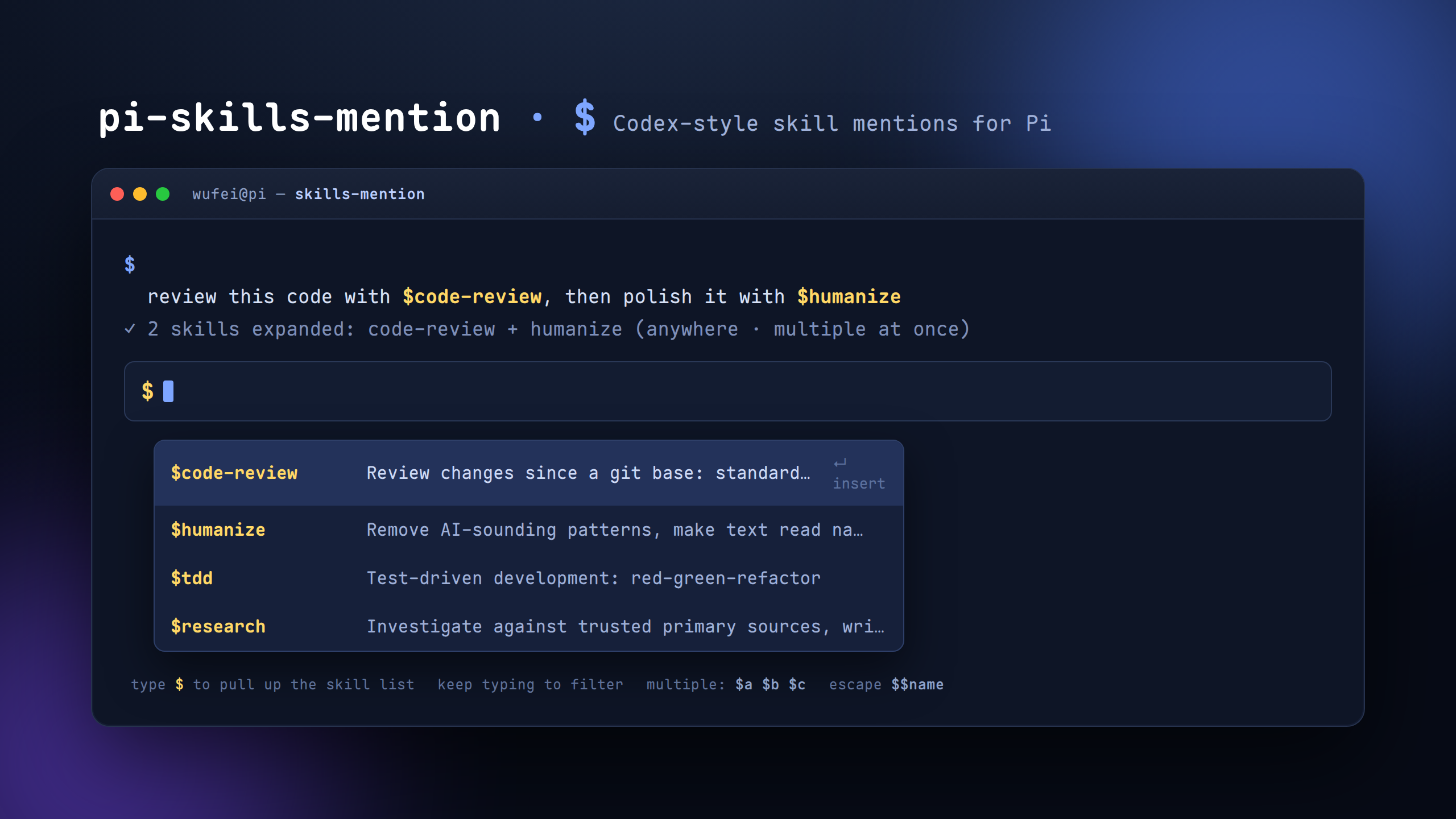
  "image": "https://raw.githubusercontent.com/WufeiHalf/pi-skills-mention/master/media/preview.png"
}
Security note
Pi packages can execute code and influence agent behavior. Review the source before installing third-party packages.
README
pi-skills-mention
Codex-style
$skill mentions for Pi · type$to pull up the skill list, and reference any number of skills from anywhere in a prompt.
pi-skills-mention brings Codex-style $ mentions of skills to the Pi coding agent. Instead of remembering /skill:name — which only works at the start of a message and expands one skill at a time — you write $ + a skill name anywhere in any prompt:
review this code with $code-review, then polish the summary with $humanize
Type $ in the input editor and the skill list appears immediately — filter as you type, accept with Enter, mention many at once. Just like Codex.
✨ Features
$anywhere — mention skills in the middle or end of any message, not just at the start.- Multiple at once —
$code-review $humanizeloads any number of skills in a single message. - Instant autocomplete — type
$and the skill list pops up immediately; filter live as you type. - Safe by default — only known skill names load;
$PATH,$FOO,$(cmd)etc. pass through untouched. - Prompt never rewritten — pi stores and displays exactly what you typed, so
/fuck-style recovery, rewind and re-editing always see your original$skillmentions. - Escape hatch —
$$namerenders as a literal$name.
Install
pi install npm:pi-skills-mention
Or run from source while developing:
pi -e /path/to/pi-skills-mention/src/index.ts
Restart pi (or /reload) after installing, then type $ in the editor to try it.
Usage
Mention any skill by name, anywhere:
$tdd 实现这个功能
先审查 $code-review 再提交
帮我把这份总结 $humanize 一下,顺便 $rewrite 精简
$code-review 与 $humanize 帮我审查 auth 模块的改动,并把结论润色成自然的中文。
Each $skill-name loads that skill's full SKILL.md instructions before the agent runs — the same <skill ...> blocks pi itself uses for /skill:name. Your prompt itself is never rewritten: pi stores and displays exactly what you typed (with the $skill mentions), and the skill contents arrive as a separate context message. The TUI renders it as a compact ✦ skills-mention: name + name (ctrl+o to expand) line — expand it to see the full skill contents.
Because the stored prompt is your original text, prompt-recovery commands like /fuck (pi-wtf), rewind and re-editing all work on your original mentions — no skill-text dump in the editor.
Autocomplete: press $, the skill picker opens immediately with the full list. Keep typing to narrow it. Press Enter (or arrow + Enter) to insert the selected $skill-name.
Tips & edges
- Loaded-skills rendering — mentioned skills show up in the chat as one compact line (
✦ skills-mention: a + b,ctrl+oto expand the full contents). Skills already loaded on the same session branch are not injected again. - Fuzzy autocomplete —
$matching is fuzzy, not prefix-only:$impvmatchesimprove-codebase-style skills (letters in order, not necessarily consecutive). Prefix matches still rank first. - Skills resolve greedily to the longest known match: if both
code-reviewandcode-review-moduleexist,$code-review-moduleuses the bigger one. - A token that isn't a known skill stays literal —
$HOME,$PATH,$(cmd)are untouched. - Use
$$nameto force a literal$name. - Skill names come from the same set pi already loaded into the session (
systemPromptOptions.skills), kept in sync every turn; on the very first turn it falls back to pi's own discovery (~/.pi/agent/skills,<cwd>/.pi/skills,~/.agents/skills, ancestor.agents/skills).
How it works
| Module | Role |
|---|---|
src/mention.ts |
$token → skill-block expansion |
src/autocomplete.ts |
$-triggered autocomplete provider wrapper |
src/discover.ts |
session skill cache + first-turn discovery |
src/skill-registry.ts |
skill indexing + block building |
- Discovery uses the skills pi already loaded into the session; on the first turn it falls back to pi's exported
loadSkillsseeder. - Expansion happens in the
inputevent (viatransform), so$works on every turn and in any position — escaping pi's single-start-only/skill:limitation. - Autocomplete wraps pi's built-in provider through
ctx.ui.addAutocompleteProvider: it only takes over when the cursor sits inside a$mention token, otherwise it delegates to the original (commands, files,@-paths …). Native/commands and/skill:are never disabled —$is purely additive.
Development
npm install
npm test          # unit tests (expansion + autocomplete)
npm run typecheck
npm run build
npm pack          # inspect publish contents
Gallery preview
The image below is what shows up on the pi.dev package gallery:
License
MIT