pi-slate
A minimal-TUI with rich-graphics support that adds zero-context bloat
Package details
Install pi-slate from npm and Pi will load the resources declared by the package manifest.
$ pi install npm:pi-slate- Package
pi-slate- Version
0.1.14- Published
- Oct 11, 2026
- Downloads
- 3,465/mo · 1,499/wk
- Author
- tiredhades
- License
- MIT
- Types
- extension, theme
- Size
- 1.5 MB
- Dependencies
- 2 dependencies · 2 peers
Pi manifest JSON
{
  "image": "https://raw.githubusercontent.com/GaganSD/pi-extensions/main/pi-slate/assets/slate-overview.png",
  "themes": [
    "./themes/*.json"
  ],
  "extensions": [
    "./extensions/pi-slate/index.ts"
  ]
}Security note
Pi packages can execute code and influence agent behavior. Review the source before installing third-party packages.
README
Setup
Option 1: Pi-agent Prompt
- Install pi-slate using: `pi install npm:pi-slate`.
- Keep my current theme and other UI extensions. Select only the Slate surfaces I want.
- Ask me to /reload after changing surfaces. Use fullscreen explicitly if I want the sidebar.
Option 2: Bash
pi install npm:pi-slate
pi --tui-mode fullscreen
Explore extension settings using /slate after installation. Releases: CHANGELOG.
Independent Surfaces
Slate can own one surface and leave the rest untouched. The closed set is header, footer, editor, sidebar, tool-cards, transcript; unselected surfaces get no setter, patch, watcher, or cleanup write.
/slate surfaces
/slate surfaces set editor
/slate surfaces set header tool-cards
/slate surfaces full
/slate surfaces none
Surface changes are saved and require /reload; they never hot-swap host chrome. Appearance settings remain live. To keep your current header, footer, and editor while using Slate's cards: /slate surfaces set tool-cards, then /reload.
| Surface | Owns |
|---|---|
header |
Compact workspace identity and update hairline, not title or sidebar bootstrap |
footer |
Zero-row footer (hides Pi's native footer), not composer metadata |
editor |
Composer, keys, paste/images, local working/thinking status; branch facts are independent of footer |
sidebar |
Session dashboard, foldable resources, tasks and images; no second editor |
tool-cards |
Highlighted edit/write cards and grouped reads; native model-facing results |
transcript |
Visible-message window, without deleting stock notices |
A missing ~/.pi/agent/pi-slate.json starts with ["editor", "sidebar", "tool-cards"]. focused: true keeps the selected sidebar hidden. Existing valid settings without surfaces migrate in memory to all six, preserving appearance preferences; the next settings save writes version 1 and the explicit array. full saves six names, never a wildcard. Invalid JSON, unknown surfaces, or an unsupported version select nothing, warn, and leave the file untouched until you repair it and reload.
composerMetadata: "standard" | "minimal" names the composer setting formerly called footer; Slate reads the old key and writes both aliases. /slate footer remains the compatible command. It does not select the footer surface. Focused and width commands never enable an unselected sidebar.
Theme and fullscreen are preferences, not surfaces. Slate no longer applies either on load or writes themeApplied / fullscreenApplied markers. /slate theme is an explicit user action; use pi --tui-mode fullscreen explicitly for the sidebar.
Header/footer/editor are last-writer-wins. Tools are first-registration-wins; Slate reports unavailable cards instead of repairing conflicts. Sidebar and transcript require a compatible fullscreen host: unavailable surfaces warn rather than forcing fullscreen or drawing a fallback overlay. The sidebar mounts once and yields if another writer replaces the root. The namespaced below-editor TUI handle renders zero rows.
The current host cannot inspect header/footer slot ownership. Shutdown disposes Slate's local resources without clearing host chrome; /reload resets those slots.
Features
Slate renders cleanly into your terminal and stays customizable without adding new model-facing tools, prompts, or model calls.
Quiet Workbench
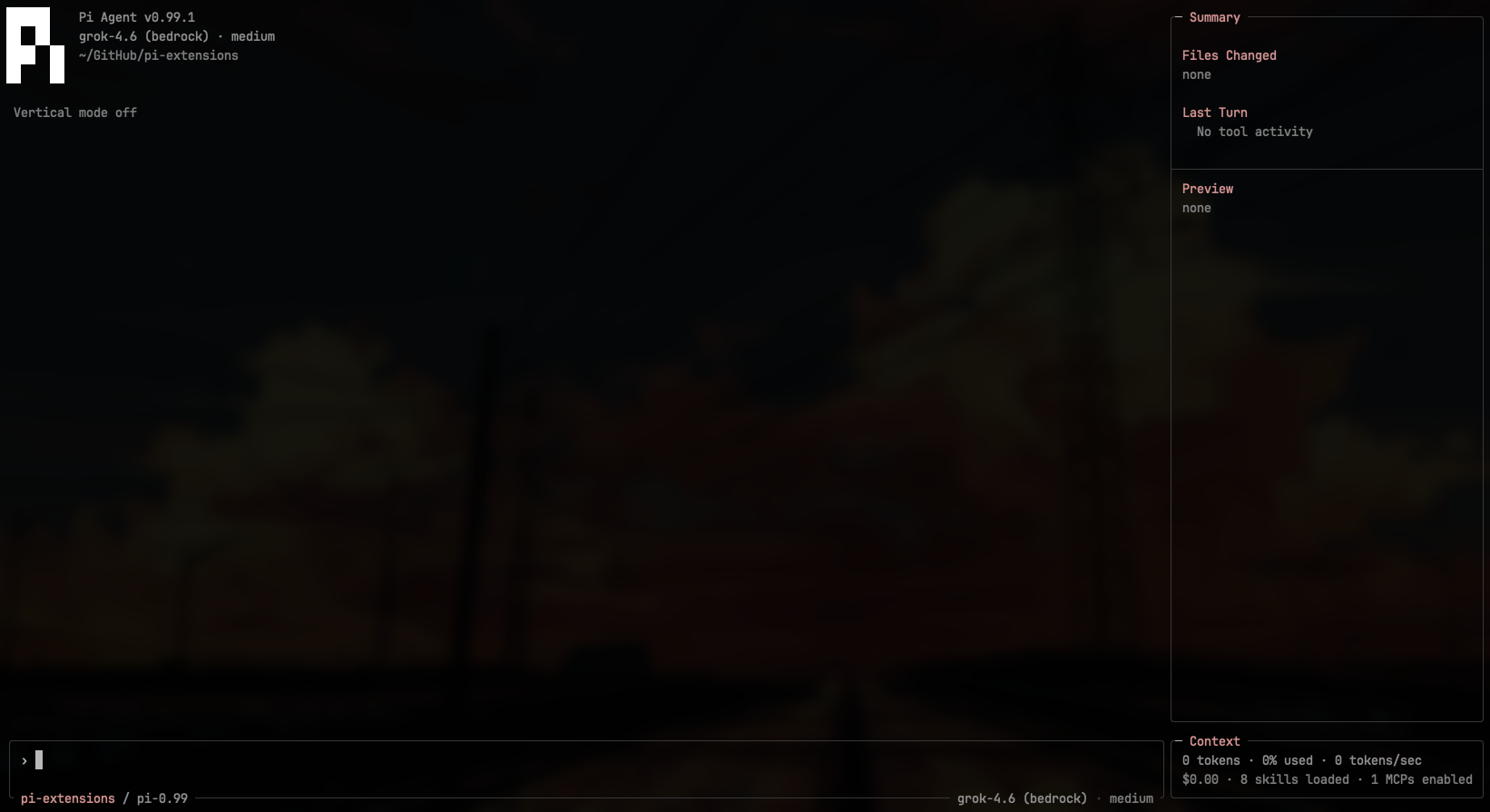
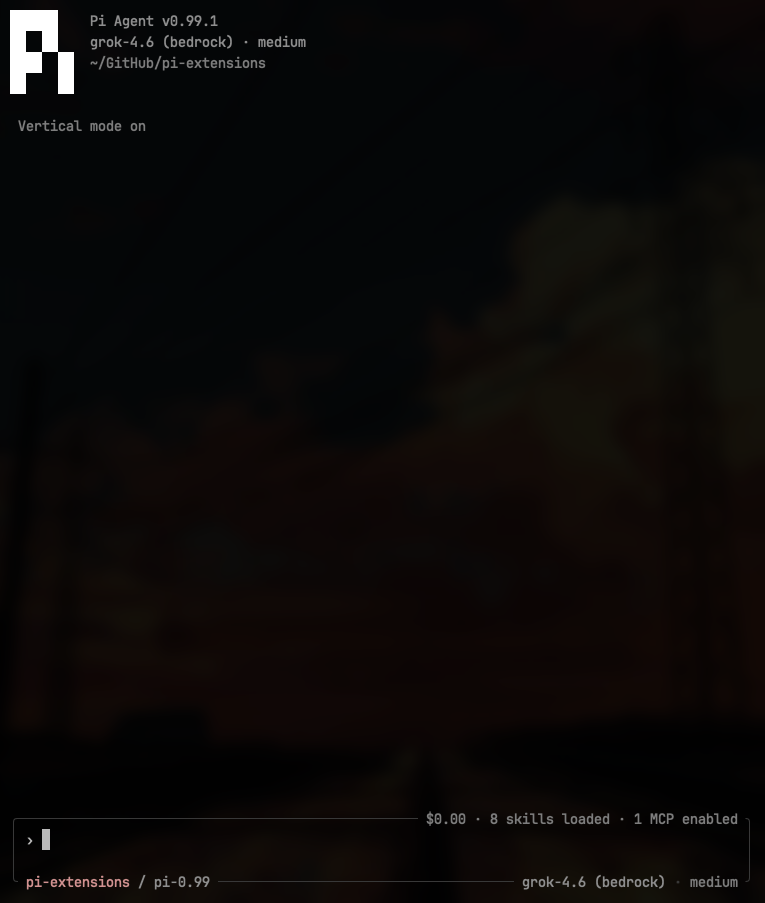
The selected header restores the stock Pi mark plus version, model, path, and a session chip on an empty idle conversation. Composer keeps project/branch and model. Context, cost, Cache, Uncached, and Rate live on the rail. Native transcript, thinking, keyboard, paste and selection behavior stay intact.
For the full workbench, select /slate surfaces full, turn /slate focused off, then /reload. Select /slate theme default for Tokyo Night. Other surface combinations and existing preferences remain supported.
/slate focused [on|off]controls the saved focused state; fresh settings still start focused./slate pid [on|off]controls the optional prompt-edge PID label, off by default.- Working/thinking status stays on the prompt edge; the editor keeps its draft and Slate density across host setup.
- Below 100 columns or 30 rows, the rail hides without changing your focus/width preferences. Context and cost return to the composer, with model/thinking when space permits.
/slate sessionstill reaches details, catalogs, tasks and image controls. - Runtime and message counts stay in
/slate sessiondetails. Cache, Uncached, and Rate are visible on the rail usage lane. - Choosing a sidebar width restores standard mode only when the sidebar surface is selected.
Thinking Status
With the editor selected in the TUI, an observed thinking block adds elapsed whole seconds and the available estimated token rate to the existing prompt-edge working word: Pondering · 7s · ↑↓42. Under one second it omits the duration; without a rate it shows Pondering · 7s. The timer stops when thinking ends, a response is aborted, or the session shuts down. Print, RPC, and JSON modes are unchanged.
Native thinking visibility, labels, click-to-expand, and Ctrl+T remain untouched, including during streaming and on session restore. Settled per-message Thought 12s needs a Pi per-message hidden-label API; the current global setter would incorrectly relabel older thoughts.
Diff
With tool-cards selected (a fresh default), edit and write results are syntax-highlighted in the transcript.
- Split edits (before/after) at 100+ columns; unified below that, and for every write.
- Word-level emphasis on paired lines. 190+ languages via Shiki; unknown types stay plain text.
- Compact until you expand the tool card. Long lines clip to the pane.
Native schemas, mutation queue, errors, and model-facing text are unchanged. Write snapshots stay in slateDiff result details for session restore. RPC, JSON, and print keep native results. /slate theme styles the whole UI, including diffs — there is no separate diff theme.
Consecutive read cards collapse into one line: read x.md stays as-is, then read 2 files. Ctrl+O lists the paths. A user message, assistant text from a later turn, or any other tool starts a new streak.
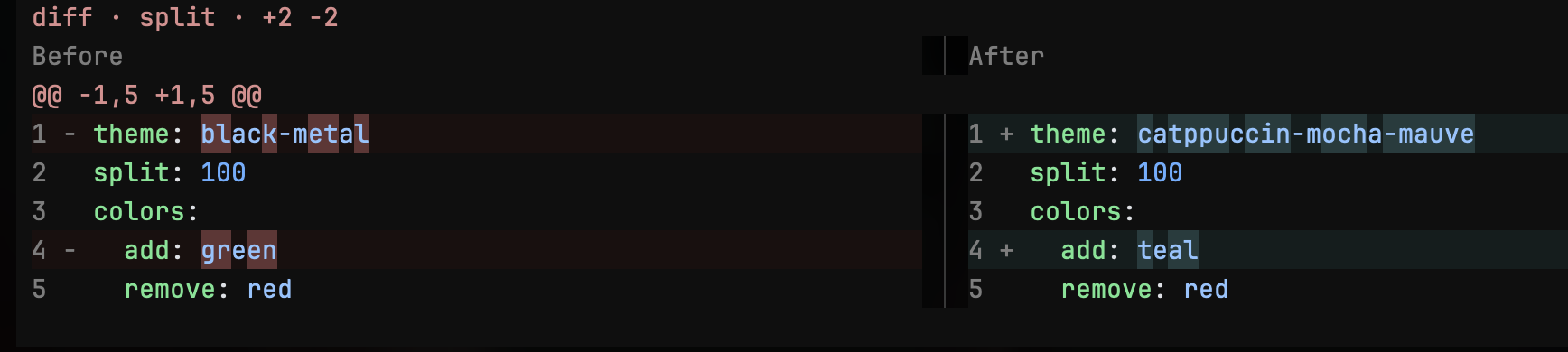

Previews are bounded: 256 KiB snapshots, 2,000 parsed rows, 16 collapsed / 400 expanded. Binary or oversized previous content shows a notice, not a fake overwrite.
Rich Media Rendering
Slate uses Kitty Graphics Protocol to display rich media inside your terminal.
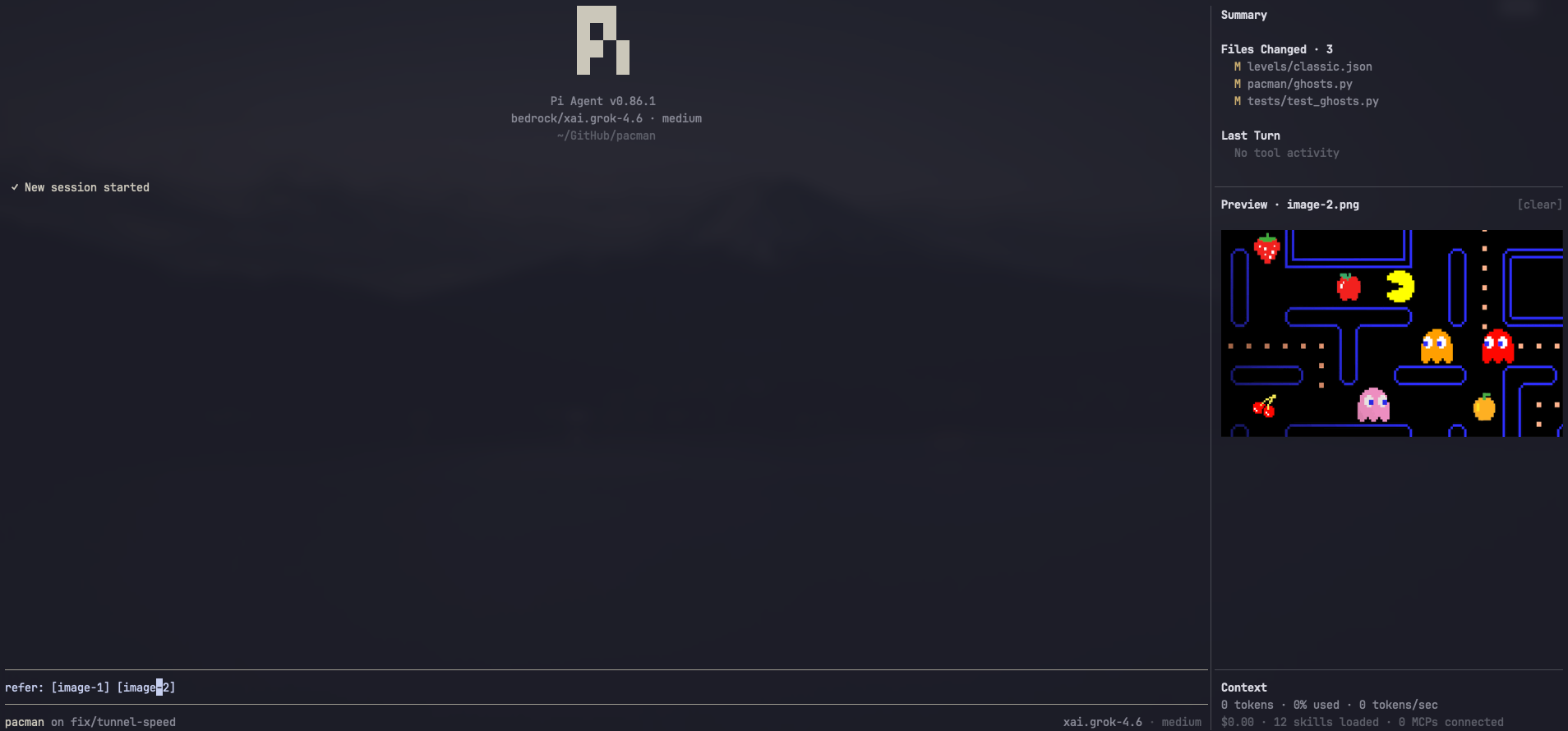
Usage: Caret-peek over image tokens to display. Open or copy from the image shelf, or double-click the image to open it. The peek leaves when the caret does. Task inspection never replaces the image. Pi-generated clipboard image paths are converted into
[image-N]tokens.
Session Dashboard
The dashboard replaces the old Summary, Activity Preview, and Context dock. It keeps session facts visible without sending them to a model:
- Session name, copyable session ID, host PID, model/thinking level and context meter.
- Occupancy merges tokens, cost and rate (
188k / 500k · $0.71 · ~420/s) beneath the context meter, followed by two usage rows pairing in/out with cache/uncached. Cache is cache-read; uncached is inbound minus cache read/write. Growing totals are abbreviated, rather than squeezing neighboring numbers. Click a usage row or/slate sessionfor full accounting, including cache write and hit share. - Runtime wall time, last-turn duration and turns/messages stay in session details.
- Input includes uncached input plus both cache categories; reasoning is not counted again. Context occupancy is separate from cumulative usage. Unavailable metrics show
—; estimated context is marked~. - Independently foldable MCP servers, Skills and Prompts, initially collapsed. Click their headings to expand; preferences persist in
sidebarSections(truemeans expanded). Fold headings are concise: MCP · 2 enabled, Skills · 5 loaded, using dim counts at the normal terminal font size. MCP shows up to five rows; skills and prompts show three. Commands stay behind/and/slate session commands, not a rail list. Wheel-scroll resource lists or the middle region when necessary. - MCP states describe configuration, not live connectivity. Global
mcp.jsonoverrides extension registrations; trusted project.pi/mcp.jsonoverrides global entries. Untrusted project files are not read. Use Pi'senabled: falseflag to disable a server; legacydisabledkeys are ignored by the native host. Validation follows the running host's native schema and exact-name file precedence; project partial overrides require a matching global server on hosts that support them. Rejected entries cannot replace a valid server. If the host adapter is unavailable, states show—. Credentials and transport arguments are never displayed. - Skills distinguish available from observed loaded on the active branch. Successful
SKILL.mdreads and explicit skill invocations are evidence; discovery alone is not. Branch changes may remove that evidence; an observed read does not guarantee the full instructions remain in context after compaction. - Nonempty background tasks stay above a separate image shelf; empty task/image shelves disappear. In-flight agent shell/terminal calls are observable; detached jobs appear only when their owning extension reports them. Native
pi-subagentspublishes display-only snapshots. Task details are read-only: no process scanning, guessed PIDs or run-control authority.
Click a task/resource to inspect it in a separate scrolling dialog. /slate session provides keyboard access to details, folds, the command catalog, tasks and image controls. Inserted commands never execute. In short terminals, the image body shrinks before the task shelf; its controls remain accessible through that command.
Focused and compact modes hide the dashboard and retain condensed composer metadata. Legacy screenshots elsewhere in this README predate the Quiet Workbench.
Cooperative Sub-agent Conversations
With editor selected, Slate can report a genuine lower navigation boundary to
pi-subagents: normal wrapping, history, autocomplete and selection retain first
refusal. A selected, owned fullscreen sidebar workspace on compatible Pi 1.1+
hosts can lend its chat slot to a worker conversation without replacing the
sidebar or original main editor/chat objects. Parent output continues while hidden;
return restores the same objects. Parent dialogs reclaim the workspace and focus.
This is a versioned UI-only capability handshake, not new model tools or execution authority. Unselected surfaces are never enabled. Without an owned compatible slot, pi-subagents uses its documented opaque conversation fallback; Slate does not force fullscreen or repair another layout owner's root.
Background-task integration
An owning extension can report detached terminals or jobs through Pi's event bus:
pi.events.emit("pi:background-tasks", {
  version: 1, source: "my-extension", sessionId: ctx.sessionManager.getSessionId(),
  tasks: [{ id: "job-1", label: "dev server", kind: "terminal", state: "running", startedAt: Date.now() }],
});
Each snapshot replaces only that source's rows for the exact owning session. Send tasks: [] to clear them. kind is shell, terminal, or subagent; state is starting, running, waiting, cancelling, failed, or cleanup_unknown. Optional pid and detail are display facts, never control permission. Completed/cancelled jobs should be omitted. Payloads are validated and bounded to 64 tasks per source and 16 sources; invalid snapshots leave the previous valid one intact.
Respond to pi:background-tasks:request ({ version: 1, sessionId }) with your current snapshot, but only for the matching owner. Slate requests one on attach and branch navigation. Sources must clear/dispose with their session; this is not a persistent task runner.
Update Notices
With header selected, Pi and package updates appear as a centered hairline. Stock Pi/package update cards remain in the transcript; no Slate surface deletes them.
Themes
The composer, transcript and session dashboard share the selected theme. Tokyo Night is Slate's default theme choice: subdued navy panels, blue accents, pale text and quiet tool backgrounds, using the Tokyo Night palette.
Your current theme remains unchanged on install. /slate theme default or /slate theme tokyo-night selects and saves Tokyo Night explicitly. Black Metal remains available in Pi's theme settings, alongside Catppuccin Mocha styles. /slate theme mocha default selects the Catppuccin Default style; /slate style default remains its compatible alias.
/slate → Theme picks one. Or set it directly:
/slate theme mauve
/slate style quiet
Selection is saved and also appears in /settings.
Prompt Templates
When editor is selected, /prompts or Ctrl+Alt+P opens a searchable picker of Pi's loaded prompt templates. Search by filename, name, description, or body; use ↑↓ to choose and Enter to insert at the composer cursor. Esc or Ctrl+C closes without changing your draft. Configured Pi selection keys are respected.
The picker rereads templates when opened, reports unreadable files, and uses the filename when name: is missing or empty. Add new templates through Pi's prompt directories or settings, then run /reload. Inserting a template does not send a message or expand argument placeholders; edit those before submitting. If your terminal does not send the shortcut, use /prompts.
Composer Keys
These work when editor is selected. No terminal configuration.
| Action | Keys |
|---|---|
| Select all prompt text | Ctrl+A |
| Copy the prompt | Ctrl+C |
| Scroll a long prompt | Mouse wheel over the composer |
| Replace or drop a large prompt | Ctrl+A then Backspace, or Esc Esc |
| Submit selected prompt | Enter |
| Clear the prompt | Esc Esc |
| Expand or collapse a paste | Click the [paste #N] token |
Ctrl+A selects the whole prompt instead of jumping to the line start; Home still does that. Ctrl+C copies the full prompt, including hidden lines and collapsed [paste #N] bodies, and leaves the text in place. Ctrl+X is left to Pi (app.message.copy). To remove a large prompt, copy first if you need it, then Ctrl+A Backspace or Esc Esc. Drag-selecting uses Pi's native screen selection; Ctrl+C copies the prompt without frame characters. Wheel over the composer scrolls overflow; wheel outside it still scrolls the transcript. Large pastes stay collapsed as [paste #N] until you click that token. Image tokens stay as [image-N]. Submit text is unchanged.
Commands
/slate with no args opens the settings picker. /prompts is registered only with editor selected. /exit always quits Pi, same as /quit.
| Setting | Commands | Effect |
|---|---|---|
| Surfaces | /slate surfaces [set <names...>|full|none] |
Show or save the selected set; requires /reload. |
| Focused | /slate focused [on|off] |
Set focused mode. Focused mode hides the sidebar; standard mode restores it. |
| PID display | /slate pid [on|off] |
Show the agent process ID on the composer's top edge. Off by default; omitted when the frame is too narrow. |
| Sidebar width | /slate width [default|narrow|medium|wide|<percent>] |
Choose the sidebar width and return to standard mode. default is 20%. |
| Session dashboard | /slate session [mcp|skills|commands|tasks|image] |
Inspect facts, expand/collapse resources, insert commands, or manage the image shelf. |
| Message length | /slate message-length [default|all|<count>] |
How many chat messages stay on screen. default is 100. |
| Density | /slate density [comfortable|compact] |
Comfortable shows a › prompt in the composer; compact is tighter. |
| Composer metadata | /slate footer [standard|minimal] |
Legacy command alias: standard shows model and thinking on the composer; minimal hides them. Not footer-slot ownership. |
| Theme | /slate theme [default|tokyo-night|quiet|mauve|sapphire|peach|teal] |
Default is Tokyo Night. Other styles select Catppuccin; /slate style retains Catppuccin aliases. |
| Bugs | /slate bug [file|open] |
Copy a bug report, or open the npm package page. |
Model Display
~/.pi/agent/pi-slate.json accepts a modelDisplay object to restyle model labels in the header and composer footer. It is provider-agnostic and display-only; the model id sent to the API never changes.
{
  "modelDisplay": {
    "stripPrefixes": ["us.", "eu.", "global.", "anthropic.", "xai.", "moonshotai."],
    "providerAliases": { "bedrock-runtime": "bedrock", "bedrock-priority": "bedrock" },
    "providerSuffix": true
  }
}stripPrefixes: literal prefixes removed from displayed model ids, applied repeatedly.us.moonshotai.kimi-k3becomeskimi-k3.providerAliases: renames a provider for display. Aliased providers collapse to the same label.providerSuffix: renderskimi-k3 (bedrock)instead ofbedrock/kimi-k3in both the header and the footer.
Minimal By Design
Slate adds no new model-facing tools, prompts, or model calls. Highlighted edit and write results keep the native response text. It's entirely deterministic and made to be customizable and improve your Pi experience while your Pi remains yours.
Requirements
- Pi Coding Agent and a modern terminal that can render Kitty or iTerm2 image protocol, such as Ghostty or Warp.
- Keep other UI extensions enabled and select only the surfaces you want Slate to own. Same-slot writers follow host precedence; no automatic conflict repair.
- Copy a bug report with
/slate bug.