pi-spark
A small, opinionated collection of pi extensions
Package details
Install pi-spark from npm and Pi will load the resources declared by the package manifest.
$ pi install npm:pi-spark- Package
pi-spark- Version
0.1.1- Published
- Jun 2, 2026
- Downloads
- not available
- Author
- zlliang
- License
- MIT
- Types
- extension
- Size
- 2.3 MB
- Dependencies
- 1 dependency · 5 peers
Pi manifest JSON
{
  "extensions": [
    "./extensions"
  ],
  "image": "https://raw.githubusercontent.com/zlliang/pi-spark/main/assets/cover.png"
}
Security note
Pi packages can execute code and influence agent behavior. Review the source before installing third-party packages.
README

pi-spark
A small, opinionated collection of pi extensions.
Extensions
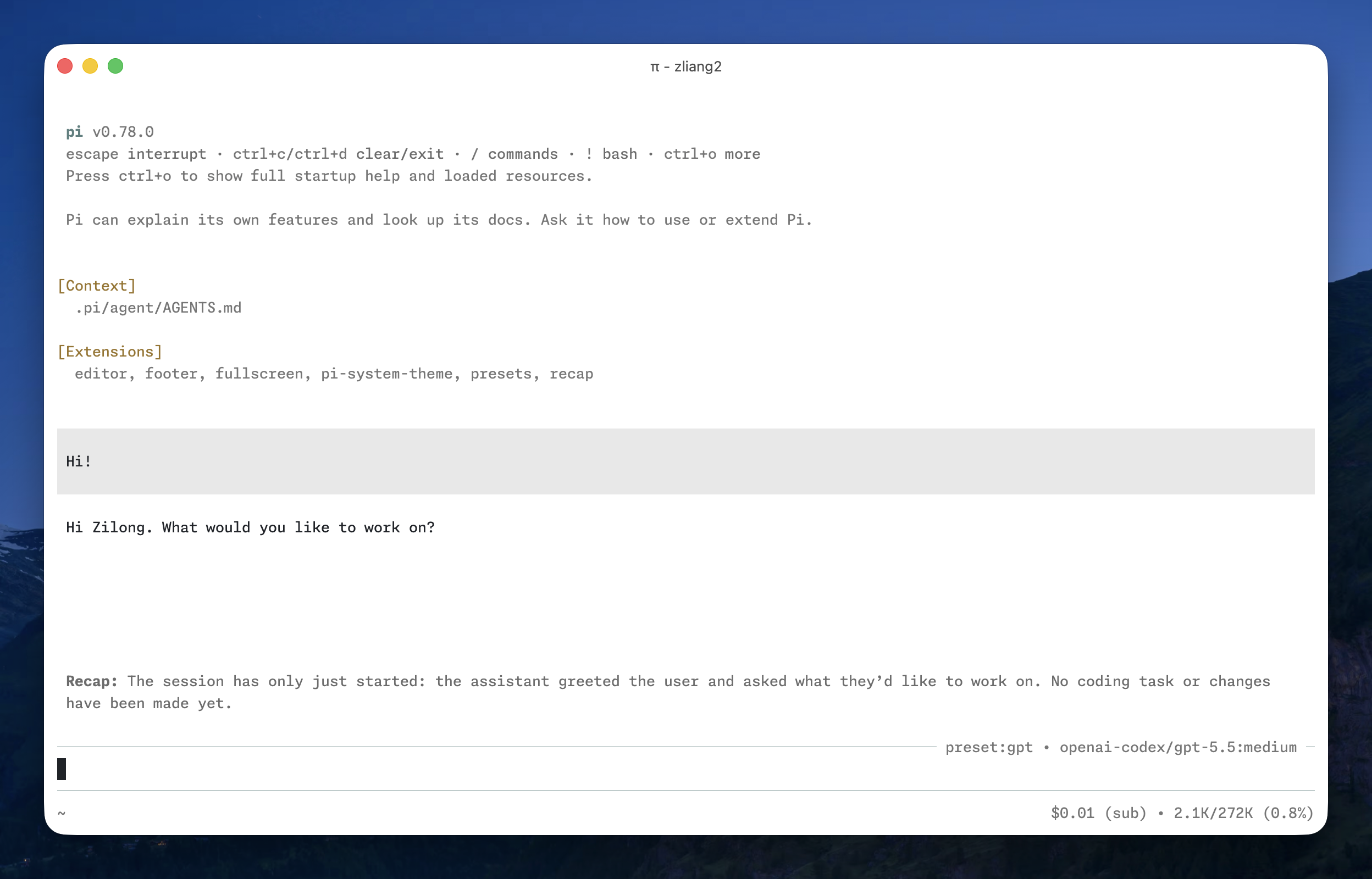
- Editor: replaces the default editor with a compact working indicator and current model info.
- Footer: shows the session info, cost, and context usage in one line, followed by extension statuses.
- Fullscreen: clears the screen and scrollback on session start and pins the editor and footer to the bottom for a full-screen session.
- Presets: switches named model presets with
/presetand quick cycle shortcuts. - Recap: generates a short idle-session recap and exposes a
/recapcommand for manual generation, inspired by Claude Code's session recap.
Install
Install from npm:
pi install npm:pi-spark
Install from git:
pi install git:github.com/zlliang/pi-spark
Configure
Spark reads config from ~/.pi/agent/spark.json and from the current project’s .pi/spark.json. Project config overrides matching global fields.
Example:
{
  "editor": {
    "spinner": "dots"
  },
  "footer": false,
  "presets": {
    "gpt": {
      "provider": "openai-codex",
      "model": "gpt-5.5",
      "thinkingLevel": "medium"
    },
    "claude-opus": {
      "provider": "anthropic",
      "model": "claude-opus-4-8",
      "thinkingLevel": "high"
    }
  },
  "recap": {
    "idle": 180000,
    "provider": "openai-codex",
    "model": "gpt-5.4-mini",
    "thinkingLevel": "off"
  }
}
Notes:
- Set an extension key to
falseto disable it. - The
editor.spinnervalue can belightsordots. - Presets can be selected with
/presetor/preset <key>. - Cycle presets with
ctrl+super+pandctrl+shift+super+p(superiscommandon macOS). - The
recap.idlevalue is in milliseconds and must be at least5000.
Recommended pi settings
The Fullscreen extension pins the editor and footer to the bottom of the terminal. For the cleanest experience, pair it with pi's terminal.clearOnShrink setting, which clears empty rows when content shrinks so the pinned UI does not leave stale lines behind.
Add this to ~/.pi/agent/settings.json (global) or .pi/settings.json (project):
{
  "terminal": {
    "clearOnShrink": true
  }
}
This setting defaults to false because it can cause flicker in some terminals. With Fullscreen enabled the trade-off is usually worth it.