pi-speedline
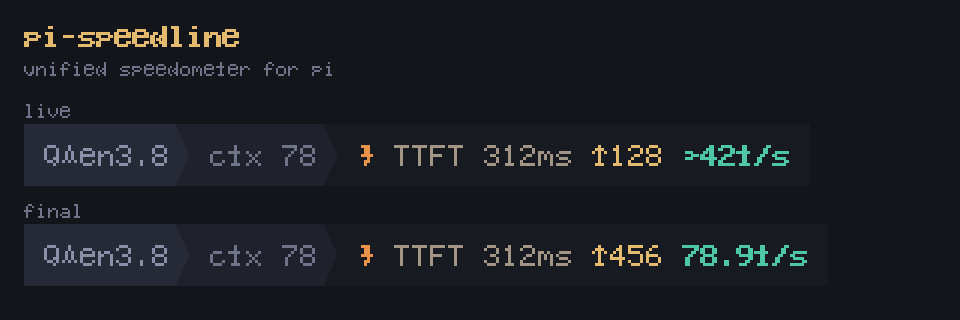
Unified pi speedometer: real-time calibrated tokens/s while streaming + exact per-turn TTFT and throughput in ONE theme-adaptive footer slot. Merges pi-tokens-per-second and pi-throughput-meter, timer-free.
Package details
Install pi-speedline from npm and Pi will load the resources declared by the package manifest.
$ pi install npm:pi-speedline- Package
pi-speedline- Version
0.1.2- Published
- Sep 24, 2026
- Downloads
- 281/mo · 21/wk
- Author
- qingwawangzi
- License
- MIT
- Types
- extension
- Size
- 43.2 KB
- Dependencies
- 0 dependencies · 1 peer
Pi manifest JSON
{
  "extensions": [
    "./extensions"
  ],
  "image": "https://cdn.jsdelivr.net/npm/@qingwawangzi/pi-speedline@0.1.0/dist/preview.png"
}
Security note
Pi packages can execute code and influence agent behavior. Review the source before installing third-party packages.
README
pi-speedline ⚡
A unified speedometer for the pi coding agent.
Real-time calibrated tokens/s while streaming, exact per-round TTFT and throughput when done — merged into ONE conflict-free footer slot with a curated, theme-adaptive palette.
⚡ TTFT 312ms ↓128 ~42t/s        ← live (calibrated estimate)
⚡ TTFT 312ms ↓456 78.9t/s       ← exact final, stays visible through tool runs
⚡ TTFT – ↓– –t/s                ← no data (ghost fields, structure intact)
pi-speedline replaces both @gnoviawan/pi-tokens-per-second and
@sugarforever/pi-throughput-meter — and fixes a class of bugs in the
former (its setTimeout captured a session ctx that goes stale after a
session replace/reload, crashing the whole pi process as an
uncaughtException). pi-speedline is fully event-driven, timer-free.
Why pi-speedline
- Numbers you can trust — every figure is either exact (from real
usage.output) or an estimate explicitly marked with~that is calibrated to converge onto the exact value after one message. Live and final views use the same fields and agree with each other. - Anchored in pi's real internals, not guesses — the round model and the TTFT anchor were verified by instrumenting a live pi 0.87.0 session (event probe) and cross-checked against the agent-loop source. Two naive implementations ("turn start" and "message start") measure the wrong thing — see Accuracy.
- A curated, theme-adaptive palette — "Amber & Jade": role-based color semantics, automatic dark/light variants for any theme, and a 256-color fallback. It is designed to be read in the peripheral vision of a busy terminal, not to shout.
- Timer-free — every UI write happens inside a pi event handler.
No
setTimeout, no captured stale contexts, safe acrossnewSession/fork/switchSession/reload.
Display lifecycle
One status slot (speed), one layout in every phase
(icon · TTFT · ↓tokens · rate). The slot is always occupied:
| Phase | Display |
|---|---|
| No previous data (fresh session) | ⚡ TTFT – ↓– –t/s (ghost) |
| Streaming (live estimate) | ⚡ TTFT 312ms ↓128 ~42t/s |
| Message done → tool (bash) execution → next segment waiting | ⚡ TTFT 312ms ↓456 78.9t/s (exact, held) |
| Aborted round | ⚡ ↓83 interrupted |
| Round with zero output | ⚡ TTFT – ↓– –t/s (warning ghost) |
Design decisions:
- No "streaming…" placeholder state — the first token immediately shows live numbers.
- Keep-last-display: a new round never blanks the slot; its first delta jumps straight to live.
- Exact values as soon as they exist: the exact line is rendered at
every
message_end. A round (one user prompt) can contain SEVERAL LLM calls — pi's internal "turn" is one call + its tool batch — and the stats span the whole round, so the display stays exact while bash runs and until the round's next call streams, never a frozen~estimate. - Per-round stats are independent — each round's numbers come only from that round's own stream (covered by regression assertions in the test).
Palette — "Amber & Jade"
Curated to complement a warm orange ⚡ accent; the icon follows your
theme's accent, the numbers use a fixed premium palette with automatic
dark/light variants (detected from the theme's text color, so custom
themes work too) and a 256-color fallback for terminals without truecolor.
| Field | Dark | Light | Role |
|---|---|---|---|
⚡ icon |
theme accent |
theme accent |
follows your theme |
| TTFT | #A29586 warm sand |
#6A5E4F |
recedes into the background |
| ↓tokens | #E3BA6E champagne gold |
#A6782A |
warm, in-family with the icon |
| rate (bold) | #4EC7A6 soft jade |
#178468 |
cool counterpoint — the "money number" |
| interrupted / no data | #D97E55 terracotta |
#B05224 |
signal, still in the warm family |
| skeleton fields | 55% "ghost" of each | 55% "ghost" of each | structure stays visible |
Design notes — the palette is doing semantic work, not just decorating:
- Role-based hierarchy — each field owns a distinct visual job: TTFT recedes (meta info), tokens sit in the warm family of the icon, and the rate is the only cool note and the only bold text — the eye finds the "money number" without reading.
- One warm family + one counterpoint — sand/gold/terracotta all sit near the orange icon (premium, not clashing); jade is the single cool accent that makes the rate pop against a warm terminal.
- Adaptive, not assumed — dark/light variants are picked by
luminance of the theme's text color (bright text ⇒ dark background),
so custom themes and
/settingsswitches just work; terminals without truecolor get nearest-256 swatches, never raw escape-code garbage. - Ghost states, not blanks — with no data the same hues render at 55%: the field structure stays visible, so the layout never jumps.
- Honest symbols —
~appears only where an estimate actually is (the live rate); the plain↓counter is an estimate too, but it is calibrated and converges, so it is presented as a number, not a guess.
Accuracy: how the numbers stay honest
Getting a "simple" speedometer's numbers right turned out to require understanding pi's internals. Three layers of care, in order:
1. The round model (what one "statistic" covers)
pi's turn_start/turn_end do not mark one conversation round —
agent-loop.js emits them around each LLM call + its tool batch. A
prompt that thinks, runs bash, and summarizes produces two pi turns:
agent_start            ← user prompt submitted (ROUND start)
turn_start  → LLM call 1 (thinking + tool call)
tool_execution (bash)
turn_end
turn_start  → LLM call 2 (final answer)     ← SAME round
turn_end
agent_end              ← ROUND end
Resetting on turn_start (the naive approach) wipes the stats mid-round
after bash and reports only the last call. pi-speedline keys everything
to agent_start … agent_end: token counts accumulate across the round's
calls, the live counter only ever climbs within a round, and rounds stay
strictly independent of each other.
2. The TTFT anchor (what "wait" measures)
Three plausible anchors were tested against a live probe; only one measures the real network+prefill wait:
| Anchor | Measures | Verdict |
|---|---|---|
turn_start → first token |
local pipeline (extension hooks, compaction) + network + prefill | overcounts — felt "longer than I waited" |
assistant message_start → first token |
≈ 0ms — pi fires this at the first SSE event, i.e. alongside the first token | useless |
before_provider_request → first token |
the real request-dispatch → first-token span | ✅ used |
Local pre-request pipeline time is deliberately excluded: the terminal is not "waiting for the model" during it.
3. Token estimation & calibration (live vs exact)
The live ↓ counter has no usage to read yet, so it estimates — and
the estimate is engineered to converge:
- Token estimate — each delta's characters are split into CJK and latin buckets and converted with per-class chars-per-token priors (CJK ≈ 1.6, latin ≈ 3.8). A typical "english thinking + chinese answer" reply is estimated per content class, not with one blended ratio.
- Dual-class residual calibration — after each message, the real
usage.outputcalibrates two factors (k_cjk,k_latin). Whichever content class dominates the message (≥2×) is updated from the residual (total minus the other class's estimate), so the thinking:answer ratio flipping between messages does not drag one class's factor with the other's. Balanced messages only re-seed both factors when total drift is ≥10% (e.g. after switching models), so good factors are never pulled back toward 1. - Live rate — token-weighted rolling 2 s window (marked
~); falls back to the whole-message average for very short windows. - Final rate — EXACT round output tokens (text + thinking +
tool-call tokens, matching
usage.output) ÷ PURE streaming time (sum of each message's first→last delta span; tool runs and inter-call gaps excluded, matching what the live rate measures). - Final everything — at each
message_endthe display switches to exact values and holds them (through bash, across call gaps) until the round ends.
Result: the first message of a session carries the prior (±20% for CJK); after one calibration round typical error is <5% — even when the thinking:answer ratio flips. Every behavior above is pinned by regression assertions in the test suite (which replays the real pi event stream, including multi-call rounds and a simulated 400ms local pipeline).
Install
pi install npm:@qingwawangzi/pi-speedlineIf you use the older meters, remove them (this package replaces both):
pi remove npm:@sugarforever/pi-throughput-meter
pi remove npm:@gnoviawan/pi-tokens-per-second   # if installed
Commands
| Command | Action |
|---|---|
/tps |
Toggle the status display (restores the current state when re-enabled) |
Notes
- The
speedslot renders as a single powerline-footer segment and never uses the[...]notification form, so it stays in one fixed position. - All UI writes happen inside pi event handlers — no timers, no captured
stale contexts, safe across
newSession/fork/switchSession/reload. - Status colors survive the powerline footer's normalization (it only strips the trailing reset code).
Development
npm install
npm test            # event-sequence simulation with regression assertions
npm run typecheck
The simulation builds a self-consistent tokenization world (CJK 2.0
chars/token, latin 4.0) and replays the REAL pi 0.87.0 event stream
(agent_start … turn_start … message_start … tool runs … agent_end).
It asserts: live-vs-final convergence, ratio flips, per-round
independence, multi-call rounds (no mid-round reset), tool-phase exact
display, TTFT anchored at request dispatch (local pipeline excluded —
and NOT at message_start, which pi fires at the first SSE event),
keep-last-display, and skeleton/restore behavior.
Credits
Merged from (both MIT):
@gnoviawan/pi-tokens-per-second— real-time TPS concept@sugarforever/pi-throughput-meter— per-turn TTFT/throughput concept
中文简介
pi 的统一速度表:流式输出时显示校准后的实时 tokens/s,输出结束后显示
精确的 TTFT + token 数 + 吞吐,全部合并到一个状态栏槽位,版式
同构(⚡ TTFT · ↓tokens · 速率),配色为呼应橙色闪电的"琥珀 & 翡翠"
高级色板(暗/亮主题自动切换)。
计算准确性(三层,全部经真实 pi 探针验证,不是拍脑袋):
- 轮次模型 —— pi 的
turn_start/turn_end实际是按每次 LLM 调用发的(思考→跑 bash→总结 = 一次对话里两组 turn)。统计锚定agent_start → agent_end(一整轮对话):轮内多次调用 token 累加不清 零,轮与轮严格独立不累计。 - TTFT 锚点 —— 三个候选锚点实测对比:
turn_start含本地预处理 (虚高,"总比真实等待长")、assistantmessage_start在 SSE 首包时 才发(≈首 token 本身,恒为 0)、before_provider_request(请求真 正发出)✅ —— TTFT = 请求发出 → 首 token,即真实的网络+prefill 等待。 - Token 估算与校准 —— 每个 delta 按 CJK/拉丁分桶折算(≈1.6/3.8
字符/token),消息结束用真实
usage.output做双系数残差校准 (k_cjk/k_latin)——思考(英文)和回答(中文)比例怎么翻转都 不互相干扰,一条消息后误差通常 <5%。实时速率 = 2 秒滚动窗口(带~),最终速率 = 整轮真实 token ÷ 纯流式时长(bash 执行和调用间隙 不算)。实时与最终视图同字段收敛,脚注永不出现两个打架的数字。
审美配色("琥珀 & 翡翠")—— 不是装饰,是语义分工:TTFT 暖沙色
退居背景(元信息)、token 香槟金与橙色闪电同族、速率是唯一冷色(翡
翠)+ 唯一粗体——"钱数"一眼定位;警示用 terracotta,不出暖色系。暗/
亮两套色板按主题文字色亮度自动选择(自定义主题也适用),无 truecolor
终端自动降级最近 256 色;无数据时同色 55% 幽灵占位,版式永不跳变;~
只标在真正的估算值上——诚实的符号。
显示逻辑:槽位常驻不空(无数据显示幽灵字段占位);每条消息完成即渲染
精确值,bash 执行期间保持不动,轮内多次 LLM 调用(如思考→跑命令→总结)
统计累加不清零;新一轮不清屏,首 token 直接跳实时。每轮统计完全独立,
不跨轮累计。零定时器实现,无 stale-ctx 崩溃风险(原
pi-tokens-per-second 的崩溃原因)。
pi install npm:@qingwawangzi/pi-speedline    # 安装
/tps                           # 开关显示