pi-sprite
A slim Codex-style sprite companion for Pi with /context, /recap, and /btw.
Package details
Install pi-sprite from npm and Pi will load the resources declared by the package manifest.
$ pi install npm:pi-sprite- Package
pi-sprite- Version
1.0.0- Published
- Jul 8, 2026
- Downloads
- not available
- Author
- safurrier
- License
- MIT
- Types
- extension, skill
- Size
- 218.6 KB
- Dependencies
- 2 dependencies · 3 peers
Pi manifest JSON
{
  "extensions": [
    "./extensions/index.ts"
  ],
  "skills": [
    "./skills"
  ],
  "image": "https://safurrier.github.io/pi-sprite/assets/wendybot3000-demo.gif"
}Security note
Pi packages can execute code and influence agent behavior. Review the source before installing third-party packages.
README
pi-sprite
pi-sprite is a small Pi package that adds a terminal sprite, a context visualizer, a recap bubble, and a side-question thread to Pi.
It is intentionally not a pet simulator or desktop companion. The sprite is there to make agent state easier to read without adding another dashboard.
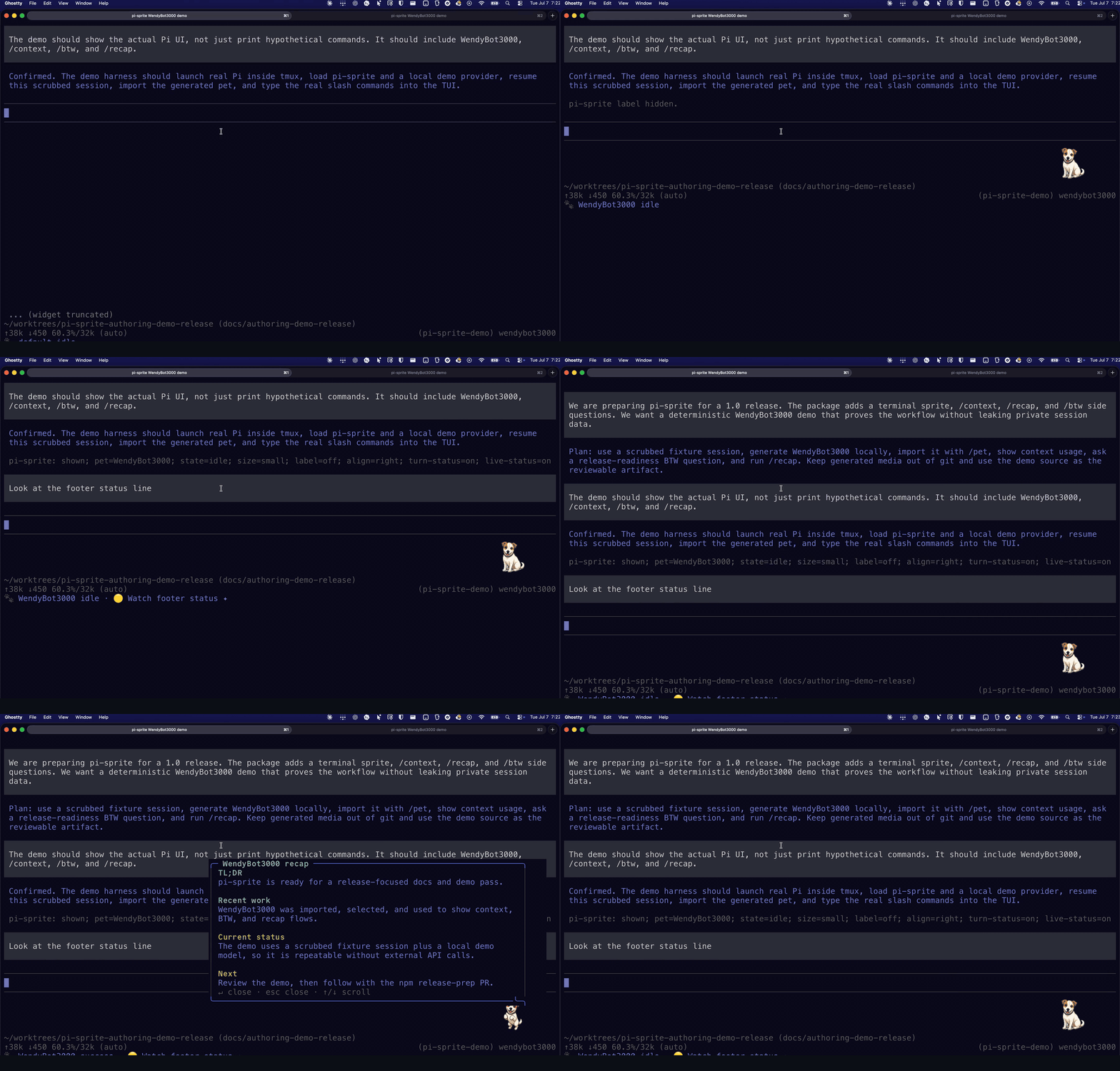
The demo shows real Pi slash commands: importing a pet, opening /context, asking /btw, running /recap, and watching the bottom footer status update.
Quick start
Install from GitHub today:
pi install git:github.com/safurrier/pi-sprite@main
pi
After the npm release, the install path becomes:
pi install npm:pi-sprite
pi
If you are developing from a checkout, run the local package without installing it:
cd /path/to/pi-sprite
pi -e .
Once Pi opens, get to a useful first sprite:
/pet status
/pet gallery
/pet preview <id-from-gallery>
/pet install <id-from-gallery>
/context
/btw what should I look at next?
/pet install selects the installed Petdex sprite automatically. If you already imported pets, use /pet list and /pet choose <id> instead.
If you already have a local pet folder, import it with an absolute path:
/pet import /absolute/path/to/my-pet
/pet choose my-pet
To author a new sprite with agent help, start the guided workflow:
/pet create tiny desk cat with cozy pixel-art vibes
For deeper custom-pet guidance, read the hosted Sprite Authoring Guide.
If native images ever get stuck after changing renderers or restarting tmux, clean the terminal image layer and redraw:
/pet clear-native
/pet show
What you get
| Command | Use it for |
|---|---|
/pet |
Show, hide, choose, import, author, and configure the sprite. |
/sprite |
Package-specific alias for /pet, useful when another package also owns pet-like commands. |
/context |
Open a Claude-style context usage visualizer. |
/recap |
Generate a compact recap of the current session in a speech bubble. |
/btw |
Ask side questions without adding normal messages to the main thread, or generate a recap into the side thread. |
The extension also updates the sprite automatically during agent turns:
thinkingwhile the agent is reasoningworkingwhile tools runsuccessorerrorafter turn/tool outcomes- compact footer status after turns, with provisional live status during long-running turns
Sprite behavior
By default the sprite is compact, right-aligned, and label-free. The pet/state label lives in Pi's footer status line instead of taking more space in the widget.
Useful /pet commands:
/pet status
/pet list
/pet choose <id>
/pet import <path>
/pet import-url <url>
/pet create [brief]
/pet author [brief]
/pet hide
/pet show
/pet size tiny|small|medium|large
/pet label on|off
/pet align left|right
/pet turn-status on|off|clear
/pet live-status on|off|clear
/pet clear-native
Pets live under:
~/.pi/agent/pi-sprite/pets/<id>/
turn-status and live-status are both on by default. Turn status is final and replaces provisional live status when the agent turn ends. Live status waits five minutes into a long-running turn before showing a compact in-progress footer such as 🟣 running tests….
Native image rendering
In Kitty/Ghostty-capable terminals, pi-sprite uses Kitty Unicode placeholders by default. Frames are uploaded quietly, while the visible sprite is rendered as placeholder text cells. That keeps tmux in charge of moving and clearing the pane grid, which avoids the ghosted native image placements caused by direct Kitty/Ghostty passthrough.
For tmux, allow passthrough:
set -g allow-passthrough on
To force the ANSI half-block fallback:
PI_SPRITE_NATIVE_IMAGES=0 pi
Custom pets
The simplest local pet has one image per state:
pet.json
idle.png
thinking.png
working.png
success.png
error.png
Minimal pet.json:
{
	"id": "boba",
	"name": "Boba",
	"sprites": {
		"idle": "idle.png",
		"thinking": "thinking.png",
		"working": "working.png",
		"success": "success.png",
		"error": "error.png"
	}
}
Optional personality text gives the selected pet a bounded voice in explicit /btw side conversations:
{
	"id": "boba",
	"name": "Boba",
	"personality": "Warm, concise, lightly mischievous, and practical. Keep answers short.",
	"sprites": {
		"idle": "idle.png"
	}
}
The personality is not injected into normal main-agent turns. It only guides /btw and /btw:ask answers.
Import and select a local pet folder:
/pet import /path/to/pet-folder
Codex/Petdex pet.json + spritesheet.webp compatibility is also supported. pi-sprite cycles multi-frame spritesheets and infers standard Petdex 8x9 atlases for spritesheet.*.
Author a sprite effectively
This package ships the pi-sprite-authoring skill. Use it when you want an agent to turn references, generated art, or hand-drawn frames into an importable pet without losing character consistency across states.
Start the guided flow from Pi:
/pet create tiny desk cat with cozy pixel-art vibes
You can also invoke the skill directly:
/skill:pi-sprite-authoring
The recommended authoring loop is:
- Write a short character brief and gather any local references.
- Pick a direction card before generating images.
- Create or choose one canonical
idleimage as the identity anchor. - Generate
thinking,working,success, anderrorfrom that anchor. - Review all states for shared silhouette, face, palette, outline, canvas size, and scale.
- Add optional simple motion strips only after the static states work.
- Add bounded BTW-only
personalitymetadata if the pet should affect explicit side replies. - Import the expanded folder with
/pet import <path>.
Create a starter folder:
node skills/pi-sprite-authoring/scripts/create-pet-template.mjs --id desk-cat --name "Desk Cat" --out /tmp/desk-cat-sprite
Add bounded BTW-only personality metadata when desired:
node skills/pi-sprite-authoring/scripts/create-pet-template.mjs \
  --id desk-cat \
  --name "Desk Cat" \
  --personality "Warm, concise, lightly mischievous, and practical. Keep BTW answers short." \
  --out /tmp/desk-cat-sprite
Third-party reference sprites should stay local unless their licenses are verified. This helper downloads Petdex examples into a gitignored folder with provenance notes:
node skills/pi-sprite-authoring/scripts/download-petdex-examples.mjs --limit 12 --out /tmp/petdex-downloads
For the full workflow, read the hosted Sprite Authoring Guide. For a deterministic release-demo pet, see the WendyBot3000 demo guide and the repo-only demo source.
/context
/context
/context all
/sprite:context
/context opens a TUI overlay with the active model, context window, token total, estimated category breakdown, and remaining free space. /sprite:context is the package-specific alias for setups that already have another /context command.
/recap
/recap
/recap generates a short executive-summary recap near the sprite:
TL;DR: ...
Recent work: ...
Current status: ...
Next: ...
Recap generation first uses an isolated, no-tools Pi side session with the current model, so it does not add messages to the main thread. Direct API-key completion is only a fallback. Use arrow keys, j/k, space/d, or u to scroll longer recaps.
/btw
/btw <message>
/btw
/btw:ask <question>
/btw:new [message]
/btw:clear
/btw:recap
/btw recap
/btw:inject
/btw:summarize
/btw is a continuing side conversation outside the main thread. Use /btw <message> for follow-ups and /btw to reopen the current side thread. Use /btw:ask <question> for a one-off aside that does not append to the thread. Use /btw:recap or /btw recap to generate the normal session recap inside the BTW thread.
Answers appear in an interactive speech bubble that points toward the sprite. Nothing is injected back into the main conversation unless you explicitly run /btw:inject or /btw:summarize.
Documentation
Start with the hosted docs; these links work from GitHub, npm, and installed package readers:
- Docs home for the user and contributor index
- Sprite Authoring Guide for custom pet authoring
- Configuration Reference for default pet state and sprite home setup
From a source checkout, durable docs live under docs/ and are published with MkDocs Material through GitHub Pages. Build them locally with:
uvx --with mkdocs-material mkdocs build --strict
Development
Install dependencies:
mise run setup
Run the usual local gate:
mise run check
Run the full verification path, including e2e smoke helpers:
mise run verify
Release publishing uses the hosted Release Checklist.
Equivalent npm commands:
npm run check
npm run test:e2e
Optional e2e variants:
PI_SPRITE_E2E_TUI=1 npm run test:e2e
PI_SPRITE_E2E_MODEL=1 npm run test:e2e
node tests/e2e/package-smoke.mjs --isolated
node tests/e2e/package-smoke.mjs --full-config
TUI smoke artifacts are written under:
artifacts/e2e/
Non-features
pi-sprite deliberately does not include:
- Electron or native floating windows
- voice, TTS, sounds, songs, or ambient weather
- hunger, feeding, bonding, XP, accessories, treats, or pet economy
- autonomous pet commentary or main-thread personality injection
- 3D/raymarched rendering
- large always-visible dashboards
Attribution
pi-sprite began as a slimmed derivative of djdiptayan1/pi-pokepet, licensed under MIT. See NOTICE.md and LICENSE.